
The best security audio recording device depends on whether you need long recording capacity, voice activation, portability, or transcription tools. The Elasound recorder is a strong fit for extended recording sessions, while the soundcore Work by Anker is better suited to users who want AI transcription and summaries. The EVIDA model adds password protection and playback, and the two Lymorvex options emphasize magnetic attachment and large stated recording capacities. Before recording, check applicable consent, privacy, and workplace rules.
| Device | Best For | Listed Standout |
|---|---|---|
| Elasound 132G Recorder | Long sessions and voice activation | 100 hours continuous recording; AI noise reduction |
| Lymorvex 72GB Recorder | Portable recording with magnetic attachment | Voice activation; AI noise reduction |
| Lymorvex 64GB Recorder | USB-C connection and stated capacity | 4800 hours recording; magnetic design |
| soundcore Work by Anker | Transcription and meeting summaries | AI tools; 150+ languages; 32-hour recording |
| EVIDA 128GB Recorder | Playback and password access | Voice activation; password feature |
Elasound 132G Voice Activated Recorder

Best for: Users who need voice-activated recording and long stated recording capacity for work, lectures, or other authorized settings.
The Elasound recorder lists 132G of storage and up to 9800 hours of recording capacity in its product name. It also advertises up to 100 hours of continuous recording, voice activation, and AI-intelligent triple noise reduction. These features make it a relevant option for users who want a portable recorder intended for extended use rather than a device focused primarily on transcription.
Why it was selected: Its stated combination of voice activation, long continuous recording time, and noise-reduction processing addresses several common needs for documenting conversations or sessions. Voice activation may help limit silent portions, though buyers should confirm how the feature works and what recording settings affect storage and battery use.
Limitation: The listed 9800-hour capacity is a maximum claim, not a guarantee for every recording mode. The supplied product information does not specify file format, battery conditions, or how storage duration changes with audio quality.
Lymorvex 72GB Magnetic Recorder
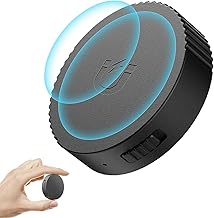
Best for: Buyers looking for a portable voice-activated recorder with a magnetic design and a large stated capacity.
This Lymorvex model is listed with 72GB of storage and a maximum claim of 9800 recording hours. Its product name also identifies magnetic attachment, voice activation, and AI-intelligent noise reduction. It is described for lectures, meetings, and interviews, so it may suit people who want a recorder for several types of authorized spoken-audio use.
Why it was selected: The magnetic design is a distinguishing feature among these products, while voice activation and noise reduction are relevant to capturing speech. Choose this model if those features matter more than a dedicated transcription workflow or a specified USB-C connection.
Limitation: The supplied details do not explain what surfaces the magnet attaches to, how securely it holds, or the recording conditions behind the maximum-hour figure. Check the listing for setup and file-transfer details before choosing it.
Lymorvex 64GB USB-C Recorder

Best for: Users who want a magnetic voice recorder whose product name specifically lists USB-C.
The Lymorvex 64GB device is described as a magnetic, voice-activated recorder with AI-intelligent noise reduction. The listing names a capacity of up to 4800 recording hours and identifies USB-C audio recording. It is presented for lectures, meetings, and interviews. That combination makes it a practical comparison point for buyers who want a stated USB-C feature alongside voice activation.
Why it was selected: It offers a distinct capacity claim from the 72GB Lymorvex model and specifically mentions USB-C. Choose this model if that connection detail is important and you prefer its stated 64GB capacity over a larger listed storage figure.
Limitation: The product information provided does not clarify whether USB-C is used for charging, transferring files, recording, or more than one purpose. Confirm the intended function and recording-time conditions in the full listing.
soundcore Work by Anker AI Recorder

Best for: People who want a wearable-style note taker with transcription and summary features.
The soundcore Work by Anker is described as a coin-sized AI voice recorder with 64GB of storage and up to 32 hours of recording. Its listed tools include AI transcription and summaries in 150+ languages. The product name also identifies MFi certification, USB-C charging, and Find My. These features make it a better fit for users who want recordings paired with text-based notes than for buyers focused only on maximum stated recording hours.
Why it was selected: Transcription and summaries can make spoken notes easier to review, while the wearable form and Find My feature distinguish it from the larger-capacity recorders in this list. Consider it for meetings or personal note-taking where those tools suit the workflow.
Limitation: Its listed recording time is 32 hours, lower than the maximum claims for several other devices here. The supplied information does not explain transcription limits, subscription requirements, or how AI features handle sensitive recordings.
EVIDA 128GB Recorder With Password

Best for: Buyers who want a digital recorder with playback and a listed password feature.
The EVIDA device is described as a 128GB digital voice recorder for lectures and meetings. Its product name lists up to 9296 hours of voice-activated recording, playback, and password protection. These features make it a relevant choice for users who want to review audio on the device and add a password step to access it.
Why it was selected: Playback and password access set it apart from models whose supplied names focus more on magnetic attachment, AI noise reduction, or transcription. Choose it if those listed functions align with how you plan to record and review audio.
Limitation: A password feature should not be treated as a complete security system or a substitute for secure file handling. The provided product details do not explain encryption, password recovery, or the limits of the protection.
Buying Guide: How to Choose a Security Audio Recording Device
What does “security” mean for your recording needs?
Security can mean different things to different buyers. It may refer to documenting an authorized meeting, protecting access to saved files, locating a misplaced device, or recording speech clearly in a noisy setting. Decide which need matters most before comparing products. For example, the EVIDA lists a password feature, while the soundcore device lists Find My and AI note tools. Neither feature alone establishes that a recording is legally permitted or fully protected.
How much recording time and storage do you need?
Compare stated storage capacity with stated recording hours, but do not assume that maximum-hour figures are directly comparable. Audio quality, file format, recording mode, and other settings can affect how much audio fits in storage. The products here advertise different maxima, including 4800, 9296, and 9800 hours. Treat these as listing claims and check the product details for the conditions used to calculate them.
Also distinguish storage capacity from battery life. A device may have room for many hours of audio but still need charging during a long session. The Elasound lists up to 100 hours of continuous recording, while the soundcore lists 32 hours. Check whether those figures meet your expected session length and whether voice activation changes runtime.
Should you choose voice activation or continuous recording?
Voice activation is intended to record when sound is detected, which can reduce silent portions in a file. It may be useful for conversations with pauses, but buyers should verify the activation settings and how quiet speech is handled. Continuous recording may be more suitable when you need an uninterrupted record of an authorized session. Review the controls carefully so the device behavior matches your documentation needs.
Do you need transcription, playback, or simple audio files?
Transcription and summaries can make recordings searchable and quicker to review. The soundcore product specifically lists AI transcription and summaries in 150+ languages. If you prefer to listen back directly, the EVIDA listing specifies playback. If you only need audio files, compare basic recording, file transfer, and storage details instead of paying attention to AI functions you may not use.
Before relying on transcription, consider whether names, technical terms, accents, or overlapping voices could affect the text. A transcript is a convenience and may need verification against the original recording, especially when the record is important.
What do magnetic design and USB-C mean in practice?
A magnetic recorder may be easier to position on a compatible surface, but the supplied information for these Lymorvex devices does not identify suitable surfaces or attachment strength. Confirm how the magnet is intended to be used. The 64GB Lymorvex product name mentions USB-C, but the provided details do not define its exact purpose. Check whether the connection supports charging, file transfer, or another function before buying.
How should you evaluate noise reduction and audio clarity?
Several products list AI-intelligent noise reduction, including the Elasound and Lymorvex models. That description signals a processing feature, but it does not provide a measured noise-reduction result or guarantee that every voice will be clear. Consider where the recorder will be used, how close it can be to speakers, and whether you can reduce background noise in the room. For important documentation, test the setup in an authorized, low-stakes session first.
What privacy and consent steps should buyers take?
Recording laws and consent requirements vary by state and situation. Workplace policies, school rules, and private-property expectations may also apply. Obtain any required consent, explain the purpose where appropriate, and avoid recording private conversations without authorization. Store files carefully, limit access, and delete recordings when they are no longer needed. A password or device-finding feature does not replace responsible handling of sensitive audio.
Frequently Asked Questions
Which device is best for AI transcription?
The soundcore Work by Anker is the clearest match because its listed features include AI transcription and summaries in 150+ languages. Check the full product details for feature limits and how transcription is accessed.
Which recorder lists the longest continuous recording time?
The Elasound product name lists up to 100 hours of continuous recording. This is a stated maximum, so confirm the settings and conditions that apply before relying on it for a long session.
Which option includes a password feature?
The EVIDA 128GB recorder lists password protection and playback. The supplied information does not describe encryption or other security controls, so do not assume the password feature provides comprehensive data protection.
Do these devices record without consent?
The product descriptions identify recording features, but they do not establish when recording is lawful. Consent requirements depend on applicable law and context. Check local rules and relevant workplace or institutional policies before recording.
Are the maximum recording-hour claims guaranteed?
No. The hour figures are product claims and may depend on recording settings, audio quality, and other conditions. Review the full listing and distinguish storage capacity from battery runtime.
Can an AI transcript replace the original audio?
No. Transcription can help organize or search notes, but it may contain errors. Keep and review the original recording when accurate wording matters, provided you are authorized to retain it.