
The best way to connect a digital optical audio output to an RCA input is to use a digital-to-analog audio converter, or DAC. The AUTOUTLET 7-foot cable is best for a direct, longer connection, while the PROZOR DAC with RCA and 3.5mm outputs suits setups needing more output options. The models below convert digital audio to analog; they do not work in the reverse direction. Check that your source can output PCM audio before choosing a converter.
| Product | Best for | Connection highlight |
|---|---|---|
| AUTOUTLET 7-foot optical-to-RCA cable | Direct connections with extra reach | Optical input to RCA plugs |
| PROZOR DAC with RCA and 3.5mm | More than one analog output option | Optical or coaxial input; RCA and 3.5mm output |
| eSynic 7-foot optical-to-RCA adapter | PCM-only optical setups | Optical input to RCA output |
| AUTOUTLET 3-foot optical-to-RCA cable | Short-distance connections | Optical input to RCA plugs |
| PROZOR 7-foot optical-to-RCA converter | Longer runs and amplified RCA output | Optical input to RCA output |
AUTOUTLET 7-Foot Optical-To-RCA Cable

This AUTOUTLET converter is a direct option for connecting a source with a Toslink optical output to a stereo amplifier or other component with RCA inputs. Its 7-foot cable combines the DAC and the RCA connection in one product, which can reduce the number of separate pieces needed for a basic setup.
The product listing specifies a 24-bit/192 kHz conversion capability and optical input support for 32, 44.1, 48, 96, and 192 kHz sample rates. It also describes a built-in audio amplifier chip and dual-channel operational amplifier intended to increase RCA output level.
- Best for: Buyers who want a longer direct cable for an optical-to-stereo-RCA connection.
- Why it was selected: It combines a stated 7-foot reach with a clearly defined optical-to-RCA signal path.
- Limitation: The listing does not describe a separate 3.5mm output, and volume adjustment is typically handled by the connected equipment.
Choose this model if the source has optical digital output and the receiving amplifier has RCA analog inputs. Confirm the source output format and the available cable route before ordering.
PROZOR DAC With RCA And 3.5mm Outputs

The PROZOR converter is the most flexible choice in this group for analog output connections. Its listing says it converts coaxial or Toslink digital PCM audio to RCA left/right and 3.5mm analog audio simultaneously. That makes it useful when a setup may call for either type of analog connection.
It supports listed sample rates of 32, 44.1, 48, 96, and 192 kHz, with a 24-bit incoming S/PDIF signal. The product information also describes an audio amplifier chipset and dual-channel operational amplifier. The manufacturer specifically advises setting the TV’s audio output to PCM and adjusting volume through the TV settings.
- Best for: Buyers who need both RCA and 3.5mm outputs or want coaxial as well as optical digital input.
- Why it was selected: It offers more input and analog output options than the simple optical-to-RCA cable converters.
- Limitation: It requires a compatible PCM digital signal; it is not an analog-to-digital converter.
Choose this product if your source has a supported digital output and you want the option to connect different analog equipment. Check the TV’s audio settings if the converter produces no sound.
eSynic 7-Foot Optical-To-RCA Adapter

The eSynic adapter is a 7-foot option for connecting an optical digital source to RCA analog equipment. Its product information identifies a 24-bit/192 kHz DAC and says the device supports PCM input. The listing describes a plug-and-play setup and an LED status indicator.
This model is a one-way converter: optical input goes to RCA output. Its stated format restriction is important when connecting a TV, game console, or media player. A source sending Dolby or DTS instead of PCM may need its audio output changed to PCM for the converter to work as intended.
- Best for: Buyers who need a longer cable and can set their source to output PCM audio.
- Why it was selected: It clearly states the supported signal format, one-way direction, cable length, and RCA output.
- Limitation: It does not support Dolby or DTS according to the listing, so it is not the right choice for an unchangeable bitstream-only source.
Choose this adapter if PCM output is available and a 7-foot cable suits the layout. Before purchase, verify the audio-format settings on the device providing the optical signal.
AUTOUTLET 3-Foot Optical-To-RCA Cable

This AUTOUTLET model provides the same general optical-to-RCA cable format as the 7-foot version, with a shorter 3-foot connection. A shorter cable can be a practical fit when the source and amplifier sit close together and a longer cable would leave excess length.
The listing specifies 24-bit/192 kHz processing and optical input rates of 32, 44.1, 48, 96, and 192 kHz. It also describes a built-in professional audio amplifier chip and dual-channel operational amplifier. The product information says volume can be adjusted on the output device.
- Best for: Buyers placing the source near the RCA-equipped amplifier or stereo system.
- Why it was selected: It provides a direct cable-style connection with a stated 3-foot length and broad listed sample-rate support.
- Limitation: The short cable may not reach components positioned farther apart; measure the route before choosing it.
Choose this version over a longer cable when the equipment is close and a compact cable run is preferred. Like other products in this category, it converts digital optical audio to analog RCA and does not convert in the opposite direction.
PROZOR 7-Foot Optical-To-RCA Converter
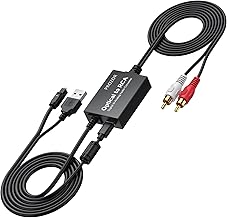
This PROZOR model is designed to convert SPDIF optical digital audio to left/right analog RCA output. Its listed 7-foot cable provides additional reach for a source and amplifier that are not positioned next to each other. The listing also identifies a built-in audio amplifier chip and dual-channel operational amplifier to address low RCA output level.
It supports listed sample rates of 32, 44.1, 48, 96, and 192 kHz, with 24-bit S/PDIF input. The product information instructs users to set TV audio output to PCM. It also explicitly says optical output is not supported, so the device should be used as a receiver of optical audio, not as a source.
- Best for: Buyers needing a 7-foot optical-to-RCA connection and a product listing that specifies an amplified RCA output stage.
- Why it was selected: It pairs a longer cable with stated high-resolution input support and clear PCM setup guidance.
- Limitation: The listing does not offer reverse conversion, and the TV’s volume may need to be controlled in its settings.
Choose this converter when the source has an optical output and the receiving equipment has RCA inputs. Avoid it if you need RCA-to-optical conversion or cannot configure the source for a supported signal.
Buying Guide: Choosing A Digital-To-RCA Converter
What does digital audio output to RCA input mean?
Digital optical and coaxial outputs carry audio in a digital format. RCA left/right inputs on many amplifiers, powered speakers, and older stereo components accept analog audio. A DAC converts the digital signal into analog audio so the two types of connections can work together.
Check the direction of conversion before buying. For a TV or player with optical output and an amplifier with RCA input, look for “digital to analog,” “optical to RCA,” or “DAC.” An analog-to-digital converter performs the reverse task and will not solve this connection need.
Does the source need to output PCM?
Often, yes. Several products in this list specify PCM support or instruct users to select PCM in the TV’s sound settings. Digital audio may also be set to a compressed format such as Dolby or DTS. A converter that only accepts PCM may not decode those formats.
Open the source device’s audio settings and select PCM or stereo PCM when available. If the setting is unavailable, check the converter’s supported formats and the source manual before purchasing. Format mismatch is a common reason a correctly connected converter produces no audio.
Which connections should you check?
- Source output: Confirm that the TV, player, or console has an optical Toslink or supported coaxial digital audio output.
- Receiving input: Check that the amplifier or audio system has matching red and white RCA inputs.
- Signal direction: Make sure the product converts digital input to analog output, rather than analog input to digital output.
- Input selection: Select the RCA input on the receiving stereo or amplifier after connecting the converter.
RCA plugs and jacks are analog connections, not digital optical connections. A converter is required between the two formats; a passive cable by itself cannot perform digital-to-analog conversion.
Should you choose a cable-style converter or a separate DAC?
A cable-style converter, such as the AUTOUTLET options listed above, combines the conversion function with a cable ending in RCA plugs. That format can make a direct connection simple, but cable length matters. The 3-foot model suits closely placed components, while the 7-foot models provide more reach.
A separate DAC can be more suitable when you need additional output choices. The PROZOR model with RCA and 3.5mm outputs also lists coaxial input, so it offers more connection flexibility. Compare the actual ports you need rather than choosing by the number of supported formats alone.
How much cable length do you need?
Measure the route between the source and the receiving equipment, allowing enough length to reach the ports without pulling the cable tight. A short cable can reduce slack in a compact installation. A longer cable is more useful when devices sit in separate areas of a TV cabinet or entertainment center.
Do not assume that a longer cable provides a different audio format or additional features. In this product group, cable length is a practical placement consideration; compare it separately from supported input formats, output types, and conversion direction.
How should you compare sample-rate specifications?
The listed converters advertise support up to 192 kHz and 24-bit audio, but the source must provide a supported signal for those specifications to matter. A converter’s maximum capability does not mean every TV or program outputs audio at that rate. Confirm the source’s available audio settings and the product’s stated format requirements.
For everyday compatibility, prioritize correct signal direction, PCM support when required, and matching input and output connections. A high maximum sample rate cannot compensate for a format mismatch or the wrong type of port.
Frequently Asked Questions
Can I connect a TV optical output directly to RCA inputs?
No. Optical output carries digital audio, while RCA inputs accept analog audio. Use a DAC that explicitly converts optical digital input to RCA analog output.
Will an optical-to-RCA converter work with Dolby audio?
It depends on the converter. The eSynic listing specifies PCM only and excludes Dolby and DTS. Check the product’s supported formats and set the source to PCM when required.
Does a digital-to-RCA converter work in reverse?
No. A digital-to-analog converter sends digital input to analog output. For RCA analog input to optical digital output, you need an analog-to-digital converter instead.
Why is there no sound after connecting the converter?
Check that the optical cable is connected to the source’s audio output, the RCA plugs are connected to the receiving device’s input, and the correct input is selected. Also verify that the source is set to PCM if the converter requires it.
Can I control volume through the TV?
Volume control depends on the source and converter setup. The AUTOUTLET 3-foot listing says volume is adjusted on the output device, while the PROZOR listings advise adjusting TV volume through settings. Check the connected devices’ controls.
Do I need a converter with 3.5mm output?
Only if the receiving equipment uses a 3.5mm analog input. If it has standard left/right RCA inputs, an optical-to-RCA converter is sufficient. The PROZOR model with RCA and 3.5mm outputs provides both options.