
The best earbuds with a mic and mute button depend on your device’s port and how you plan to use them. The AIAUXAI and ASKUBSKU USB-A models suit computer users who want a physical mic-mute control, while JVC’s USB-C earbuds are a better fit for compatible USB-C devices. APETOO’s USB models add features such as a DAC, fit accessories, or magnetic earbuds.
| Product | Best For | Connection | Standout Feature |
|---|---|---|---|
| AIAUXAI USB Earbuds | PC users who want sound modes | USB-A | Mic mute and three music modes |
| JVC HAFR29UC | USB-C users seeking fit options | USB-C | Four silicone ear-tip sizes |
| ASKUBSKU Mute USB Earbuds | Users who want a long cable | USB-A | 7.5-foot cable |
| APETOO USB Earbuds | Long sessions and active wear | USB-A | DAC and wingtip accessories |
| APETOO Magnetic USB Earbuds | Users who value storage convenience | USB-A | Magnetic earbuds |
AIAUXAI USB Earbuds With Mic Mute
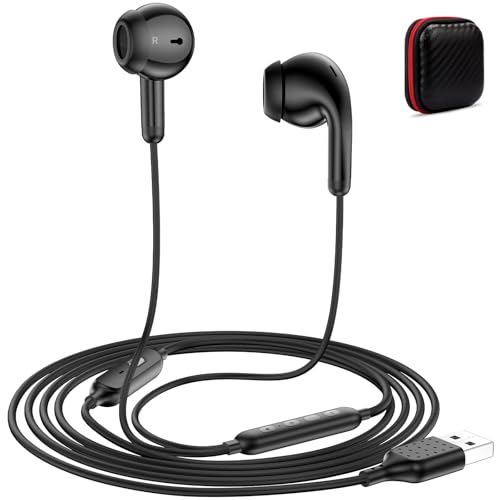
These USB-A earbuds are best for computer users who want microphone muting and audio controls on the cable. A side button switches the mic on or off, which can be useful during calls, online meetings, or gaming sessions when a quick mute is preferable to searching through software settings.
The inline controller also provides master volume control and a multifunction button for supported devices. A separate control cycles among Original Sound, Bass Boost, and Clear Vocal modes. The built-in high-sensitivity microphone is described as designed to make the wearer’s voice clear.
- Best for: PC users who want physical mute and sound-mode controls.
- Why it stands out: It combines mic mute, volume adjustment, and three listed music modes in one wired USB-A design.
- Check before buying: It uses USB-A, so it may not connect directly to a device that only has USB-C or a headphone jack. The listed compatibility includes computers and laptops with USB-A ports.
JVC HAFR29UC USB-C Earbuds

JVC’s HAFR29UC is best for buyers whose device has a USB-C port and who want a wired earbud set with a mic-mute function. The product listing describes a USB-C connection, a built-in microphone, and a three-button remote for call management, volume adjustment, and music playback.
The package includes four silicone ear-tip sizes: XS, S, M, and L. Multiple tip sizes can help buyers select a fit that feels more secure or comfortable for their ears. JVC also lists noise isolation, a DAC, and Hi-Res audio among the product features.
- Best for: USB-C device users who want several ear-tip sizes and inline controls.
- Why it stands out: Its three-button remote and built-in mic mute combine call and media controls, while four tip sizes offer more fit choices than a single-size design.
- Check before buying: This is a USB-C model, not a USB-A or 3.5mm headset. Confirm that the intended device has a compatible USB-C audio connection.
ASKUBSKU USB Earbuds With 7.5-Foot Cable

These ASKUBSKU earbuds are best for people using a computer or laptop who want a longer wired connection. The listed 7.5-foot cable can provide more reach between the listener and a computer, which may be useful at a desk or workstation.
The side button turns the microphone on or off, and a top button selects among three music modes: Original Sound, Bass Boost, and Clear Vocals. The product listing says the USB-A earbuds require no drivers and are compatible with many computers and laptops, including systems running several Windows versions and Mac OS X.
- Best for: Desk users who need extra cable length and straightforward mic muting.
- Why it stands out: It pairs a stated 7.5-foot cable with a physical mute button and selectable sound modes.
- Check before buying: It connects through USB-A. The listing describes broad computer compatibility, but buyers should verify that their device has the required port.
APETOO USB Earbuds With DAC And Wingtips
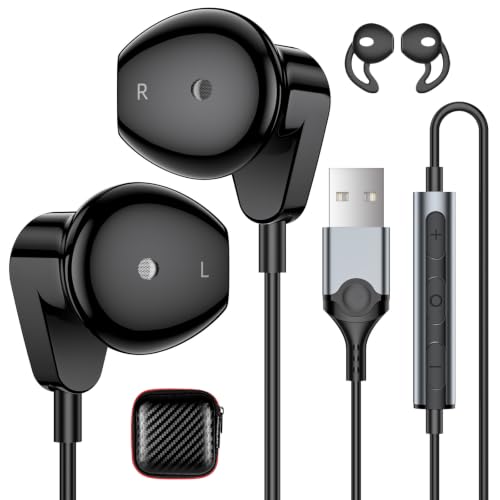
APETOO’s USB-A earbuds are best for buyers looking for a wired mic-mute headset with additional fit and audio features. The listing describes an internal DAC chip, 13 mm dynamic drivers, a built-in microphone, and an inline controller for volume, track selection, and one-press microphone muting.
The design uses a 45-degree half-in-ear shape and includes silicone wingtips intended to help the earbuds stay in place. Those features may interest people who wear earbuds for long study or gaming sessions, but comfort and fit are individual, so the included accessories should be checked against personal preferences.
- Best for: Users who want inline mute controls plus wingtips for a more secure fit.
- Why it stands out: The listed controls extend beyond muting to volume and track changes, and the product includes both a DAC and fit accessories.
- Check before buying: This model has a USB-A connector. Its half-in-ear design may not suit buyers who prefer silicone tips that seal inside the ear canal.
APETOO Magnetic USB Earbuds

These APETOO earbuds are best for USB-A users who want a mic-mute control and a design that is easier to gather together when not in use. The product listing says the backs of the earbuds contain hidden magnets, allowing them to connect to each other when worn around the neck or put away.
The model has a built-in microphone with a mute function and a wired remote for volume adjustment. Its listing also describes an internal digital DAC chip, stereo sound, and silicone ear tips in different sizes. The flexible, long cord is intended to allow movement while connected to a device.
- Best for: People who want wired earbuds that can connect magnetically when not in use.
- Why it stands out: Magnetic backs add a storage and carry convenience not called out for the other USB-A picks, while the inline remote includes microphone mute and volume control.
- Check before buying: The USB-A plug limits direct use to devices with a suitable USB-A port. The listing does not specify the cable length, so confirm whether its reach meets your setup’s needs.
Buying Guide: How To Choose Earbuds With Mic Mute
Which connector does your device need?
Start with the physical port on the device you plan to use. USB-A earbuds are intended for compatible USB-A ports, while the JVC HAFR29UC uses USB-C. A product’s connector type is a practical first filter: the wrong plug may not connect directly, and the supplied product information does not establish that an adapter will work with every device.
Also check whether you need the earbuds for a computer, laptop, tablet, or another device. Listings may name operating systems or device types, but port availability and audio support can vary by model. Confirm the specific device’s port and audio requirements before choosing.
How important is a physical mute button?
A hardware mute button is useful when you want to silence the microphone without opening meeting or chat software. Look for where the control is placed and how it works. The AIAUXAI and ASKUBSKU models list a side button for switching the mic on or off. The APETOO DAC model describes one-press inline muting, while the JVC and magnetic APETOO listings also identify a built-in mic mute function.
Remember that a mute control is different from a volume control. If you regularly adjust both listening volume and microphone status, choose a model whose listed inline controls cover the actions you need.
Do you need extra cable length?
For a stationary desk, cable length affects how freely you can move while connected. The ASKUBSKU model specifically lists a 7.5-foot cable, and one APETOO USB-A model also lists a 7.5-foot cable. The magnetic APETOO listing describes a long, flexible cord but does not give a measurement. If exact reach matters, compare the stated length with the distance between your listening position and device.
What fit features should you compare?
Earbud shape and included accessories influence how the product feels, but fit is personal. The JVC model includes four silicone tip sizes, while the APETOO DAC model includes silicone wingtips and a half-in-ear design. The magnetic APETOO listing describes silicone tips in different sizes. If you know that standard earbuds tend to loosen or feel uncomfortable, prioritize models that list multiple sizes or fit accessories.
Buyers who prefer a less intrusive fit may want to consider the APETOO half-in-ear design. Buyers who want a more adaptable silicone-tip fit may prefer a model with several tip sizes. The listed features do not guarantee a particular fit for every wearer.
Are sound modes, DAC features, or magnetic storage priorities?
For quick sound-profile selection, the AIAUXAI and ASKUBSKU USB earbuds list Original Sound, Bass Boost, and Clear Vocal or Clear Vocals modes. The APETOO DAC model lists an internal DAC chip and 13 mm drivers, while the JVC product listing identifies a DAC and Hi-Res audio. These features may matter to buyers comparing sound options, but they do not replace checking connector compatibility and microphone controls.
The magnetic APETOO model is a distinct choice for people who value keeping the earbuds joined when they are not in use. That feature addresses storage convenience rather than microphone performance, so weigh it according to how you carry or set down your earbuds.
Which option is best for meetings, gaming, or everyday listening?
For meetings, prioritize a clearly described microphone mute control and a connector that matches the computer. For gaming or long study sessions, consider cable reach and fit accessories as well as access to the mute button. For everyday listening, inline volume or track controls and any listed sound modes may be more important. None of the listed product information establishes that one model is universally best for every use.
Frequently Asked Questions
Can I use USB-A earbuds with a USB-C-only laptop?
Not directly if the laptop has no USB-A port. The products listed here do not establish that a particular adapter will work, so check the laptop’s audio support and adapter requirements before buying.
Do all of these earbuds have a microphone mute function?
Each of the five selected products lists a microphone mute feature. The control varies by model, so check the product description to see whether it is a side button, inline control, or part of a remote.
Which listed earbuds have a 7.5-foot cable?
The ASKUBSKU Mute USB Earbuds and the APETOO USB Earbuds with Mic Volume Control list a 7.5-foot cable. The magnetic APETOO model describes a long cord without stating an exact measurement.
Which option has the most listed ear-tip sizes?
The JVC HAFR29UC lists four silicone ear-tip sizes: XS, S, M, and L. This gives buyers multiple sizes to compare for their preferred fit.
Do the listed USB-A earbuds need drivers?
The ASKUBSKU listing says its USB earbuds require no drivers. The AIAUXAI and APETOO product details supplied here do not make the same driver claim, so check their current product information for device-specific setup details.
What should I check before joining a call?
Confirm that the earbuds connect to your device, identify how to toggle the microphone mute control, and test the mic and listening volume in the app you plan to use. These steps help verify the setup before a meeting or voice chat.