
The best car stereo auxiliary input adapter depends on your car’s available connections and your phone’s port. Choose the COMSOON receiver for wireless Bluetooth through an existing 3.5 mm AUX jack, the Seulliya cable for a compatible iPhone with Lightning, or the JXMOX cable for a compatible USB-C device. The Honda interface is aimed at listed Honda models, while the arsvita cassette adapter is an option for a car with a cassette player.
| Adapter | Best for | Connection approach |
|---|---|---|
| COMSOON Bluetooth Receiver | Wireless playback and calls | Bluetooth to 3.5 mm AUX |
| Seulliya Lightning AUX Cable | Lightning-equipped iPhones | Wired Lightning to 3.5 mm |
| JXMOX USB-C AUX Cable | USB-C phones and devices | Wired USB-C to 3.5 mm |
| Honda USB Aux Interface | Listed Honda model years | Vehicle-specific USB/AUX interface |
| arsvita Cassette Adapter | Cars with a cassette deck | Bluetooth cassette-to-AUX adapter |
COMSOON Bluetooth Receiver For AUX

Best for: Drivers who have a working 3.5 mm AUX input but want to stream audio wirelessly from a phone. The receiver connects to non-Bluetooth car audio systems through AUX and pairs with a phone using Bluetooth 5.0.
The listed features include CVC8.0 noise cancellation and digital signal processing intended to reduce echo and background noise during calls. The manufacturer lists up to 16 hours of use for music or calls, a 2.5-hour charging time with the included Type-C cable, and the ability to use the adapter while it charges.
Why it was selected: It adds Bluetooth playback without replacing the stereo, and its listed calling features make it more versatile than a basic wired audio cable. Limitation: It requires a 3.5 mm AUX input and needs charging; it is not a direct wired connection from the phone.
Seulliya Lightning To AUX Cable

Best for: Buyers with a Lightning-equipped iPhone and a car stereo that has a 3.5 mm AUX port. This is a wired adapter, so it avoids pairing a separate Bluetooth receiver and does not rely on the phone having a built-in headphone jack.
The product listing describes an Apple MFi-certified chip, a built-in digital-to-analog converter (DAC), and high-purity copper wires. It also lists a 3.3-foot length, a soft TPE cable, and a claimed bend lifespan of more than 15,000 bends. The cable is described for connecting compatible iPhones to car stereos, speakers, headphones, and other equipment with a 3.5 mm input.
Why it was selected: Its dedicated Lightning-to-AUX design offers a direct wired route for users with the matching phone connector. Limitation: It is not the right choice for USB-C devices or a stereo without a 3.5 mm AUX input. Check the phone’s connector before buying.
JXMOX USB-C To AUX Cable

Best for: People whose phone or other audio device has USB-C and whose car stereo accepts a standard 3.5 mm AUX plug. The product is a four-foot wired cable and is listed for a range of USB-C devices, including selected iPhone, Samsung Galaxy, Pixel, and iPad models.
JXMOX lists a DAC smart chip for digital-to-analog audio conversion and high-definition sound, along with a nylon-braided cable designed to withstand more than 12,000 bending tests. It can also connect a compatible USB-C device to a home stereo, speaker, or headphones with a 3.5 mm jack.
Why it was selected: It is a straightforward option for USB-C users who want a physical connection rather than Bluetooth. Limitation: The USB-C connector alone does not guarantee compatibility with every device. Check the product’s compatibility list and confirm the car has an AUX input.
Honda USB AUX Interface Adapter
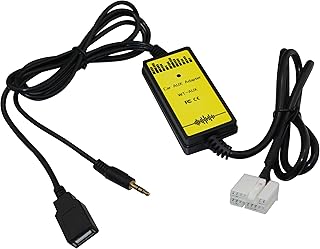
Best for: Owners of a Honda model and year listed for this interface: Accord (2003–2011), CR-V (2005–2011), Pilot (2006–2011), Odyssey (2005–2011), or Civic (2006–2011). The listing describes the product as a USB AUX interface for charging and playing audio.
Why it was selected: Unlike a generic cable that plugs into an existing AUX jack, this product is presented as a vehicle-oriented interface for specified Honda applications. It may suit buyers looking for a model-specific connection approach rather than a portable Bluetooth receiver.
Limitation: The supplied product information does not provide detailed installation instructions or a complete compatibility list. Confirm the exact vehicle, model year, and existing audio connections against the full listing before purchasing; do not assume that every Honda or trim level is supported.
arsvita Bluetooth Cassette Adapter

Best for: Drivers whose car has a cassette player and who want a Bluetooth-based audio connection. The product name identifies it as a Bluetooth 5.0 cassette-to-AUX adapter in charcoal black, positioning it as an alternative for older stereos without relying on a standard AUX jack.
Why it was selected: It addresses a different compatibility need from the wired AUX cables and the COMSOON receiver: the car’s cassette deck is the defining connection point. Consider it when the stereo has a cassette player but lacks a convenient modern phone input.
Limitation: It is intended for a cassette player, so it is not a fit for a car with only a 3.5 mm AUX port, USB input, or no cassette deck. The supplied feature information is limited, so check the full listing for operating details before choosing it.
Buying Guide: How To Choose A Car AUX Adapter
What input does the car stereo have?
Start by identifying the physical connection in the vehicle. A 3.5 mm AUX input accepts an audio cable or a Bluetooth receiver with a 3.5 mm plug. A cassette player points to a cassette-style adapter. A vehicle-specific interface should be considered only when the car’s make, model, year, and audio setup match the listing.
If the stereo has no AUX jack or cassette deck, do not assume that a standard AUX cable will connect to it. Check the vehicle manual and inspect the stereo’s available ports before selecting an adapter. The Honda interface in this list is described for specific model-year ranges, not all Honda vehicles.
Should you choose Bluetooth or a wired cable?
Choose Bluetooth if avoiding a direct phone cable is the priority. The COMSOON receiver uses an existing AUX input and adds wireless pairing, but its listed battery life means charging is part of ownership.
Choose a wired adapter if you prefer a direct connection and your phone has the matching port. The Seulliya model is Lightning-to-3.5 mm; the JXMOX model is USB-C-to-3.5 mm. A wire does not require Bluetooth pairing, but it can restrict where the phone sits and must match both the phone and car connections.
How do you match the adapter to a phone?
Check the phone’s charging or data port before choosing a cable. A Lightning cable is not interchangeable with a USB-C cable. Also verify that the cable’s listed device support covers the exact phone model. For USB-C devices, a DAC is relevant because the adapter must convert digital audio for a 3.5 mm connection; JXMOX lists a DAC chip for that purpose.
What sound and call features matter?
For music, prioritize a connection that fits the car and device without loose or improvised adapters. The Seulliya and JXMOX products list DAC-related sound features. For calls, the COMSOON listing specifically mentions echo and background-noise reduction. These are manufacturer-listed features, not a guarantee of identical results in every vehicle or driving environment.
What should you check about installation and everyday use?
Portable receivers and cables are generally selected around accessible ports, while a vehicle-specific interface depends on the car’s configuration. Check whether the cable length suits the distance between the phone and AUX port. The Seulliya cable is listed as 3.3 feet; the JXMOX cable is four feet.
For a rechargeable Bluetooth adapter, consider charging access and whether using it while charging is useful. COMSOON lists that option. For any model-specific interface, verify fitment and installation requirements from the complete product information before purchase.
Frequently Asked Questions
What does a car stereo auxiliary input adapter do?
It connects an audio source, such as a phone or Bluetooth receiver, to a compatible car stereo input. The connection type may be a 3.5 mm AUX jack, cassette player, USB interface, or a vehicle-specific port.
Can I use a USB-C-to-AUX cable with any car stereo?
No. The car stereo needs a compatible 3.5 mm AUX input, and the cable must support the specific USB-C device. Check both ends and the device compatibility information before buying.
Is a Bluetooth AUX adapter better than an AUX cable?
Neither is universally better. Bluetooth is useful when you want wireless pairing and the car has AUX; a cable is a direct option when the phone connector and stereo input match. A rechargeable Bluetooth receiver also needs charging.
Will a Lightning-to-AUX cable work with a USB-C iPhone?
No. A Lightning-to-AUX cable has a Lightning connector and is not a USB-C cable. Choose an adapter that matches the exact port on the phone.
Can I use the Honda interface in any Honda?
Do not assume so. Its listed applications include particular model-year ranges for Accord, CR-V, Pilot, Odyssey, and Civic. Verify the exact vehicle and stereo configuration against the complete listing.
Does a cassette adapter work without a cassette player?
No. A cassette-style adapter requires a cassette player as its connection point. For a stereo with a 3.5 mm AUX jack, consider a compatible AUX cable or Bluetooth receiver instead.