
Quality computer speakers can make music, video calls, games, and movies easier to hear without relying on built-in laptop audio. The Logitech Z207 is best for flexible Bluetooth and wired connections, while the Logitech Z313 is better for shoppers seeking a separate subwoofer. OHAYO suits buyers who want compact stereo speakers with a stated 60-watt output, and the Nylavee sound bar fits a single-speaker desktop setup. Bluedee is an option for buyers seeking a 2.1 system, though the available product details are limited.
| Speaker | Best For | Connection or Design Highlight |
|---|---|---|
| Logitech Z207 | Switching between audio devices | Bluetooth and 3.5 mm cable |
| Logitech Z313 | Separate-subwoofer sound | 2.1 system with control pod |
| OHAYO 60W | Compact stereo with front volume control | Bluetooth 5.3 and bookshelf-style pair |
| Bluedee 2.1 | Buyers considering a subwoofer system | 2.1 configuration; 80W peak stated in name |
| Nylavee Sound Bar | Saving space across the desk | Bluetooth 5.0 and 3.5 mm AUX |
Logitech Z207: Best For Device Switching

The Logitech Z207 is a 2.0 stereo speaker set designed for computer desks and other listening setups. It supports Bluetooth wireless audio and a 3.5 mm wired connection, giving buyers two ways to connect compatible audio devices.
Its Easy-Switch feature is intended to make switching between audio devices straightforward: pause audio on one device, then play audio on the other. Each speaker has one powered full-range driver and one passive radiator for bass extension. This design makes the Z207 a practical fit for listeners who want a simple stereo pair rather than a separate subwoofer.
- Best for: People who alternate between a computer and another Bluetooth or wired device.
- Why it stands out: It combines two connection types with a described device-switching feature.
- Consideration: The listed details do not specify output power or a dedicated subwoofer, so choose another option if those are essential buying criteria.
Logitech Z313: Best For A Subwoofer Setup

The Logitech Z313 is a 2.1 multimedia speaker system that includes a compact subwoofer. Its listed output is 25 watts RMS, and a convenient control pod provides a separate point for operating the system.
A 2.1 arrangement may suit buyers who prefer a dedicated subwoofer alongside the main speakers. The control pod is a useful design consideration for a desktop, since it places system controls apart from the speaker units. This model is best for shoppers who specifically want a subwoofer-based computer speaker system and do not need the product description to emphasize Bluetooth.
- Best for: Desktop users who want a 2.1 system with a compact subwoofer.
- Why it stands out: Its listed specifications identify both the subwoofer and RMS output, making the basic system configuration clear.
- Consideration: The supplied product details do not list wireless connectivity. Check the connection requirements before choosing it for a Bluetooth-first setup.
OHAYO 60W: Best For Compact Stereo Speakers
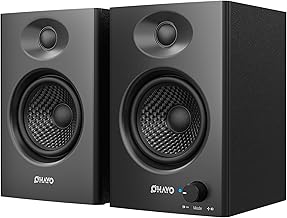
The OHAYO speaker set is a compact 2.0 pair with Bluetooth 5.3, a stated 60-watt total output, and a front-panel volume knob. The listed feature description identifies 30 watts per speaker, a 0.75-inch carbon-fiber silk-dome tweeter, and a 3-inch carbon-fiber full-range driver.
Its MDF wooden enclosure and rear bass port are described as helping reduce enclosure resonance and add low-frequency depth. The product also lists an integrated independent sound card. The compact bookshelf-style design may suit a home office or gaming station where a pair of speakers is preferred but desk space is limited.
- Best for: Buyers seeking a compact stereo pair with Bluetooth and an easy-to-reach volume knob.
- Why it stands out: The supplied description names the driver sizes, enclosure material, and stated output.
- Consideration: This is a pair of speakers, not a listed 2.1 system with a separate subwoofer. Confirm that its physical dimensions fit your desk.
Bluedee 2.1: Best For Subwoofer Seekers

The Bluedee product name identifies this model as a 2.1 computer speaker system with a subwoofer and 80 watts of peak power. Those details may interest buyers who want a subwoofer-based system and are comparing products by their stated peak output.
The available product information does not include a fuller feature list. It does not establish connection types, RMS output, controls, driver specifications, or the subwoofer’s dimensions. Treat the stated 80-watt figure as peak power, not as an RMS rating or a direct measure of sound quality.
- Best for: Buyers who are specifically considering a 2.1 system and want to investigate a model listing 80W peak power.
- Why it is included: Its named configuration provides a direct comparison with the Logitech Z313 subwoofer system.
- Consideration: Verify connection options and detailed specifications in the current product listing before purchase; they are not provided in the supplied information.
Nylavee Sound Bar: Best For A Clear Desk

The Nylavee is a desktop sound bar with Bluetooth 5.0 and a 3.5 mm AUX wired connection. Its listed design includes four speaker units and two independent bass diaphragms. The product description also names double-layer neodymium magnets and mica-fiber diaphragms.
A sound bar can be a better fit than two separate speakers when desk layout favors one horizontal unit. The stated connections also give buyers a choice between Bluetooth and AUX, while the product description lists compatibility with laptops, desktop PCs, phones, tablets, Xbox, and PS5. Check the device’s available output and connection method before ordering.
- Best for: People who want a single desktop sound bar and both wireless and wired connection options.
- Why it stands out: Its single-bar form and stated four speaker units distinguish it from the separate left-and-right speaker pairs in this list.
- Consideration: The supplied details do not state output power or include a separate subwoofer. Choose a 2.1 system if a dedicated subwoofer is a priority.
Buying Guide: How To Choose Computer Speakers
Do you want a 2.0 pair, a 2.1 system, or a sound bar?
A 2.0 setup uses two main speakers and does not include a separate subwoofer in the listed configuration. The Logitech Z207 and OHAYO are 2.0 choices here. A 2.1 system adds a subwoofer, as listed for the Logitech Z313 and Bluedee. A sound bar, such as the Nylavee, consolidates the speaker units into one horizontal enclosure.
Choose a 2.0 pair if two separate speakers suit your desk and a subwoofer is not required. Consider a 2.1 model if a separate low-frequency speaker is part of your desired setup, while accounting for the extra space it may take. A sound bar may be preferable when one unit is easier to place beneath or near a monitor.
Which connection types do you need?
Check the devices you plan to use before comparing speaker features. Bluetooth can reduce the need for an audio cable, while a 3.5 mm connection can provide a direct wired option when the source device has a compatible output. The Z207 lists Bluetooth and 3.5 mm connectivity, and the Nylavee lists Bluetooth 5.0 and AUX. OHAYO lists Bluetooth 5.3.
Do not assume that a speaker supports a connection simply because another model in the same category does. The supplied details for the Logitech Z313 do not state Bluetooth, and the available Bluedee information does not specify connection methods. Confirm those details if wireless playback or a particular cable connection is essential.
How should you compare wattage?
Read the type of power measurement alongside the number. The Z313 lists 25 watts RMS, while the OHAYO description states 30 watts per speaker and 60 watts total. The Bluedee product name states 80 watts peak. RMS and peak figures describe different power measurements, so they should not be treated as equivalent specifications.
Wattage alone does not tell you whether a speaker will suit your room or listening preferences. Consider the system configuration, connection needs, placement, and the level of detail available in the product specifications. If comparing two systems, look for the same type of power rating rather than relying on the largest number.
How much room do the speakers need?
Measure the available space before choosing a design. A pair of speakers needs room on both sides of the display, while a sound bar uses one horizontal footprint. A subwoofer adds another component to place. The OHAYO description specifically presents its pair as compact, and the Logitech Z313 description identifies its subwoofer as compact, but the supplied information does not give exact dimensions.
Check the current product listing for measurements and control placement. A front-facing volume knob, such as the one listed for OHAYO, may be convenient if the speakers sit within reach. The Z313’s control pod offers a separate control point, which may matter if the speaker units are positioned farther away.
What details matter for music, calls, and games?
For general computer use, prioritize clear connection instructions and controls that fit your habits. Buyers who switch between devices may value the Z207’s Easy-Switch feature. People who want a single-unit desk arrangement may prefer the Nylavee form factor. For a subwoofer-oriented setup, compare the Z313 and Bluedee while checking their detailed specifications.
For calls, verify how the computer routes audio and whether the speakers are intended for playback rather than microphone input. The supplied details do not list microphones for these products. For gaming, consider how the speakers connect to the specific console or computer; the Nylavee description names Xbox and PS5 compatibility, but users should still confirm the connection method for their setup.
Frequently Asked Questions
Are computer speakers with a subwoofer always better?
No. A subwoofer is a separate component that may suit buyers seeking a 2.1 setup, but it requires extra placement space. A 2.0 pair or sound bar can be a more practical choice when desk space or a simpler layout matters more.
What is the difference between 2.0 and 2.1 speakers?
A 2.0 system has two main speaker channels. A 2.1 system adds a subwoofer to the two main speakers. The Logitech Z207 and OHAYO are listed as 2.0 choices, while the Logitech Z313 and Bluedee are listed as 2.1 systems.
Can I connect computer speakers to a phone?
It depends on the speaker’s connection options and the phone. The Z207 and Nylavee list Bluetooth, and the Nylavee description names phones among its compatible devices. Confirm that the connection type supported by the speaker is available on your phone.
Is peak wattage the same as RMS wattage?
No. Peak and RMS are different power measurements. The Bluedee name gives an 80-watt peak figure, while the Logitech Z313 description lists 25 watts RMS. These figures should not be compared as if they were the same rating.
Which computer speakers are easiest to switch between devices?
The Logitech Z207 is the clearest fit in this selection because its listed Easy-Switch technology is designed for switching audio between devices, and it supports Bluetooth and 3.5 mm wired connections.