
The best CD player with an auxiliary connection depends on where you plan to listen. The KOVCDVI portable player is best for personal listening and includes an AUX cable, while the Proscan and Tyler boomboxes suit shared listening. The home stereo is a better fit for a stationary setup, and the Jupiter is designed for compatible car stereos with USB ports. Check whether you need an AUX input, an included cable, or a USB connection before choosing: those are different connection options.
| Product | Best For | Connection Highlight |
|---|---|---|
| KOVCDVI Portable CD Player | Personal, portable listening | AUX cable included |
| Proscan Elite Boombox | Home or room-to-room use | AUX input |
| Tyler Portable Boombox | Portable speaker playback | AUX input |
| Home Stereo System | Stationary home audio | AUX in and USB in |
| Jupiter USB CD Player | Compatible car stereos | USB connection; check stereo support |
KOVCDVI Portable CD Player

Best for: Someone who wants a compact CD player for personal listening, travel, or use with an AUX connection. This model is described as lightweight and portable, and its listing specifically includes an AUX cable and earphones.
It has an LCD display and supports CD, CD-R, CD-RW, CD-MP3, and CD-WMA discs. Four playback modes are listed: repeat one, repeat all, random play, and intro track preview. Five sound effects—BBS, Pop, Rock, Jazz, and Classic—provide additional listening options.
Why it stands out: Among these picks, it is the clearest match for a buyer searching for a CD player with an auxiliary cord, because the supplied features explicitly mention an AUX cable. Its anti-skip and shockproof design is also presented as a feature for active or mobile use.
Limitation: It is a personal CD player rather than a listed speaker system. Choose it for headphones or an AUX-connected device, not if you specifically want built-in room-filling speakers.
Proscan Elite Portable CD Boombox

Best for: Buyers who want a CD player, radio, and AUX input in one portable boombox. The listed features include AM/FM radio and an AUX input for connecting an iPhone, iPad, or another audio device.
The purple Proscan Elite is powered by an included AC adapter. Its combination of CD playback, radio, and auxiliary connectivity makes it a practical choice for a room where several types of audio sources may be used. The AUX input is useful when you want to play audio from a separate device through the boombox rather than listen to a CD.
Why it stands out: Choose this model if you prefer a straightforward all-in-one unit for shared listening and want radio as well as CD playback. The listed input supports connecting external audio devices, though the product information does not say that an AUX cord is included.
Limitation: The listed power source is an AC adapter. The supplied details do not confirm battery operation, so avoid assuming it can run unplugged.
Tyler Portable Boombox CD Player
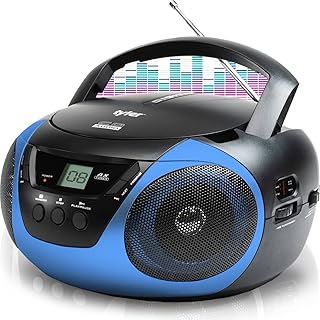
Best for: Listeners looking for a portable boombox with built-in speakers, CD playback, AM/FM radio, and an auxiliary input. The listing also identifies a 3.5 mm headphone jack, giving the unit a separate option for private listening.
The Tyler boombox is described as suitable for home or outdoor use and includes a long antenna for radio reception. Its AUX input can connect another audio source, while the CD player and radio provide additional ways to listen. The blue finish distinguishes it from a more neutral-looking unit.
Why it stands out: Choose this if you want a single portable stereo that combines CD and radio playback with an AUX input. It is a better match than a personal Discman-style player when built-in speakers are a priority.
Limitation: The supplied product details do not specify whether an auxiliary cable is included or explain the power options. Confirm those details if you need a cord in the box or a particular power setup.
Home Stereo System With CD Player

Best for: A fixed home listening area where you want a shelf stereo with CD playback and several audio options. The listed features include FM radio, Bluetooth, AUX in, USB in, an earphone jack, a remote control, and 30-watt HiFi output.
The AUX input is the relevant connection for a wired external audio source. USB in and Bluetooth offer other ways to connect or play audio, but they are not the same as an auxiliary cord. A remote control is included, which may be useful when operating the system from across a room.
Why it stands out: Choose this system if you want more than a basic CD player and need a home stereo with multiple listed inputs. It is better suited to a stationary setup than outdoor or pocket listening.
Limitation: The supplied information does not say that an AUX cable is included. Check the package contents if you need the cord as well as an AUX input.
Jupiter USB CD Player for Car

Best for: Drivers whose car stereo lacks a CD player but has a USB port and supports the required music-file playback. This is a USB-connected external CD player, not a conventional CD player with a 3.5 mm AUX input.
The listing says to connect the unit to the car stereo’s USB port, insert a disc, and select the recognized USB drive and track on the stereo. It notes WAV support as a compatibility requirement and says the stereo must be able to play WAV music files. A USB extension cable is included, and a USB-A-to-USB-C adapter is also listed.
Why it stands out: Choose this if you specifically want to add CD playback to a compatible car stereo through USB. The extension cable can help position the player in a location such as a center console, dashboard, or glove box, according to the listing.
Limitation: It depends on the car stereo’s USB port and WAV playback support. Verify those requirements before buying; a USB connection should not be mistaken for an AUX connection.
Buying Guide: How to Choose a CD Player With an Auxiliary Connection
Do you need an AUX input or an AUX cord?
An AUX input is a port on the player that accepts audio from another device through a compatible cable. An AUX cord is the cable itself. Product listings may advertise an AUX input without stating that a cable is included. In this selection, the KOVCDVI listing explicitly includes an AUX cable; the Proscan, Tyler, and home stereo listings mention an input but do not confirm a cable is supplied.
Check both ends of the connection before ordering. The source device and the CD player or speaker need compatible ports, and the cord must have the appropriate connectors. If you already own a cable, confirm that it fits the devices you plan to connect.
Which format fits your listening setup?
- For headphones or personal listening: A portable CD player is the compact option. The KOVCDVI listing includes earphones and an AUX cable, plus an LCD display and several playback modes.
- For speakers and radio: A boombox combines CD playback with built-in speakers. The Proscan and Tyler models also list AM/FM radio and an AUX input.
- For a home stereo system: The shelf stereo lists CD playback, FM radio, AUX in, USB in, Bluetooth, an earphone jack, and a remote control.
- For a car without a CD player: The Jupiter connects through USB, but only choose it after checking that the vehicle stereo meets the stated port and WAV playback requirements.
Do you want to connect a phone or another audio device?
Look for an AUX input when you want to send audio from a separate device to a boombox or stereo over a wired connection. The Proscan listing specifically mentions connecting an iPhone, iPad, or other audio device. An AUX input does not, by itself, confirm that the product includes the cable, so review package contents separately.
Also distinguish input from output. An AUX input is for bringing audio into a speaker or stereo. A headphone jack is generally listed as a separate connection on the Tyler boombox and home stereo, but the supplied product descriptions do not provide detailed output specifications.
What should car buyers verify?
Car stereos vary in the ways they support external players. The Jupiter listing calls for a USB port and a stereo capable of playing WAV music files. It describes the CD player being recognized as a USB drive, with tracks selected through the car stereo. Check the vehicle’s stereo instructions or settings rather than assuming that every USB port supports this type of playback.
If you specifically need a 3.5 mm AUX connection in a car, confirm that both the car stereo and the CD player have the appropriate ports. The Jupiter’s described connection is USB, so it is not the direct match for a buyer who requires an auxiliary cord.
Which features matter for portability?
For a player you plan to carry, compare the form factor and the information provided about its power source. The KOVCDVI is described as slim, lightweight, and portable. The Proscan is called a portable boombox, but its listed power source is an included AC adapter. The product details provided here do not establish battery operation for these models, so check the manufacturer’s specifications if unplugged use is essential.
For shared listening, built-in speakers in a boombox or home stereo may be more useful than a personal player. For individual listening, the KOVCDVI’s listed earphones and compact design are more directly aligned with that use.
How do disc formats and playback controls affect the choice?
If you have discs beyond standard CDs, check the supported formats before selecting a player. The KOVCDVI listing specifically names CD, CD-R, CD-RW, CD-MP3, and CD-WMA. The other supplied product descriptions do not list comparable disc-format details, so do not assume that they support every format.
Playback controls can matter if you listen to a collection in different ways. The KOVCDVI includes repeat-one, repeat-all, random, and intro modes, along with five sound effects. These listed options make it a more feature-specific choice for personal disc playback, while the boomboxes and stereo emphasize combinations of CD playback, radio, and external inputs.
Frequently Asked Questions
What does “CD player with AUX” mean?
It usually means the player has an auxiliary input or connection for wired audio from another device. Check the product description to confirm whether the AUX cable is included.
Which product explicitly includes an AUX cable?
The KOVCDVI portable CD player’s listed features include an AUX cable and earphones. The supplied details for the other selected products mention AUX inputs or other connections without confirming an included AUX cord.
Can I connect a phone to a CD boombox?
The Proscan listing says its AUX input can connect to an iPhone, iPad, or another audio device. You will need a compatible cable, and the provided details do not confirm that one is included.
Is the Jupiter car CD player an AUX model?
No. Its described connection is USB. It is intended for compatible car stereos with USB ports and WAV music-file playback support, so it is not the direct choice for a 3.5 mm AUX connection.
Which option is best for listening through built-in speakers?
The Proscan and Tyler are boombox-style options, and the home stereo is a shelf system. The KOVCDVI is described as a portable personal player with earphones, while the Jupiter is a car accessory that relies on a compatible stereo.
What should I check before buying an auxiliary cord?
Confirm the connector type required by the AUX input and the audio source. Also check whether the product includes a cable; an AUX port alone does not mean a cord comes in the box.