
To connect a device with a coaxial digital audio output to equipment with an optical Toslink input, choose a powered, bidirectional coaxial-to-optical converter and set its input to coaxial. The PROZOR 192K is best for buyers who want stated support for several audio formats and sample rates; the LUKFOCAB is better for those who also want a signal-repeater function. The Laboen is a simple plug-and-play option. Two listed DACs convert digital audio to analog, not coaxial to optical, so they are not substitutes for a digital-format converter.
| Product | Best suited for | Important distinction |
|---|---|---|
| PROZOR 192K Bi-Directional Converter | Format and sample-rate flexibility | Coaxial-to-optical conversion is supported |
| LUKFOCAB Bi-Directional Converter | Buyers who need a repeater feature | Includes a 5V micro-USB power cable |
| Laboen Bi-Directional Adapter | Basic two-way digital conversion | Plug-and-play operation |
| PROZOR Digital-to-Analog DAC | Connecting digital audio to analog outputs | Not a coaxial-to-optical converter |
| Hdiwousp Digital-to-Analog DAC | PCM audio to RCA or 3.5mm equipment | Conversion is one-way to analog |
PROZOR 192K Bi-Directional Converter

This PROZOR unit accepts either coaxial or Toslink optical input and can convert between the two digital connection types. A switch selects the input, making it suitable for a coaxial digital audio output feeding an optical input on a receiver, sound system, or other audio device. The listing also describes coaxial and Toslink output options.
Best for: Buyers who want a two-way converter with a stated range of supported formats and sample rates. Listed formats include LPCM 2.0, DTS, and Dolby AC-3/5.1-channel audio. Listed sampling rates range from 32 kHz through 192 kHz, with support up to 24-bit.
Why it was selected: It directly addresses the coaxial-out-to-optical-in connection and also supports the reverse direction, which can be useful in a system with devices using different digital connectors.
Limitation: The input selection is manual. Confirm that the source’s audio format is among the formats supported by the converter and the receiving equipment.
LUKFOCAB Bi-Directional Digital Converter

The LUKFOCAB converts coaxial digital audio to Toslink optical or Toslink to coaxial. Its input switch selects the signal source, and its built-in amplification chip is described as allowing the unit to serve as an audio-signal repeater. It comes with a 5V micro-USB power cable.
Best for: Buyers who need the coaxial-to-optical connection and value a listed repeater function or included power cable. The converter is described as plug and play, with no driver installation required.
Why it was selected: It directly converts between the two digital connection types and offers stated support for stereo audio formats including Dolby, DTS, ACC, and PCM. The listing specifies PCM sampling frequencies up to 192 kHz and a 16-bit PCM word length.
Limitation: Its stated PCM word length is 16-bit, which is lower than the 24-bit support claimed by some alternatives here. Check the source and receiver requirements before buying.
Laboen Two-Way Coaxial Audio Adapter

The Laboen adapter is described as a two-way digital audio converter: coaxial to Toslink or Toslink to coaxial. It is a straightforward option for connecting devices that use different digital audio ports. The product listing says it is plug and play and does not require software or a driver.
Best for: Buyers looking for a basic bidirectional converter without a need for detailed format or sample-rate specifications in the product information provided.
Why it was selected: Unlike a digital-to-analog DAC, this product is specifically described as converting between coaxial and optical digital audio. The listing also states that it is intended to provide noise-free, high-definition audio output for an amplifier and speaker.
Limitation: The supplied feature information does not specify supported audio formats, sampling rates, bit depth, or power requirements. Confirm those details with the seller if your equipment has particular requirements.
PROZOR 192K Digital-to-Analog DAC

This PROZOR product has a different job from a coaxial-to-optical converter. It converts coaxial or Toslink digital PCM audio into analog left/right RCA and 3.5 mm outputs. Those connections serve analog audio equipment; they do not provide an optical digital output for an optical input.
Best for: Buyers whose actual goal is to connect a digital coaxial or optical source to analog RCA or 3.5 mm audio inputs.
Why it was selected: It is relevant when a search for digital audio conversion reflects a need to change digital sound into analog sound. The listing states support for PCM input up to 192 kHz/24-bit and directs users to set the TV audio output to PCM.
Limitation: Avoid this product if you specifically need coaxial digital out to optical digital in. It is a DAC, not a digital-to-digital coaxial-to-optical converter.
Hdiwousp Digital-to-Analog DAC
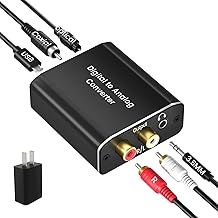
The Hdiwousp DAC accepts coaxial or Toslink digital PCM/LPCM audio and outputs analog RCA or 3.5 mm stereo audio. The listing says it includes an optical cable and a power adapter. It also specifies that the audio format should be set to PCM or LPCM.
Best for: Buyers who need to connect a digital audio source to equipment with analog stereo inputs and want RCA and 3.5 mm output options.
Why it was selected: Its coaxial input makes it relevant to people comparing digital audio adapters, but its output type is analog rather than optical. It lists sampling rates of 32, 44.1, 48, 96, and 192 kHz, plus 24-bit S/PDIF input.
Limitation: The listing explicitly says conversion cannot be reversed. Do not choose it for a coaxial digital output feeding an optical digital input.
Buying Guide: How to Choose a Coaxial-to-Optical Converter
Does the converter change coaxial digital audio into optical?
Check the direction of conversion before considering other features. A coaxial-to-optical converter accepts a coaxial digital input and provides an optical Toslink output. A bidirectional converter can handle that route as well as optical-to-coaxial conversion, but it may require you to select the input manually. A DAC instead turns digital audio into analog output such as RCA or 3.5 mm. That is a different signal path.
For the connection in this article, the signal should travel from the source’s coaxial digital output, through the converter, and then from the converter’s optical output to the receiving device’s optical input. Check the labels on the converter’s input and output ports rather than relying on a general product name.
What should you check about power and input selection?
Digital converters may require external power. Review the product’s included power accessories and requirements, and make sure you can supply power at the intended location. For models with an input switch, select coaxial when the source is connected through coaxial. A switch set to optical will not select the coaxial source.
Also check what cables are included. The LUKFOCAB listing specifies a 5V micro-USB power cable, while the supplied feature information for the other bidirectional models does not fully detail included power accessories. Do not assume that a cable or power adapter is included unless the product information says so.
Which audio formats and sample rates matter?
Match the converter’s listed format support to the audio signal sent by the source and accepted by the receiving device. The product listings vary: the PROZOR 192K model lists LPCM 2.0, DTS, Dolby AC-3/5.1-channel support, and rates up to 192 kHz/24-bit. LUKFOCAB lists Dolby, DTS, ACC, and PCM, with PCM up to 192 kHz and 16-bit word length. Laboen’s provided details do not state format limits.
Do not treat a maximum sample rate as proof that every format or channel arrangement will work. Check the source’s audio-output settings and the receiver’s supported input formats. For a DAC, also note that the supplied PROZOR and Hdiwousp product information calls for PCM or LPCM input.
When is a bidirectional converter useful?
A bidirectional model can be useful when a setup may need to convert in either direction, or when the same unit will be moved between sources and receivers. For a fixed connection, the key requirement is still that the model supports coaxial input to optical output. Confirm how to choose the direction or input, because a two-way label does not mean that both directions operate simultaneously.
Some models advertise a repeater function. The LUKFOCAB listing says its built-in amplification chip can serve as a signal repeater and help extend transfer distance. Treat that as a product feature, not a guarantee that it will solve every long-cable or signal problem; verify the device’s requirements for your installation.
How do you avoid buying the wrong type?
Read the input and output descriptions closely. “Digital-to-analog” means the device changes a digital signal into analog sound. It does not turn coaxial digital audio into optical digital audio. The PROZOR and Hdiwousp DACs in this list are examples of that separate category. They are appropriate only when the receiving device has analog audio inputs and the source provides a supported digital signal.
Before ordering, write down the source’s output connector, the receiving device’s input connector, and the desired signal direction. For this use case, those should be coaxial digital out, optical digital in, and coaxial-to-optical conversion. Then check power, input selection, and audio-format support.
Frequently Asked Questions
Can I connect coaxial digital out to optical in directly?
Not with a passive cable alone. Coaxial and optical are different digital connection types, so use an active converter that accepts coaxial input and provides optical output.
Is a coaxial-to-optical converter the same as a DAC?
No. A coaxial-to-optical converter changes the digital connection type while keeping the output digital. A DAC converts digital audio to analog output, such as RCA or 3.5 mm.
Do bidirectional converters work both ways automatically?
Not necessarily. The listed bidirectional products use an input-selection switch or otherwise require you to select the source. Check the instructions and choose the correct input for your connection.
Will every converter pass Dolby or DTS audio?
No. Format support depends on the individual model and the devices in the signal chain. Check the converter’s listed formats and confirm that the source and receiver support the same audio format.
What audio setting should I use with a DAC?
The PROZOR and Hdiwousp DAC listings specify PCM or LPCM input. Set the source’s digital audio output to a supported format if you are using one of those DACs.