
The right 3.5mm dual-connection cable depends on what you want to connect: a headset with separate microphone and headphone plugs, two headphones sharing one source, or stereo audio feeding two mono inputs. The UGREEN headset splitter is best for a CTIA headset and a computer with separate jacks; the MOSWAG is best for sharing headphone audio. The RIIEYOCA cable is designed for splitting stereo into left and right mono channels. Check connector direction and wiring before choosing, since these cables serve different purposes.
| Product | Best For | Connection Type |
|---|---|---|
| UGREEN Headphone Splitter | Headsets with mic and audio plugs | TRRS female to two male plugs |
| Bordsek Headphone Mic Splitter | CTIA headsets and computer audio jacks | TRRS female to two male plugs |
| RIIEYOCA Stereo-to-Dual-Mono Cable | Separate left and right mono inputs | 3.5mm TRS to two TS plugs |
| MOSWAG Headphone Splitter | Two listeners sharing one source | 3.5mm male to two female jacks |
| UGREEN 3.5mm-to-RCA Cable | Connecting a headphone output to RCA audio inputs | 3.5mm plug to two RCA plugs |
UGREEN Headphone Splitter For Separate PC Jacks

This UGREEN adapter converts a headset’s single 4-pole 3.5mm TRRS connection into separate headphone and microphone plugs. That arrangement is useful for a computer or laptop with distinct audio and mic jacks, including setups for online gaming, calls, classes, and meetings.
Best for: People using a CTIA-compliant headset with a computer that has separate microphone and headphone ports. It is selected because its connector direction and intended headset-to-PC use are clearly specified.
- 24K gold-plated connectors and oxygen-free copper are specified for audio transmission.
- The cable has an aluminum-alloy casing and nylon-braided jacket; the listing states it passes more than 10,000 bend tests.
- It is a headset adapter, not a two-headphone sharing splitter.
Limitation: Microphone output requires a CTIA-standard TRRS headset. The product information warns that OMTP and other standards may not provide microphone function.
Bordsek TRRS Headset Mic Splitter
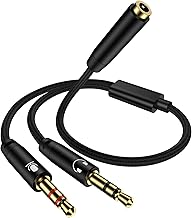
The Bordsek splitter takes one 3.5mm TRRS headset plug and separates it into two 3.5mm male connections for headphone audio and microphone input. Its plug-and-play design does not require an app or additional drive, according to the product details.
Best for: Buyers who need a CTIA headset adapter and want a product listing that names examples of gaming headsets and computers. It is a close alternative to the UGREEN model, with compatibility examples including Turtle Beach, HyperX, Razer, and some Bose headphones.
- Gold-plated contacts are described as supporting clean audio transmission.
- The listing identifies the adapter as a female TRRS connector splitting to two male plugs.
- It is intended for headsets with separate mic and audio connections, not for connecting two listeners to one source.
Limitation: The product information says the microphone may not work with Apple original earphones or Beats headphones. Check headset wiring and device ports before purchase.
RIIEYOCA Stereo-To-Dual-Mono Breakout Cable

This 3-meter cable splits one 3.5mm stereo TRS output into two mono TS connections. The product is intended to route left and right audio channels separately to equipment such as a mixer or audio interface. Red marks the right channel and white marks the left.
Best for: Home-studio users and audio-gear owners who need separate left and right mono connections. It is selected because it explicitly describes stereo channel separation rather than headset microphone splitting or dual headphone listening.
- Red and white color coding helps identify the right and left channels.
- The listing specifies 24K gold-plated connectors and oxygen-free copper conductors.
- Its 3-meter length may suit setups where connected equipment is not immediately beside the source.
Limitation: This cable ends in two TS mono plugs. It is not a dual-headphone adapter and is not the same as a headset mic splitter. Confirm that the receiving equipment accepts the connector type.
MOSWAG Dual-Headphone Audio Splitter

The MOSWAG adapter connects a device with a 3.5mm headphone jack to two headphone or earphone plugs. It is designed to let two people listen to the same audio source at once, rather than to split microphone and headphone signals.
Best for: Two listeners sharing audio from a compatible device with a 3.5mm output. It is selected because its dual female headphone jacks match the common meaning of a headphone-sharing splitter.
- The listing names phones, tablets, and laptops with a 3.5mm headphone jack as compatible device types.
- It is described as providing audio to both connected headphone sets.
- The male-to-dual-female arrangement makes its direction clear: one source, two headphone connections.
Limitation: The product information does not describe separate microphone support. Choose a TRRS headset splitter instead if your goal is to connect a headset mic and headphones to separate computer jacks.
UGREEN 3.5mm-To-RCA Stereo Cable

This 6.6-foot cable connects a 3.5mm headphone output to two RCA audio inputs. It carries stereo audio through the left and right RCA plugs, making it a relevant option when a source with a 3.5mm jack needs to connect to a sound system with RCA inputs.
Best for: Buyers connecting a phone, laptop, or other 3.5mm audio output to equipment with stereo RCA inputs. It is included as a useful alternative for shoppers searching broadly for a 3.5mm cable with two audio connectors.
- The cable has one 3.5mm connector and two RCA male connectors.
- UGREEN lists gold-plated connectors, copper conductors, and a flexible PVC jacket.
- The specified length is 6.6 feet.
Limitation: This cable does not split a headset’s microphone from its audio or provide two headphone jacks. Check that the receiving device has RCA inputs.
Buying Guide: How To Choose A 3.5mm Dual-Connection Cable
What Does “Dual Input” Mean For Your Setup?
The phrase “dual input” can describe several different cable jobs. Some adapters take one headset plug and divide its microphone and headphone signals. Others send one audio source to two headphones. A stereo breakout cable separates left and right channels, while a 3.5mm-to-RCA cable connects a source to stereo equipment. Decide what the two connections are for before comparing cable materials or length.
A quick way to narrow the choice is to identify both ends of the connection. Write down the source port, the receiving ports, and whether a microphone must work. Connector count alone is not enough: two plugs can carry separate stereo channels, separate mic and headphone signals, or audio for two listeners.
Do You Need A Headset Microphone Splitter?
Choose a TRRS female-to-two-male adapter when a headset has one combined 3.5mm plug and the computer has separate headphone and microphone jacks. The UGREEN and Bordsek products in this list are designed for that arrangement. Look for the TRRS designation and check whether the headset follows the CTIA wiring standard if microphone function matters.
Do not choose a dual-headphone splitter for this job. A headphone-sharing adapter typically has one male plug and two female headphone jacks; it does not separate a headset microphone into its own connection. Wiring standards and device-port layouts can affect whether a mic works, so confirm them rather than relying only on the 3.5mm size.
Are Two Headphones Or Separate Audio Channels The Goal?
For two people listening to one source, choose a male-to-dual-female headphone splitter such as the MOSWAG. Confirm that the source has a 3.5mm headphone output. The product information describes dual audio output, but it does not specify microphone support, so do not assume that both headset microphones will operate.
For a mixer or recording setup that needs left and right audio on separate mono connectors, choose a stereo-to-dual-mono breakout cable such as the RIIEYOCA. Verify whether the equipment calls for TS or TRS plugs and whether the cable’s stereo-in, dual-mono-out direction matches the signal path you need.
When Is A 3.5mm-To-RCA Cable The Better Choice?
Choose a 3.5mm-to-RCA cable when the source has a headphone or line-style 3.5mm output and the receiving system has two RCA audio inputs. The UGREEN RCA cable is specified for this type of connection. It is not a replacement for a headset splitter, a dual-headphone adapter, or a studio breakout cable with two mono TS plugs.
Before buying, check that the RCA connections are inputs on the receiving device. Also confirm the required cable length and whether the source and destination use standard stereo audio connections. A cable can physically fit yet still be wrong for the intended signal direction or port function.
Which Cable Details Should You Compare?
- Connector layout: Match the exact number, gender, and type of plugs to the ports on both devices.
- Signal purpose: Confirm whether you need mic separation, two headphone outputs, left/right channel breakout, or RCA connectivity.
- Wiring standard: For headset microphone use, check the TRRS standard. The UGREEN listing specifically calls for CTIA compliance.
- Length: Pick a cable that reaches between devices without putting unnecessary strain on the plugs. The listed lengths here are 3 meters for RIIEYOCA and 6.6 feet for the UGREEN RCA cable.
- Build features: Materials such as braided jackets, PVC, gold-plated connectors, and copper conductors are listed product details, but they do not replace checking connector compatibility.
For straightforward computer headset use, compare the UGREEN and Bordsek models by headset standard and listed compatibility. For shared listening, the MOSWAG has the appropriate one-to-two headphone layout. For audio equipment, distinguish the RIIEYOCA dual-TS breakout from the UGREEN dual-RCA cable by checking the receiving input type.
Frequently Asked Questions
Can I Use A 3.5mm Splitter To Connect A Headset Mic To A PC?
Yes, if it is a headset mic splitter with a female TRRS connection and two male plugs for separate headphone and microphone jacks. Check the headset’s wiring standard and the computer’s ports before choosing.
Will A Dual-Headphone Splitter Make Two Microphones Work?
Do not assume so. A dual-headphone splitter is designed to share audio through two headphone jacks. The MOSWAG listing does not specify microphone support; choose a headset mic splitter when microphone connections are needed.
What Is The Difference Between TRRS And TRS?
TRRS describes a 3.5mm connector with four contact sections, commonly used for combined headset audio and microphone signals. TRS has three contact sections and commonly carries stereo audio. Match the connector type to the cable’s intended purpose and your devices.
Can A 3.5mm-To-RCA Cable Replace A Headphone Splitter?
No. A 3.5mm-to-RCA cable connects a 3.5mm audio output to two RCA inputs. It does not provide two headphone jacks or separate a headset microphone from headphone audio.
How Do I Choose Between The UGREEN And Bordsek Headset Splitters?
Both are described as adapters that split one TRRS headset connection into separate audio and microphone plugs. Compare the listed headset examples, check CTIA compatibility, and confirm that your computer has separate headphone and microphone jacks.