
The best stereo touchscreen Bluetooth radio depends on your dashboard opening and the features you want. The Leadfan is a double-DIN option with a backup camera included in its listing, while the wireless CarPlay and Android Auto models suit drivers seeking smartphone integration. The Haudio offers a larger 10-inch screen, and the Upgrade Wireless model highlights audio connections for subwoofers. Compare the five options below, then check your vehicle’s opening and wiring requirements before choosing.
| Product | Best For | Key Listed Features |
|---|---|---|
| Leadfan 7-inch Double-DIN | Buyers seeking a multimedia receiver with a backup camera | Touchscreen, Bluetooth, mirror link, FM, USB |
| 6.9-inch Wireless Single-DIN | Wireless smartphone integration | Wireless CarPlay and Android Auto, USB Type-C |
| Dual-Knob Single-DIN | Buyers who want a touchscreen with physical knobs | Wireless CarPlay and Android Auto, Bluetooth, GPS |
| Haudio 10-inch Single-DIN | Drivers prioritizing a larger screen | Android 13, wireless CarPlay and Android Auto |
| Upgrade Wireless Double-DIN | Audio setups needing multiple subwoofer connections | CarPlay, Android Auto, Bluetooth, four-channel RCA |
Leadfan 7-Inch Double-DIN Touchscreen Stereo

The Leadfan is a double-DIN multimedia receiver with a 7-inch touchscreen. Its listing describes Bluetooth caller ID, mirror link, FM, MP3 and MP4 support, USB, an auxiliary input, subwoofer support, and a backup camera. These features make it a broad-function option for buyers who want phone connectivity and several media inputs in one receiver.
Best for: Drivers looking for a double-DIN touchscreen with an included backup camera and multiple listed media options. It may also suit buyers who want mirror link rather than choosing a model specifically marketed around wireless CarPlay or Android Auto.
Why it was selected: The product combines touchscreen operation, Bluetooth, several audio and video formats, and camera support in one listing. Its range of named inputs makes it easier to compare with models focused on smartphone projection or sound-system connections.
Limitation: The listing does not identify wireless CarPlay or Android Auto. Confirm the exact vehicle fit and camera installation details before buying; double-DIN sizing alone does not establish compatibility with every dash.
6.9-Inch Wireless CarPlay Single-DIN Stereo

This single-DIN radio pairs a 6.9-inch UHD touchscreen with wireless Apple CarPlay and Android Auto, according to its product name. Other listed features include Bluetooth, a 1080P backup camera, mirror link, navigation, USB Type-C fast charging, FM and AM radio, an equalizer, and steering wheel control support.
Best for: Buyers who want a single-DIN receiver with wireless smartphone integration and a range of named convenience features. The USB Type-C charging reference may be useful to shoppers who specifically want that connector, while the camera and steering wheel control features address other common upgrade priorities.
Why it was selected: It offers a combination of wireless CarPlay and Android Auto, touchscreen controls, Bluetooth, and camera support. Compared with the Leadfan, it is the more directly specified choice for shoppers prioritizing wireless phone projection.
Limitation: The product name says single-DIN, but the screen is 6.9 inches; buyers should verify the required mounting arrangement and available dash space. Check the listing for vehicle-specific fit and installation details rather than assuming the screen size guarantees fit.
Dual-Knob Wireless CarPlay Single-DIN Stereo

This single-DIN touchscreen stereo is described as having dual knobs and wireless Apple CarPlay and Android Auto. The listing also names Bluetooth, GPS, FM and AM radio, USB, an equalizer, steering wheel control support, and backup-camera readiness. Its mix of touchscreen and knob controls gives it a different interface emphasis from models described only as touchscreens.
Best for: Drivers who want wireless smartphone integration but also prefer physical knobs as part of the receiver’s interface. It is a useful candidate for shoppers comparing a more tactile control layout with touchscreen-focused alternatives.
Why it was selected: The product combines wireless CarPlay and Android Auto with dual knobs, a feature that distinguishes it from the other single-DIN options in this group. Its stated camera readiness and steering wheel control support add further comparison points.
Limitation: The listing says backup-camera ready, which is not the same as stating that a camera is included. Confirm what is supplied and review the vehicle fit and installation requirements before ordering.
Haudio 10-Inch Android 13 Single-DIN Stereo

The Haudio is listed as a 10-inch single-DIN radio running Android 13. Its product name also specifies wireless Apple CarPlay and Android Auto, a rear camera, mirror link, Bluetooth, FM and AM with RDS, steering wheel control support, and an equalizer. The larger stated screen size is its most obvious point of distinction among these five choices.
Best for: Buyers who prioritize a larger touchscreen while also wanting wireless CarPlay and Android Auto. It may be worth comparing with the 6.9-inch single-DIN unit if screen size is a central buying factor.
Why it was selected: The listing combines a 10-inch display with smartphone integration, Bluetooth, radio functions, and a rear camera. Android 13 is also explicitly named, giving shoppers a specific software detail to verify against their needs.
Limitation: A 10-inch screen may require careful consideration of dashboard space and mounting. The “single-DIN” label describes the radio category, not necessarily the screen’s installed footprint, so check the product’s dimensions and fit information before purchase.
Upgrade Wireless Double-DIN Touchscreen Stereo
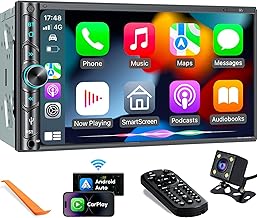
This double-DIN receiver has a 7-inch HD capacitive touchscreen and lists wireless CarPlay, Android Auto, and Bluetooth. The product name also identifies four-channel RCA, high power, two subwoofer ports, and a backup camera. These sound-system connections make it a distinct alternative to receivers whose feature descriptions focus mainly on screen size or basic media playback.
Best for: Buyers comparing double-DIN radios who specifically need the listed four-channel RCA connections or two subwoofer ports. It also suits shoppers seeking wireless smartphone integration in a 7-inch touchscreen receiver.
Why it was selected: The product combines common touchscreen and phone-connectivity features with explicitly named audio outputs. Those connection details provide a practical reason to compare it with the Leadfan, which lists subwoofer support but does not specify two subwoofer ports.
Limitation: “High power” is not accompanied by a specific output figure in the provided product information. Check the full listing for output specifications, wiring details, included accessories, and fit requirements before deciding whether it matches an existing audio system.
Buying Guide: How To Choose A Touchscreen Bluetooth Stereo
A touchscreen Bluetooth stereo can combine hands-free phone connectivity, music playback, radio functions, and other features in one dashboard receiver. The right choice depends on the vehicle opening, desired phone connection, control style, and any camera or audio equipment you plan to use. Product titles alone cannot confirm that a receiver will fit a particular vehicle, so verify dimensions and installation requirements before purchase.
Does The Stereo Match Your Dash Opening?
Start by checking whether your vehicle takes a single-DIN or double-DIN receiver and whether the selected model lists the appropriate format. The products here include both types. A single-DIN label does not by itself confirm that a large screen will fit the dashboard, and double-DIN sizing does not guarantee compatibility with every vehicle. Check the receiver’s dimensions, dash space, mounting needs, and vehicle-specific fit information.
Also consider whether the installation requires additional parts or professional help. The supplied product details do not specify vehicle-by-vehicle fit, wiring harnesses, or mounting accessories. Confirm what is included and what may be needed for your particular car before making a purchase decision.
Do You Need Wireless CarPlay Or Android Auto?
Look for the exact phone feature you plan to use. The 6.9-inch, dual-knob, Haudio, and Upgrade Wireless models explicitly list wireless Apple CarPlay and Android Auto. The Leadfan listing describes Bluetooth and mirror link instead, without naming either CarPlay or Android Auto. Do not treat Bluetooth, mirror link, and CarPlay or Android Auto as interchangeable features.
If you need a wired connection, a particular phone function, or specific app behavior, check the complete product details for that information. The supplied names do not explain every connection requirement or supported phone setup. Confirm those details before relying on a receiver for a particular navigation or media workflow.
Which Screen And Controls Suit Your Driving Needs?
The choices include 6.9-inch, 7-inch, and 10-inch screen descriptions. A larger display may be a priority for buyers who want a broad touchscreen, but its size also makes checking dashboard space and mounting especially important. The 7-inch products offer a middle screen-size comparison, while the 6.9-inch model is the smallest stated screen in this group.
Control style matters too. The dual-knob model combines a touchscreen with named physical knobs. If you prefer physical controls, compare that design with the other models rather than assuming all touchscreens operate identically. Review product images and the listing’s control descriptions to see whether the interface fits your preferences.
What Camera Features Are Included?
Camera wording can mean different things. The Leadfan and Haudio product names list a backup or rear camera, and the 6.9-inch model lists a 1080P backup camera. The dual-knob model says it is backup-camera ready, which does not establish that a camera comes in the package. The Upgrade Wireless listing mentions a backup camera. Check the complete product details to confirm included components and installation requirements.
Do not assume a camera’s resolution, viewing angle, or installation method unless the product information states it. If a camera is a deciding feature, verify the exact package contents and relevant specifications before purchasing.
Do You Need Extra Audio Connections?
Compare the named audio outputs with the equipment you intend to connect. The Upgrade Wireless receiver lists four-channel RCA and two subwoofer ports. The Leadfan lists subwoofer support, while the other product names emphasize features such as Bluetooth, radio, or phone integration. The available details do not provide complete output specifications for every model.
For an existing amplifier or subwoofer setup, verify the connection type, number of outputs, and relevant signal or power information in the full listing. Do not assume that a general mention of subwoofer support means a specific number or type of connection.
Which Other Features Should You Compare?
Make a short list of must-have functions before comparing models. The products name different combinations of FM and AM radio, USB, USB Type-C, mirror link, GPS or navigation, equalizer controls, and steering wheel control support. These details vary by model, so compare the precise feature list rather than relying on a general description such as “multimedia stereo.”
Steering wheel control support is named for several models, but the supplied information does not establish whether extra adapters or vehicle-specific components are required. USB Type-C fast charging is named for the 6.9-inch stereo; verify the port’s intended functions and charging details in the full listing if that feature matters to you.
Frequently Asked Questions
What Is The Difference Between Single-DIN And Double-DIN?
They refer to different receiver form factors. Check which opening your vehicle uses and confirm the selected stereo’s dimensions and mounting requirements. A product’s DIN label alone does not establish fit in a specific car.
Does Bluetooth Mean A Stereo Has Wireless CarPlay?
No. Bluetooth and wireless CarPlay are distinct listed features. Choose a model that explicitly names the phone-integration feature you want, then confirm its connection requirements in the complete product information.
Which Models Explicitly List Wireless CarPlay And Android Auto?
The 6.9-inch wireless single-DIN, dual-knob single-DIN, Haudio 10-inch, and Upgrade Wireless double-DIN models list wireless Apple CarPlay and Android Auto in their product names.
Does “Backup-Camera Ready” Mean A Camera Is Included?
Not necessarily. “Backup-camera ready” describes readiness, not confirmed package contents. Check the listing to determine whether a camera is included and what installation components are required.
Which Model Lists Two Subwoofer Ports?
The Upgrade Wireless double-DIN stereo explicitly lists two subwoofer ports and four-channel RCA. The Leadfan lists subwoofer support but does not specify two ports in the supplied product information.
How Should I Check Whether A Stereo Fits My Vehicle?
Compare the vehicle’s receiver opening with the product’s stated format and dimensions. Check the full listing for mounting and wiring requirements, and verify whether additional vehicle-specific parts are needed before ordering.