
A USB-to-3.5mm adapter lets you connect compatible wired headphones or a headset to a device with a USB-A port. For a single-plug headset with a microphone, consider the UGREEN or MOSWAG adapter; for separate headphone and microphone plugs, the SABRENT has dedicated jacks. The STSAUX two-pack suits buyers who want a spare adapter, while the DUKABEL is another straightforward option for supported computers and consoles.
| Adapter | Best For | Connection Type |
|---|---|---|
| MOSWAG | CTIA/OMTP headset use | One TRRS combo jack |
| STSAUX 2-Pack | Keeping a spare adapter | One TRRS combo jack |
| UGREEN | High-resolution headphone output | One TRRS combo jack |
| SABRENT | Separate headphone and mic plugs | Two separate jacks |
| DUKABEL | Simple headset connection for supported systems | One TRRS combo jack |
MOSWAG USB To 3.5mm Adapter

The MOSWAG is a compact external sound card for adding a 3.5mm headset connection to a USB device. Its single TRRS port combines headphone output and microphone input, so it can suit a headset with one four-pole plug. The listed DAC supports 16-bit/48kHz audio output and CTIA and OMTP headset standards.
Best for: Buyers who need both listening and speaking through a compatible TRRS headset. The listed compatibility includes Windows, macOS, Linux, Chromebook, Raspberry Pi, PS4, and PS5 systems.
Limitation: The microphone jack does not support TS or TRS connectors. Check the plug type before choosing it, particularly if your microphone has its own separate plug.
STSAUX USB Audio Adapter 2-Pack
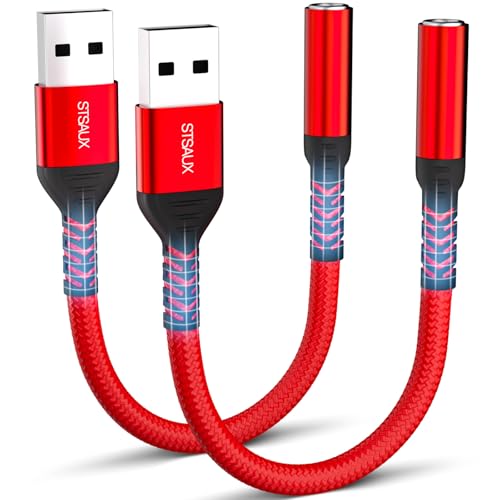
This STSAUX option comes as a two-pack and provides a USB-A connection with a 3.5mm TRRS headset jack. The manufacturer lists a DAC rated for 24-bit/96kHz audio output, plug-and-play setup, and support for CTIA and OMTP standards. It is designed to provide headphone audio and microphone functionality through a compatible headset.
Best for: Buyers who want a spare adapter or need one for more than one setup. Listed system support includes Windows 10 and 11, macOS, Linux, ChromeOS, and Surface Pro.
Limitation: The listing says it is not compatible with TVs or cars and does not support iOS microphone functionality. Confirm that the intended device has USB-A and supports USB audio.
UGREEN USB Headphone DAC Adapter

The UGREEN adapter combines a USB-A plug with one 3.5mm jack for compatible headphones or headsets. Its listed features include a DAC, CTIA and OMTP headset support, microphone functionality, and headphone output up to 24-bit/96kHz. The adapter also has an aluminum-alloy shell and a nylon-braided cable, according to the product details.
Best for: Buyers who want a single-plug headset adapter with a stated high-resolution headphone output specification. In-line controls and microphone support are listed for compatible setups.
Limitation: The 24-bit/96kHz specification applies to headphone output, not microphone recording. The listing also specifies a TRRS requirement for a connected microphone; it is not a replacement for a two-jack splitter when using separate plugs.
SABRENT USB External Stereo Sound Card

Unlike the single-combo-jack adapters, the SABRENT has two separate 3.5mm ports: a stereo headphone output and a mono microphone input. It connects through USB-A, draws power from the USB connection, and is described as plug-and-play without drivers or external power. Its listed compatibility includes Windows, Mac, and Linux systems that support class-compliant USB audio.
Best for: A buyer whose headphones and microphone have separate plugs, or who wants to connect headphones and a separate 3.5mm microphone.
Limitation: It does not support a four-pole headset using one combo plug. It also provides stereo two-channel audio, not surround sound, and does not power passive speakers.
DUKABEL USB Headphone Adapter
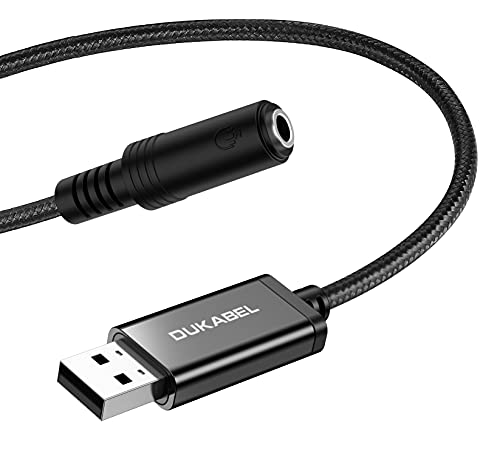
The DUKABEL adapter adds one 3.5mm TRRS port for listening and speaking through a compatible headset. Its listed features include plug-and-play setup, no external power requirement, and support for CTIA-standard headsets. The manufacturer lists Windows, macOS, Linux, Chromebook, Raspberry Pi, PS4, and PS5 among supported platforms.
Best for: Buyers seeking a simple USB-A adapter for a supported computer or listed gaming console, especially when the headset has one CTIA four-pole plug.
Limitation: The listing excludes TVs, cars, PS3, and trucks. It specifies CTIA support, so buyers with OMTP headsets should check the headset standard before purchasing.
Buying Guide: How To Choose A USB-To-3.5mm Adapter
Does your headset have one plug or two?
Look at the 3.5mm plug before choosing an adapter. A headset with one four-pole TRRS plug carries headphone audio and microphone signals through a single connector. It needs an adapter with a compatible TRRS combo jack if you want both functions. MOSWAG, STSAUX, UGREEN, and DUKABEL are listed with single-jack headset support, subject to their individual connector and compatibility notes.
Headphones and microphones with separate 3.5mm plugs need a different arrangement. The SABRENT has a dedicated stereo headphone output and a separate mono microphone input. A single-jack adapter may not accept both plugs at once without an appropriate splitter, and a splitter is not included in the product details provided here.
What do TRRS, CTIA, and OMTP mean?
TRRS describes a 3.5mm connector with four contact sections, commonly used for a combined headset connection. CTIA and OMTP are wiring standards for some four-pole headsets. An adapter that lists support for both offers broader stated headset-standard support than one that lists only CTIA. Check the headset documentation or connector standard if microphone audio does not work as expected.
Check the USB port and device support
These products use USB-A. Verify that the computer, console, or other intended device has a compatible USB-A port and supports USB audio. Product compatibility varies: for example, the listed STSAUX adapter excludes TVs and cars, while DUKABEL excludes TVs, cars, PS3, and trucks. A device having a USB port does not by itself confirm that it supports an external USB sound card.
Some adapters are described as plug-and-play or driverless, but the operating system may still require you to select the new device as the sound input or output. If the adapter is connected but you hear no audio, check the device’s sound settings and choose the USB audio device for playback. For microphone use, select it separately as the input device.
Do audio specifications affect your choice?
DAC and sample-rate specifications describe the adapter’s digital-to-analog headphone output. UGREEN and STSAUX list output up to 24-bit/96kHz, while MOSWAG lists 16-bit/48kHz. These numbers alone do not guarantee a noticeable difference; the source audio, headphones, and device settings also affect playback. UGREEN specifically notes that its 24-bit/96kHz specification does not apply to microphone input.
If your priority is straightforward headset connectivity, first confirm the plug type, microphone wiring standard, and device compatibility. A higher stated output specification is secondary if the adapter cannot connect to your headset or intended device.
When should you choose separate audio jacks?
Choose a two-jack adapter when your headphones and microphone use separate connectors. The SABRENT’s green headphone output and pink microphone input are designed for those separate connections. Choose a single combo jack when your headset has one TRRS plug and you want headphone audio and microphone input through that same cable. Avoid assuming that a combo-jack adapter supports two separate plugs.
What else should you check?
- Microphone needs: Confirm that the adapter supports microphone input and that your headset plug type is supported.
- Port format: The listed adapters connect through USB-A. A device without USB-A may require a separate, suitable USB adapter.
- Use case: Check the product’s listed platform exclusions, especially for consoles, TVs, and vehicles.
- Port replacement: An external sound card can provide another audio connection, but device recognition and audio settings still depend on the host system.
- Pack size: STSAUX is listed as a two-pack, which may be useful when a spare is important.
Frequently Asked Questions
Can I connect USB headphones to a 3.5mm audio jack with these adapters?
No. These products convert a USB-A port into a 3.5mm audio connection. They are intended for 3.5mm headphones or headsets connected to a USB-equipped device, not USB headphones connected to an audio jack.
Will a USB-to-3.5mm adapter let my headset microphone work?
It can if the adapter supports microphone input and the headset plug and wiring standard are compatible. Check whether the headset is TRRS and whether it uses a listed standard such as CTIA or OMTP.
Can I use a single-plug gaming headset with the SABRENT adapter?
The product details say the SABRENT does not support a four-pole headset on one combo plug. It is intended for separate headphone and microphone plugs.
Do USB audio adapters need drivers?
The MOSWAG, STSAUX, and DUKABEL listings describe plug-and-play use or no driver requirement, and SABRENT is described as driverless. The host device must still support USB audio, and you may need to select the adapter in sound settings.
Will these adapters work with a TV or car stereo?
Do not assume so. STSAUX explicitly lists TVs and cars as incompatible, and DUKABEL lists similar exclusions. Check the individual product details and the host device’s USB audio support before buying.