
The right HDMI-to-optical extractor depends on whether you need audio from an HDMI source or audio returned from a TV’s ARC/eARC port. The VPFET HDMI Audio Extractor is best for a conventional HDMI input with optical output, while the eSynic and Neoteck models are better suited to routing TV ARC/eARC audio to optical equipment. The products below identify their stated audio formats and connection types so you can compare them with your television, soundbar, or receiver before buying.
| Product | Best suited for | Key stated feature |
|---|---|---|
| VPFET HDMI Audio Extractor | HDMI sources needing optical audio | 4K, optical and 3.5mm outputs |
| eSynic ARC/eARC Extractor | TVs feeding an optical soundbar | ARC/eARC, 192 kHz, USB powered |
| Neoteck ARC/eARC Extractor | TV and legacy audio systems | PCM, Dolby 5.1, and DTS 5.1 support |
| HDMI ARC Audio Extractor | ARC setups needing optical or 3.5mm | 4K at 60 Hz and 3.5mm output |
| VPFET eARC Audio Extractor | ARC/eARC setups needing two digital outputs | Toslink and coaxial outputs |
VPFET HDMI Audio Extractor
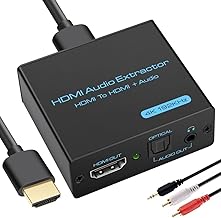
Best for: A setup where an HDMI source needs to send audio to optical or 3.5mm equipment. The product name identifies it as a 4K HDMI audio extractor with optical and AUX outputs, making it a flexible option when the listening device does not use HDMI audio.
Its listed format support includes HDCP, digital DTS 5.1, and PCM. Those details can help buyers comparing an extractor for a television source, media device, or other HDMI-connected equipment. Confirm the exact audio format your source outputs and your receiving equipment accepts before choosing a setting.
- Stated 4K HDMI support
- Optical and 3.5mm AUX audio outputs
- Listed support for DTS 5.1 and PCM
Choose this if you want both optical and analog-style 3.5mm output options from an HDMI connection. Limitation: The listing name describes a standard HDMI extractor, not an ARC/eARC-only device. Do not assume it will return sound from a TV’s HDMI ARC port; check the connection diagram and your intended signal path.
eSynic 192 kHz ARC/eARC Extractor

Best for: Connecting a TV’s ARC/eARC audio to an optical soundbar or other optical audio equipment. This model is explicitly described as an ARC and eARC to optical extractor, so its intended role differs from a conventional HDMI source extractor.
The listed specifications include 192 kHz, USB power, and support for PCM 2.0, Dolby 5.1, and DTS 5.1. The product name also calls out a 7-foot cable and “No CEC.” The cable length may matter when planning placement, while the CEC note is useful for buyers who want to know that this device is not presented as a CEC-control solution.
- ARC/eARC-to-optical conversion
- USB powered
- Listed PCM 2.0, Dolby 5.1, and DTS 5.1 support
Choose this if the TV has an ARC/eARC connection and the audio system accepts optical input. Limitation: It is described as an ARC/eARC device, so it is not the natural choice for extracting audio from a separate HDMI source plugged into a regular input. The listing also specifies no CEC.
Neoteck ARC/eARC Audio Extractor

Best for: TV owners connecting ARC/eARC audio to an optical soundbar, home cinema system, or legacy audio equipment. The product name specifically identifies TV ARC audio extraction and lists a range of common digital formats.
Neoteck states support for PCM 2.0, Dolby 5.1, and DTS 5.1, along with 24-bit/192 kHz audio. It is also described as plug and play. These are useful comparison points if your priority is format support or a straightforward connection, but the source and receiver still need to use compatible formats and connections.
- ARC/eARC audio to optical output
- Listed PCM 2.0, Dolby 5.1, and DTS 5.1 support
- Listed 24-bit/192 kHz capability
Choose this if you need a TV-focused extractor and want the stated support for both stereo PCM and multichannel formats. Limitation: The product is described for ARC/eARC audio extraction; it should not be treated as a general-purpose HDMI input extractor without confirming that use in the manufacturer’s instructions.
HDMI ARC Extractor With Optical And AUX

Best for: An ARC-based TV setup where the audio needs to reach optical or 3.5mm equipment. Its listed output options provide a choice between digital optical and a 3.5mm connection, which can suit different soundbars, speakers, amplifiers, or home theater equipment.
The product name specifies 4K at 60 Hz, ARC-to-optical conversion, and support for 3D, HDCP 1.4, and DTS. It also names TV boxes and game consoles among possible equipment contexts. Because the product is identified as an ARC adapter, verify that the connection path you plan to use matches its ARC function rather than assuming it extracts audio from every HDMI input.
- Stated 4K at 60 Hz
- Optical and 3.5mm audio outputs
- Listed 3D, HDCP 1.4, and DTS support
Choose this if your system needs the combination of ARC audio and both optical and 3.5mm output choices. Limitation: The listing identifies HDCP 1.4 and does not state a newer HDCP version in the supplied product name. Check whether that specification fits your source and display chain.
VPFET eARC Extractor With Toslink And Coaxial

Best for: A TV ARC/eARC setup where the audio equipment can accept either Toslink optical or coaxial digital audio. Unlike products whose names specify optical alone, this VPFET model names both output types, giving buyers two stated digital connection options.
The listing describes the device as an HDTV ARC/eARC audio adapter and says audio is transmitted through Toslink and coaxial ports. It also lists support up to 192 kHz and states “No CEC.” These details are particularly relevant when matching a TV output to a soundbar, home theater receiver, or audio system with the corresponding input.
- Designed for HDTV ARC/eARC audio
- Toslink and coaxial digital outputs
- Listed support up to 192 kHz
Choose this if your receiving equipment has coaxial input, optical input, or you want to compare those digital connection types. Limitation: It is described as an ARC/eARC adapter, not a standard HDMI source extractor, and the listing explicitly says it does not provide CEC.
Buying Guide: How To Choose An HDMI-To-Optical Extractor
Do you need a standard HDMI extractor or an ARC/eARC adapter?
This is the first decision. A standard HDMI audio extractor is generally selected to separate audio from an HDMI source signal. An ARC/eARC extractor is intended to receive audio returned from a TV through its HDMI ARC or eARC connection. These are different signal paths, even when both product types have HDMI connectors and optical audio outputs.
Choose a product described as ARC/eARC if your goal is to send the TV’s built-in app audio or returned HDMI audio to an optical receiver. Choose a conventional HDMI extractor if you want to separate audio from a connected HDMI source. Check the product’s connection diagram before ordering, particularly if you plan to connect a game console, streaming device, or disc player.
Which ports does your sound system accept?
Check the input ports on the soundbar, receiver, amplifier, or speakers. Toslink is the common optical connection named in these listings. Some products also specify 3.5mm AUX output, and the VPFET eARC model lists coaxial digital output as well. Select an extractor with an output that matches an available input on the audio system.
Do not assume that two devices can connect simply because both have HDMI ports. ARC/eARC is a specific audio-return function, and the source and destination ports need to be appropriate for it. If the receiving device has only analog input, an optical-only extractor may not meet your needs.
Does the audio format match your equipment?
Compare the formats stated for the extractor with the formats supported by both the TV or source and the receiving audio system. The products here list combinations of PCM 2.0, Dolby 5.1, DTS 5.1, and, in one case, digital DTS 5.1. A format appearing in an extractor’s description does not by itself confirm that every connected device will output or decode it.
For troubleshooting, check the TV’s digital audio output setting and the source device’s audio setting. If a multichannel format does not pass through as expected, PCM stereo may be a useful compatibility setting to test, provided your equipment offers that option.
What do 4K and refresh-rate specifications mean here?
Some product names state video-related specifications, including 4K or 4K at 60 Hz. These matter when video passes through the device as part of the intended connection. Confirm the exact resolution, refresh rate, and copy-protection requirements of your sources and display against the extractor’s full specifications. The listed product names do not establish support for every video format or every HDCP version.
Should you consider power, cable length, or CEC?
The eSynic model is described as USB powered and includes a stated 7-foot cable. Those details can affect where you place the unit and whether a suitable USB power connection is available. The eSynic and VPFET eARC listings explicitly say “No CEC.” If you expect device-control functions through HDMI-CEC, confirm the product’s instructions and capabilities before buying rather than assuming they are included.
What should you verify before ordering?
- Identify whether the audio source is a regular HDMI output or a TV ARC/eARC output.
- Match the extractor’s output port to an available input on the audio equipment.
- Compare supported audio formats across the source, extractor, and receiver.
- Check stated video and HDCP specifications when video passes through the device.
- Review the manufacturer’s setup diagram, power requirements, and operating instructions.
Frequently Asked Questions
What does an HDMI-to-optical extractor do?
It converts or separates audio from an HDMI-related connection and provides an optical audio output. The exact signal path depends on whether the product is a standard HDMI extractor or an ARC/eARC extractor.
Can an ARC extractor work with a regular HDMI source?
Not necessarily. ARC extractors are described for audio returned through a TV’s ARC/eARC port. A conventional HDMI source extractor is intended for a different connection path. Check the model’s instructions for the use you need.
Will optical audio carry Dolby 5.1 or DTS 5.1?
Some listed products state support for Dolby 5.1 or DTS 5.1, but successful playback depends on the source settings, extractor, and receiving system. Confirm that all connected equipment supports the selected format.
Is eARC required to use an ARC/eARC extractor?
Not in every case; some products are described as supporting both ARC and eARC. Confirm that the extractor supports the TV’s available connection mode and follow its setup instructions.
What if my soundbar has a 3.5mm input instead of optical?
Choose a model that explicitly lists a 3.5mm audio output, such as the VPFET HDMI Audio Extractor or the HDMI ARC extractor with optical and AUX listed above. Verify the connector type on the soundbar before purchase.
Do these products provide HDMI-CEC control?
Do not assume that they do. The eSynic and VPFET eARC product names explicitly state “No CEC.” Check the individual product documentation if CEC control is important to your setup.