
The right optical-to-analog converter depends on your source format and the outputs you need. For a simple optical-to-RCA connection, AUTOUTLET offers a long attached cable, while the PROZOR cable model also lists a built-in amplifier chip. Choose DigitConvert or Rybozen if you need RCA and 3.5 mm outputs, and consider the PROZOR 5.1 model if your source sends supported Dolby or DTS audio. These products convert consumer SPDIF/Toslink audio; they are not ADAT-format converters.
| Product | Best For | Key Difference |
|---|---|---|
| AUTOUTLET Optical-to-RCA Cable | Direct stereo RCA connection | Attached 7-foot cable |
| DigitConvert DAC | RCA and headphone-style output | Coaxial or optical input |
| PROZOR PCM Converter | Two-channel PCM setups | RCA and 3.5 mm outputs |
| PROZOR 5.1 Converter | Supported Dolby or DTS sources | Lists 5.1 input decoding |
| Rybozen DAC | PCM stereo with included accessories | Optical and coaxial input |
AUTOUTLET Optical-To-RCA Cable

The AUTOUTLET is a cable-style DAC that converts optical digital audio to analog RCA stereo output. Its attached cable measures 7 feet, or 2.1 meters, which can simplify a setup when the source and amplifier are within reach of that cable length.
The listed features include a built-in professional audio amplifier chip and a dual-channel operational amplifier. The converter supports 24-bit input and sampling rates up to 192 kHz, with supported rates also including 32, 44.1, 48, and 96 kHz.
- Best for: A buyer connecting an optical-output TV, DVD player, Blu-ray player, or game console to an RCA stereo amplifier.
- Why it stands out: The fixed cable combines the converter and connection in one product, and the listed amplifier circuitry is intended to boost RCA output level.
- Limitation: It provides RCA male output rather than a separate 3.5 mm jack. Check that the receiving device has compatible RCA inputs and that the source sends a supported signal.
DigitConvert Optical And Coaxial DAC

DigitConvert accepts either Toslink optical or coaxial digital audio and converts the signal to analog left/right RCA and 3.5 mm audio. The listed outputs operate simultaneously, which can help when connecting more than one compatible analog listening device.
The product supports 24-bit SPDIF input and sampling rates of 32, 44.1, 48, 96, and 192 kHz. Its feature list names devices such as PS3, PS4, Xbox, Blu-ray players, HD DVD players, home cinema systems, and AV amplifiers as possible sources.
- Best for: Buyers who want input flexibility or need both RCA and 3.5 mm analog outputs.
- Why it was selected: It offers the widest listed connection choices among the compact converters in this selection: two digital input types and two analog output types.
- Limitation: It converts digital audio to analog only; it does not convert analog input to digital. Confirm the source outputs PCM-compatible SPDIF audio before choosing it.
PROZOR Two-Channel PCM Converter
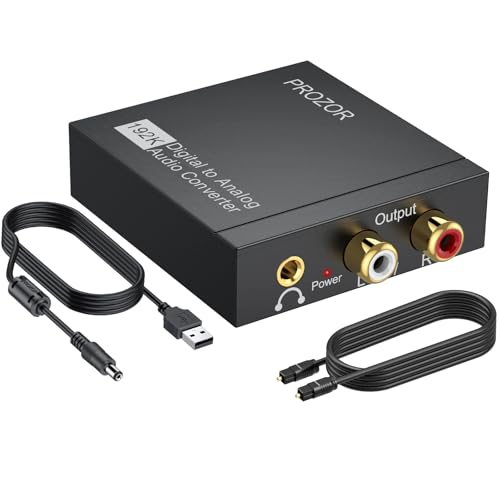
This PROZOR model converts coaxial or Toslink/SPDIF digital PCM audio to analog RCA left/right and 3.5 mm output. It is designed for uncompressed two-channel LPCM or PCM, so source-device audio settings are an important part of a successful setup.
The listed sampling rates are 32, 44.1, 48, 96, and 192 kHz, with 24-bit SPDIF input. The manufacturer notes that users should set the TV audio format to PCM or LPCM and adjust volume through the TV settings or connected output device.
- Best for: A buyer who needs a compact two-channel converter with both RCA and 3.5 mm outputs.
- Why it was selected: Its requirements are stated clearly, making it easier to match with a TV or other PCM-capable digital source.
- Limitation: It does not decode 5.1-channel audio. The listing also says optical output is not supported, so it should not be used to send audio from an optical port.
PROZOR 5.1 Optical-To-Analog Converter
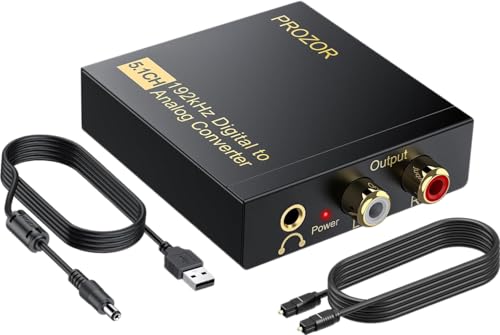
Unlike the two-channel-only options, this PROZOR converter lists support for Dolby AC-3 and DTS 5.1-channel input, as well as PCM. It converts optical or coaxial digital input to analog RCA left/right and 3.5 mm output, with 5.1-channel input converted to 2.0-channel analog output.
The listed maximum sampling rate is 192 kHz, with 24-bit SPDIF input to the left and right channels. The feature description names DVD players as possible digital sources and speakers or headphones as possible analog destinations.
- Best for: Buyers whose source outputs a supported Dolby AC-3 or DTS 5.1 signal and who need analog stereo output.
- Why it was selected: Its stated format support addresses a common mismatch between surround-format source output and a stereo analog destination.
- Limitation: It outputs analog stereo, not discrete 5.1 analog channels. Confirm the source is set to a format the converter supports; format support does not guarantee compatibility with every surround-audio setting.
Rybozen Optical And Coaxial DAC

The Rybozen DAC converts optical or coaxial digital PCM audio to analog RCA left/right and 3.5 mm output. Its listed package includes an optical fiber cable and a power adapter, which may reduce the need to source those accessories separately.
It supports uncompressed two-channel LPCM or PCM and lists sampling rates of 32, 44.1, 48, 96, and 192 kHz, with a 24-bit SPDIF input stream. The manufacturer specifies that a DVD or music player should be set to PCM or LPCM.
- Best for: A buyer looking for optical and coaxial input options, stereo analog outputs, and the listed included cable and adapter.
- Why it was selected: It combines multiple input and output choices with explicit guidance about the required two-channel audio format.
- Limitation: The product is not available for 5.1-channel audio. A source sending Dolby Digital or another unsupported multichannel format may need to be changed to PCM stereo.
Buying Guide: How To Choose An Optical-To-Analog Converter
Does “ADAT optical” mean the same thing as Toslink?
No. ADAT Lightpipe is a digital audio format commonly associated with recording equipment and multichannel studio audio. Toslink is a connector and optical transmission method often used for consumer SPDIF audio from televisions and home entertainment devices. The products in this article are listed as Toslink/SPDIF converters, not ADAT converters.
If your source is an ADAT interface or recorder, do not assume a consumer optical-to-RCA DAC will accept its signal. Check the source’s output format, channel configuration, and connector requirements. A physical optical connection alone does not establish that two devices use compatible digital audio formats.
Should you choose a PCM-only converter or one with 5.1 support?
Choose a PCM-only model when the source can output uncompressed two-channel PCM or LPCM. This is a common configuration for converting TV or media-player audio to stereo RCA or 3.5 mm output. The PROZOR two-channel model and Rybozen both specify this limitation, while DigitConvert also lists PCM support.
Choose the PROZOR 5.1 model only when you need its listed Dolby AC-3 or DTS input support. It converts supported multichannel input to two-channel analog output; it does not provide six separate analog outputs. Check the exact format selected in the source menu rather than relying only on the device’s general audio capabilities.
Which connections do you need?
- RCA stereo output: Choose a converter with left and right RCA outputs for a stereo amplifier or other device with matching inputs.
- 3.5 mm output: DigitConvert, both selected PROZOR box-style models, and Rybozen list a 3.5 mm output. Verify that this is the connection your headphones or powered speakers require.
- Optical and coaxial inputs: DigitConvert, the selected PROZOR models, and Rybozen list both input types. AUTOUTLET is described as an optical-to-RCA cable.
- Attached cable: AUTOUTLET and one listed PROZOR model are cable-style options. Check the stated cable length and where the converter will sit in your setup.
What should you check before connecting a TV?
First, confirm that the TV has an optical digital audio output and the converter has the matching optical input. Next, set the TV’s digital audio output to PCM or LPCM if the converter requires stereo PCM. The PROZOR two-channel listing specifically advises this setting, and Rybozen also requires a PCM or LPCM source format.
Then confirm the analog destination accepts the converter’s output. RCA inputs are usually a pair of left and right sockets, while 3.5 mm is a single jack. A converter changes the signal type; it does not necessarily control the TV’s volume. One PROZOR listing advises adjusting volume through the TV or output device.
How important are sampling rate and bit depth?
Sampling-rate figures indicate the digital formats a product lists as supported, but they do not by themselves ensure better sound in a particular setup. The source and converter must use compatible formats. The products here list rates up to 192 kHz and 24-bit SPDIF input, but the source’s actual output settings still matter.
For basic compatibility, prioritize the source format and channel count before the maximum sampling-rate figure. A converter that supports 192 kHz may still fail to produce audio if the source sends an unsupported surround format or a digital signal outside the product’s stated capabilities.
What if there is no sound or the audio is distorted?
- Check that the optical cable is connected to the source’s output and the converter’s input.
- Set the TV, player, or console to PCM/LPCM when using a PCM-only converter.
- Check that the analog RCA or 3.5 mm output is connected to a compatible input.
- For a 5.1 source, confirm that the converter lists support for the exact audio format, or change the source output to stereo PCM.
- Review the source and destination volume settings, especially if the TV does not control the converter’s analog output level.
Frequently Asked Questions
Can an optical-to-analog converter connect a TV to an RCA amplifier?
Yes, if the TV has a compatible optical digital audio output and the converter provides RCA analog output. Set the TV to a digital format the converter supports, commonly PCM stereo for the two-channel models in this article.
Can these products convert ADAT to analog?
They are listed as consumer SPDIF/Toslink converters, not ADAT converters. Do not select one for ADAT equipment unless the equipment documentation explicitly confirms compatible signal formats.
Will a PCM-only DAC work with Dolby Digital audio?
Not necessarily. A PCM-only converter may not decode Dolby Digital bitstream audio. Set the source to PCM stereo or choose a converter that explicitly lists support for the source’s Dolby format.
Do these converters send audio from RCA to optical?
Most products selected here convert digital input to analog output. They do not perform the reverse conversion. The Musou product in the supplied list is an analog-to-digital converter, so it is the wrong direction for optical-to-RCA use.
Can the converter output surround sound through RCA?
The selected products provide analog stereo outputs. The PROZOR 5.1 model lists decoding of supported 5.1 input to 2.0-channel analog output; it does not provide separate analog connections for a full 5.1 speaker system.