
The PROZOR bi-directional converter is the clearest match for converting a Toslink optical signal to coaxial digital audio: it supports both directions and lists LPCM, DTS, Dolby AC-3, and sampling rates up to 192 kHz. The other products below serve related audio-conversion needs, but several do not convert optical input to coaxial output. Check each product’s signal direction before buying.
| Product | Best suited for | Optical-to-coaxial fit |
|---|---|---|
| PROZOR Bi-Directional Converter | Converting between optical and coaxial digital audio | Direct match; bidirectional |
| LiNKFOR Coaxial-to-Optical Converter | Sending coaxial audio to an optical input | Reverse direction only |
| Musou RCA-to-Digital Converter | Converting analog RCA audio to digital outputs | Not a Toslink-input converter |
| Rybozen Digital-to-Analog Converter | Connecting a digital source to analog speakers or headphones | Digital-to-analog, not optical-to-coaxial |
| DigitConvert Digital-to-Analog Converter | Converting digital audio to RCA or 3.5 mm | Digital-to-analog, not optical-to-coaxial |
PROZOR Bi-Directional Optical Converter

Best for: Buyers who need to change a Toslink optical digital output into a coaxial digital output, or occasionally convert in the reverse direction. This is the most directly relevant option in the supplied list because its features explicitly describe bidirectional optical and coaxial conversion.
A switch selects the input, and the listed supported formats include LPCM 2.0, DTS, Dolby AC-3, and 5.1-channel audio. It supports sampling rates from 32 kHz through 192 kHz and up to 24-bit audio. The product description also mentions an optical cable.
Choose this if your source has Toslink output and your receiving device needs coaxial input, or if you want one converter for either direction. Limitation: confirm the input-selection switch and output connections match your particular setup; the product’s listed format support does not guarantee every source device is configured to output a compatible signal.
LiNKFOR Coaxial-To-Optical Converter
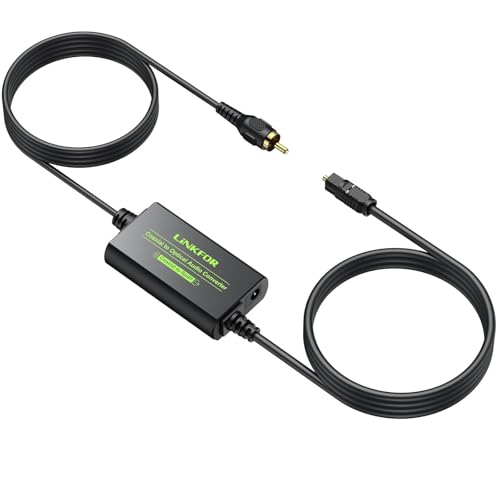
Best for: A setup that needs the opposite signal direction: coaxial digital audio in and Toslink optical audio out. The supplied description explicitly says this unit converts coaxial to optical, making it a relevant comparison but not a substitute for an optical-to-coaxial converter.
Its listed features include built-in 1-meter coaxial and Toslink cables, plug-and-play operation, sampling rates up to 192 kHz, and support for LPCM 2.0, DTS, Dolby AC-3, and 5.1-channel audio. The cables may be useful when the connected equipment is not positioned close together.
Choose this if your source outputs coaxial and your receiver or soundbar accepts optical. Avoid this if the source is Toslink and the destination requires coaxial: the stated conversion direction is the reverse of that use.
Musou RCA Analog-To-Digital Converter

Best for: Converting an analog stereo RCA source into digital coaxial and Toslink outputs simultaneously. This product is included as an adjacent option for buyers whose actual source is analog, rather than an optical digital signal.
The listed features specify uncompressed two-channel LPCM output and a 48 kHz sampling rate. Its conversion path begins with analog RCA audio and produces digital outputs. That is different from converting Toslink digital input to coaxial digital output.
Choose this if you need to connect an RCA analog source to equipment with a digital optical or coaxial input. Avoid this if your source already outputs Toslink and you need a coaxial signal. The product notes that its analog input does not support Dolby, and its stated output is two-channel LPCM.
Rybozen Digital-To-Analog Audio Converter

Best for: Sending optical or coaxial digital audio to analog RCA speakers or a 3.5 mm audio connection. It is a digital-to-analog converter, so it addresses a common connection problem but does not perform the requested optical-to-coaxial conversion.
The product lists simultaneous RCA left/right and 3.5 mm outputs, sampling rates from 32 kHz to 192 kHz, and support for uncompressed two-channel PCM or LPCM. Its instructions say to set the source device to PCM or LPCM; it does not support 5.1-channel audio.
Choose this if the receiving equipment needs analog audio. Avoid this if you need a digital coaxial output or need to pass multichannel 5.1 audio. The PCM setting and two-channel limitation are important requirements to check before purchase.
DigitConvert Digital-To-Analog Converter

Best for: Converting Toslink or coaxial digital PCM audio into analog RCA or 3.5 mm output. This is another related product for a digital-to-analog connection, not an optical-to-coaxial converter.
The listed features state that the converter accepts optical or coaxial digital input and provides RCA and 3.5 mm analog outputs simultaneously. It supports sampling rates from 32 kHz to 192 kHz and a 24-bit SPDIF input stream on the left and right channels. The description lists use with devices such as game consoles, Blu-ray players, and home cinema systems.
Choose this if your destination has an analog input. Avoid this if you need the converter to produce coaxial digital audio; the described outputs are analog, not coaxial.
Buying Guide: How To Choose A Toslink-To-Coaxial Converter
Does the converter support the direction you need?
Start by identifying the source output and the destination input. Toslink is an optical digital connection; coaxial digital audio uses an electrical connection, commonly through an RCA-style jack. A converter must accept the source format and provide the destination format. A coaxial-to-optical converter does not necessarily work in reverse.
For an optical source and coaxial destination, look for product wording that specifically says “optical to coaxial,” “Toslink to coaxial,” or “bidirectional optical/coaxial.” The PROZOR model in this list is the only listed product that clearly identifies bidirectional conversion. Do not rely on a product title that mentions both connection types without checking which is input and which is output.
Is a converter different from an adapter?
Yes. Optical and coaxial digital audio use different signal types. A simple cable or plug adapter does not necessarily convert one signal into the other. A suitable converter actively changes the signal between the two connection types. Check the product’s stated conversion direction and required power or included accessories; do not assume that a cable alone will perform the conversion.
Which audio format should you check?
Match the converter’s format support to the source device’s audio output setting and the receiving equipment. The PROZOR listing identifies LPCM 2.0, DTS, Dolby AC-3, and 5.1-channel support. By contrast, the Musou, Rybozen, and DigitConvert products describe analog conversion or two-channel PCM use rather than optical-to-coaxial digital conversion.
If audio does not work, check whether the source is set to a supported output format. Some equipment allows PCM or LPCM selection in its audio settings. Format compatibility is separate from connector compatibility: having the right optical and coaxial ports does not by itself establish that a converter supports the audio format being sent.
Does a 192 kHz specification matter?
Sampling-rate support describes the digital audio rates a product says it can handle. The PROZOR and LiNKFOR listings specify support up to 192 kHz, but the source and destination also need to work with the signal being used. A higher maximum figure is not proof that every connected device will output or accept that rate.
Check the complete chain: source output settings, converter input and output, and the receiving device’s supported formats. For a basic connection issue, the correct signal direction and audio format are more important than choosing a converter based only on its highest sampling-rate number.
What should you check before ordering?
- Source port: Confirm whether the source outputs Toslink optical or coaxial digital audio.
- Destination port: Confirm whether the receiving device accepts coaxial or optical digital audio.
- Conversion direction: Verify that the product explicitly supports the direction you need.
- Audio format: Compare listed PCM, LPCM, Dolby, DTS, or multichannel support with your equipment settings.
- Cables and placement: Check whether cables are included and whether their length suits your setup.
- Power and setup: Review the product instructions for power requirements, switches, and input selection.
When is a different converter type more suitable?
Choose an analog-to-digital converter when the source has RCA analog output and the destination requires digital input. Choose a digital-to-analog converter when the source outputs optical or coaxial digital audio but the destination needs RCA or 3.5 mm analog audio. Neither type should be treated as a Toslink-to-coaxial digital converter unless its specifications explicitly state that conversion path.
Frequently Asked Questions
Can a Toslink optical signal be converted to coaxial digital audio?
Yes. Use an active converter that explicitly accepts Toslink optical input and provides coaxial digital output. The PROZOR bidirectional model listed above is described as supporting Toslink-to-coaxial conversion.
Can I use a coaxial-to-optical converter in reverse?
Not necessarily. A converter may support only one direction. The LiNKFOR product listed here is described as converting coaxial input to optical output, so its stated function does not establish that it can convert optical to coaxial.
Will an optical-to-coaxial converter change analog RCA audio?
No, not unless it also specifically supports analog-to-digital conversion. Toslink and coaxial are digital audio connection types. An analog RCA source needs a converter designed for analog input, such as the type described for the Musou product.
Do these converters automatically support Dolby Digital or DTS?
No. Format support varies by product. Check the listed audio formats and your source settings. The PROZOR listing names DTS and Dolby AC-3 support, while some other products in this list are limited to two-channel PCM or are designed for analog output.
What should I do if there is no sound?
Verify that the source is connected to the converter’s correct input and the destination to its matching output. Check the input-selection switch if the unit has one, confirm that the source’s audio format is supported, and make sure the receiving device is set to the connected input.