
To connect an optical audio source to RCA inputs, use a digital-to-analog converter (DAC) with an optical input and left/right RCA outputs. These products convert digital audio to line-level analog audio; they do not convert optical audio into the low-level signal required by a turntable’s phono input. The PROZOR model with RCA and 3.5mm outputs suits buyers who want output flexibility, while the AUTOUTLET and eSynic options include a 7-foot cable for a longer connection.
| Product | Best For | Listed Detail |
|---|---|---|
| PROZOR Optical-to-RCA/3.5mm DAC | More output choices | RCA and 3.5mm outputs |
| AUTOUTLET Optical-to-RCA DAC | A longer included cable | 7-foot cable; 192 kHz, 24-bit |
| eSynic Optical-to-RCA Adapter | PCM-ready source setups | 7-foot cable; PCM required |
| 192 kHz Optical-to-RCA DAC | A basic converter setup | Optical input to RCA output |
| PROZOR 7-Foot Optical-to-RCA DAC | A built-in amplifier chip | 7-foot cable; amplifier chip |
PROZOR Optical-to-RCA and 3.5mm DAC

This PROZOR converter is best for buyers who want to send an optical digital source to either RCA stereo inputs or a 3.5mm connection. Its listed outputs make it more flexible than a converter described only with RCA output. The product name identifies it as a 192 kHz digital-to-analog converter and notes an aluminum-alloy housing.
Choose this model if the receiving equipment has RCA inputs and you also want the option of a 3.5mm output. The listing names devices such as PS3, PS4, Apple TV, HD DVD equipment, amplifiers, and home cinema systems as intended use cases. Check the actual ports and audio-output settings on your equipment before purchase.
Limitation: The listed description does not specify an included cable length or state a source audio-format requirement. It outputs analog audio, not a dedicated phono-level signal, so it is not a direct solution for a turntable-style phono input.
AUTOUTLET 7-Foot Optical-to-RCA DAC

The AUTOUTLET converter is best for buyers who want an optical-to-RCA connection with a longer cable included. Its product name specifies a 7-foot cable, a 192 kHz, 24-bit digital-to-analog converter, and a Toslink input with RCA male output. A cable-integrated design can reduce the need to source a separate optical cable, but confirm that the listed connections match the source and receiver.
This is a practical choice for connecting named source types such as HDTVs, DVD players, Blu-ray players, and game consoles to equipment with analog RCA inputs. The listing describes it as plug and play. A digital source still needs to send a supported audio signal, so check the television or player’s audio-output settings if there is no sound.
Limitation: RCA male plugs are not the same as RCA jacks. Make sure the receiving device has matching RCA inputs, and note that this converter provides line-level analog audio rather than phono-level output.
eSynic Optical-to-RCA Adapter

The eSynic adapter is best for buyers who can set their source to PCM and need a longer run to RCA stereo inputs. Its listing specifies a 192 kHz optical-to-RCA converter, a 7-foot cable, a DAC chip, an aluminum shell, and an easy setup. It names HDTVs, Blu-ray players, DVD players, and gaming consoles among its intended sources.
Choose this product when the audio source offers a PCM setting and the receiver accepts left/right analog audio. The PCM requirement is important: set the digital audio output to PCM rather than assuming that every encoded surround-sound format will work. If the source has separate audio-output controls, consult its setup menu or documentation.
Limitation: The product description explicitly says that the source must be set to PCM. Avoid this option if you cannot change the source’s digital audio format or need a converter that specifically handles another format.
192 kHz Optical-to-RCA Converter

This 192 kHz DAC is best for buyers looking for a straightforward optical digital-to-RCA analog converter. Its listed connections are SPDIF Toslink optical input and RCA output, and the product name includes an optical cable. It is described for use with HDTVs, DVD and Blu-ray players, and game consoles.
Choose this model when the source has optical digital audio out and the receiving system has RCA stereo inputs. The core job is to convert the digital signal to analog so it can feed an analog input. It is not an amplifier or a phono preamp based on the product details provided, so confirm that the connected equipment has the appropriate input.
Limitation: The listing information provided does not specify a cable length or a PCM requirement. Check the full product details and the source device’s output options if those factors matter to your setup.
PROZOR 7-Foot Optical-to-RCA DAC
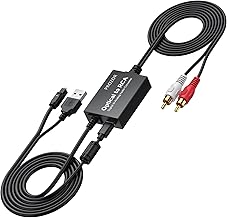
This PROZOR model is best for buyers who need a 7-foot connection and want a converter described with a built-in audio amplifier chip. Its listing identifies a 192 kHz DAC, a 7-foot cable, SPDIF Toslink optical input, and RCA output. It names HDTVs, amplifiers, Blu-ray and DVD players, and PS3 and PS4 among its intended applications.
Consider it when a shorter connection would not reach the analog input, or when the built-in amplifier chip is a feature you specifically want. The listed connection path is optical digital audio to RCA analog audio. Compare it with the AUTOUTLET and eSynic options if cable length is a priority; all three product names specify a 7-foot cable.
Limitation: The listing does not specify a PCM requirement or give more detail about the amplifier chip’s function. Do not assume it replaces a phono preamp or changes line-level RCA output into phono-level output.
Buying Guide: How To Choose An Optical Audio To RCA Converter
Do you need RCA line-level audio or phono-level audio?
This distinction is the most important part of choosing a converter for a search such as “optical audio to phono.” Optical audio is digital. A DAC converts it into analog audio, commonly delivered through left and right RCA connections. That output is generally intended for a line-level input, such as an auxiliary or CD input.
A phono input is designed for a turntable cartridge signal, which is different from standard line-level output. If your receiver has only a phono input, an optical-to-RCA DAC may not be the right device to connect to it. Check the receiver’s labels and documentation. Look for a line-level input or a separate phono preamp solution appropriate to the equipment.
Which connections should you check?
- Source output: Confirm that the television, player, or console has a Toslink optical digital audio output. Some devices may offer other digital outputs instead.
- Converter input: Match the source’s optical output to the converter’s optical input.
- Receiver input: Confirm whether the receiver needs RCA jacks, RCA plugs, or a 3.5mm connection. The AUTOUTLET listing specifies RCA male output, while the first PROZOR model lists RCA and 3.5mm outputs.
- Power and setup: Review the product listing for power requirements and included accessories. The supplied product details do not establish identical power arrangements for all five models.
Does your source need to be set to PCM?
Some optical-to-analog converters require a compatible digital audio format from the source. The eSynic product description specifically says the source must be set to PCM. If a converter does not produce sound, check the source’s audio menu and try PCM or stereo PCM when available. Do not assume that a converter accepts every surround or compressed audio format unless its listing says so.
How much cable length do you need?
Measure the path between the source and the equipment receiving RCA audio, allowing room to route the cable without pulling on the plugs. The AUTOUTLET and eSynic listings specify a 7-foot cable, and the second PROZOR listing specifies 7 feet as well. The other supplied product details do not state a cable length. Verify whether a cable is integrated or included before ordering.
What does a 192 kHz specification tell you?
Several product names include a 192 kHz figure, and the AUTOUTLET product also lists 24-bit conversion. These are converter specifications, but they do not guarantee that every source format or device setup will work. Compatibility depends on the signal the source sends and the converter’s supported formats. Check the full manufacturer listing when a particular resolution or audio format is essential.
How should you troubleshoot a silent connection?
- Confirm that the optical cable is connected to the source’s audio output and the converter’s optical input.
- Check that the source is configured to send audio through optical output.
- For the eSynic model, set the source audio format to PCM as specified in its listing.
- Make sure the RCA plugs connect to an analog input, not a phono input that requires a different signal level.
- Check that the receiving system is set to the input where the RCA cables are connected.
Frequently Asked Questions
Can an optical audio converter connect directly to a phono input?
Not necessarily. These products convert optical digital audio to analog RCA output, which is generally line-level. A phono input is intended for a turntable signal. Check your receiver’s input requirements before connecting a DAC.
Is optical audio the same as RCA audio?
No. Optical audio carries a digital signal, while RCA connections carry analog audio. A DAC is needed to convert an optical digital signal into analog RCA output.
Will these converters work with every television?
Not automatically. The television needs a compatible optical audio output, and its audio format must be supported by the converter. Check the TV’s ports and audio settings, including whether PCM output is available.
Does a 192 kHz DAC guarantee compatibility?
No. A 192 kHz specification alone does not establish compatibility with every source or audio format. Confirm the supported input formats and configure the source accordingly.
Which listed converter is best for a longer cable run?
The AUTOUTLET, eSynic, and second PROZOR product names specify a 7-foot cable. Compare their other requirements, especially the eSynic model’s stated PCM setting requirement, before choosing.