
The listed products are portable digital voice recorders rather than dedicated desktop units. For desk use, the EVIDA 9296 is best for high capacity and adjustable voice activation, the Tonfarb is best for quick one-button recording, and the OM SYSTEM WS-882 is a straightforward PCM/MP3 option. The NEXTSIGNAL suits users who prioritize stated battery life and dual microphones, while the Cappsu offers built-in storage without a memory card.
| Recorder | Best For | Notable Feature |
|---|---|---|
| EVIDA 9296 | Long recording sessions | 128GB storage and voice activation |
| Tonfarb 64GB | Fast start-and-save operation | Side-button controls and PCM recording |
| OM SYSTEM WS-882 | Basic PCM/MP3 recording | USB direct and file controls |
| NEXTSIGNAL 160GB | Extended sessions | Dual microphones and stated 68+ hours of use |
| Cappsu 32GB | Simple desk recording | Built-in memory and voice activation |
EVIDA 128GB Voice Recorder
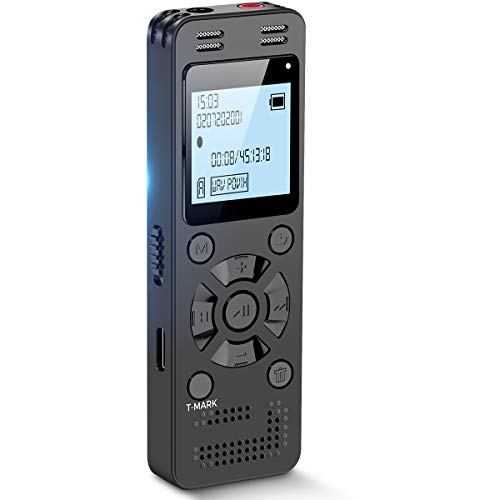
The EVIDA 9296 is best for users who want substantial listed storage and voice-activated recording for meetings, lectures, or conversations. Its 128GB capacity is described as holding up to 9,296 hours of recordings, and the product information states up to 54 hours of continuous recording on a full battery.
Recording options include MP3 at 128 or 192 kbps and WAV at 1536 kbps. The product also lists a noise-canceling microphone, playback, password protection, and six voice-activation sensitivity levels. These controls may help desk users reduce silent sections in recordings, though the device remains a portable recorder rather than a dedicated computer-connected desktop interface.
Choose this if you need high stated capacity, adjustable voice activation, and multiple recording formats. Limitation: the maximum continuous recording time is stated as 54 hours, so long-term operation still requires attention to battery charge.
Tonfarb 64GB Recorder

The Tonfarb is best for people who want to start and save recordings with a physical side button. Its listed control lets users push a button to begin recording and push it again to save, including when the recorder is powered off. That direct operation can be useful on a desk when a meeting starts unexpectedly.
The device includes a 64GB TF card, with capacity described as up to 4,600 hours, and a 600mAh battery rated for up to 48 hours at MP3 32 kbps. It supports WAV PCM recording up to 1536 kbps and includes automatic noise reduction. The listing also mentions playback, password protection, A-B repeat, and voice activation.
Best for users who value quick physical controls and a combination of long-duration, low-bitrate storage and higher-quality PCM recording. Limitation: the maximum 4,600-hour figure is tied to recording conditions; the listing’s 48-hour battery figure specifies MP3 at 32 kbps.
OM SYSTEM Olympus WS-882

The OM SYSTEM Olympus WS-882 is best for buyers seeking a compact recorder with clearly listed PCM and MP3 formats and basic file-management features. Its product details specify 4GB of internal flash memory and up to 1,040 hours of maximum recording time on internal memory.
Other listed features include USB direct, playback-speed and volume adjustment, file indexing, and the ability to erase selected files. For desk use, these controls can make it easier to review recordings and manage stored audio without relying only on a computer. The product information provided does not specify a voice-activation feature or a high-capacity storage option.
Choose this if you prefer a recorder focused on standard recording formats and playback/file controls. Limitation: its listed internal storage is 4GB, less than the 32GB to 160GB options in this comparison.
NEXTSIGNAL 160GB Recorder

The NEXTSIGNAL is best for users who want a high-capacity portable recorder for extended meetings, lectures, or content work. Its listed 160GB total combines 32GB of RAM and a 128GB memory card, and the product description states capacity for up to 11,500 hours of stereo recordings.
It supports 1536 kbps stereo recording and lists dual microphones and noise reduction. The rechargeable 1100mAh battery is described as providing 68 or more hours of continuous use. One-click recording and saving are also emphasized, making the device a potential fit for users who want straightforward controls at a desk or while moving between work locations.
Best for users prioritizing stated storage, dual microphones, and long battery runtime. Limitation: the stated capacity is based on the product’s recording assumptions; actual recording time can vary with selected settings and audio content.
Cappsu 32GB Voice Recorder

The Cappsu is best for buyers who want a simple recorder with built-in storage and voice activation. Its 32GB memory chip does not require a separate TF card, according to the product details. That can simplify setup for desk recording because there is no additional memory card to install or keep track of.
The recorder supports audio up to 1536 kbps and is described as starting when sound is detected and pausing during silent moments. The listing recommends placing the recorder closer to the speaker or sound source for more balanced results. This is relevant for desktop use: position and distance can affect captured speech, regardless of the recorder’s maximum setting.
Choose this if you want built-in storage and automatic recording control without a card-based setup. Limitation: the provided product details do not state battery runtime, so buyers who need long continuous sessions should verify that information before choosing.
Buying Guide: How To Choose A Desktop Digital Audio Recorder
“Desktop digital audio recorder” can refer to different equipment. Some buyers want a small recorder placed on a desk for meetings, while others need a studio device that connects to microphones and a computer. The products compared here are portable digital voice recorders. Their listed features cover voice capture and playback, but the supplied information does not establish that they function as dedicated desktop audio interfaces.
Do you need a portable recorder or a computer-connected unit?
Choose a portable voice recorder if you want to place a self-contained device on a desk, start a recording, and review audio later. Choose a dedicated computer-connected recorder or audio interface if your workflow requires specific microphone inputs, live computer monitoring, or recording directly into desktop software. Check the manufacturer’s details for inputs and connection functions before buying; do not assume that a USB connection means a recorder supports every computer workflow.
How much storage should you look for?
Storage needs depend on how often you record, how long each session lasts, and the selected audio quality. The options here range from 4GB on the OM SYSTEM WS-882 to 160GB total on the NEXTSIGNAL. EVIDA lists 128GB, Tonfarb lists 64GB, and Cappsu lists 32GB. Hours-of-recording estimates are not directly comparable unless the recording format and bitrate are the same.
- For occasional notes: lower storage may be sufficient if you regularly transfer or delete files.
- For frequent meetings: consider more storage if you keep recordings for reference.
- For maximum detail: remember that higher-quality formats can use more storage than low-bitrate settings.
Is voice activation useful for meetings?
Voice activation can start or resume recording when sound reaches a set level and pause during silence. It may reduce empty sections and save storage, as described for the EVIDA and Cappsu models. The Tonfarb and NEXTSIGNAL listings also mention voice activation. For a quiet speaker, distant microphone placement, or a room with intermittent speech, test the activation setting before relying on it for an important session.
Which recording format and quality matter?
WAV or PCM recording is commonly chosen when retaining more audio detail is important, while MP3 settings may be useful when storage efficiency is a priority. The EVIDA and Tonfarb list WAV/PCM options up to 1536 kbps. The OM SYSTEM lists Linear PCM and MP3 formats, while NEXTSIGNAL also specifies 1536 kbps stereo recording. A maximum bitrate alone does not guarantee clear speech; microphone placement and the recording environment also matter.
What battery details should you compare?
Look for continuous recording time at the format and settings you plan to use. The listed products provide different claims and conditions: EVIDA states up to 54 hours, Tonfarb states up to 48 hours at MP3 32 kbps, and NEXTSIGNAL states 68 or more hours. These figures should not be treated as directly equivalent because their test conditions may differ. The provided details for the OM SYSTEM and Cappsu do not state a runtime.
Which controls make desk recording easier?
For a fixed desk setup, clear start, stop, and playback controls can matter more than small size. Tonfarb and NEXTSIGNAL describe one-click recording or saving. EVIDA offers voice activation and playback, and OM SYSTEM lists playback-speed adjustment, file indexing, and selected-file deletion. Consider whether you need to review audio on the recorder itself or expect to manage files later on another device.
Frequently Asked Questions
Are these dedicated desktop audio recorders?
No. The listed products are portable digital voice recorders. They can be used on a desk for capturing audio, but the provided details do not identify them as dedicated desktop audio interfaces or studio recording systems.
Which listed recorder has the most storage?
NEXTSIGNAL lists 160GB total, combining 32GB of RAM and a 128GB memory card. Its product description states up to 11,500 hours of recordings, though actual capacity depends on recording settings.
Which model is best for starting a recording quickly?
Tonfarb and NEXTSIGNAL both emphasize one-button recording controls. Tonfarb’s listing specifically describes using a side button to start and save recordings.
Does voice activation guarantee that every speaker will be captured?
No. Voice activation depends on sound reaching the recorder’s detection threshold. Distance, speaker volume, room noise, and sensitivity settings can affect whether recording starts or pauses as intended.
Which recorder avoids the need for a separate memory card?
Cappsu lists 32GB of built-in memory and says no TF card is needed. EVIDA also lists internal storage, while other product descriptions may refer to included or built-in memory components.
What should I check before recording an important meeting?
Confirm the selected format, available storage, battery charge, microphone placement, and any voice-activation threshold. Make a short test recording and play it back to check that speech is audible before relying on the device for a full session.