
The best USB DAW control surface depends on whether you need motorized faders, a customizable display, or a compact mixer-style layout. The iCON P1-Nano is best for producers who want a compact touchscreen controller, while the iCON P1-M and V1-M suit users who prioritize motorized fader control. The Akai MIDImix is a straightforward option for hands-on mixing with physical faders and knobs.
| Product | Best For | Key Feature |
|---|---|---|
| iCON P1-Nano Bundle | Compact touchscreen control | Four-inch display and five layers |
| iCON P1-M Bundle | Fader control with included display | Eight motorized faders and D4T display |
| iCON V1-M | Expanded channel control | Seven-inch display and expansion support |
| iCON P1-M | Motorized faders in a focused layout | Eight touch-sensitive faders |
| Akai MIDImix | Portable hands-on mixing | Eight line faders and 24 knobs |
iCON P1-Nano Compact Control Surface Bundle

The iCON Pro Audio P1-Nano is a compact USB C-MIDI control surface bundled with a D5 display. Its four-inch touchscreen has five color-coded layers, with up to 80 displayable and actionable functions. Users can organize controls in real time to suit their workflow.
Best for: Producers who want customizable touchscreen control in a compact setup. The listed compatibility includes Bitwig, Cubase/Nuendo, Logic Pro X, Ableton Live, and Pro Tools. The product can connect to and control up to three DAWs simultaneously, according to its feature description.
Why it stands out: Compared with the fader-focused options below, the P1-Nano emphasizes configurable touchscreen actions and multi-DAW use. Choose it if you want to arrange frequently used functions across display layers rather than rely mainly on a bank of physical faders.
Limitation: The listed features do not specify a bank of motorized faders. Avoid this choice if motorized fader movement is a priority.
iCON P1-M Bundle With D4T Display

This P1-M bundle combines a professional USB-MIDI control surface with a D4T display. It features eight touch-sensitive motorized faders with 12-bit resolution. A four-inch, 16-panel digital touchscreen can be customized for up to 80 displayable and actionable functions using drag-and-drop in iMAP software.
Best for: DAW users who want physical fader control alongside configurable display functions. The motorized faders make this a better fit than the P1-Nano for workflows centered on adjusting track levels with faders.
Why it stands out: The bundle listing specifically includes the D4T display, so it may suit buyers looking for a control surface and display package together. Its eight faders offer a defined control bank, while the touchscreen provides another way to access assigned actions.
Limitation: The display is four inches and offers up to 80 functions, rather than the larger display and higher function count specified for the V1-M. Check the bundle contents and DAW control requirements before buying.
iCON V1-M USB MIDI Control Surface
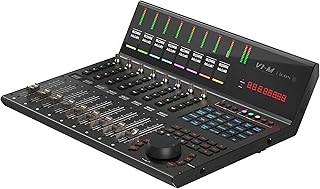
The V1-M pairs eight touch-sensitive motorized faders with 12-bit resolution and a customizable seven-inch touchscreen. Its five color-coded layers can provide access to up to 120 DAW functions. The product is expandable to as many as 64 channels with V1-X DAW Control Expanders.
Best for: Producers who want a larger display and a path to expanded channel control. Compared with the P1-M, the V1-M has a seven-inch screen and a listed capacity of up to 120 functions instead of a four-inch screen and up to 80 functions.
Why it stands out: Its combination of motorized faders, layered touchscreen controls, and stated expansion support makes it the most suitable choice in this group for buyers planning to manage more channels over time.
Limitation: The expansion to 64 channels requires V1-X DAW Control Expanders, which are not identified as included in the listed product features. Confirm the required accessories and setup before planning an expanded system.
iCON P1-M Control Surface With Motorized Faders

This P1-M listing describes a USB-MIDI DAW control surface with eight touch-sensitive motorized faders and 12-bit resolution. Its four-inch, 16-panel digital touchscreen can be customized for up to 80 displayable and actionable functions through drag-and-drop in iMAP software.
Best for: Producers who want a dedicated bank of eight motorized faders and configurable touchscreen actions. It is a direct fit for workflows that benefit from tactile level adjustments rather than relying only on mouse and screen controls.
Why it stands out: Its listed control features match the P1-M bundle above: eight motorized faders and a four-inch display with up to 80 functions. Compare this listing with the D4T bundle based on which package contents you need; the product data supplied here does not specify that this listing includes the D4T display.
Limitation: The stated touchscreen is smaller than the V1-M’s seven-inch display. Choose another model if a larger screen or stated channel expansion is more important.
Akai Professional MIDImix USB MIDI Mixer

The Akai Professional MIDImix is a lightweight, compact MIDI mixer and DAW controller. It has eight individual line faders, one master fader, and 24 assignable knobs arranged three per channel. Its features describe mapping DAW mixer settings with a single button press.
Best for: Producers who want a portable, physical mixer-style layout with separate knobs and faders. The knobs can be assigned to controls such as EQ, bus sends, virtual instrument parameters, and effects, according to the product description.
Why it stands out: Compared with the iCON units, the MIDImix offers a simple arrangement of eight channel faders, a master fader, and 24 knobs rather than a touchscreen-based control system. It is a better match when direct access to multiple rotary controls is the main requirement.
Limitation: The listed features do not identify motorized faders or a customizable touchscreen. Avoid it if those features are essential to your workflow.
Buying Guide: How to Choose a USB DAW Control Surface
Do you need motorized faders?
Motorized faders are a key difference among these options. The iCON P1-M and V1-M list eight touch-sensitive motorized faders with 12-bit resolution. The product details for the P1-Nano and Akai MIDImix do not list motorized faders.
Choose a motorized-fader model if moving between DAW-controlled levels and physical fader positions matters to your work. If you mainly want assignable knobs and straightforward mixer controls, the MIDImix offers eight line faders, a master fader, and 24 knobs without the listed motorized-fader feature.
How much touchscreen control do you want?
The P1-Nano and P1-M list four-inch displays, with up to 80 displayable and actionable functions. The V1-M has a seven-inch display, five color-coded layers, and up to 120 functions. The MIDImix product features do not mention a touchscreen.
A larger display and more listed functions can matter if you want access to many assigned DAW actions from the controller. A smaller display may be a better fit if the physical controls are your main priority and you do not need the V1-M’s stated display capacity.
Will you need more channel capacity later?
The V1-M is the only listed product with a stated expansion path: it can expand to 64 channels with V1-X DAW Control Expanders. The features provided for the other products do not specify comparable channel expansion. If you expect your control needs to grow, account for the additional expander requirement rather than assuming it is included.
Which DAW and workflow do you use?
The P1-Nano listing identifies compatibility with Bitwig, Cubase/Nuendo, Logic Pro X, Ableton Live, and Pro Tools. It also states that the controller can connect to and control up to three DAWs simultaneously. The supplied features for the other products do not provide a comparable DAW compatibility list.
Before choosing any controller, verify that its control functions match your DAW and the tasks you want to perform. Consider whether you need track mixing, quick access to assigned functions, or a combination of both. The product details do not establish compatibility beyond the information provided.
What should you check when comparing P1-M listings?
Two P1-M products appear in this selection. Both list eight touch-sensitive motorized faders, a four-inch, 16-panel touchscreen, and up to 80 functions. One listing explicitly identifies a bundle with a D4T display; the other is described as the P1-M control surface with motorized faders.
Compare the stated package contents carefully. Do not assume that the separate listings include the same display or accessories when the product descriptions do not say so.
Is a compact controller or a larger control surface better?
A compact controller can suit a desk where space is limited or a workflow that emphasizes assigned touchscreen functions. The P1-Nano’s compact positioning and layered four-inch display make it the option to consider for that use. The V1-M is better suited to buyers who value a seven-inch touchscreen and an identified expansion path.
For a physical mixer-style layout, compare the MIDImix’s knobs and line faders against the iCON models’ listed motorized faders and displays. Match the control layout to the actions you perform most often instead of selecting solely by the number of controls.
Frequently Asked Questions
What is a USB DAW control surface?
A USB DAW control surface is a hardware controller for operating functions in a digital audio workstation. Depending on the model, it may provide faders, knobs, touchscreen controls, or a combination of physical and display-based controls.
Which product has the most touchscreen functions?
The iCON V1-M lists up to 120 DAW functions on a seven-inch touchscreen. The P1-Nano and P1-M list four-inch displays with up to 80 functions.
Which controller in this list has motorized faders?
The iCON P1-M and V1-M list eight touch-sensitive motorized faders with 12-bit resolution. The supplied features for the P1-Nano and Akai MIDImix do not specify motorized faders.
Which option is best for hands-on mixing with knobs?
The Akai Professional MIDImix is the clearest match for a knob-focused mixer layout. It lists 24 assignable knobs, eight individual line faders, and one master fader.
Can the iCON P1-Nano control multiple DAWs?
Yes. Its product features state that it can connect to and control up to three DAWs simultaneously. The listing also names Bitwig, Cubase/Nuendo, Logic Pro X, Ableton Live, and Pro Tools.
Does the V1-M expand to 64 channels on its own?
The V1-M is described as expandable to 64 channels with V1-X DAW Control Expanders. The listed features do not say that those expanders are included, so check package contents before buying.