
The best inexpensive iPod docking station depends on your device and how you plan to use it. The iClassic is best for a bedside alarm and radio, while the KUJOBUY cradle is aimed at charging and syncing compatible Shuffle models. Pyle adds a flexible stand and FM transmitter, Dynex offers connections for external audio or video equipment, and Acoustic Research provides a display for photos and video. Check your iPod’s generation and connector before choosing: older docks are not automatically compatible with every iPod or iPhone.
| Product | Best for | Listed standout feature |
|---|---|---|
| iClassic Docking Speakers Alarm AM/FM Station | Bedside use | Alarm, snooze, and AM/FM presets |
| KUJOBUY USB Charger Sync Dock | Compatible Shuffle charging and syncing | Computer or power-adapter connection |
| Pyle PIFMDK6 | Docking with a flexible stand | Gooseneck and FM transmitter |
| Dynex Docking Station | Connecting an iPod to other equipment | TV, home theater, or powered-speaker connection |
| Acoustic Research ARS3i | Photo and video display | Seven-inch screen |
iClassic Docking Speakers Alarm AM/FM Station

Best for: A buyer who wants a bedside docking station with an alarm and radio functions in addition to iPod playback.
The listed features include charging and docking for iPod players, digital AM/FM radio, and 20 station presets: 10 FM and 10 AM. Its alarm clock includes snooze, and the alarm source can be set to an iPod, buzzer, or AM/FM radio. Those features make it the most suitable choice here for someone combining a dock with a basic clock-radio routine.
Why it was selected: It offers several clearly stated everyday functions in one product, including charging, radio listening, and wake-up options. Choose this if those functions matter more than a display or a computer-sync cradle.
Limitation: The product name specifies a 30-pin iPod/iPhone connection. Check your device’s connector and generation before buying; the listing does not establish compatibility with newer connector types.
KUJOBUY USB Charger Sync Dock
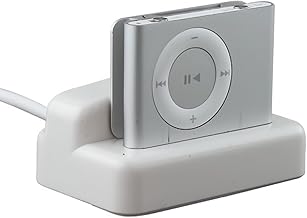
Best for: Owners of a compatible second- or third-generation iPod Shuffle who want a dock for charging and syncing.
The listing specifically names the iPod Shuffle 2nd Gen and 3rd Gen as compatible. It describes connecting the cradle to a computer or power adapter to charge the player, with computer connection available for syncing songs, playlists, and data. It also describes use with certain older iPod Nano models, but the clearest explicit compatibility statement is for the two Shuffle generations.
Why it was selected: This is the most directly targeted option for someone seeking a simple charging-and-syncing cradle rather than speakers, an alarm, or a video display. Choose it if you have one of the listed Shuffle generations and want a compact connection point for routine file transfers.
Limitation: Do not assume that “iPod Nano” means every Nano generation. Confirm the exact model and connector before purchase, especially if you plan to use the dock for a Nano rather than a Shuffle.
Pyle PIFMDK6 Docking Station

Best for: A buyer looking for a dock with a flexible gooseneck stand and an FM transmitter.
The listed features identify the PIFMDK6 as an iPod docking and charging station. It includes a flexible gooseneck stand and a blue-backlight LCD display. The product name also specifies a 200-channel FM transmitter. That combination makes it a different kind of pick from a basic desk cradle: it is aimed at docking and charging while providing a positionable stand and a transmitter feature.
Why it was selected: Choose this if the stand and FM-transmitter functions are more relevant to you than an alarm clock, a slideshow display, or a dedicated Shuffle sync cradle. The named features are concise, so compare them against your intended setup rather than assuming extra functions.
Limitation: The supplied feature information does not specify supported iPod generations or connector types. Verify the exact device compatibility before ordering.
Dynex Docking Station with Remote

Best for: Owners of a listed older iPod who want to connect it to a TV, home theater, or powered speakers.
The product information lists compatibility with iPod, iPod mini, iPod with color display, iPod nano, and iPod with video. It says the dock can charge an iPod and let users listen to music, view slideshows, or watch video. It can also connect an iPod to a TV, home theater, or powered speakers. A remote is included in the product name.
Why it was selected: This is the clearest choice in the group for routing iPod content to other equipment instead of relying only on the dock itself. Choose it if you want to use a compatible iPod with a larger screen or an external audio system.
Limitation: The listed compatibility describes older iPod families, not every Apple device. Confirm both the iPod model and the connections required by your TV or audio equipment before purchase.
Acoustic Research ARS3i with Seven-Inch Display

Best for: A buyer who wants a dock with a built-in display for viewing supported video and image formats.
The ARS3i is described as an iPod/iPhone docking and charging station with a seven-inch display. Its listed media support includes MP3, JPEG, MJPEG, and WMA, and the display is described as 16:9 with an 800-by-480 digital resolution. The listing also mentions automatic video and slideshow creation via Muvee Reveal.
Why it was selected: Its screen and stated media features make it the most display-oriented option in this selection. Choose it if photos or video are a priority and the listed formats suit your intended media.
Limitation: The supplied details do not identify specific iPod or iPhone generations or connector types. Verify compatibility with your particular device; also note that the listed resolution is 800 by 480.
Buying Guide: How to Choose an iPod Docking Station
Which iPod generation and connector do you have?
Start with the exact model name and generation printed on the device or shown in its settings. Then compare that information with the dock’s compatibility details. A product that says “iPod” may refer to older models rather than every iPod or iPhone. The iClassic listing, for example, specifies a 30-pin connection, while the KUJOBUY listing explicitly names second- and third-generation Shuffle models.
If a listing does not state a generation or connector, treat compatibility as unconfirmed. This matters especially for older accessories: similar product names do not establish that the connector, fit, or functions will work with your device. When the listing mentions several model families, look for the exact generation rather than relying on a broad family name such as Nano.
Do you need charging, syncing, or both?
Charging and syncing are separate needs. A charging dock supplies power, while syncing requires a connection and support for transferring data. The KUJOBUY cradle specifically describes syncing songs, playlists, and data when connected to a computer, as well as charging through a computer or power adapter. The other products in this group are described primarily around docking, charging, audio, radio, or display functions.
Choose a sync cradle if you regularly manage music or data from a computer and have a listed compatible model. If you only need a place to dock and charge a player, focus on the power and connector information instead. Do not assume that every dock can transfer files simply because it can charge an iPod.
Would an alarm, radio, or speaker connection be more useful?
Match the dock’s extra features to the room and routine where you will use it. The iClassic is the strongest fit for bedside use because its listed functions include an alarm, snooze, selectable alarm source, and AM/FM presets. The Pyle is a better fit if its gooseneck stand and FM transmitter matter to your setup. The Dynex is more suitable when the goal is connecting an iPod to a TV, home theater, or powered speakers.
Compare features by their specific purpose. An FM radio with presets is not the same function as an FM transmitter, and an external audio connection is different from built-in radio listening. Select the feature you will actually use rather than treating all audio-related terms as interchangeable.
Is a built-in screen important?
A display can make a dock more useful for viewing photos or video, but it also makes format and resolution details important. The Acoustic Research ARS3i lists a seven-inch display, 16:9 aspect ratio, 800-by-480 resolution, and support for several media formats. The Dynex listing instead describes connecting an iPod to a TV or other equipment for viewing or listening.
Choose a dock with its own screen if you want a standalone display and the media formats match your files. Choose a connection-oriented dock if you plan to use a separate screen or audio system. Check which device stores or plays the media and what connections the setup requires.
What should you check before buying a budget dock?
- Exact model compatibility: Match the dock’s stated generations to your iPod or iPhone rather than relying on the product title alone.
- Connector type: Confirm that the dock’s physical connection matches your device.
- Intended function: Decide whether you need charging, syncing, an alarm, radio, external audio or video connections, or a screen.
- Listed media support: For a display dock, check the supported file formats and resolution against your files and expectations.
- Connection requirements: If you plan to use a computer, TV, home theater, or powered speakers, verify that the dock has the connections needed for that equipment.
- Unspecified details: Treat missing compatibility or connection information as a reason to verify before ordering, not as proof that a feature is supported.
A low-cost legacy dock is only a useful value when it fits the exact player and provides the functions you need. Compare the product’s stated compatibility and features before considering convenience or appearance. If the model information is unclear, verify it with the seller or product documentation before making a decision.
Frequently Asked Questions
Will any iPod docking station work with any iPod?
No. Dock compatibility can depend on the iPod generation and connector. Check the specific model and connector against the product’s compatibility details before buying.
Which option is best for an iPod alarm clock?
The iClassic is the most direct fit based on the supplied features. It lists an alarm with snooze and lets users select an iPod, buzzer, or AM/FM radio as the alarm source.
Which dock explicitly supports syncing?
The KUJOBUY listing describes syncing songs, playlists, and data when the cradle is connected to a computer. Its explicit compatibility information names the second- and third-generation iPod Shuffle.
Can I connect a docked iPod to a television?
The Dynex listing says it can connect an iPod to a TV, home theater, or powered speakers. Confirm that your iPod model and the equipment connections are compatible before purchasing.
Which product has a built-in display?
The Acoustic Research ARS3i has a listed seven-inch display with an 800-by-480 resolution and support for specified image and audio formats.