
The best flat-screen TV for a car depends on how many passengers need a screen, whether you want built-in apps, and how you plan to play video. The 13.5-inch AINAVITO pair is best for families who want two large screens; the 10.8-inch AINAVI pair suits buyers seeking Android apps and phone mirroring; and the NOAUKA single monitor offers a smaller touchscreen with several audio options. Check headrest fit and connectivity before choosing.
| Product | Best For | Notable Features |
|---|---|---|
| AINAVITO 13.5-inch pair | Two passengers who want large screens | Two Android monitors, HDMI, Wi-Fi, Bluetooth |
| AINAVI 10.8-inch pair | App and phone-mirroring users | Android 13, AirPlay, Miracast, 5G Wi-Fi |
| Android 12 10.1-inch pair | Travelers wanting touchscreens and varied inputs | Wi-Fi, HDMI, USB, SD card, Bluetooth, FM |
| NOAUKA 10.1-inch single monitor | One-screen setups and flexible audio | AirPlay, Miracast, Bluetooth, FM, USB, SD |
| NHOPEEW 9-inch monitor | Smaller-screen users who want CarPlay or Android Auto | Phone connectivity, voice control, 64G memory card |
AINAVITO 13.5-Inch Dual Headrest Monitors
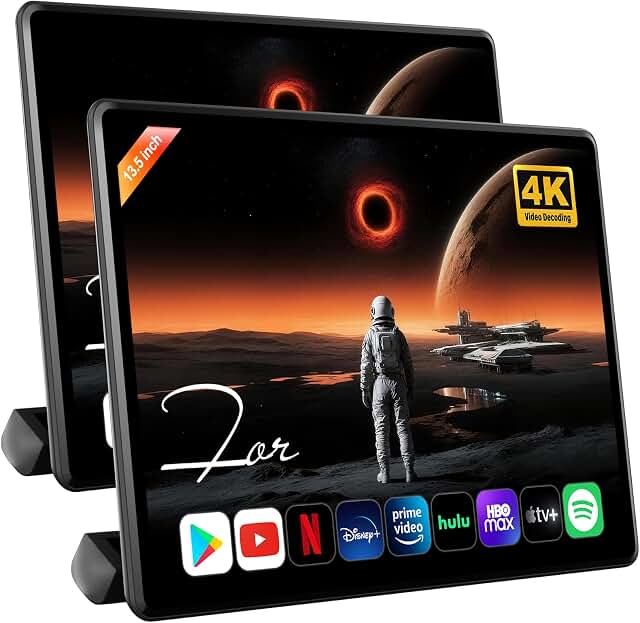
Best for: Families or groups who want a large screen for each of two rear passengers. This product is sold as a pair of independent Android 13 monitors, making it possible for passengers to watch separate content or synchronize the same movie through HDMI.
Each monitor is listed with 4GB RAM and 64GB storage. The 13.5-inch anti-glare IPS displays have a 1920 x 1280 resolution and can decode 4K video. The stated connections and functions include Wi-Fi, Bluetooth, HDMI, USB, FM, AirPlay mirroring, parental control, and OTA upgrades. The HDMI input can also connect a compatible game source such as a PS5 or Switch, according to the product information.
Why it was selected: Its two large displays, separate-viewing option, and HDMI synchronization address different needs in a multi-passenger vehicle. The listed storage also supports downloading content for viewing when internet access is unavailable, as described by the manufacturer.
Limitation: The larger screens may not suit buyers looking for a compact, single-monitor setup. Confirm that the vehicle’s headrests and available space can accommodate the monitors before purchase.
AINAVI 10.8-Inch Android 13 Monitor Pair

Best for: Buyers who want two touchscreen monitors with Android apps and phone-screen mirroring. The product listing describes a pair of 10.8-inch displays with Android 13, 2GB RAM, and 32GB storage per monitor.
The monitors support app downloads through Google Play, along with wireless mirroring through Apple AirPlay and Android Miracast. The listing also names Happycast connectivity for mobile phones, a MyCar Link app for phone control, 5G Wi-Fi, HDMI, and USB. These options give passengers several ways to access or display content, depending on the app and connection method.
Why it was selected: It is a useful middle ground for shoppers who want two screens but do not need the larger 13.5-inch display. Android 13 and the listed mirroring methods make it a better fit for app-based viewing than a basic monitor that relies only on external video sources.
Limitation: The product notes that the phone and monitor must use the same Wi-Fi network for mirroring. It also warns that some protected apps cannot be mirrored; those apps may need to be installed directly on the monitor instead.
10.1-Inch Android 12 Dual Monitor Set

Best for: Families who want a pair of touchscreens with several ways to connect devices and headphones. Each listed monitor has a 10.1-inch display, Android 12, and 2GB RAM with 32GB storage.
For entertainment, the monitors provide Wi-Fi access to apps and storage for video, pictures, and music. Listed inputs include HDMI, USB, and SD card. Bluetooth supports wireless headphones or speakers, while FM transmission can send audio to the car speakers. The product description presents the screens as a rear-seat entertainment system for travel.
Why it was selected: The combination of two monitors, onboard storage, touchscreen controls, and multiple input and audio options makes this a flexible choice for passengers with different devices. Choose it if you value connection variety as much as app access.
Limitation: The seller notes that some apps, including Netflix, Disney+, and YouTube, may not run properly because of version issues and may require an updated version. Buyers who depend on a particular streaming app should check its operation before a trip.
NOAUKA 10.1-Inch Portable Car TV

Best for: Buyers who need one headrest-mounted screen and want several ways to mirror a phone or route audio. The listing describes a 10.1-inch touchscreen, 2GB RAM, and 32GB storage, with mounting kits and a car charger included.
The monitor supports iOS AirPlay and Android Miracast screen mirroring. The MyCar Link app is listed for screen synchronization and player control. Audio options include a built-in speaker, FM transmission to car speakers, Bluetooth headphones, and wired headphones. USB and SD card support are also included in the product title.
Why it was selected: It is a straightforward single-screen alternative to the dual-monitor systems in this list. Its multiple listening options can help buyers choose between private headphone audio and sound through the vehicle’s speakers.
Limitation: The product instructions say FM should be turned off when using a Bluetooth headset or the built-in speaker. Its listed memory is 2GB RAM and 32GB storage, so buyers who specifically want a pair of screens or more onboard storage should compare other options.
NHOPEEW 9-Inch Headrest Video Player

Best for: Buyers who prefer a smaller screen and want wireless or wired CarPlay and Android Auto features. This is a single 9-inch headrest player, and the listing includes a 64G memory card.
The product description lists a 1024 x 600 IPS display, phone mirroring, video website access, and voice control. Its CarPlay and Android Auto functions are described as supporting navigation, calls, messages, and music. The player is supplied with a custom mounting bracket intended to fit most headrests, but the listing specifically excludes headrests with wide retractable posts and seats without retractable posts.
Why it was selected: It suits shoppers who value phone-based vehicle features and do not need a large display or a two-screen package. The included memory card is a relevant feature for buyers considering stored media.
Limitation: The headrest fit is not universal. Check the mounting diagram and the vehicle’s headrest-post configuration before choosing this model.
Buying Guide: How to Choose a Flat-Screen TV for a Car
Do you need one screen or two?
Start by counting passengers who will regularly watch video. A single monitor can be a practical choice when only one seat needs entertainment, or when the vehicle layout makes a second screen unnecessary. A pair is more appropriate when two passengers want their own displays. Check whether the pair supports independent viewing, synchronized playback, or both: the AINAVITO listing specifically describes both separate viewing and HDMI synchronization.
Also consider whether passengers will watch the same program. Independent screens can accommodate different preferences, while synchronized screens help passengers follow one shared video. Do not assume every pair offers both modes; check the product’s listed features before buying.
What screen size and resolution fit your vehicle?
A larger screen can be easier for passengers to see, but size should be considered alongside the space around the headrest and the passenger’s viewing position. The products here range from 9 inches to 13.5 inches. Measure the available area and review the mounting method rather than choosing solely by diagonal screen size.
Resolution is another comparison point. The NHOPEEW listing specifies 1024 x 600, while the AINAVITO listing specifies 1920 x 1280. A product’s ability to decode 4K video does not necessarily mean its display has a 4K resolution. Compare the stated display resolution separately from video decoding claims.
Should you choose Android apps or phone mirroring?
A monitor with an Android operating system can provide direct access to apps, subject to app availability and software compatibility. Check the operating system version, listed memory, and whether the product description identifies an app store. The Android 12 model cautions that some named streaming apps may need updates to work properly.
Phone mirroring sends a phone’s screen to the monitor, but it may depend on a shared Wi-Fi network and can be blocked by protected content. The AINAVI description specifically notes both conditions. If you intend to watch a particular service, confirm whether the monitor can run that service directly or whether it can be mirrored.
Which connections and audio options matter?
HDMI is useful when you plan to connect an external video source or gaming device, but verify the product’s input and output details. USB and SD card support can provide additional ways to access stored media. Wi-Fi supports internet-connected features, while mirroring tools depend on compatible phones and network arrangements.
For sound, compare Bluetooth, wired headphones, built-in speakers, and FM transmission. Headphones can keep audio private, while FM may send sound through the car speakers. Follow each model’s instructions: the NOAUKA listing, for example, says to turn FM off when using Bluetooth headphones or its speaker.
Will the monitor fit your headrests?
Mounting compatibility is a practical requirement, not a minor detail. Headrest posts and seat designs vary, and a mounting bracket described as fitting most vehicles may still exclude certain configurations. NHOPEEW identifies wide retractable posts and seats without retractable posts as unsuitable. Review the product’s installation diagram and compare it with your vehicle before purchase.
What should you check before a road trip?
Test the intended content and connection method before relying on the monitor during travel. Confirm that apps open, downloaded media plays, headphones pair, and the chosen audio route works. If using mirroring, verify the network requirements and test the specific app because some protected services may not mirror. For offline trips, check whether the selected model supports stored media or app downloads and make sure content is available before losing internet access.
Frequently Asked Questions
Can a car headrest TV work without Wi-Fi?
Some can play stored media through onboard storage or listed USB and SD card connections. Internet access is generally relevant to online apps and streaming. Check the individual model’s supported playback methods and prepare content in advance if the vehicle will travel through areas without service.
Can two passengers watch different shows?
They can if the system supports independent playback. The AINAVITO pair is explicitly described as supporting separate content on its two monitors. Other dual-screen products should be checked individually; a pair of screens does not by itself confirm independent playback.
Can I mirror Netflix or another protected streaming app?
Not always. The AINAVI product description warns that some protected apps cannot be mirrored. Direct app installation may be an alternative when the monitor supports the app, but app availability and operation can vary by model and software version.
Do all car TVs fit every headrest?
No. Mounts and headrest designs differ. Review the fit information and installation diagram, especially if the vehicle has unusual or wide headrest posts. The NHOPEEW listing names specific headrest configurations that are not supported.
Does “4K video” mean the screen is 4K?
Not necessarily. A product may decode 4K video while displaying it at the screen’s native resolution. Check the stated display resolution separately from video-decoding capability.