
A USB 2 audio interface connects microphones and instruments to a computer for recording, streaming, or podcasting. The PreSonus AudioBox 96 is the clearest match for buyers specifically seeking a USB 2.0 model. The M-Audio M-Track Duo suits two-input recording and direct monitoring, while the Universal Audio Volt 2 is a higher-resolution option. Mackie’s Onyx Artist 1X2 is designed for one microphone and one instrument, and BOMGE’s mini interface offers flexible RCA outputs.
| Interface | Best For | Listed Recording Resolution |
|---|---|---|
| PreSonus AudioBox 96 | USB 2.0 personal recording | Not specified in the supplied features |
| M-Audio M-Track Duo | Two inputs and direct monitoring | 48 kHz |
| Universal Audio Volt 2 | Higher-resolution recording | Up to 24-bit/192 kHz |
| Mackie Onyx Artist 1X2 | Microphone and instrument recording | 24-bit/192 kHz |
| BOMGE mini 2 Channel | Recording with RCA output options | 48 kHz |
PreSonus AudioBox 96
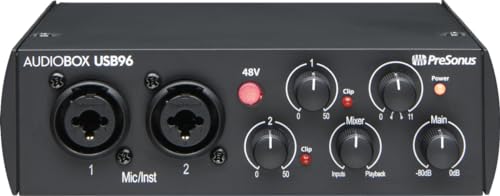
The PreSonus AudioBox 96 is the most direct choice for shoppers looking for an explicitly identified USB 2.0 audio interface. Its supplied product details describe it as a two-channel interface for personal and portable recording.
- Two Class-A microphone preamps.
- Two high-headroom instrument inputs for guitar, bass, and line-level devices.
- MIDI input and output.
- USB 2.0 connection, as identified in the product name and description.
Best for: Home recordists who want a straightforward two-channel USB 2.0 setup and may need MIDI connections. Its two mic preamps are useful when recording two microphone sources, while the instrument inputs support guitar- and bass-focused sessions.
Limitation: The supplied features do not state a recording bit depth or sample rate, so compare the manufacturer’s full specifications if those figures are essential to your project. Choose another option if a listed 24-bit/192 kHz specification is a deciding requirement.
M-Audio M-Track Duo
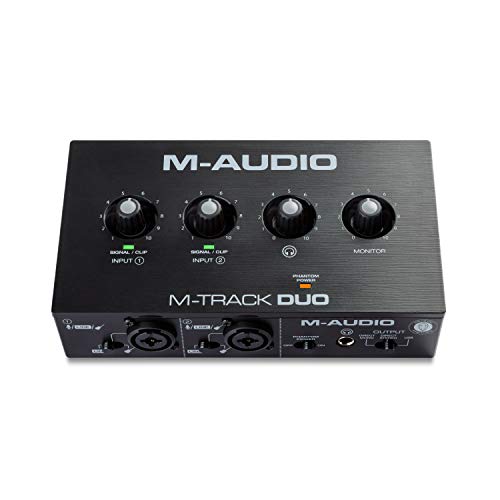
The M-Audio M-Track Duo is a two-input interface for recording, podcasting, and live streaming. It is listed as a USB sound card for Mac or PC and provides 48 kHz audio resolution.
- Two combo XLR, line, and instrument inputs.
- Phantom power for compatible condenser microphones.
- One-quarter-inch headphone output and stereo one-quarter-inch outputs.
- USB/Direct switch for zero-latency monitoring.
Best for: Buyers who need two flexible inputs for combinations of vocals, guitar, or line-level sources. The USB/Direct switch is a practical feature for monitoring a live input without relying on a delayed computer playback signal.
Limitation: The supplied features specify 48 kHz resolution, not a higher sample rate. Choose this model for its input flexibility and monitoring controls rather than if your priority is a listed 192 kHz recording specification. Its USB generation is not stated in the provided details.
Universal Audio Volt 2
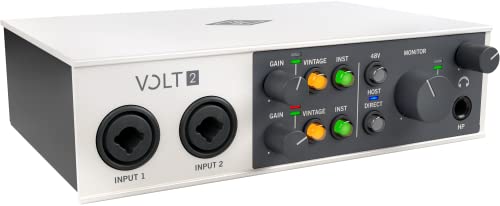
The Universal Audio Volt 2 is a two-channel USB interface with a listed maximum recording quality of 24-bit/192 kHz. Its feature set emphasizes detailed conversion, a Vintage mode inspired by UA’s classic 610 preamps, and a recording workflow that includes the LUNA Digital Audio Workstation.
- Recording and playback quality up to 24-bit/192 kHz.
- Vintage mode for a classic preamp-inspired sound character.
- Clear converters for capturing performance detail.
- Listed support for recording and mixing with LUNA.
Best for: Musicians and producers who prioritize a high listed sample rate and want a Vintage mode as part of the recording workflow. It is a better fit than the 48 kHz options when those features are central to the buyer’s selection.
Limitation: The supplied features do not provide a detailed input and output count or confirm the USB generation. Verify those specifications before buying if you need a particular connection layout or specifically require USB 2.0.
Mackie Onyx Artist 1X2

The Mackie Onyx Artist 1X2 is a 24-bit/192 kHz interface for recording a microphone and an instrument. Its listed connections and preamp features make it especially relevant to solo performers who record vocals alongside guitar, bass, or another instrument.
- High-resolution 24-bit/192 kHz recording.
- Onyx microphone preamp with 48V phantom power.
- One-quarter-inch TRS input with a Hi-Z switch for guitar, bass, and more.
- Includes the Musician Collection of 23 plugins and instruments, according to the supplied features.
Best for: Solo musicians who want a dedicated microphone input and a Hi-Z instrument connection, along with a high listed recording resolution. The input arrangement is more specialized than a pair of combo inputs.
Limitation: The product name and supplied features describe a 2-in/2-out interface, but the listed inputs focus on one microphone preamp and one instrument input. It may not suit buyers who need two microphone preamps for simultaneous vocal or podcast guests. USB generation is not specified in the supplied details.
BOMGE Mini 2 Channel Interface

The BOMGE mini interface is a compact two-input option for recording, streaming, and podcasting. Its listed resolution is 48 kHz, and its outputs include independent RCA stereo jacks for connecting equipment such as powered monitors, PA speakers, or amplifiers.
- Two combo XLR, microphone, and line inputs.
- 48V phantom power for compatible microphones.
- Two independent RCA stereo output jacks.
- Supports balanced RCA TRS and unbalanced TS connections, according to the supplied features.
Best for: Buyers who want two combo inputs and RCA output options in a portable interface. The output connections are a useful point of comparison if the rest of a recording or listening setup uses compatible RCA connections.
Limitation: Its listed resolution is 48 kHz, and the supplied features do not identify the USB generation. Choose a different interface if you require a confirmed USB 2.0 designation or a stated 24-bit/192 kHz maximum.
Buying Guide: How To Choose A USB 2 Audio Interface
A USB audio interface converts analog microphone and instrument signals into digital audio for a computer, then routes computer audio back to headphones or speakers. USB 2.0 describes the connection standard; it does not, by itself, specify an interface’s sound quality, number of inputs, or supported recording resolution. Check each model’s full specifications instead of assuming that all USB interfaces have the same capabilities.
Do you specifically need USB 2.0?
If your computer setup or purchasing requirement calls for USB 2.0, confirm that the product documentation names that standard. Of these five options, the supplied details explicitly identify the PreSonus AudioBox 96 as USB 2.0. The USB generation is not stated in the supplied information for the other four models, so verify their connection requirements with the manufacturer before choosing one for a USB-standard-specific setup.
Also check the physical connector and computer requirements. A USB standard and a port shape are different details: the connection type, included cable, and operating-system support can affect setup. Do not assume an interface will connect directly to a particular computer based only on the word “USB.”
How many inputs do you need at the same time?
Count the sources you plan to record simultaneously. A solo vocalist may need one microphone input, while a singer accompanying themselves may want one microphone and one instrument input. Two-person podcasts or recordings of two microphones typically call for two mic preamps. Check whether inputs are combo jacks and whether they support microphones, line-level gear, or instruments.
- One microphone and one instrument: The Mackie Onyx Artist 1X2 lists a microphone preamp and a Hi-Z instrument input.
- Two flexible sources: M-Audio M-Track Duo and BOMGE list two combo inputs for microphone, line, or instrument sources.
- Two mic preamps and MIDI: PreSonus lists two Class-A mic preamps, instrument inputs, and MIDI I/O.
What recording resolution is enough?
Compare bit depth and sample rate as separate specifications. The M-Audio M-Track Duo and BOMGE list 48 kHz; the Mackie Onyx Artist 1X2 and Universal Audio Volt 2 list up to 24-bit/192 kHz. The supplied AudioBox 96 features do not state a resolution. A higher maximum can matter when it is part of your workflow, but it should not replace checking input count, monitoring, computer requirements, and connection details.
Do you need phantom power or instrument inputs?
Phantom power is used by many condenser microphones. Several listed interfaces specify 48V phantom power, including M-Audio, Mackie, and BOMGE; XTUGA also lists switchable 48V power, though it is not included in this selection. Confirm the manufacturer’s instructions for your microphone before connecting or switching phantom power.
For electric guitar or bass, look for an instrument or Hi-Z input. A line input and an instrument input are not always interchangeable. The Mackie specifies a Hi-Z switch, while the M-Audio lists instrument-capable combo inputs. Choose based on the source you need to connect, not only the number of jacks.
Which monitoring and output connections matter?
Direct monitoring lets you hear an input signal without depending entirely on computer playback, which can help when recording vocals or instruments. M-Audio lists a USB/Direct switch for zero-latency monitoring. Also compare headphone and speaker outputs with your existing equipment. BOMGE specifically lists RCA stereo outputs, while M-Audio lists stereo one-quarter-inch outputs and a headphone output.
What should you verify before ordering?
- Confirm the USB generation, connector, and computer compatibility in the full product specifications.
- Count microphone preamps, instrument inputs, and outputs—not just total jacks.
- Check whether phantom power is included if your microphone requires it.
- Compare the maximum bit depth and sample rate if your recording workflow depends on them.
- Check for direct monitoring and suitable headphone or speaker connections.
- Review any included software or workflow features only if you plan to use them.
Frequently Asked Questions
What does a USB 2 audio interface do?
It connects microphones, instruments, and other audio sources to a computer for recording or streaming. It can also send computer audio to headphones or speakers, depending on its outputs.
Which listed interface is explicitly USB 2.0?
The PreSonus AudioBox 96 is identified as a USB 2.0 interface in the supplied product information. The USB generation is not stated in the supplied details for the other selected models.
Is a 48 kHz interface suitable for podcasting?
The M-Audio M-Track Duo and BOMGE list 48 kHz resolution and include features aimed at recording, streaming, or podcasting. Confirm that the input count, microphone support, and monitoring options suit your setup.
Do all microphones need 48V phantom power?
No. Phantom power is required by many condenser microphones, but not all microphones use it. Check your microphone’s requirements and the interface’s instructions before enabling phantom power.
Can I record two microphones at once?
Look for two microphone preamps, not just two total inputs. The PreSonus AudioBox 96 lists two mic preamps. For other models, verify the exact preamp and input configuration before buying.
Does a higher sample rate automatically mean better recordings?
No. A higher maximum sample rate is only one specification. Input quality, microphone choice, recording technique, monitoring, and the needs of your project also matter.