
The best in-dash entertainment system depends on whether you want smartphone integration, a large touchscreen, or straightforward audio and Bluetooth features. The BOSS BVCP9700A and wireless double-DIN stereo are options to compare for CarPlay and Android Auto; the Leadfan adds a backup camera and mirror link; and the BOSS BV9364B offers a smaller screen with Bluetooth, USB, and SD support. Check vehicle fit and installation requirements before choosing any unit.
| System | Best For | Listed Highlights |
|---|---|---|
| BOSS BV9358B | CarPlay and Android Auto users | 7-inch touchscreen |
| Wireless Double DIN Stereo | Wireless smartphone integration | CarPlay, Android Auto, camera, subwoofer ports |
| Leadfan 7-inch Stereo | Mirror link and camera features | Bluetooth, FM, USB, backup camera |
| BOSS BV9364B | Bluetooth and removable media | 6.2-inch display, USB, SD |
| BOSS BVCP9700A | Large-screen CarPlay and Android Auto | 7-inch touchscreen |
BOSS BV9358B 7-Inch Car Stereo

The BOSS Audio Systems BV9358B is a double-DIN in-dash receiver with a 7-inch touchscreen. Its listed features include Apple CarPlay and Android Auto, making smartphone integration its main point of distinction among these choices.
- Best for: Drivers seeking CarPlay and Android Auto on a large touchscreen.
- Why it was selected: It combines both named smartphone platforms with a 7-inch display in a double-DIN receiver.
- Choose this if: You want a touchscreen interface and the listing’s stated CarPlay and Android Auto features match your priorities.
Caution: The supplied product details do not specify whether smartphone connections are wired or wireless. Confirm connection requirements and vehicle fit before buying.
Wireless Double DIN Stereo With CarPlay
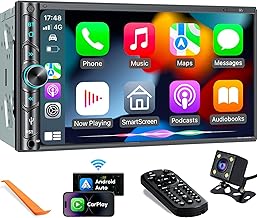
This wireless double-DIN stereo lists wireless CarPlay and Android Auto, Bluetooth, a 7-inch HD capacitive touchscreen, a backup camera, four-channel RCA, and two subwoofer ports. The listed connections and audio outputs make it a feature-rich option to compare for smartphone integration and expanded audio setups.
- Best for: Buyers looking for wireless smartphone integration alongside camera and subwoofer connections.
- Why it was selected: Its name lists both wireless smartphone platforms, camera support, RCA outputs, and two subwoofer ports.
- Better for: Shoppers who want more explicitly listed audio connections than a basic touchscreen receiver.
Caution: The supplied details do not identify the included camera’s specifications or explain installation requirements for the RCA and subwoofer connections. Check the full listing and vehicle setup.
Leadfan 7-Inch Touchscreen Stereo

The Leadfan double-DIN receiver features a 7-inch touchscreen and lists backup camera support, mirror link, Bluetooth caller ID, FM, MP3 and MP4 playback, USB, subwoofer support, and an auxiliary input. It is distinct from the CarPlay-focused choices because the supplied product name emphasizes mirror link and media playback instead.
- Best for: Drivers who want mirror link, Bluetooth calling, and several listed media inputs.
- Why it was selected: It brings together a touchscreen, backup camera support, USB, auxiliary input, and multiple playback formats.
- Choose this if: Its stated mirror-link and media features align with how you plan to use the receiver.
Caution: The provided information does not list CarPlay or Android Auto. Do not assume it supports either platform; verify the full product details if those features are essential.
BOSS BV9364B Bluetooth Stereo

The BOSS Audio Systems BV9364B is a double-DIN Bluetooth car stereo with a 6.2-inch display. Its listed USB and SD support provides options for playing media from removable storage. Compared with the 7-inch models in this selection, its stated screen size is smaller.
- Best for: Drivers prioritizing Bluetooth and USB or SD media support over a larger display.
- Why it was selected: It offers a simpler feature set for shoppers who want an in-dash receiver with Bluetooth and multiple listed media sources.
- Better for: Buyers who do not require a 7-inch screen based on the supplied product description.
Caution: The supplied product name does not list CarPlay, Android Auto, or a backup camera. Confirm whether those functions are available if you need them.
BOSS BVCP9700A 7-Inch Touchscreen Stereo

The BOSS Audio Systems BVCP9700A is listed as a 7-inch touchscreen car stereo with Apple CarPlay and Android Auto. It is a direct comparison option for shoppers who want both named smartphone platforms and a large display, without the product name emphasizing the additional RCA and subwoofer connections listed for the wireless double-DIN model.
- Best for: Drivers who want a large touchscreen and listed CarPlay and Android Auto support.
- Why it was selected: Its key stated features directly address two common in-dash upgrade priorities: smartphone integration and screen size.
- Choose this if: You prefer to compare a BOSS model with both smartphone platforms listed.
Caution: The supplied product name does not clarify whether smartphone integration is wired or wireless. Check the complete listing for connection details and fitment information.
Buying Guide: How To Choose An In-Dash Entertainment System
An in-dash receiver can change how you access navigation, calls, music, and other media in a vehicle. Start with fitment, then compare the exact functions you will use. Product descriptions vary in how much detail they provide, so verify specifications against the full listing and your vehicle before ordering.
Will the receiver fit your vehicle?
Confirm the required receiver size and the dimensions of the opening in your dashboard. Several products here are described as double-DIN, but that label alone does not confirm that a particular unit will fit every vehicle. The dashboard opening, trim, wiring, and factory features can affect installation. Check vehicle-specific requirements and whether additional installation parts are needed.
Do you need CarPlay or Android Auto?
Choose a model that explicitly lists the smartphone platform you use. The BOSS BV9358B, wireless double-DIN stereo, and BOSS BVCP9700A name CarPlay and Android Auto. The Leadfan description instead lists mirror link, while the BV9364B name emphasizes Bluetooth, USB, and SD. These terms are not interchangeable, so verify the exact function rather than assuming one feature includes another.
Connection type also matters. A listing that names CarPlay or Android Auto may not make clear in its product name whether the connection is wired or wireless. If avoiding a cable is important, confirm wireless support in the complete product details before choosing.
What screen size and interface should you compare?
Four systems in this selection list a 7-inch screen; the BOSS BV9364B lists a 6.2-inch display. A larger display may be a priority for buyers who want a more prominent touchscreen, while a smaller screen may suit a shopper comparing a receiver with Bluetooth and removable-media functions. Screen size alone does not establish resolution, brightness, or ease of use, so do not infer those specifications from the diagonal measurement.
Which audio and media connections do you need?
Make a list of the sources and components you plan to connect. The Leadfan lists USB, auxiliary input, FM, MP3 and MP4 support, and subwoofer support. The BV9364B lists USB and SD. The wireless double-DIN stereo names four-channel RCA and two subwoofer ports. These listed features can help narrow the options, but confirm the connection type and number of ports in the detailed product information if your setup depends on them.
Do you want backup camera support?
The wireless double-DIN stereo and Leadfan list a backup camera. If camera use is important, confirm whether a camera is included or whether the receiver only supports one, and check the camera connection requirements. The product names provided here do not give enough detail to establish camera specifications or installation instructions.
What should you check before installation?
- Confirm dashboard and double-DIN fitment for your specific vehicle.
- Check whether the receiver supports the smartphone connection method you want.
- Review wiring, camera, steering-wheel control, and other vehicle integration requirements as applicable.
- Verify which accessories are included instead of assuming they come in the box.
- Compare the listed media inputs and audio outputs with your existing equipment.
These checks help prevent choosing a receiver based only on its screen size or headline feature. When the listing leaves a detail unclear, consult the full product description or installation documentation before purchase.
Frequently Asked Questions
What does an in-dash entertainment system do?
It is a receiver installed in a vehicle’s dashboard that can provide functions such as audio playback, Bluetooth, touchscreen controls, or smartphone integration, depending on the model.
Which of these systems lists wireless CarPlay and Android Auto?
The wireless double-DIN stereo’s supplied product name explicitly lists wireless CarPlay and Android Auto. The BOSS BV9358B and BVCP9700A list CarPlay and Android Auto, but their supplied names do not specify wireless connections.
Which model lists a backup camera?
The wireless double-DIN stereo and Leadfan 7-inch stereo list backup camera support. Check the full listing to determine whether a camera is included and what connections it requires.
Does mirror link mean the same thing as CarPlay or Android Auto?
No. The Leadfan description lists mirror link, while some other models list CarPlay and Android Auto. Verify the specific smartphone features supported by the receiver rather than treating these terms as equivalent.
Is a 7-inch receiver always a better choice than a 6.2-inch model?
Not necessarily. A 7-inch display may suit buyers prioritizing screen size, while a 6.2-inch receiver may be worth comparing when its listed features, such as Bluetooth, USB, and SD support, better match the buyer’s needs. Check dashboard fit and full specifications before deciding.