
To send sound from a 3.5mm headphone jack to an optical digital input, you need an analog-to-digital converter with a Toslink optical output. The Hdiwousp analog-to-digital converter is the closest match for that job; VEDINDUST offers a similar conversion direction. The other products below are included to clarify common alternatives, but some convert in the opposite direction or extract audio from HDMI rather than from an audio jack.
| Product | Best For | Direction or Connection |
|---|---|---|
| Hdiwousp Analog-to-Digital Converter | 3.5mm or RCA source to optical | Analog in to digital out |
| VEDINDUST Analog-to-Digital Converter | Basic AUX-to-optical conversion | Analog in to optical or coaxial out |
| VPFET HDMI Audio Extractor | Extracting sound from an HDMI source | HDMI in to optical or 3.5mm out |
| Hdiwousp Digital-to-Analog Converter | Optical source to analog speakers | Digital in to analog out |
| PROZOR Digital-to-Analog Converter | Optical source to analog stereo gear | Digital in to analog out |
Hdiwousp Analog-to-Digital Converter
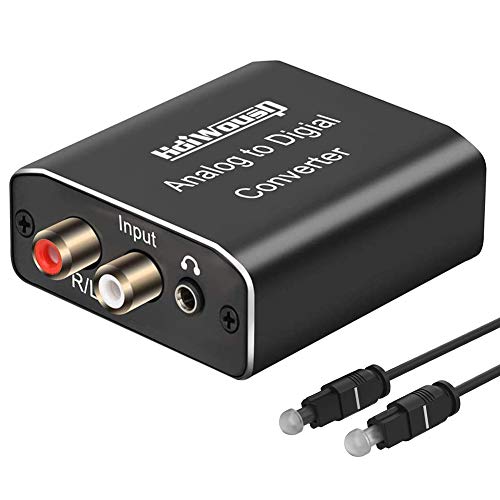
Best for: Connecting a device’s 3.5mm headphone output or RCA stereo output to equipment with an optical digital input. This is the most direct match for an “audio jack to optical digital in” search because it converts analog stereo audio into Toslink optical and coaxial digital output.
The converter supports uncompressed two-channel LPCM and an output sampling-rate range of 8–96 kHz. Its aluminum frame is described as durable and designed to help dissipate heat. The product information also specifies a power adapter connection, so it is not a passive cable.
Why it was selected: It supports the required direction of conversion and accepts 3.5mm AUX as an input. Set the receiving equipment and source for PCM/LPCM stereo as instructed by the product information.
Limitation: It does not decode Dolby Digital, DTS 5.1, or other multichannel formats according to the listed setup instructions. It is intended for two-channel PCM/LPCM audio.
VEDINDUST AUX-to-Optical Converter

Best for: Users who need to convert RCA or 3.5mm analog audio to a digital optical input on a soundbar or home audio system. The stated direction is analog input to optical Toslink or coaxial digital output.
The product supports PCM/LPCM and is described as plug and play, with no software or driver required. Its listed connection steps call for the audio source, an optical cable, and USB power. That makes it a practical option for an AUX source that cannot connect directly to a receiver’s optical input.
Why it was selected: Unlike a simple 3.5mm-to-Toslink cable, it performs the analog-to-digital conversion required when the source is a headphone jack. It also lists both RCA and 3.5mm analog inputs.
Limitation: The supplied product details do not state a sampling-rate range. Confirm that its PCM/LPCM support matches the audio format and connection needs of the source and receiving device.
VPFET HDMI Audio Extractor

Best for: Extracting sound from an HDMI-connected video source when the desired output is optical or 3.5mm. This is not a converter for a headphone jack source: its input is HDMI, and it separates audio from the HDMI signal.
The VPFET provides 2.0-channel, 5.1-channel, and pass modes. Its listed outputs include optical for audio and a 3.5mm stereo output. The product details specify that the 3.5mm output uses 2.0-channel mode, while optical output can support DTS 5.1. Its stated HDMI capability is HDMI 1.4 with support up to 4K at 30 Hz.
Why it was selected: It is a relevant alternative when the audio source is a game console, streaming device, or other HDMI device, rather than an analog AUX jack.
Limitation: The product information says it does not support ARC or eARC, and a TV is not supported as the input source. It also lists limitations for some devices and 4K signals, so check the signal path before choosing it.
Hdiwousp Digital-to-Analog DAC

Best for: Connecting a digital optical or coaxial audio output to analog RCA speakers or a 3.5mm input. This product is a useful comparison because it has the same kinds of connectors but converts in the opposite direction from the requested setup.
It converts digital PCM/LPCM signals from Toslink or coaxial input to analog left/right RCA and 3.5mm output. The listed sampling rates are 32, 44.1, 48, 96, and 192 kHz. The product includes an optical cable and power adapter, and the instructions specify selecting PCM/LPCM audio.
Why it was selected: It helps distinguish a DAC from an analog-to-digital converter. Choose it when the source is digital and the destination is analog, not when sending headphone-jack audio into an optical input.
Limitation: The product listing explicitly says conversion cannot be reversed. It will not convert a 3.5mm analog source into an optical digital signal.
PROZOR Optical-to-Analog Converter
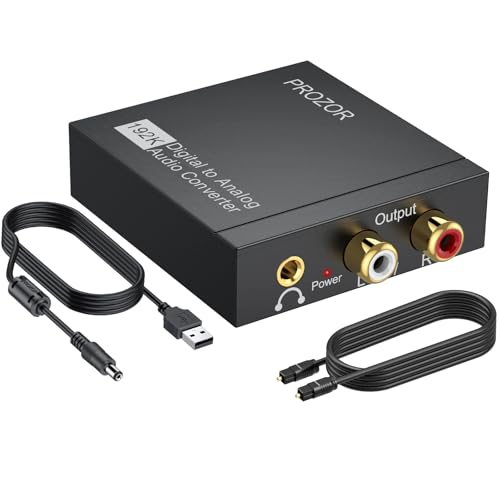
Best for: Sending optical or coaxial digital audio from a TV or game console to analog RCA equipment or a 3.5mm audio input. It is another opposite-direction option, not a solution for converting AUX output to optical input.
The PROZOR converter changes digital PCM signals to analog RCA and 3.5mm audio simultaneously. It supports two-channel uncompressed PCM/LPCM and lists sampling rates of 32, 44.1, 48, 96, and 192 kHz. Its instructions emphasize setting the source device’s audio output to PCM or LPCM.
Why it was selected: The connector names can make digital-to-analog converters easy to confuse with analog-to-digital models. This example makes the direction clear for shoppers comparing optical and 3.5mm equipment.
Limitation: It does not support optical output and is not described as a multichannel 5.1 decoder. Avoid it if the source signal is analog or the receiving device needs optical input.
Buying Guide: How to Choose an AUX-to-Optical Converter
Which direction does the audio need to travel?
Identify the source and destination before choosing a converter. A 3.5mm headphone jack sends analog audio. An optical Toslink input receives digital audio. To connect those two, the converter must accept analog input and provide optical digital output. Product listings may use similar terms for devices that perform the reverse conversion, so check the words “input” and “output,” not just the connector names.
A DAC usually means digital-to-analog converter: optical or coaxial audio goes in, and analog RCA or 3.5mm audio comes out. An analog-to-digital converter takes analog RCA or AUX audio and sends a digital signal to optical or coaxial equipment. These directions are not interchangeable unless a device specifically supports both.
Does a 3.5mm-to-Toslink cable convert the signal?
Usually, a standard 3.5mm cable carries analog stereo audio; a Toslink cable carries digital optical audio. A cable alone cannot perform the required analog-to-digital conversion. Use an active converter with a 3.5mm analog input and optical digital output. The converter also needs power when its design requires it.
What audio format should you select?
Check the converter’s supported format and set the source device to match. The two analog-to-digital products listed here specify PCM/LPCM support; the Hdiwousp model specifies uncompressed two-channel LPCM. If the source is set to Dolby Digital, DTS, or another unsupported format, the converter may not provide usable output. For a simple headphone-jack source, stereo PCM is generally the format to look for in the device settings.
What should you check about the receiving device?
Confirm that the soundbar, receiver, or other destination has an optical digital input—not only an optical output. Also check that it accepts the converter’s output format and sample rate. Optical ports are often marked “Optical In,” “Digital Audio In,” or “Toslink In.” The port direction matters: an optical output cannot serve as an input simply because the connector fits.
When is an HDMI audio extractor a better choice?
Choose an HDMI audio extractor when the source audio is carried over HDMI and you want to separate it for an optical or analog connection. It is not the right product for an analog headphone jack. Check HDMI version, video resolution, copy-protection support, channel modes, and whether the device supports your exact source and display arrangement.
How should you connect and troubleshoot the setup?
- Connect the source’s 3.5mm headphone output to the converter’s analog input.
- Connect the converter’s Toslink output to the receiving equipment’s optical input.
- Connect the converter’s required power supply, if specified.
- Set the source audio format to PCM or LPCM when the converter requires it.
- Select the optical input on the receiver or soundbar and check its volume settings.
- If there is no sound, verify the converter’s direction, port selection, power, and audio format.
Frequently Asked Questions
Can I connect a 3.5mm headphone jack directly to an optical input?
No. A headphone jack provides analog audio, while an optical input expects digital audio. Use an active analog-to-digital converter with a 3.5mm input and Toslink output.
Will a regular AUX-to-Toslink cable work?
A passive cable does not convert analog audio into optical digital audio. Choose a powered converter that explicitly lists analog 3.5mm input and optical digital output.
Can a digital-to-analog DAC work in reverse?
Not unless the product specifically supports reverse conversion. The Hdiwousp DAC and PROZOR model listed above convert digital input to analog output, so they are not suitable for AUX-to-optical conversion.
Do these converters support surround sound?
The analog-to-digital models featured as direct matches specify PCM/LPCM stereo support. Do not assume they encode surround sound. Check the product’s stated channel and format support before purchase.
Does the converter need external power?
The featured analog-to-digital models list USB or power-adapter power requirements. Check the included connection instructions and use the specified power source for reliable operation.