
If you need an ASIO-compatible USB sound card, none of the five products listed here explicitly confirms ASIO driver support. They are USB audio adapters with features such as stereo headphone and microphone jacks, surround sound, or digital output. The Sabrent is best for basic headphone-and-mic connections, while the StarTech and Cubilux offer more surround and connection options. Check the sound card’s driver documentation and your audio software’s device list before buying specifically for ASIO.
| Product | Best suited for | Listed audio features |
|---|---|---|
| Sabrent AU-MMSA | Basic stereo audio | 3.5mm headphone and microphone jacks |
| StarTech ICUSBAUDIO7D | Analog and digital connections | Up to 7.1 surround, SPDIF, 3.5mm audio |
| Cubilux 7.1 USB Sound Card | Surround audio and input options | 7.1 surround, line-in, stereo mic-in |
| 1Mii USB Sound Card | Gaming and voice chat | Virtual 7.1, inline controls, 6-foot cable |
| USB Audio Adapter for PC and PS5/PS4 | Simple headphone-and-mic connection | USB to 3.5mm, plug and play |
Sabrent AU-MMSA Stereo USB Sound Card

The Sabrent AU-MMSA is a compact option for adding separate headphone and microphone connections through USB. Its listed features include plug-and-play operation, no driver requirement, Windows and Mac support, and 3.5mm headphone and mic jacks.
Best for: Buyers who need a straightforward stereo adapter for a computer with a missing, damaged, or inconvenient audio jack. The separate headphone and microphone connections make it a practical choice for basic listening and voice input.
Why it stands out: Its feature set is simple and clearly described. Buyers who do not need surround sound or digital output can focus on the core USB-to-3.5mm function.
ASIO note: The product details do not state that it includes an ASIO driver or supports ASIO in audio software. Do not assume plug-and-play operation means ASIO compatibility.
Limitation: The listed connections are stereo headphone and microphone jacks; the product description does not specify multichannel surround or SPDIF output.
StarTech 7.1 USB Audio Adapter
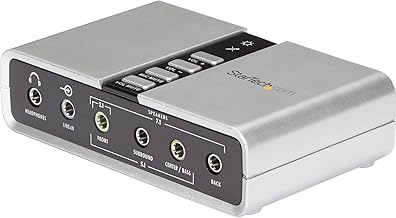
The StarTech ICUSBAUDIO7D is an external sound card for laptops and PCs. Its listed features include support for up to 7.1 surround sound, digital SPDIF, and analog 3.5mm audio connections.
Best for: Buyers who want more connection choices than a basic stereo USB adapter provides. It is better suited to a setup where both digital SPDIF and analog audio connections matter.
Why it stands out: The stated combination of surround sound and digital and analog outputs makes this the most connection-flexible option in this list. It may be a better match for users connecting different audio equipment, provided the required connections align with their setup.
ASIO note: The product information does not confirm ASIO driver support, sample-rate options, or compatibility with particular audio applications. Confirm those details with the manufacturer before relying on it for low-latency production.
Limitation: The feature listing says “up to 7.1,” not that every connected device or software configuration will use 7.1 audio. Check the intended system’s connection requirements.
Cubilux 7.1 USB Surround Sound Card

The Cubilux USB adapter is listed as a 7.1 surround sound card with a stated sample-rate range of 48 kHz to 384 kHz. The product description also names a full aluminum-alloy body, USB-A connection, line-in, and stereo microphone input.
Best for: Buyers seeking a USB-A audio adapter with surround-sound capability and separate input options. Line-in and stereo mic-in are useful features to compare when a setup needs more than a headphone output.
Why it stands out: Its listed sample-rate range and input connections provide more specification detail than the basic stereo adapters in this selection. It is a stronger candidate for buyers comparing audio formats and input types, as long as the listed connections suit their equipment.
ASIO note: The supplied product details do not identify an ASIO driver. A high listed sample rate alone does not establish ASIO compatibility or guarantee low-latency performance.
Limitation: The product is described as USB-A. Buyers whose computers lack a matching port should verify whether their existing connection setup can accommodate it.
1Mii USB Sound Card With Virtual 7.1

The 1Mii USB sound card is described as a 3.5mm audio adapter with virtual 7.1 for PC and laptop use. Its listed features include plug-and-play operation without a driver, direct volume and mute controls, and a six-foot braided cable. The description names gaming, meetings, and voice chat as use cases.
Best for: Buyers who want convenient controls and a longer cable for gaming or communication. The volume and mute controls are useful when audio needs to be adjusted quickly without opening software menus.
Why it stands out: Unlike the simpler adapters, this model explicitly lists inline control functions and a six-foot cable. It is a practical comparison choice when cable reach and quick muting matter more than digital outputs or studio-specific features.
ASIO note: “No driver needed” does not confirm an ASIO driver. If ASIO is essential for recording or music production, verify the device’s driver support and compatibility with the software you plan to use.
Limitation: The listed surround feature is virtual 7.1, not a specification for physical multichannel outputs. The provided details also do not state SPDIF support.
USB Audio Adapter for PC and PlayStation

This USB-to-3.5mm adapter is listed for PC, computer, laptop, PS5, and PS4. Its description names plug-and-play operation, no required drivers, a 3.5mm headphone connection, and a 3.5mm microphone connection. It is also listed for Windows and Mac.
Best for: Buyers who want a basic headphone-and-microphone adapter and value the product’s stated computer and console use cases. It is a simple option to compare when surround sound, advanced inputs, or digital output are not listed requirements.
Why it stands out: The description explicitly names several platforms and the two common 3.5mm audio functions. That makes it relevant to buyers looking for a general-purpose adapter rather than a feature-rich external interface.
ASIO note: The product details do not state ASIO support. Platform mentions and driver-free setup should not be treated as confirmation that a Windows audio application can select it as an ASIO device.
Limitation: The listed features focus on headphone and microphone connections. The description does not specify surround sound, SPDIF, or a dedicated ASIO driver.
Buying Guide: How to Choose a USB Sound Card for ASIO
Does the adapter need to explicitly support ASIO?
Yes, if your audio software requires an ASIO device or driver. ASIO is an audio driver interface used by some Windows music and recording applications. A USB sound card’s physical connection, sample-rate specification, or plug-and-play description does not by itself prove ASIO support.
Check the product’s official documentation for a named ASIO driver or confirmed ASIO compatibility. Then check whether your software can select that device. If neither source confirms support, treat ASIO compatibility as unknown rather than assuming it will work.
Which connection type fits your equipment?
Start by listing the connections required by your headphones, microphone, speakers, and computer. The Sabrent and the USB adapter listed for PC and PlayStation describe headphone and microphone jacks. StarTech lists SPDIF as well as analog 3.5mm audio. Cubilux lists line-in and stereo mic-in. These are not interchangeable feature sets.
Also check the USB connector your computer can accept. Cubilux is specified as USB-A. The other product summaries do not provide enough detail here to compare connector types across every model.
Do you need stereo, virtual surround, or 7.1?
For basic headphone listening and microphone use, a stereo adapter may be sufficient. The 1Mii description specifically says virtual 7.1, while StarTech and Cubilux are described as supporting 7.1 surround. Compare the stated type of surround feature rather than treating all “7.1” descriptions as identical.
Surround support is most relevant when your content, software, and connected audio equipment can use it. If your priority is recording or low-latency audio, confirm the driver and application support separately; surround labeling does not answer those questions.
How important are controls and cable length?
Consider day-to-day operation. The 1Mii model lists direct volume and mute controls and a six-foot braided cable, which may suit a desk or communication setup where reach and quick access matter. The other product details do not list the same controls, so do not assume they include them.
What sample-rate information should you compare?
Cubilux lists a range from 48 kHz to 384 kHz. That is useful specification information, but it does not establish actual performance in a particular application or confirm ASIO support. For music production, compare the device’s documented driver options, supported sample rates, input and output channels, and the settings available in your recording software.
What should you verify before ordering?
- Whether the product documentation explicitly confirms ASIO support if your workflow requires it.
- Whether your computer has the USB port the adapter uses.
- Whether the adapter provides the exact headphone, microphone, line-in, or SPDIF connections you need.
- Whether the product’s stated operating-system or platform support matches your setup.
- Whether your audio application can select the adapter and use the desired channel configuration.
Frequently Asked Questions
Does a plug-and-play USB sound card automatically support ASIO?
No. Plug-and-play describes setup, not ASIO compatibility. Confirm that the manufacturer documents an ASIO driver or that your audio software explicitly supports the device through ASIO.
Which listed product is best for a basic headphone and microphone setup?
The Sabrent AU-MMSA is a clear basic option because its listed features include separate 3.5mm headphone and microphone jacks, USB audio, and no-driver setup for Windows and Mac.
Which listed USB sound card has SPDIF?
The StarTech ICUSBAUDIO7D is the product in this selection whose description explicitly lists digital SPDIF alongside analog 3.5mm audio.
Does a high sample-rate specification prove low latency?
No. Cubilux lists a 48 kHz to 384 kHz sample-rate range, but that information alone does not establish latency or ASIO support. Check driver documentation and application settings for those requirements.
Is virtual 7.1 the same as physical 7.1 output?
Not necessarily. The 1Mii description specifically calls its feature virtual 7.1. Compare that wording with products that list 7.1 surround and verify the actual outputs and software support you need.
Can these products be recommended as confirmed ASIO sound cards?
Not from the supplied product details. None of the five descriptions explicitly confirms ASIO driver support, so verify that requirement with the manufacturer before choosing one for an ASIO-dependent workflow.