
The best Android car play device depends on whether you want a simple wireless adapter or a broader in-car entertainment system. The Teeran and Spedal adapters suit households switching between iPhone and Android, while the OTTOCAST Play2Video Ultra adds video apps for use when parked. These devices generally require a vehicle with factory-wired CarPlay or Android Auto, so check your car’s existing system before choosing.
| Product | Best For | Key Difference |
|---|---|---|
| Teeran 2 in 1 Adapter | Mixed-phone households | Claims broad vehicle coverage and automatic reconnection |
| TECHLANE 2-in-1 Adapter | USB-A or USB-C ports | Includes both connector types |
| Butook 2 in 1 Adapter | Buyers who want a straightforward setup | Uses Bluetooth 5.3 and includes a USB-C adapter |
| OTTOCAST Play2Video Ultra | Parked-car entertainment | Adds an Android system and video apps |
| Spedal 2-in-1 Adapter | Drivers who prefer a compact device | Small stick-style design |
Teeran 2 in 1 Wireless Adapter

The Teeran adapter converts a compatible factory-wired CarPlay or Android Auto system to a wireless connection. It supports both platforms, making it a practical option when drivers in the same household use different phone operating systems.
- Best for: Families or shared-car drivers who switch between iPhone and Android.
- Why it stands out: The listing describes automatic reconnection, dual-band 2.4GHz and 5GHz chips, and support for factory controls such as touchscreens, steering-wheel buttons, rotary knobs, and voice commands.
- Phone requirements: The product details specify iPhone 6 or later and Android 11 or later.
Teeran states that the adapter supports more than 1,000 vehicle models, but compatibility still depends on the car having the required factory-wired system. Limitation: It will not add CarPlay or Android Auto to a vehicle that lacks a compatible wired system.
TECHLANE 2-in-1 Wireless Adapter

The TECHLANE adapter is designed to make wired CarPlay or Android Auto wireless, with support for both iOS and Android. Its USB-A and USB-C connectors are a useful distinction for buyers checking the ports in an older or newer vehicle.
- Best for: Drivers who need flexibility between USB-A and USB-C ports.
- Why it stands out: The listed features include 5GHz Wi-Fi, Bluetooth 5.4, automatic connection after startup, and plug-and-play setup without an app download.
- Consider it if: You want one adapter to serve drivers with iPhones and Android phones.
The product description names vehicles from brands such as Mazda, Honda, Mercedes-Benz, and Lexus, but those examples do not guarantee compatibility with every model or year. Limitation: The listing’s broad compatibility language does not replace checking whether your specific vehicle has factory-wired CarPlay or Android Auto.
Butook 2 in 1 Wireless Adapter

The Butook adapter offers wireless access to CarPlay and Android Auto in vehicles that already support the wired versions. The listing specifies Android 11 or later for Android Auto and describes support for iOS 10 and later, along with an included USB-C adapter.
- Best for: Buyers seeking a basic two-platform adapter with a USB-C adapter included.
- Why it stands out: Its stated features include Bluetooth 5.3, automatic switching, and access to navigation, music, Siri, calls, and radio functions through the car system.
- Setup detail: The instructions say to allow approximately 20–30 seconds for a phone prompt, then select the option to use CarPlay.
Limitation: The listed setup process may take longer than an instant connection, and compatibility requires a vehicle with wired CarPlay or Android Auto. Confirm the vehicle and phone requirements before buying.
OTTOCAST Play2Video Ultra
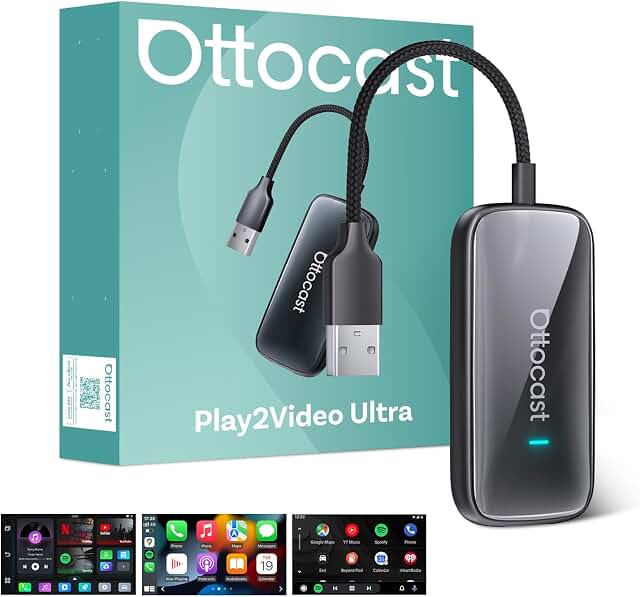
The OTTOCAST Play2Video Ultra combines wireless CarPlay and Android Auto conversion with an Android-based entertainment system. The listing describes built-in Netflix and YouTube, plus support for offline video playback from a USB drive up to 128GB.
- Best for: Drivers who want entertainment options on the vehicle display while parked.
- Why it stands out: It supports both iOS and Android phones, uses Wi-Fi 6 and Bluetooth 5.4 according to the listing, and offers a one-click switch between its video system and CarPlay or Android Auto.
- Useful for: Road-trip stops or waiting in a parked vehicle, where video playback can be used appropriately.
Limitation: The listing says the device does not support cars that already have wireless CarPlay or wireless Android Auto. Video viewing should be reserved for when the vehicle is safely parked; it is not a reason to watch a screen while driving.
Spedal 2-in-1 Wireless Adapter

The Spedal adapter is a compact option for converting a compatible wired system to wireless CarPlay or Android Auto. Its stick-style shape plugs directly into a USB port, which may appeal to drivers who want to avoid a dongle with dangling cables.
- Best for: Drivers who prioritize a small, low-profile adapter.
- Why it stands out: It supports iPhone and Android, and the listed features describe automatic phone identification and switching between the two systems.
- Connection features: The product description specifies Wi-Fi 6 and Bluetooth 5.4, along with a heat-resistant design and internal thermal design.
Limitation: A compact stick design may not suit every vehicle’s port placement. Check that the adapter can connect securely and that the car has factory-wired CarPlay or Android Auto before selecting it.
Buying Guide: How to Choose an Android Car Play Device
Does your car need wired CarPlay or Android Auto?
Most products in this list are wireless adapters, not standalone replacements for a car stereo. They convert a compatible factory-wired connection into a wireless one. Before shopping, check your owner’s manual or vehicle settings to confirm that the car already supports wired CarPlay, Android Auto, or both. A USB port alone does not confirm compatibility.
Also distinguish between wired and wireless factory systems. Several adapters are intended for cars that have wired functionality but do not already provide wireless CarPlay or Android Auto. The OTTOCAST listing explicitly excludes vehicles that already have wireless versions.
Do you need Android Auto, CarPlay, or both?
Choose a two-in-one adapter if drivers in the car use both iPhones and Android phones. These products are intended to support CarPlay and Android Auto, but phone requirements vary. The Teeran listing specifies Android 11 or later and iPhone 6 or later. Butook specifies Android 11 or later and iOS 10 or later. Check current device and vehicle requirements before ordering.
If everyone uses the same phone platform, a two-system adapter may still be convenient, but the main benefit is switching between platforms without changing devices or cables. For a shared car, confirm that the adapter can pair with each driver’s phone as described in its instructions.
Which connection and port details matter?
Check whether the car’s data-capable USB port is USB-A or USB-C. TECHLANE lists both connector types, while Butook says it includes a USB-C adapter. Connector fit is only one part of compatibility: the port must also support the vehicle’s wired CarPlay or Android Auto connection.
Wireless adapters use Bluetooth and Wi-Fi to link a phone to the car system. Product descriptions cite different versions and bands, but those specifications do not guarantee identical performance in every vehicle. Dashboard layout, phone settings, and the car’s original system can affect the setup experience.
Is a simple adapter enough, or do you want video features?
A standard adapter is the more direct choice if your goal is wireless navigation, calls, and music through CarPlay or Android Auto. The Teeran, TECHLANE, Butook, and Spedal products focus on this conversion.
The OTTOCAST Play2Video Ultra adds an Android interface and video-app features. That can be relevant for parked-car entertainment, but it also makes the device more than a basic wireless adapter. Follow local laws and use video only when the vehicle is parked safely.
What should you check before buying?
- Confirm your vehicle has factory-wired CarPlay or Android Auto.
- Check the adapter’s supported phone operating systems and minimum versions.
- Match the adapter connector to the vehicle’s compatible USB port.
- Review setup instructions, including any required pairing prompt or initial wait.
- Check whether the car already has wireless CarPlay or Android Auto, since some adapters are not intended for those vehicles.
- Consider whether you need both phone platforms, a low-profile design, or additional parked-car entertainment features.
Frequently Asked Questions
What is an Android car play device?
The phrase commonly refers to a device that brings Android Auto to a car display or makes an existing wired Android Auto connection wireless. In this list, most products also support Apple CarPlay.
Will a wireless adapter add Android Auto to any car?
No. These adapters generally require factory-wired Android Auto or CarPlay. Check the specific product and vehicle requirements before buying.
Can one adapter work with an iPhone and an Android phone?
The listed two-in-one adapters are designed to support both CarPlay and Android Auto. Phone operating-system requirements differ by product, so verify the details for the model you choose.
Do these devices make factory-wired CarPlay wireless?
Yes, that is the stated purpose of the adapters in this guide. They are designed to convert a compatible wired system to a wireless connection rather than replace the vehicle’s infotainment system.
Can I watch video while driving with the OTTOCAST device?
Video features should be used only while the vehicle is safely parked. Do not watch video while driving, and follow applicable local rules.
Why might an adapter fail to connect?
Possible causes include an incompatible vehicle system, an unsupported phone version, using the wrong USB port, or incomplete pairing. Check the product’s setup instructions and confirm that the car supports the required wired system.