
The best USB headset for working from home depends on whether you prioritize call-focused noise cancellation, simple controls, lightweight comfort, or versatile audio connections. The Yealink UH37 is the most office-oriented option in this group, while the Logitech H390 models offer straightforward USB-A calling. The Lenovo headset emphasizes a lightweight design and app-assisted noise cancellation, and the HyperX Cloud III is better suited to buyers who also want gaming features.
| Headset | Best For | Connection Or Notable Feature |
|---|---|---|
| Yealink UH37 | Work calls | Wired USB headset with noise-canceling mic |
| Lenovo USB-A Stereo Headset Gen 2 | Lightweight work use | 140 g; app-assisted noise cancellation |
| Logitech H390 Black | Simple everyday meetings | USB-A and in-line controls |
| Logitech H390 Rose | Buyers who prefer rose color | USB-A and in-line controls |
| HyperX Cloud III | Work and gaming | USB-C, USB-A, and 3.5 mm connections |
Yealink UH37 USB Headset

The Yealink UH37 is a wired PC headset with a noise-canceling microphone. Its work-call focus makes it a strong candidate for people who spend much of the day in meetings and want a headset designed around voice communication rather than gaming. Choose it if microphone noise reduction is a priority in your home office.
The product name identifies it as a wired headset for PC. That makes it a straightforward option for a desk setup where a cable is acceptable and charging a wireless headset is not desired. Its noise-canceling mic is the clearest work-oriented feature listed.
- Best for: Remote workers who prioritize a noise-canceling microphone.
- Why it was selected: It is explicitly described as a USB headset with a noise-canceling mic for PC.
- Limitation: The supplied product details do not specify cable connector type, controls, weight, or compatibility with particular meeting applications. Check those requirements before choosing.
Lenovo USB-A Stereo Headset Gen 2

The Lenovo USB-A Wired Stereo Headset Gen 2 is best for home workers who want a light headset with a boom microphone and direct call controls. Lenovo lists a weight of 140 g, replaceable earcups, a double-sided boom mic, and an in-line control box with mute. These features make it a practical choice for people who wear a headset regularly and want to reach mute and volume controls without navigating software menus.
The product description says Lenovo Accessories and Device Manager software enhances noise cancellation. It also names Teams and Zoom as supported use cases. The AI noise-canceling feature is tied to the app, so buyers should consider whether installing and using that software fits their work computer setup.
- Best for: People seeking a lightweight wired headset with an adjustable call-focused feature set.
- Why it was selected: It combines USB-A, a boom mic, in-line mute and volume controls, replaceable earcups, and stated app-based noise cancellation.
- Limitation: The listed noise-cancellation enhancement depends on Lenovo software; the supplied details do not describe performance without the app.
Logitech H390 USB Headset, Black

The Logitech H390 in black is a good fit for remote workers who want a wired USB-A headset with practical controls for calls. Logitech lists fine-tuned drivers for digital stereo sound, a rotating noise-canceling microphone, and in-line volume and mute controls. The rotating boom can be moved out of the way when it is not needed, which is useful for people who switch between calls and other audio tasks.
This model is a straightforward choice for a desk where USB-A is available. Its controls are built into the headset cable, so adjusting volume or muting a call does not require searching for the meeting window. The product information describes it for PC and laptop use, but does not specify a particular operating system or meeting app.
- Best for: Buyers who want simple call controls and a retractable-position boom mic.
- Why it was selected: The listed features cover stereo sound, microphone noise reduction, and accessible mute and volume controls.
- Limitation: It uses USB-A, so it may require an adapter if the computer has no compatible USB-A port.
Logitech H390 USB Headset, Rose

The rose Logitech H390 offers the same listed work features as the black H390, making it best for someone who wants those features in a different color. It is a wired USB-A stereo headset for PC and laptop use. The fine-tuned drivers are described as suitable for calls, meetings, music, and other audio.
Its rotating noise-canceling mic is designed to minimize unwanted background noise, and the boom arm can be moved aside when not in use. In-line controls provide access to volume and mute on the cable. If you are comparing the two H390 color listings, the supplied feature information does not identify a functional difference between them.
- Best for: Buyers who prefer a rose-colored headset with the H390’s listed meeting controls.
- Why it was selected: It provides a color alternative while retaining the same USB-A, stereo sound, rotating mic, and in-line controls described for the H390.
- Limitation: This is not a different feature set from the black H390 based on the supplied details; choose it primarily for its color.
HyperX Cloud III Wired Headset
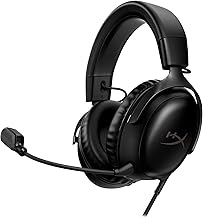
The HyperX Cloud III is better for someone who wants one wired headset for both remote work and gaming. Its listed features include angled 53 mm drivers, spatial audio, memory foam, a durable frame, and a 10 mm microphone. It includes USB-C, USB-A, and 3.5 mm connections, offering more connection options than the USB-A-only headsets in this selection.
For work, the ultra-clear mic and multiple connection types are relevant, while the gaming-focused audio features may appeal to people who use their headset beyond meetings. Choose it if that versatility matters more than having a headset described specifically around office calling.
- Best for: Remote workers who also want gaming-oriented audio features and multiple connection options.
- Why it was selected: It offers a listed 10 mm mic, memory foam, spatial audio, and USB-C, USB-A, and 3.5 mm connections.
- Limitation: Its product description emphasizes gaming. Buyers seeking an office-first headset may prefer a model whose listed features focus on calls and in-line work controls.
Buying Guide: How To Choose A Work-From-Home USB Headset
Which connection does your computer use?
Check your computer’s available ports before choosing a wired headset. The Logitech H390 models and Lenovo headset list USB-A connections. The HyperX Cloud III lists USB-C, USB-A, and 3.5 mm connections. The supplied Yealink description does not state the connector type, so verify that detail if you are considering it.
A USB-A headset is convenient when your computer has an open USB-A port. If your laptop has only USB-C, a model with USB-C listed may be more suitable, or you may need to confirm whether an appropriate adapter is available. Do not assume that every headset includes an adapter unless the product details say so.
Do you need microphone noise cancellation?
Microphone noise cancellation is a relevant feature for calls in a shared room or a home with background activity. The Yealink UH37 is described as having a noise-canceling mic. The Logitech H390 listings say the rotating noise-canceling mic minimizes unwanted background noise. Lenovo describes app-assisted noise-cancellation enhancement through its software.
These descriptions do not provide a shared measurement or guarantee that all ambient sounds will be removed. If your work environment is noisy, compare the listed mic features and consider whether your organization allows any required companion software.
Are physical controls important during meetings?
In-line mute and volume controls can make common adjustments easier while a meeting is in progress. Both H390 listings include those controls, and the Lenovo headset lists an in-line control box with call functions, volume, and mute. The supplied details for the Yealink and HyperX do not describe comparable controls, so check the full listing if physical controls are essential to your routine.
How much comfort detail is available?
For long calls, weight and earcup design can influence comfort, but the available details vary by product. Lenovo lists a weight of 140 g and replaceable earcups. HyperX lists memory foam. The provided information does not state the weight or cushion material for the other models, so avoid comparing their comfort based on assumptions.
If you wear glasses or use a headset for several hours, consider how the headband and earcups feel in practice. Product descriptions alone may not reveal individual fit preferences. Replaceable earcups are a specific maintenance-related feature listed for the Lenovo model, but the supplied information does not describe replacement availability or process.
Should you choose an office headset or a gaming headset?
An office-oriented model is a sensible starting point when calls are the main purpose. The Yealink and Lenovo descriptions emphasize microphone and work-use features, while the H390 emphasizes meeting controls and a rotating mic. HyperX Cloud III adds gaming-oriented features such as spatial audio and angled drivers, so it is better suited to buyers who want broader entertainment use as well.
For a headset used only for calls, prioritize connection fit, microphone features, and accessible mute controls. For combined work and gaming, weigh the HyperX’s multiple connection types and audio features against the more explicitly work-focused feature descriptions of the other options.
Frequently Asked Questions
What is the best USB headset for working from home?
There is no single best choice for every home office. The Yealink UH37 is a strong match when a noise-canceling mic is the priority. The Lenovo model suits buyers seeking a lightweight headset with in-line controls, while the Logitech H390 is a straightforward USB-A option.
Which headset in this list has USB-C?
The HyperX Cloud III lists USB-C, USB-A, and 3.5 mm connections. The Lenovo and Logitech H390 listings specify USB-A. The supplied Yealink product details do not identify its connector type.
Do the Logitech H390 models have the same features?
The black and rose H390 listings provide the same features: digital stereo sound, a rotating noise-canceling microphone, and in-line volume and mute controls. The supplied information distinguishes them by color, not by functionality.
Is a wired headset suitable for remote work?
A wired headset can suit remote work if its cable reaches your work area and its connector matches your computer. These listed models are wired, so they do not require a wireless connection for audio. Their cable length is not provided in the supplied details.
Does the Lenovo headset require software for noise cancellation?
The Lenovo description says Lenovo Accessories and Device Manager software enhances noise cancellation. It does not explain how the microphone performs without that software, so check the product information and workplace software policies before buying.