
For computer-based music creation, the PreSonus Eris 3.5 and Edifier MR3 are the clearest studio-monitor choices in this group. The Ortizan C7 suits buyers who want studio-style monitoring with USB, Bluetooth, and analog inputs. OHAYO is a compact bookshelf-style option, while FUNLOGY is better for simple everyday desktop audio than critical monitoring. Compare the connection types, driver sizes, and intended use before choosing.
| Product | Best For | Standout Listed Feature |
|---|---|---|
| PreSonus Eris 3.5 | Music production and general listening | 50W amplification and 80 Hz–20 kHz range |
| Edifier MR3 | Monitoring with varied connections | Balanced TRS, RCA, AUX, Bluetooth |
| Ortizan C7 | USB and wireless desktop setups | 24-bit USB DAC and Bluetooth 5.3 |
| OHAYO 60W | Compact home office or gaming audio | Front volume control and MDF enclosure |
| FUNLOGY 14W | Simple, space-saving computer sound | USB power and 30-degree tilt |
PreSonus Eris 3.5 Powered Studio Monitors

The PreSonus Eris 3.5 is a powered stereo pair presented for music production, gaming, movies, streaming, and everyday audio. Its stated 50 watts of built-in amplification is intended to deliver dynamic sound, and its 3.5-inch woven-composite woofers and 1-inch silk-dome tweeters divide low and high frequencies between dedicated drivers.
The listed frequency range is 80 Hz to 20 kHz. That gives buyers a concrete specification to compare when evaluating desktop speakers, although it does not describe performance in every room or at every listening position.
- Best for: Desktop creators and listeners who want a stereo pair described for both production and entertainment.
- Why it stands out: The listed power, woofer and tweeter sizes, and frequency range make its core specifications easy to compare.
- Consider: The supplied product details do not identify its input connections, so check the listing to confirm it suits your computer’s outputs.
Edifier MR3 Powered Studio Monitor

The Edifier MR3 is a practical choice for a desktop setup that needs more than one kind of audio connection. Its listed inputs include balanced TRS, RCA, and AUX, and it also has Bluetooth with multipoint connection. The product information says RCA and AUX inputs allow simultaneous connections with more audio devices.
For sound output, the MR3 lists 18 watts RMS per channel, a 3.5-inch mid-low driver, and a 1-inch tweeter. It also lists a 52 Hz–40 kHz response and Hi-Res Audio certification. These specifications make it a strong candidate for buyers comparing monitoring and everyday listening features in one speaker system.
- Best for: Users switching among a computer, other wired sources, and Bluetooth devices.
- Why it stands out: The range of named inputs makes source planning straightforward, while the driver and response specifications help with comparison.
- Consider: Confirm which connection is appropriate for your audio interface or computer; the product information does not describe included cables.
Ortizan C7 Powered Studio Monitors

The Ortizan C7 combines several connection options with a two-driver design. Its listed connections include USB, RCA, 3.5 mm AUX, and Bluetooth 5.3. The built-in 24-bit DAC is described as receiving digital audio over USB, which may appeal to computer users who want a direct USB audio path rather than relying only on an analog output.
Each speaker design uses a 3.5-inch carbon-fiber mid-bass driver and a 0.75-inch silk-dome tweeter, with an electronic two-way crossover. The product description positions the C7 for accurate monitoring as well as music, movies, and games.
- Best for: Buyers who want a studio-monitor-style pair with USB, wireless, and analog connection choices.
- Why it stands out: The USB DAC and multiple listed inputs offer flexibility for a computer-centered workspace.
- Consider: The supplied details do not state an output-power figure, so compare that specification with other models if loudness is a priority.
OHAYO 60W Computer Speakers

OHAYO’s 2.0 bookshelf-style speakers are aimed at compact desktop setups, home offices, and gaming stations. The listed system provides 30 watts per speaker, with a 0.75-inch carbon-fiber silk-dome tweeter and a 3-inch carbon-fiber full-range driver. A rear bass port is included to support low-frequency output.
The MDF wooden enclosure is described as reducing box resonance, and an independent sound card is listed as part of the design. A front-panel volume knob provides a direct way to adjust sound. Bluetooth 5.3 is included, but the supplied features do not specify a full set of wired inputs.
- Best for: Desktop users who want compact bookshelf-style speakers with Bluetooth and easy-to-reach volume control.
- Why it stands out: Its driver details, stated 60-watt total output, and space-saving positioning fit a small-room computer setup.
- Consider: Buyers who need a specific wired connection should verify that input before purchasing; it is not identified in the supplied feature list.
FUNLOGY Compact USB PC Speakers
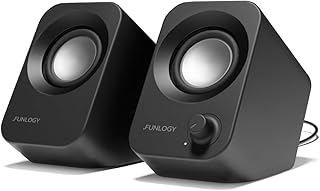
FUNLOGY is the most compact and straightforward computer-speaker option in this selection. It is USB powered and lists 14 watts of total output, dual 48 mm full-range drivers, and passive radiators. Its 30-degree upward tilt is designed to direct sound toward a seated desktop listener while keeping the speaker footprint small.
The product includes USB and 3.5 mm cables, and the listed setup does not require driver installation or Bluetooth pairing. It is described for desktop PCs, laptops, monitors, smartphones, and gaming consoles. However, its listed features do not position it as a studio monitor for critical mixing.
- Best for: Buyers who prioritize simple setup, small size, and everyday computer audio.
- Why it stands out: USB power, a 3.5 mm connection, and an angled design suit a basic desktop arrangement.
- Consider: Choose a more explicitly monitoring-focused model if you need speakers for production decisions or detailed mix checking.
Buying Guide: How To Choose Computer Studio Monitors
Do you need studio monitors or general computer speakers?
Studio monitors are intended to make audio details easier to assess during recording, editing, or mixing. General computer speakers are often chosen for games, video, calls, and music listening. The product descriptions here identify the PreSonus Eris 3.5, Edifier MR3, and Ortizan C7 as studio-monitor or monitoring options. OHAYO is described as a bookshelf-style computer speaker, and FUNLOGY as a compact PC speaker.
Choose based on your main task. If you produce audio, prioritize a model whose stated purpose and connections suit your workflow. If you mainly want sound for a laptop or desktop, USB-powered or Bluetooth options may be more convenient. A speaker marketed for monitoring does not automatically replace careful listening in your room.
Which connections should you check first?
Match the speaker inputs to the outputs on your computer, audio interface, or other sources. A 3.5 mm output is common on some computers, while an interface may offer balanced TRS connections. USB audio can provide a direct digital route when supported by the speaker. Bluetooth is convenient for wireless playback, but wired connections may better suit a fixed production setup.
- For several wired sources: The Edifier MR3 lists TRS, RCA, and AUX inputs.
- For USB and wireless options: The Ortizan C7 lists a USB DAC and Bluetooth 5.3.
- For basic plug-in computer audio: FUNLOGY includes USB and 3.5 mm cables.
- For Bluetooth desktop listening: OHAYO lists Bluetooth 5.3, but verify wired inputs separately.
Do not assume a cable, adapter, or connection is included unless the product listing says so. Check whether the computer’s output is analog or digital and whether any needed interface or adapter is part of your setup.
How much do driver size and frequency range matter?
Driver size is one useful comparison point, not a guarantee of sound quality. The listed woofer or mid-bass sizes range from FUNLOGY’s 48 mm full-range drivers to 3.5-inch drivers in the Edifier and Ortizan models. PreSonus lists 3.5-inch woofers and a frequency range of 80 Hz–20 kHz; Edifier lists 52 Hz–40 kHz. Specifications use different methods and do not alone establish how a speaker will sound in your room.
Small desktop speakers can be easier to place, but they may not provide the same low-frequency reach as a larger system. If deep bass matters for your work or listening, compare published frequency specifications and consider whether your workflow calls for a separate subwoofer. None of the listed details establishes that a subwoofer is included with these choices.
How should you think about output power?
Power figures help distinguish products on paper, but they are not a direct substitute for listening level, room coverage, or sound quality. The supplied information lists 50 watts for the PreSonus pair, 18 watts RMS per channel for Edifier, 60 watts total for OHAYO, and 14 watts total for FUNLOGY. The Ortizan feature list does not provide a power figure.
Compare units carefully: total system output and per-channel RMS output are not necessarily presented in the same way. For a desk near the listener, suitable placement and clear sound at normal working levels may matter more than selecting the largest number.
What size and placement work for a computer desk?
Measure the available desk area, including space for the speakers to sit on either side of the monitor. Consider whether the cabinets will block the screen, interfere with other equipment, or sit too close to the listening position. FUNLOGY emphasizes a compact footprint and upward angle, while OHAYO describes a space-saving bookshelf-style design. The provided information does not give cabinet dimensions for these products, so check the current product listing before planning a tight fit.
For monitoring, place the left and right speakers evenly around the screen and direct them toward the listening position where practical. Avoid assuming that a speaker’s sound will be accurate in every room; furniture, walls, and desk reflections can change what you hear.
Should Bluetooth be a deciding factor?
Bluetooth can make casual playback from a phone or tablet easier and reduce cable clutter. The Ortizan C7 and OHAYO list Bluetooth 5.3, and the Edifier MR3 lists Bluetooth with multipoint connection. FUNLOGY instead emphasizes wired USB power and a 3.5 mm cable. For music production, check whether the connection and playback behavior suit your software and timing needs rather than choosing wireless convenience alone.
Frequently Asked Questions
What are the best studio monitors in this selection for a computer?
The PreSonus Eris 3.5, Edifier MR3, and Ortizan C7 are the most explicitly monitoring-focused options in the supplied product information. Choose among them by comparing listed inputs, output specifications, driver details, and your intended use.
Can I use studio monitors for gaming and movies?
Yes. The PreSonus description specifically includes gaming, movies, streaming, and everyday audio. The Ortizan C7 is also described for movies and games. Check your preferred input method before connecting a computer or console.
Which option has the most connection choices?
The Edifier MR3 lists balanced TRS, RCA, AUX, and Bluetooth. The Ortizan C7 lists USB, RCA, 3.5 mm AUX, and Bluetooth 5.3. Check the product listing for connection details and included cables before buying.
Are the FUNLOGY speakers suitable for audio mixing?
FUNLOGY is described as a compact computer speaker for general desktop use, not as a studio monitor. Buyers making production or mixing decisions should compare the PreSonus, Edifier, and Ortizan options instead.
Do these products include a subwoofer?
The supplied descriptions do not establish that a separate subwoofer is included with any of the five products. OHAYO’s features mention a rear bass port, which is part of its speaker cabinet design, not confirmation of a separate subwoofer.
What should I verify before ordering?
Confirm the speaker’s dimensions, input types, required cables, and compatibility with your computer or audio interface. The product descriptions provide different levels of detail, so check the current listing for any specification that is essential to your setup.