
The best car TV stereo system depends on whether you prioritize simple media playback, smartphone integration, a larger screen, or navigation features. The Leadfan is best for basic touchscreen audio and mirror link; the wireless double-DIN receiver suits CarPlay and Android Auto users; the 10.1-inch model is best for a large display; Haudio adds built-in Android storage and GPS navigation; and Rimoody offers a single-DIN option. These are touchscreen car stereos, not necessarily televisions with broadcast-TV tuners, so check the listed functions and vehicle fit before buying.
| System | Best For | Notable Listed Features |
|---|---|---|
| Leadfan 7-inch double-DIN | Basic media and mirror link | Backup camera, Bluetooth, USB, AUX |
| Wireless double-DIN stereo | CarPlay and Android Auto | Wireless phone integration, RCA outputs |
| 10.1-inch QLED stereo | Large-screen interface | Wireless phone integration, SWC, dual subwoofer output |
| Haudio 9-inch Android stereo | Navigation and onboard storage | GPS, Wi-Fi, 2GB RAM, 64GB storage |
| Rimoody 6.9-inch single-DIN | Single-DIN installation needs | Wireless phone integration, Bluetooth 5.2 |
Leadfan 7-Inch Double-DIN Car Stereo

The Leadfan 7-inch receiver is a practical choice for drivers seeking a touchscreen upgrade with common media connections. Its listed functions include Bluetooth caller ID, FM radio, MP3 and MP4 support, USB, AUX input, mirror link, subwoofer support, and a backup camera. The product name identifies it as a double-DIN unit.
Best for: Buyers who want a touchscreen for everyday audio playback and phone mirroring rather than a feature-rich navigation system. It was selected because its listed inputs and media formats cover several basic in-car listening needs.
Compare it with: The wireless double-DIN models if CarPlay or Android Auto is a priority. The Leadfan listing specifies mirror link, not those phone platforms.
Limitation: The supplied product details do not specify wireless CarPlay or Android Auto. Confirm the stereo’s dimensions and your vehicle’s installation requirements before ordering.
Wireless Double-DIN Stereo With CarPlay
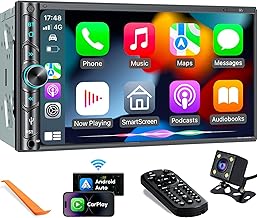
This 7-inch HD capacitive touchscreen receiver lists wireless Apple CarPlay and Android Auto, Bluetooth, a backup camera, and four-channel RCA connections. It also identifies two subwoofer ports and high power as features. The combination makes it relevant to buyers comparing phone integration with options for connecting external audio components.
Best for: Drivers who want wireless access to compatible phone features and are also considering a more involved audio setup. The RCA connections and two subwoofer ports distinguish it from simpler multimedia receivers.
Choose this if: A 7-inch screen is suitable for your dashboard and wireless phone integration is more important than built-in navigation or a larger display. The listing names CarPlay and Android Auto directly.
Limitation: The provided details do not identify the included installation hardware or vehicle compatibility. Check the dashboard opening, wiring needs, and any steering-wheel-control requirements for your car.
10.1-Inch QLED Double-DIN Car Stereo

The 10.1-inch QLED model is the largest-screen option in this selection. Listed features include wireless CarPlay and Android Auto, steering-wheel control support (SWC), Bluetooth, a backup camera, FM/AM radio, navigation, dual subwoofer output, and a music-sync luminous bar. The product name also lists 240W.
Best for: Buyers who want a prominent touchscreen and a broad set of named functions. The display size is the clearest reason to choose it over the 7-inch receivers, while wireless phone integration supports a connected driving setup.
Better for: Drivers whose dashboard can accommodate the larger display and who want to compare radio, phone, camera, and subwoofer features in one receiver. Verify the physical fit carefully; a large screen may affect how the unit sits in the dash.
Limitation: The listing does not provide detailed fitment dimensions in the supplied information. Do not assume that the screen will fit every double-DIN vehicle opening or that navigation works without a connected phone unless confirmed by the seller.
Haudio 9-Inch Android Car Stereo

Haudio’s 9-inch double-DIN Android receiver combines wireless Apple CarPlay and Android Auto with GPS navigation, Wi-Fi, Bluetooth, FM/AM/RDS radio, and a backup camera. Its listed hardware includes 2GB RAM and 64GB storage, and the touchscreen resolution is 1280 by 720.
Best for: Buyers comparing a connected stereo with onboard Android hardware and specified storage. The GPS, Wi-Fi, and storage details make this a distinct option for people looking beyond a basic radio interface.
Choose this if: You want a 9-inch screen and value the listed navigation and connectivity features. Compare it with the 10.1-inch model if screen size is your main priority, or with the 7-inch model if you prefer a smaller display.
Limitation: The listing details provided do not explain which navigation functions work offline or what apps are preinstalled. Confirm those details and the unit’s vehicle fit before purchase.
Rimoody 6.9-Inch Single-DIN Touchscreen Stereo

The Rimoody receiver is described as a 6.9-inch single-DIN touchscreen stereo with wireless CarPlay and Android Auto. Its listed features also include Bluetooth 5.2, mirror link, FM radio, EQ, USB, AUX, steering-wheel-control support, a microphone, and a backup camera.
Best for: Buyers whose vehicle needs a single-DIN receiver but who still want a touchscreen and wireless phone integration. Its listed single-DIN format sets it apart from the four double-DIN options in this group.
Better for: Drivers who want a mix of phone connectivity and physical audio inputs. USB and AUX provide listed connection options, while FM radio and EQ cover basic radio and sound adjustment functions.
Limitation: The product details do not give installation dimensions or explain how the screen fits a particular dashboard. Confirm the receiver’s fit and whether your vehicle requires separate mounting or wiring components.
Buying Guide: How to Choose a Car TV Stereo System
Start by matching the receiver to your intended use. In everyday listings, “car TV stereo” can describe a touchscreen multimedia receiver rather than a television with an over-the-air TV tuner. The five products here list radio, audio, smartphone, camera, and touchscreen functions, but none of the supplied product names explicitly identifies a TV tuner. If broadcast television is essential, look for an explicit tuner specification instead of assuming a touchscreen plays TV channels.
Will the Stereo Fit Your Dashboard?
Check whether your vehicle uses a single-DIN or double-DIN opening, then compare that requirement with the product description. The Rimoody is identified as single-DIN; the other four are described as double-DIN. Screen size is a separate consideration: a 10.1-inch display may be more prominent than a 7-inch model, but the product name alone does not confirm that it fits your particular dashboard.
Before purchasing, verify the installation dimensions, dash opening, wiring connections, and any adapters needed for your vehicle. The supplied product information does not establish compatibility with specific makes, models, or years. Also check whether existing steering-wheel controls can be retained; support is listed for the 10.1-inch model and Rimoody, but vehicle-specific requirements still need confirmation.
Do You Need CarPlay, Android Auto, or Mirror Link?
Choose a receiver based on the phone connection it explicitly lists. The wireless double-DIN, 10.1-inch QLED, Haudio, and Rimoody product names specify wireless CarPlay and Android Auto. The Leadfan name specifies mirror link instead. These terms describe different connectivity features, so do not assume mirror link provides the same functions as either phone platform.
Consider how you plan to use the screen. Phone integration may be the priority if you want a connected interface, while onboard Android hardware may be relevant if you are comparing storage and Wi-Fi specifications. Haudio lists 2GB RAM, 64GB storage, and Wi-Fi, but the supplied details do not describe which applications or offline functions are included.
How Much Screen Space Do You Want?
Compare the listed screen sizes with your dashboard layout and preferred interface. The options include 6.9 inches, 7 inches, 9 inches, and 10.1 inches. A larger display may offer a more expansive viewing area, while a smaller one may be easier to accommodate; exact fit and usability depend on the vehicle and installation.
Look beyond diagonal size when the product provides additional display information. Haudio lists a 1280 by 720 resolution, and the 7-inch wireless model describes its screen as HD and capacitive. The 10.1-inch unit is identified as QLED. These are stated specifications, not a guarantee of identical image quality across different products.
Which Audio and Camera Connections Matter?
For a basic setup, compare the available sources and inputs. Leadfan lists FM, MP3 and MP4 support, USB, AUX, Bluetooth, and subwoofer support. Rimoody lists FM, USB, AUX, Bluetooth, and EQ. The wireless 7-inch stereo highlights four-channel RCA and two subwoofer ports, while the 10.1-inch model lists dual subwoofer output.
If a backup camera is part of your plan, all five product names include a backup camera feature. Verify whether a camera is included, what connections it requires, and whether it works with your vehicle; the supplied descriptions do not answer every installation question. A camera-related feature should not be treated as proof of complete vehicle compatibility.
What Should You Check Before Ordering?
- Installation format: Confirm single-DIN or double-DIN fit and check the physical dimensions.
- Phone connection: Confirm whether the listing names wireless CarPlay, Android Auto, or only mirror link.
- Screen size: Compare the display size with your dashboard space and visibility needs.
- Audio expansion: Check for RCA connections, subwoofer outputs, USB, AUX, and radio bands that matter to your setup.
- Camera and controls: Verify camera connection details and any steering-wheel-control requirements.
- Navigation and storage: Look for explicit GPS, Wi-Fi, RAM, and storage specifications if onboard features matter.
Frequently Asked Questions
Are these car stereo systems actual televisions?
The supplied product descriptions identify touchscreen car stereos and multimedia receivers, not broadcast-TV tuners. Check the complete listing for an explicit TV tuner specification if you need to receive television channels.
Which system is best for wireless CarPlay and Android Auto?
The wireless 7-inch double-DIN receiver, 10.1-inch QLED receiver, Haudio 9-inch Android receiver, and Rimoody single-DIN receiver all list wireless CarPlay and Android Auto. Choose among them based on fit, screen size, and other listed features.
Which option has the largest screen?
The 10.1-inch QLED double-DIN stereo has the largest listed display among these five products. Confirm that its dimensions and screen position work with your vehicle’s dashboard.
Which system is designed for a single-DIN opening?
The Rimoody 6.9-inch touchscreen stereo is identified as a single-DIN model. Verify the required installation measurements and any vehicle-specific components before ordering.
Does every product include a backup camera?
Each product name lists a backup camera feature, but the supplied details do not confirm whether a camera is included in the package. Check the full product listing for camera inclusion and connection requirements.
Does mirror link mean the same thing as CarPlay?
No. The Leadfan listing names mirror link, while several other models explicitly list CarPlay and Android Auto. Treat these as distinct features and verify the phone functions you need before choosing a receiver.