
If you want to play MP3 music in your car, choose a stereo with a USB input and confirm that it supports the way you plan to connect your music. The Pioneer MVH-S110BT is best for USB playback with listed MP3 support, while the MVH-S230BT supports MP3 and several other formats. The BOSS 616UAB and AINAVI touchscreen offer USB connections, but their supplied details do not fully specify MP3 file playback. REAKOSOUND is better suited to wireless streaming than confirmed USB playback.
| Product | Best suited for | MP3 or input information provided |
|---|---|---|
| Pioneer MVH-S110BT | USB music and Bluetooth | Front USB; MP3, FLAC, and WMA |
| Pioneer MVH-S230BT | Several digital audio formats | USB; MP3, WMA, AAC, and WAV |
| BOSS Audio Systems 616UAB | Bluetooth and basic USB connectivity | USB appears in product name; format details are not provided |
| AINAVI 6.36-Inch Touchscreen | Touchscreen smartphone integration | USB and AV-in; MP3 file support is not specified |
| REAKOSOUND Single DIN | Bluetooth streaming in an older vehicle | Bluetooth streaming is described; USB input is not listed |
Pioneer MVH-S110BT: Best for MP3 USB Playback
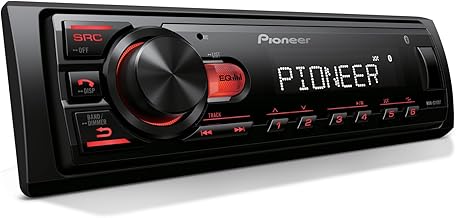
The Pioneer MVH-S110BT is a strong match for drivers who specifically want to play MP3 files from a USB device. Its listed features identify a front USB input and compatibility with MP3, FLAC, and WMA files. The front-facing location also makes the USB connection easy to reach compared with a port placed elsewhere, although the product information does not describe cable routing or installation details.
Bluetooth adds a second way to listen: compatible iPhone and Android devices can stream music wirelessly, and the receiver supports hands-free calling. For wired speaker output, the listed built-in MOSFET amplifier is rated at up to 50 watts per channel across four speakers.
- Best for: Drivers who want clearly stated MP3 playback through USB, plus Bluetooth.
- Why it stands out: Its listed USB formats make the MP3 use case explicit.
- Limitation: The provided information does not identify an auxiliary input, so do not assume it accepts a 3.5 mm audio cable.
Pioneer MVH-S230BT: Best for Multiple Formats

The Pioneer MVH-S230BT is a useful option if your digital music collection includes MP3s as well as other common file types. The provided feature list names MP3, WMA, AAC, and WAV playback and describes a USB port for connecting portable devices, including MP3 players and USB drives. It also supports Bluetooth for wireless smartphone connection and hands-free calling.
Choose this model if format flexibility matters and you want both USB and wireless listening options. The USB port is also described as supporting device charging, which may be useful on a commute. Its AM/FM radio provides a separate listening source when you are not playing files or streaming from a phone.
- Best for: Drivers with a mixed-format digital library who want Bluetooth and USB.
- Why it was selected: MP3 support and USB playback are both stated, alongside several additional formats.
- Limitation: The supplied details do not state that FLAC is supported, so check the required formats before choosing it for a FLAC collection.
BOSS 616UAB: Best for Bluetooth Features

The BOSS Audio Systems 616UAB is a single-DIN digital media receiver with Bluetooth, hands-free calling, and push-to-talk access to a smartphone assistant. Its product name also identifies USB, making it relevant to shoppers comparing basic media receivers. The supplied feature details, however, focus on Bluetooth and do not explain supported USB audio formats or explicitly confirm MP3 file playback.
Bluetooth lets a driver play music and apps such as Spotify or Pandora wirelessly from a connected smartphone. A built-in microphone is described for calls, with audio played through the car speakers. The selectable tuner is stated to support broadcasts in the United States and Europe.
- Best for: Drivers who prioritize hands-free calling, Bluetooth streaming, and a simple receiver.
- Why it was selected: It combines wireless media features with USB identified in the product name.
- Limitation: Choose another model if confirmed USB MP3 file compatibility is essential; the provided details do not specify it.
AINAVI Touchscreen: Best for Smartphone Integration

The AINAVI 6.36-inch single-DIN touchscreen is better suited to drivers seeking a display and smartphone navigation features than to shoppers who only need a basic MP3 receiver. Its listed features include wired and wireless Apple CarPlay and Android Auto, a 6.36-inch HD capacitive touchscreen, USB and Type-C connections, and 1080p video playback. It also lists AV-in, RCA output, backup-camera input, and steering-wheel-control support.
CarPlay and Android Auto can provide access to supported phone functions, including navigation and music apps, according to the product description. The receiver uses a Linux system. USB input is stated, but the supplied information does not name MP3 as a supported file format, so confirm USB audio compatibility if playing locally stored MP3 files is your main requirement.
- Best for: Buyers who want a touchscreen with phone integration and multiple listed connections.
- Why it was selected: It offers USB alongside a broader set of display and smartphone features.
- Limitation: Its details do not explicitly confirm MP3-file playback from USB; its larger screen may also be more than a simple audio setup requires.
REAKOSOUND Single DIN: Best for Bluetooth Streaming

The REAKOSOUND single-DIN receiver is best for drivers who want to add Bluetooth streaming and hands-free calling to a vehicle, rather than shoppers who need confirmed USB MP3 playback. Its description says a compatible smartphone can stream playlists, podcasts, and audiobooks through the car speakers. A built-in microphone and dedicated answer/end button are also listed, along with push-to-talk access to a supported phone voice assistant.
For broadcast listening, the radio covers 87.5–108 MHz FM and offers automatic and manual station search. It can save up to 18 stations, and the description says its memory function keeps them available. These are useful alternatives to file playback when listening to local radio.
- Best for: Drivers upgrading an older vehicle for wireless streaming, calling, and FM radio.
- Why it was selected: It provides a clear Bluetooth use case for music and spoken audio.
- Limitation: The provided features do not list a USB input or confirm playback of MP3 files from storage, so it is not the clearest choice for a wired MP3 source.
Buying Guide: How to Choose a Car Stereo With MP3 Input
Do you need USB MP3 playback or an auxiliary input?
“MP3 input” can refer to more than one connection. A USB input may read compatible MP3 files from a USB drive or connect to a supported portable device. An auxiliary input, often a 3.5 mm jack, carries audio from an external player using an audio cable. These are different connection types. The listed Pioneer models explicitly identify USB and MP3 playback; the supplied feature details do not confirm a 3.5 mm auxiliary input for either one.
Check the receiver’s full specifications before buying if you specifically need an AUX jack. Do not assume that a USB port accepts every phone, drive, or file type. The source device, file format, and receiver’s stated support all matter.
Which listed model confirms MP3 file support?
The Pioneer MVH-S110BT and MVH-S230BT have the clearest stated MP3 support. The S110BT lists MP3, FLAC, and WMA through its front USB input. The S230BT lists MP3, WMA, AAC, and WAV and describes USB playback from devices such as USB drives and MP3 players. The BOSS and AINAVI descriptions identify USB connections but do not specify MP3-file support in the supplied information.
If confirmed local-file playback is the main purchase requirement, favor explicit format information over a product name that merely mentions USB. For another model, consult its current manufacturer specifications to verify formats, supported storage devices, and any file or drive limits before purchase.
Would Bluetooth be more convenient than a USB drive?
Bluetooth is useful when music or podcasts are on a phone and you prefer not to connect a cable for audio playback. The Pioneer models, BOSS receiver, and REAKOSOUND model list Bluetooth features. Their descriptions include music streaming, while some also specify hands-free calling or voice-assistant access. Bluetooth streaming does not by itself confirm that a stereo can browse and play MP3 files stored on a USB drive.
Choose USB when you want a direct connection for files and the receiver states the formats it supports. Choose Bluetooth when you primarily stream from a phone. Some drivers may value both options, in which case the Pioneer products offer the clearest combination of stated USB MP3 playback and Bluetooth among these choices.
What else should you check before installation?
Confirm that the receiver’s size and wiring suit the vehicle before ordering. The products here include single-DIN models, but the AINAVI unit has a large 6.36-inch display. A single-DIN designation alone does not establish that a particular vehicle’s dashboard will accommodate a screen in the desired position. Check the vehicle and product installation requirements, including any need for mounting parts or wiring adapters.
Also compare the connections you plan to use. The AINAVI description lists USB, Type-C, AV-in, RCA output, backup-camera input, and steering-wheel-control support. Those features may matter to buyers adding a display or other equipment. For a basic audio replacement, a simpler receiver may be a better fit. Verify any needed input or control support in the product specifications rather than assuming it is included.
Should you prioritize a display, radio, or audio formats?
Start with the function you will use most. A format-focused buyer can compare the Pioneer receivers’ stated USB formats. A driver who wants maps and phone apps may prefer to investigate the AINAVI’s CarPlay and Android Auto features. Someone who often listens to broadcast stations can compare the REAKOSOUND’s stated FM tuning and presets or the AM/FM radio listed for the Pioneer MVH-S230BT.
Audio power information is another comparison point, but the provided specifications are not equally detailed for every product. The MVH-S110BT lists a built-in amplifier rated up to 50 watts per channel for four speakers. Do not infer that other models have the same rating when their supplied details do not state it.
Frequently Asked Questions
What does MP3 input mean on a car stereo?
It usually means a way to play MP3 audio through the receiver, commonly from a USB device or an external audio source. Check whether the stereo supports MP3 files over USB, has an auxiliary input, or offers another connection; these are not interchangeable.
Which stereo in this list explicitly supports MP3 over USB?
The Pioneer MVH-S110BT and Pioneer MVH-S230BT explicitly list MP3 support and USB. The S110BT also lists FLAC and WMA, while the S230BT lists WMA, AAC, and WAV.
Can I play MP3 music through Bluetooth?
Bluetooth can stream audio from a compatible phone, including music playing on that phone. That is different from plugging in a USB drive and asking the receiver to read MP3 files directly.
Does a USB port guarantee USB-drive MP3 playback?
No. A USB port can serve different functions, and product descriptions may not state which audio formats or storage devices are supported. Confirm the receiver’s specifications if direct MP3 playback from a USB drive is required.
Is an auxiliary input the same as USB?
No. An auxiliary input carries analog audio from an external source, commonly through a 3.5 mm cable. USB is a separate connection that may support data, charging, audio playback, or a combination of functions, depending on the receiver.
Which model is the clearest choice for MP3 playback and Bluetooth?
The Pioneer MVH-S110BT is a clear match because its listed features specify USB playback of MP3 files and Bluetooth music streaming. The Pioneer MVH-S230BT is another option, with MP3 and additional listed formats through USB.