
The best computer-connected audio mixer depends on whether you need USB recording, physical channel controls, or simple sub-mixing. The FIFINE AmpliGame SC3 is best suited to streamers who want hands-on controls and an XLR input; the Aveek 5-channel mixer emphasizes PC recording and playback options; and the LZSIG is better for combining instrument-level line sources. Note that the listed products are hardware mixers or audio interfaces, and their descriptions do not establish that every setting is controlled through computer software.
| Product | Best suited for | Key listed feature |
|---|---|---|
| FIFINE AmpliGame SC3 | Streaming and podcasting | USB plug-and-play, XLR preamp, individual fader |
| LZSIG Mini Audio Mixer | Combining instruments | Four-channel stereo line mixing |
| Aveek 5 Channel Audio Mixer | PC recording and playback | Built-in PC recording interface |
| Gaming Audio Mixer Sound Board | Streaming with sound effects | Customizable soundpads and voice changer |
| FIFINE AmpliGame SC3W | White setup with streaming controls | USB, XLR preamp, phantom power |
FIFINE AmpliGame SC3 Gaming Audio Mixer

Best for: Streamers, podcasters, and vocal creators who want physical controls paired with a USB connection to a PC. The listed features include USB plug-and-play operation, an individual fader, volume control, a mute button, an XLR preamp, 48V phantom power, monitoring, RGB lighting, and a voice changer.
It stands out when quick access to controls matters more than operating the whole mix from software. The XLR input and phantom power are relevant for users with microphones that require those features, while monitoring supports listening during a session.
Limitation: The listing describes physical mixer controls and USB connectivity, but does not specify computer-based control software. Choose it for a hands-on streaming setup, not on the assumption that it is a software-controlled digital console.
LZSIG Mini Four-Channel Audio Mixer

Best for: Musicians who need to combine several line-level sources, such as electronic drums, guitars, bass, or keyboards. The product is described as a four-channel, ultra-low-noise stereo line mixer with four inputs and one output. It supports 1/4-inch and 1/8-inch TS and TRS input and output connections.
This is the most focused option for simple sub-mixing among the five products. It can suit a setup where multiple instruments need to feed a single output, without the additional streaming effects and voice features found on some other models.
Limitation: Its supplied description does not list USB connectivity, a PC recording interface, or computer control. Choose it for combining compatible audio sources; avoid treating it as a USB mixer or computer audio interface unless the full product specifications confirm those functions.
Aveek Five-Channel Audio Mixer

Best for: Users who want a mixer explicitly described as having a built-in PC recording interface. The five-channel model lists 48V phantom power, Bluetooth and USB playback, echo and delay effects, and uses that include live streaming, podcasting, karaoke, and studio recording.
Compared with the LZSIG line mixer, the Aveek is a better match for a mixed-use recording or broadcast setup because PC recording and playback are specifically mentioned. Its Bluetooth playback and effects may also be useful when a session calls for backing audio or echo and delay.
Limitation: The description does not explain detailed software controls, channel routing, or supported computer operating systems. Confirm those requirements before choosing it for a particular recording workflow.
Gaming Audio Mixer With Custom Soundpads

Best for: Streamers and broadcasters who want a soundboard as part of an all-in-one audio setup. The product name lists a USB audio interface, voice changer, customizable soundpads, and use with PC and smartphone recording, streaming, podcasting, and broadcasting.
Choose this model if triggering stored or customized sounds is a central part of the content workflow. Its soundpad focus separates it from the FIFINE SC3, whose listed emphasis is on individual faders, XLR preamp, and monitoring. The named USB interface makes computer audio use relevant, while the smartphone mention may appeal to creators who work across devices.
Limitation: The supplied product information does not specify the number of soundpads, their storage method, or how customization is performed. Check those details if soundpad capacity or configuration is important.
FIFINE AmpliGame SC3W White Mixer
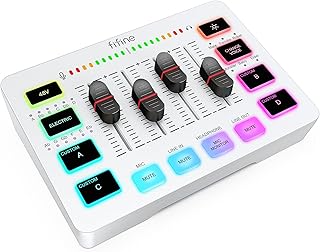
Best for: Creators who want the listed AmpliGame SC3 features in a white finish. The product description names USB plug-and-play PC connection, an individual fader and volume control, mute button, XLR preamp, RGB lighting, voice changer, 48V phantom power, and monitoring for podcasting, recording, vocals, and streaming.
It is a better fit than a basic line mixer when the workflow includes a microphone, live muting, voice effects, and direct monitoring. It shares a feature set with the black SC3, so the clearest stated distinction is the white color. Select between the two based on the desired setup appearance rather than assuming a functional difference.
Limitation: As with the other SC3 listing, the supplied features do not confirm computer-based mixer control software. Its USB plug-and-play description should not be mistaken for proof that every mixer setting can be changed from a PC.
Buying Guide: How to Choose a Computer-Connected Audio Mixer
Do you need computer control or just a computer connection?
These terms describe different capabilities. A USB connection can send or receive audio between a mixer and a computer, but it does not automatically mean the mixer has software that controls its faders, routing, or effects. The product descriptions here identify USB connections or PC recording on some models, but do not clearly promise comprehensive computer-based control.
If remote adjustments, saved digital scenes, or software routing are essential, look for those functions stated explicitly in the full product specifications. Check whether the software is included, what operating systems it supports, and whether the mixer can operate without the software. Do not infer those details from “USB” or “plug-and-play” alone.
How many inputs do you need?
Count the audio sources you expect to connect at the same time. A microphone, instrument, computer playback, phone, and guest microphone may require different input types, and the number of channels alone does not tell you which sources can be connected. The LZSIG is explicitly a four-input line mixer for instruments and similar sources. The Aveek is described as a five-channel mixer, but its supplied feature list does not give a full input-by-input breakdown.
Before buying, compare the source devices with the mixer’s specific input connectors and signal types. A mixer intended for line-level instruments may not replace a microphone preamp, while a mixer with an XLR preamp may better suit a microphone-centered setup.
When does phantom power matter?
Phantom power is relevant when a microphone requires it. The two FIFINE SC3 listings and the Aveek listing identify 48V phantom power. That feature alone does not establish which microphones are included or what other microphone types are supported. Check the microphone’s requirements and the mixer’s complete specifications before connecting equipment.
If your sources are only keyboards, playback devices, or instruments with line-level outputs, phantom power may not be a deciding feature. Prioritize the inputs and outputs that match the gear you actually use.
Should you prioritize effects or direct monitoring?
Choose effects based on the job. The Aveek listing names echo and delay, while the gaming mixers describe voice-changing features. Those options may suit live content or karaoke, but the descriptions do not establish the full range of effect controls. For vocal recording, monitoring is also an important listed feature on the FIFINE models because it gives the user a way to listen during a session.
If effects are not needed, a simpler device can be a more appropriate fit. For combining instruments, the LZSIG’s stated purpose is straightforward stereo line mixing rather than podcast-style sound processing.
Which connections should you verify?
Check input and output connector sizes before ordering. The LZSIG explicitly lists 1/4-inch and 1/8-inch TS and TRS connections. The FIFINE listings specify an XLR preamp and USB, while the Aveek listing names USB and Bluetooth playback. The soundpad mixer’s description mentions USB and PC or smartphone use but does not provide a full connector inventory.
Make a short connection list for every device: microphone, instruments, computer, headphones or monitors, and any playback source. Then confirm that the mixer has the matching inputs and outputs. Adapters may not solve every mismatch, especially when the issue is signal type rather than connector shape.
What is the difference between the two FIFINE SC3 models?
The supplied descriptions show similar core features for the black SC3 and white SC3W, including USB, an individual fader, XLR preamp, phantom power, voice changing, and monitoring. The SC3W is identified as white. The listings do not establish additional technical differences, so compare the full specifications if you need to know whether their controls or included accessories differ.
Frequently Asked Questions
Is a USB audio mixer automatically computer-controlled?
No. USB may provide an audio connection to a computer without allowing software to control the mixer. Look for explicit details about control apps, software compatibility, and adjustable settings.
Which listed mixer is best for PC recording?
The Aveek is specifically described as having a built-in PC recording interface. The FIFINE SC3 models are described as USB plug-and-play for PC, but the supplied information does not detail their recording workflow or software control.
Which model is best for combining instruments?
The LZSIG is the clearest match for instrument sub-mixing because it is described as a four-input, one-output stereo line mixer for sources such as electronic drums, guitars, bass, and keyboards.
Which mixer has customizable soundpads?
The Gaming Audio Mixer Sound Board listing includes customizable soundpads, a voice changer, and a USB audio interface. Its supplied description does not specify the number of pads or how customization works.
Do the FIFINE mixers include phantom power?
Both listed FIFINE AmpliGame SC3 models specify 48V phantom power. Check the complete product details and microphone requirements to confirm suitability for a particular microphone.
Can these products replace audio-mixing software?
Not necessarily. The supplied information describes hardware mixing, USB audio, effects, or recording features, but does not establish full software mixing capabilities for every model. Confirm routing, control software, and operating-system support before relying on a mixer as a software-console replacement.