
A two-male-to-one-female 3.5mm splitter connects a single-plug headset to a computer with separate headphone and microphone jacks. The D & K Exclusives and similar TRRS-to-dual-male adapters are the right type for that setup; the SYNCWIRE and JOMLEY cables have the opposite connector direction and are intended to send audio to two listening devices instead.
| Product | Connector direction | Best suited for |
|---|---|---|
| D & K Exclusives headset-to-PC adapter | One female to two male | Connecting a headset to separate PC audio and mic jacks |
| 3.5mm Female to Dual Male Y Separator | One female to two male | Gaming, calls, and computer chat |
| Bordsek Headphone Mic Splitter | One female to two male | Headsets with separate mic and audio plugs |
| SYNCWIRE Headphone Splitter | One male to two female | Sharing audio with two output devices |
| JOMLEY Headphone Splitter | One male to two female | Connecting two headphones or speakers to one source |
D & K Exclusives Headset-to-PC Adapter

This adapter is designed for a headset with one 3.5mm plug and a computer with separate headphone and microphone jacks. Its female headset connection splits into two male plugs: one for headphone audio and one for the microphone input. That makes it a direct match for the two-male-to-one-female configuration.
- Best for: People connecting a single-plug headset to a desktop or laptop with separate audio and mic ports.
- Why it was selected: Its listed purpose is to connect newer headsets to a PC or laptop for VOIP and chat applications.
- Listed details: Gold-plated connectors, oxygen-free copper, and a compact design intended for portability.
Choose this if you need to separate a headset’s audio and microphone signals for two computer jacks. Avoid it if you want to connect two pairs of headphones to one device; this cable is not described as a two-listener audio-sharing splitter. Check the computer’s port labels before plugging in the two male connectors.
3.5mm Female-to-Dual-Male Y Separator

This 9.3-inch Y cable is described as a way to connect a single-plug headset to separate computer audio and microphone jacks. The listed configuration has one 3.5mm female connector and two male connectors, with the black connector for stereo audio and the red connector for microphone input.
- Best for: Computer users who need separate headset audio and mic connections for gaming, conferencing, or chat.
- Why it was selected: Its stated connection direction and use match the requested two-male-to-one-female adapter.
- Listed details: Compact, lightweight, and designed for plug-and-play use without additional tools.
Choose this if the red and black male plugs correspond to the separate microphone and headphone jacks on your computer. The listing identifies the connector types as TRSS, so confirm the connector arrangement and headset standard against your equipment before purchase. Its short cable length may also limit how far the headset can sit from the computer.
Bordsek Headphone Mic Splitter for PC
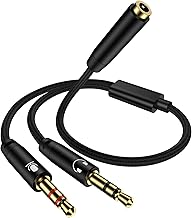
The Bordsek splitter converts a headset connection into separate audio and microphone plugs. Its listed design includes a 3.5mm TRRS female connector and two 3.5mm male ports. The product description says it is intended for CTIA-standard headsets and lists a range of gaming headsets, wired headphones, and computers as examples.
- Best for: Users with a compatible single-plug headset who need separate mic and audio connections on a PC.
- Why it was selected: It has the requested one-female-to-two-male direction and explicitly describes headset microphone and audio separation.
- Listed details: Plug-and-play operation and 24K gold-plated contacts.
Check the connector standard and your exact headset model before choosing this adapter. The listing specifically cautions that the microphone will not work with Apple original earphones and Beats headphones. Avoid it if you need an adapter for sharing music with two listeners rather than connecting a headset mic to a computer.
SYNCWIRE 3.5mm Audio Sharing Splitter

This SYNCWIRE cable is included as a useful comparison, but it has the reverse direction from the requested PC headset adapter. It has one 3.5mm male plug and two female outputs. The listing describes sending audio from a source to two output devices, such as headphones or speakers.
- Best for: Sharing audio from one device with two listening devices.
- Why it was selected: It is a 3.5mm Y splitter, but its connector direction makes it relevant mainly as a contrast to a headset mic adapter.
- Listed details: Nylon-braided cable, gold-plated connector, double shielding, and a compact design.
Do not choose this for connecting a one-plug headset to separate computer microphone and headphone jacks. Its two female connectors are outputs for listening devices, and the listing says “No Mic.” It is better suited to audio sharing than microphone input separation.
JOMLEY 1-Foot Headphone Splitter

The JOMLEY cable is another reverse-direction option. Its one male connector plugs into an audio source, while its two female connectors accept two output devices. The product description says both female connectors provide stereo audio and do not divide left and right channels between them.
- Best for: Sending audio from a phone, laptop, or tablet to two headphones or speakers.
- Why it was selected: It helps distinguish a two-listener splitter from the two-male-to-one-female PC headset adapter buyers may be seeking.
- Listed details: One-foot length, 22 AWG oxygen-free copper conductor, and 24K gold-plated connectors.
Avoid this if you need a microphone connection or two male plugs for separate PC jacks. Its listed female connectors are for audio output, not separate microphone input. Choose it only when the goal is to connect two listening devices to one 3.5mm source.
Buying Guide: How to Choose a Two-Male-to-One-Female 3.5mm Adapter
What does “two male to one female” mean?
The adapter has one female socket that accepts a headset’s male plug and two male plugs that connect to separate device ports. For a typical PC setup, one male plug carries headphone audio and the other connects the headset microphone. This is different from a one-male-to-two-female audio splitter, which sends sound from one source to two listening devices.
Does your computer have separate headphone and microphone jacks?
Check the computer before selecting a cable. A desktop may have distinct headphone and microphone ports, while another device may use a single combined headset port. A two-male-to-one-female splitter is intended for separate jacks. It is not the right connector arrangement when both the headset and device already use a single combined port.
Will the microphone work with your headset?
Confirm that the headset plug and adapter use compatible wiring. Product listings may specify a headset standard, such as CTIA, or identify limitations for particular earphones. If microphone support matters, read the compatibility notes rather than assuming every 3.5mm plug carries mic audio in the same way. The Bordsek listing, for example, warns that its mic will not work with Apple original earphones and Beats headphones.
How can you tell a headset adapter from an audio-sharing splitter?
Look at both connector count and stated function. A headset-to-PC adapter generally has one female headset socket and two male plugs for audio and microphone ports. An audio-sharing splitter generally has one male plug for the source and two female sockets for headphones or speakers. Connector direction is more important than the word “splitter” in the product name.
What cable details matter?
Choose a cable length that fits the space between the headset and computer. A short adapter is easy to carry but may offer little reach. Some product descriptions also identify materials such as gold-plated connectors, copper conductors, shielding, or a braided exterior. These are listed construction details, not substitutes for checking the correct signal direction and headset wiring.
What if the computer does not have two separate audio ports?
A dual-male headset splitter is intended to plug into separate headphone and mic jacks. If the device has only one combined 3.5mm port, this cable may not match the setup. Check the device’s port configuration and the adapter’s stated purpose first. Do not buy a reverse-direction audio-sharing splitter as a substitute; it does not provide the same connection function.
Frequently Asked Questions
Can a two-male-to-one-female splitter connect a gaming headset to a PC?
Yes, when the headset has one compatible 3.5mm plug and the PC has separate headphone and microphone jacks. Connect the adapter’s two male plugs to the corresponding PC ports.
Does this type of splitter let two people listen at once?
No. A two-male-to-one-female headset adapter separates headset audio and microphone connections. For two listening devices, look for a one-male-to-two-female audio splitter instead.
Does every 3.5mm headset microphone work with these adapters?
No. Microphone function depends on compatible headset wiring and the adapter’s design. Check the product’s compatibility notes and any stated limitations before buying.
Which connector goes into the computer’s microphone jack?
Use the male plug designated for the microphone input. Some splitters identify it by color, such as red, while others use labels. Follow the product’s markings and the computer port labels.
Can I use a one-male-to-two-female splitter for a headset mic?
Not based on the listed function of the SYNCWIRE and JOMLEY products. They are described as audio-output splitters for two listening devices, not as adapters for separating headset microphone and headphone signals.