
The best optical audio output adapter depends on the connection you need: choose a digital-to-analog converter for 3.5mm or RCA audio, or an optical splitter to send one source to two optical devices. The ESWN DNXB is best for a basic optical-to-3.5mm connection, while the AUTOUTLET converts optical audio to RCA. For two optical outputs, consider the SOUNDFAM or avedio links splitter.
| Product | Best For | Connection Type |
|---|---|---|
| ESWN DNXB 192KHz DAC | 3.5mm speakers or headphones | Optical to 3.5mm |
| QIMIAOUS 192KHz DAC | 3.5mm output with PCM setup guidance | Optical to 3.5mm |
| Tackston 192KHz DAC | 3.5mm audio with device-side volume control | Optical to 3.5mm |
| AUTOUTLET 192kHz DAC | Stereo amplifiers with RCA inputs | Optical to RCA |
| SOUNDFAM Optical Splitter | Sending optical audio to two devices | Optical to two optical outputs |
ESWN DNXB 192KHz Optical To 3.5mm DAC
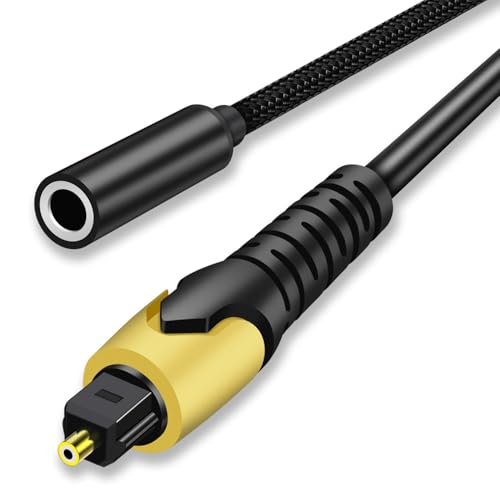
This ESWN DNXB converter changes optical or SPDIF/Toslink digital audio into stereo analog audio through a 3.5mm AUX output. It is a direct option for connecting a compatible optical audio source to a speaker or headphones with a 3.5mm input.
- Supports optical input sampling rates of 32, 44.1, 48, 96, and 192kHz, and 24-bit data streams.
- Requires USB power, according to the product title.
- The source device’s audio output must be set to PCM or stereo.
Best for: Buyers who need a straightforward optical-to-3.5mm adapter for stereo speakers or headphones. It was selected because its output type and setup requirement are clearly stated.
Limitation: This is not a bidirectional adapter, so it cannot convert a 3.5mm signal to optical. It also requires the source to output PCM or stereo audio.
QIMIAOUS 192KHz Optical To AUX Converter

The QIMIAOUS DAC converts an optical digital audio signal to stereo analog output through a 3.5mm AUX connection. Its listed supported optical input rates are 32, 44.1, 48, 96, and 192kHz, with data streams up to 24-bit.
The product description emphasizes setting the TV or other source to PCM before use and provides example menu paths for Samsung, LG, and Sony TVs. Menu names can vary by model, so the general requirement is more important than following an exact path: select PCM or stereo digital audio output.
Best for: Buyers who want optical-to-AUX conversion and may benefit from model-specific PCM setup examples. It was selected as another clearly specified 3.5mm DAC option.
Limitation: The conversion works in one direction only. The source must provide optical audio, and the product listing says to set its output to PCM or stereo before connecting.
Tackston 192KHz Optical To 3.5mm Adapter

Tackston’s adapter converts an optical/Toslink audio signal to 3.5mm AUX. The listing specifies support for optical input rates of 32, 44.1, 48, 96, and 192kHz and up to 24-bit audio. It also says the unit must be powered by its USB cable.
Best for: Buyers connecting an optical-output TV or other source to a 3.5mm speaker or headphone input who are comfortable adjusting volume on the receiving device.
Why it was selected: It provides a clearly described optical-to-AUX conversion path and specifies both USB power and audio-format requirements, helping buyers identify setup needs in advance.
Limitation: The product listing says the TV remote cannot control playback volume while this converter is in use. Adjust volume through the speaker, headphones, or other playback device instead. It cannot convert 3.5mm audio back to optical.
AUTOUTLET 192kHz Optical To RCA DAC

The AUTOUTLET adapter converts optical Toslink digital audio into analog RCA output. Unlike the 3.5mm converters above, it is aimed at equipment with RCA audio inputs, such as a stereo amplifier. The listing describes a 7-foot cable with RCA male output.
- Supports optical input rates up to 192kHz and 24-bit streams.
- Lists support for 32, 44.1, 48, 96, and 192kHz optical input.
- Uses a built-in audio amplifier chip and dual-channel operational amplifier, as described by the manufacturer.
Best for: Buyers whose receiving equipment accepts stereo RCA input and who need to convert a digital optical output to analog audio.
Why it was selected: It serves a different common connection need from the 3.5mm DACs, with RCA male output and a stated cable length.
Limitation: Choose another adapter if your speaker or headphones require a 3.5mm plug or if you need optical output rather than analog RCA. Check the receiving device’s input connectors before buying.
SOUNDFAM Optical Audio Splitter

The SOUNDFAM is a passive optical splitter, not a digital-to-analog converter. It takes one optical audio input and provides two optical outputs for receiving devices such as an A/V receiver and a soundbar. The listing says it requires no power supply.
Its stated audio support includes DTS, panoramic surround sound, and 5.1/7.1 channels. The product description also specifies one male input and two female outputs. Confirm that your source and receiving equipment use optical connections before choosing this type of adapter.
Best for: Buyers who want to route one optical source to two optical receivers. It was selected because it offers a different function from the DAC converters and clearly identifies the one-in, two-out arrangement.
Limitation: This splitter does not provide a 3.5mm or RCA analog output. The listing says its two outputs cannot work together simultaneously, so it may not suit buyers who need both devices active at once.
Buying Guide: How To Choose An Optical Audio Adapter
Do you need a converter or a splitter?
First, identify the direction and type of connection required. A DAC converter changes a digital optical signal into analog audio, such as 3.5mm AUX or RCA. An optical splitter keeps the signal optical and routes one optical source toward two optical receiving devices. These products do different jobs and are not interchangeable.
Choose an optical-to-3.5mm converter when the receiving speaker or headphones have an AUX input. Choose an optical-to-RCA converter when the receiver or amplifier has stereo RCA inputs. Choose a splitter only when both the source and the receiving devices use Toslink/optical connections.
Which output connector does your equipment use?
Check the input ports on the device that will play the sound. A 3.5mm input is common on AUX-connected speakers and headphones, while RCA inputs are found on some stereo amplifiers and audio equipment. A device with an optical input needs an optical splitter or optical cable arrangement, not an analog DAC output.
Do not rely on a product name alone. Confirm the listed input and output direction: for example, “optical to 3.5mm” means optical is the source side and 3.5mm is the output side. The listed DAC converters are not reversible.
Will you need to change the TV audio settings?
The 3.5mm DAC listings require the optical source to output PCM or stereo audio. If the converter produces no sound, check the TV or source device’s digital audio settings and select PCM or stereo where available. The exact menu path differs between brands and models.
Also confirm that the source is sending audio through its optical output. If you use a game console, cable box, DVD player, or TV, check that device’s audio-output selection rather than assuming the adapter changes the source settings automatically.
Does the adapter require power?
Power requirements vary by product. The ESWN DNXB and Tackston product titles specify USB power, while the SOUNDFAM splitter listing says it needs no power supply. Check the product details for the adapter you choose and make sure a suitable power source is available if required.
Do not assume that all optical adapters are passive. A DAC has to convert digital audio to an analog connection, while a splitter routes an optical signal. Review the listed power requirement before planning where to place the adapter.
What audio formats and sample rates should you check?
The three 3.5mm DAC listings describe support up to 192kHz and 24-bit, with specified optical input rates. AUTOUTLET also lists support up to 192kHz/24-bit. These specifications describe supported inputs; they do not mean every source will output audio in those formats.
For a splitter, check the stated channel and format support against the source and receivers. The SOUNDFAM listing mentions DTS and 5.1/7.1 channels. The Orisell and avedio links splitter listings also describe support for multiple optical devices and surround formats, but verify simultaneous-output behavior for the exact model before purchase.
What if you need two outputs at the same time?
Read the splitter’s instructions carefully. The SOUNDFAM listing says its two outputs cannot work simultaneously, while the avedio links listing describes use with a soundbar and headset simultaneously, with separate volume controls. The Orisell listing describes two optical output devices operating at the same time. These descriptions differ, so do not treat all one-in, two-out splitters as equivalent.
Confirm whether the two receiving devices need to play at once, and whether both outputs must be optical. If one device needs analog 3.5mm or RCA input, select a suitable DAC instead of assuming a splitter will change the connector type.
Frequently Asked Questions
What does an optical audio output adapter do?
It either converts optical digital audio to an analog connection, such as 3.5mm or RCA, or splits an optical signal to additional optical outputs. The correct type depends on the ports on the source and receiving device.
Can an optical-to-3.5mm adapter work in reverse?
No. The listed 3.5mm DAC converters are one-way devices: they convert optical input to analog 3.5mm output, not 3.5mm audio to optical.
Why does my optical DAC have no sound?
Check that the optical cable is connected to the source’s audio output, that the converter has power if required, and that the source is set to PCM or stereo. The listed 3.5mm converters specify PCM or stereo output as a setup requirement.
Can an optical splitter connect a TV to a 3.5mm speaker?
Not by itself. An optical splitter provides optical outputs, while a 3.5mm speaker needs analog audio. Use an optical-to-3.5mm DAC when the source has an optical output and the speaker has a 3.5mm input.
Should I choose 3.5mm or RCA output?
Choose the connector that matches the receiving device’s input. A 3.5mm DAC suits equipment with AUX input; an optical-to-RCA converter suits equipment with stereo RCA input.