
The best listed option for watching Blu-ray discs in a car is the WONNIE portable Blu-ray player, which has a built-in screen and a car charger. The other portable picks below play DVDs, not Blu-rays, so they are alternatives only if DVD playback meets your needs. A compact home theater Blu-ray player is not a self-contained car setup. Compare disc formats, screen arrangement, power options, and your vehicle’s available mounting space before choosing.
| Product | Disc format | Best suited for |
|---|---|---|
| WONNIE 17.6-inch Portable Blu-ray Player | Region A Blu-ray and Region 1 DVD | Travelers who need actual Blu-ray playback |
| DESOBRY 12.5-inch Dual Portable DVD Player | DVD | Two-screen viewing and HDMI input |
| WONNIE 10-inch Dual DVD Players | DVD | Independent or shared viewing for two passengers |
| FELEMAN 10.5-inch Dual DVD Player | DVD | DVD playback with HDMI input |
| A R Blu-ray DVD Player | Blu-ray and DVD | Home theater use, not standalone car viewing |
WONNIE Portable Blu-ray Player With Screen

Best for: Drivers or passengers who specifically want to play Blu-ray discs on a portable player during a trip. Unlike the other portable screens in this selection, this model is described as a Blu-ray player, with support for Region A Blu-ray discs and Region 1 DVDs.
The unit has a 15.4-inch 1080p swivel screen and a built-in rechargeable battery. A car charger is included, giving users an in-car power option. Its listed disc formats include BD, BD-R, BD-RE, DVD, and several recordable DVD and CD formats. It also supports USB drives and SD/MMC cards up to 32GB using FAT32, with listed video, audio, and image formats.
Choose this if a self-contained screen and actual Blu-ray playback are priorities. The listing describes a single portable screen, rather than two independent headrest displays. Note the regional limits: the product is specified for Region A Blu-ray and Region 1 DVD discs, and its storage-card support is limited to 32GB.
DESOBRY 12.5-Inch Dual Portable DVD Player

Best for: Families seeking two screens and flexible viewing options, provided DVD playback is sufficient. This is a DVD player, not a Blu-ray player. It has two 12.5-inch screens, and the listed features allow passengers to watch different movies or mirror one DVD across both displays using an AV cable.
The player includes HDMI input for receiving video and audio from a compatible source, and AV input/output for connecting to a TV with the included RCA cable. HDMI is input only, not output. The listing says to confirm that a phone supports HDMI output before attempting to connect it. Power options include a built-in rechargeable battery, car charger, and AC adapter. Two mounting brackets and six headrest straps are included.
Choose this over a single-screen portable player if two passengers need separate screens or the option to share a DVD. Avoid it if Blu-ray disc playback is essential; its listed disc playback is DVD-based. The supplied details do not give a specific battery runtime.
WONNIE 10-Inch Dual DVD Players

Best for: Families who want two DVD screens that can play different movies independently or show the same movie together. This model is a DVD system, not a Blu-ray player. Its two 10-inch units support independent playback, while an AV cable can connect them for shared viewing.
The listed power setup includes a rechargeable battery in each player, two AC adapters, and a 2-in-1 car charger specified for 12V car use. The manufacturer lists up to five hours of separate playback after a full charge, or about 2.5 hours when the units are connected to play the same movie. Each player has built-in stereo speakers, adjustable volume, and a headphone jack. The product description also lists USB and SD support, headrest mounts, and all-region playback.
Choose this if independent viewing and stated battery-life guidance matter more than a larger screen or Blu-ray support. The shared-play battery estimate is shorter than the separate-play estimate, so plan to use vehicle power for longer shared sessions. Confirm that the vehicle’s power supply matches the stated 12V requirement.
FELEMAN 10.5-Inch Dual DVD Player

Best for: DVD viewers who want two independent screens plus an HDMI input for a compatible external source. This product is not listed as a Blu-ray player. Its two systems can show different movies or mirror the same movie over an AV cable.
The product description specifies 10.5-inch 1080p screens and HDMI input for sources such as a compatible phone, Firestick, or laptop. It also describes AV connection to a home TV using an included RCA cable. Power options include a built-in 5000mAh battery, AC adapter, and car charger. The listing states up to five hours of continuous use for one screen and about 2.5 to three hours with dual screens.
Choose this if HDMI input and two-screen DVD viewing are more important than Blu-ray disc support. The battery estimate is lower when both screens are used, so continuous dual-screen viewing may require a power connection. Check the external device’s output and connection requirements before relying on HDMI input.
A R Blu-ray DVD Player
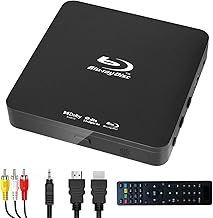
Best for: Buyers seeking a compact Blu-ray and DVD player for a home entertainment setup, rather than a ready-to-use car player. The listed features include 1080p Full HD playback, image up-conversion, Dolby Digital sound, and a slim design for narrow shelves or racks.
The product is described as playing Region A Blu-rays and Region 1 DVDs. Its compact form may suit a home media space, but the supplied details do not specify a built-in screen, rechargeable battery, or car charger. Those omissions matter for car use: a buyer would need to verify how to power and connect the player in a vehicle and provide a compatible display separately.
Choose this if the goal is a home Blu-ray player that may be transported between locations and used with a suitable setup. Avoid treating it as a complete portable car entertainment system based on the supplied information. For straightforward in-car viewing, the portable WONNIE Blu-ray model is the more directly relevant option.
Buying Guide: How to Choose a Blu-ray Player for a Car
Start by checking whether you need Blu-ray discs specifically. Several portable products marketed for car use are DVD players. They may offer large screens, HDMI input, rechargeable batteries, or dual displays, but those features do not mean they can read Blu-ray discs. If your collection is Blu-ray, select a product explicitly described as a Blu-ray player and confirm its region support.
Does the player support the discs you own?
Disc region and format are separate considerations. The portable WONNIE model lists Region A Blu-ray and Region 1 DVD support, which is relevant for many U.S. buyers, but it does not establish support for every disc from every region. Check the region printed on your discs and the player’s specifications. Also distinguish standard Blu-ray playback from DVD playback: a DVD-only unit cannot play Blu-ray discs just because it has a high-definition screen.
Do you need one screen or two?
A single-screen portable Blu-ray player is a direct choice for one viewing area. Dual-screen DVD systems are better suited to backseat passengers who want separate displays, but the listed models do not provide Blu-ray disc playback. Consider whether passengers need to watch the same title or different titles. Some dual players support both arrangements, but shared playback may use an AV cable and can affect battery runtime.
How will the player get power?
For road trips, compare battery operation with vehicle power. Rechargeable batteries allow playback away from an outlet, while a car charger can support longer sessions when compatible with the vehicle. Battery estimates depend on use: the WONNIE DVD system lists different runtimes for separate and shared playback, and the FELEMAN listing gives a shorter estimate for dual-screen use than for one screen. Do not assume that runtime figures apply to every operating mode.
Will the screen fit your setup?
Portable screens vary in size and mounting approach. Check the screen dimensions, included mounting hardware, and the available space around the vehicle’s headrests. The DESOBRY listing includes brackets and straps, while the WONNIE dual DVD listing describes headrest mounts. The portable Blu-ray player has a swivel screen, but the supplied information does not describe a dual-screen headrest setup. Confirm mounting details before buying if a fixed installation matters.
What does HDMI input let you do?
HDMI input can let a player display video from a separate compatible source. It is not the same as HDMI output, and it does not by itself mean the player streams content or reads Blu-ray discs. The DESOBRY listing explicitly says its HDMI connection is input only and advises checking whether a phone supports HDMI output. Verify the direction of the connection and source-device compatibility before planning to use a phone, computer, or streaming device.
When is a home Blu-ray player a poor car choice?
A home player may play Blu-ray discs, but car use also requires a display, a suitable power arrangement, and a way to secure the equipment. The A R player’s listed features focus on home use and do not mention a built-in screen, rechargeable battery, or car charger. It may suit a home media setup; it is not the simplest choice for self-contained backseat viewing based on the available product details.
Frequently Asked Questions
Can a portable DVD player play Blu-ray discs?
No. A DVD-only player cannot play Blu-ray discs. Choose a product whose specifications explicitly list Blu-ray playback, such as the portable WONNIE Blu-ray model in this selection.
Which listed product is the clearest choice for Blu-ray in a car?
The WONNIE portable Blu-ray player is the most directly relevant choice because it is listed with a built-in screen, Region A Blu-ray support, a rechargeable battery, and a car charger.
Are the DESOBRY and FELEMAN players Blu-ray models?
No. Their supplied product details describe portable DVD players. Their HDMI input and screen features do not change the disc format they support.
Can I connect my phone to a player’s HDMI input?
Only if the phone supports video output through a compatible connection. The DESOBRY listing specifically advises buyers to verify phone HDMI-output support and states that its HDMI connection is input only.
Can a home Blu-ray player be used in a car?
Possibly, but the A R product details do not list a built-in screen, rechargeable battery, or car charger. Buyers would need to confirm the required display, power, and installation arrangements before using it in a vehicle.
What should I check before buying for a long road trip?
Confirm disc format and region, battery runtime for the intended playback mode, vehicle power requirements, screen and mounting arrangements, and whether the product needs separate cables or a display. These checks help distinguish a true portable Blu-ray setup from a DVD player or home-only Blu-ray unit.