
The best headphones with a microphone jack depend on whether you need a standard 3.5mm connection, a headset for online calls, or flexible connections for several devices. The Logitech H111 is a straightforward choice for everyday use, while the Cyber Acoustics AC-5002 suits classroom and gaming-controller use. Botesty Sound offers an over-ear design for school and travel, JIAMQISHI adds USB and 3.5mm connection options, and Arama includes USB-A, USB-C, and 3.5mm connections.
| Headset | Best For | Connection Highlight |
|---|---|---|
| Logitech H111 | Everyday calls and listening | 3.5mm audio jack |
| Cyber Acoustics AC-5002 | Classrooms and gaming controllers | 3.5mm connector |
| Botesty Sound Wired Headphones | School and travel | 3.5mm plug |
| JIAMQISHI USB Headset | Computer calls and flexible wear | USB and 3.5mm |
| Arama USB Headset | People using varied devices | USB-A, USB-C adapter, and 3.5mm |
Logitech H111 Stereo Headset

The Logitech H111 is a simple wired headset for buyers who want a standard 3.5mm audio jack and a microphone for calls. Its listed compatibility includes PC, Mac, laptops, smartphones, and tablets, making it a practical option when a device has a suitable 3.5mm port.
The headset provides full stereo sound for music, movies, and games. Its noise-cancelling microphone is designed to reduce room noise during internet calls. The rotating boom can be positioned on either the left or right side, which gives users some flexibility in how they wear it.
- Best for: Everyday communication and listening on devices with a 3.5mm audio jack.
- Why it stands out: It combines a familiar analog connection, stereo sound, and a repositionable microphone.
- Limitation: The listed connection is 3.5mm, so it is not the pick for someone specifically seeking a USB headset.
Choose this if you want a basic wired headset without needing USB connection options. Check your device’s port and audio setup before buying, particularly if it uses separate headphone and microphone sockets.
Cyber Acoustics AC-5002 Headset

The Cyber Acoustics AC-5002 is best for classroom use, home learning, and voice chat through compatible gaming controllers. It has an integrated 3.5mm connector and is described as compatible with Xbox and PlayStation controllers, including PS5, PS4, Xbox Series X|S, and Xbox One.
Its unidirectional noise-cancelling microphone is intended to reduce background distractions. The flexible boom can be worn on either side, while the adjustable headband and soft leatherette earpads support a more customizable fit. A braided TuffCord cable is included to help resist tangles and wear.
- Best for: Students, home users, and players who need a wired headset for a compatible controller.
- Why it stands out: It pairs a 3.5mm connector with a flexible microphone and a durable braided cable.
- Limitation: Controller use depends on having a compatible controller with a suitable 3.5mm connection.
Choose this over a basic headset if classroom durability or controller voice chat is a priority. As with any analog headset, verify the port and microphone support on the device you plan to use.
Botesty Sound 3.5mm Headphones

Botesty Sound’s wired over-ear headphones are aimed at school, online learning, and travel. They use a 3.5mm plug and include a 4.9-foot tangle-free nylon cord. The over-ear design is described as providing deep bass and clear sound, while the built-in cable microphone supports hands-free calls and online meetings.
This is a useful fit for buyers who want one wired headset for listening and calls on a compatible phone, tablet, laptop, or other device with a 3.5mm connection. The foldable design is another practical feature for storing or carrying the headset.
- Best for: Students and travelers who want over-ear headphones with a built-in microphone.
- Why it stands out: The foldable form, 4.9-foot cord, and 3.5mm plug suit portable everyday use.
- Limitation: Volume is adjusted on the connected device, not on the headphones. The listed MFB button works only with phones and tablets, and the microphone may not work with some desktops, laptops, or adapters.
Choose this if your device has a 3.5mm port and you prefer over-ear headphones. Avoid it if you need headset-mounted volume adjustment or confirmed microphone support through an adapter; check the device’s audio support first.
JIAMQISHI USB Headset With 3.5mm
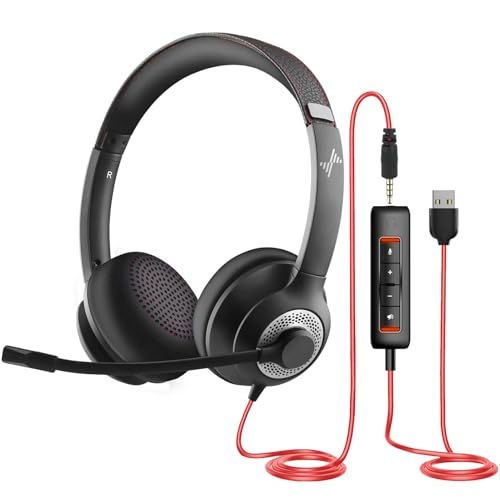
The JIAMQISHI headset is best for buyers who want a computer-oriented headset with both USB and 3.5mm connection options. It has an on-ear design, an adjustable headband, and a 270-degree unidirectional boom microphone. The microphone can be positioned for left- or right-side wear and is described as reducing unwanted background noise.
Its features also include 40mm audio drivers, a built-in audio sound card, and soft protein memory-foam earpads. The product description positions it for calls, online classes, music, movies, and gaming, so it may suit users who want one headset for communication and general listening.
- Best for: Computer users who want USB and 3.5mm connection choices plus a repositionable microphone.
- Why it stands out: The two connection types and adjustable boom offer more flexibility than a 3.5mm-only model.
- Limitation: Confirm which connection your device supports and whether its audio setup works with the selected connection.
Choose this if having both USB and 3.5mm options is more important than choosing a strictly analog headset. Its on-ear fit may be preferable to over-ear styles for some users, but fit is personal.
Arama Headset With Three Connection Options

The Arama headset is the most connection-flexible pick in this group. Its listed options include a 3.5mm jack and USB-A with a tethered USB-C adapter. That mix may suit buyers who switch between computers, phones, and tablets, provided each device supports the connection being used.
Arama lists laser-tuned speaker drivers and a built-in equalizer for stereo sound. The lightweight design has an adjustable headband, leatherette ear cushions, and a 270-degree adjustable microphone. The cushions are described as rotatable and easy to clean.
- Best for: Buyers who want several wired connection options for different devices.
- Why it stands out: USB-A, a USB-C adapter, and a 3.5mm jack are included in the product’s connection description.
- Limitation: Multiple connectors do not guarantee that every device supports microphone input through every port; check the device’s audio requirements.
Choose this if connection flexibility is your main priority. If you only need a basic 3.5mm headset, the Logitech H111 offers a simpler connection specification.
Buying Guide: How to Choose Headphones With a Microphone Jack
What kind of microphone jack does your device have?
“Microphone jack” can refer to different audio arrangements. A headset may use a single 3.5mm plug that carries both headphone audio and microphone input, or a computer may have separate headphone and microphone ports. A USB connection is not the same as a 3.5mm audio jack, even when a headset offers both options.
Before ordering, check the device’s port and audio documentation. If you plan to use an adapter, confirm that it supports microphone input as well as headphone audio. The Botesty product description specifically notes that some devices and conversion adapters may not support its microphone.
Should you choose 3.5mm, USB, or both?
A 3.5mm headset is a direct choice for devices with a compatible analog audio connection. It may be a good fit for laptops, phones, tablets, and controllers that have the appropriate jack. A USB headset connects through a USB port instead, so it can suit users whose devices support USB audio but lack a suitable audio jack.
For multiple devices, consider a model that lists more than one connection type. JIAMQISHI lists USB and 3.5mm, while Arama lists 3.5mm, USB-A, and a tethered USB-C adapter. Still, verify that the exact port and microphone function are supported by each device.
Which microphone design is best for calls?
A boom microphone can be moved closer to the user’s mouth and repositioned out of the way. The Logitech H111 and Cyber Acoustics AC-5002 list rotating or flexible boom microphones. JIAMQISHI and Arama describe adjustable booms, while Botesty uses a built-in microphone positioned on the cable.
For calls in a busy room, look for a product that explicitly describes noise reduction or a unidirectional microphone. These features are intended to reduce background sound, but they do not guarantee that every call will sound identical. Device settings and the surrounding environment also matter.
Do you need on-ear, over-ear, or earbuds?
On-ear designs rest on the ears and can provide a compact headset shape. Over-ear headphones cover the ears and may appeal to users who prefer that style. Earbuds are smaller, but fit and comfort depend on the individual. The products in this selection include on-ear and over-ear options, so consider how you plan to wear the headset and how long you expect to use it.
For extended sessions, fit is important. The Amazon Basics headset listing advises gradual wear and breaks during extended use, and notes that its compact design is intended for small to medium head sizes. That guidance is a reminder to check fit-related product details rather than assuming every headset suits every user.
What features matter for school, travel, and gaming?
- For school: Look for a microphone for online classes, a durable cord, and a connection compatible with the student’s device. The Cyber Acoustics AC-5002 lists classroom use and a braided cable.
- For travel: A foldable design and a cord length that works for your setup can help with portability. Botesty lists a foldable form and a 4.9-foot cord.
- For gaming: Check whether the headset’s 3.5mm plug works with the controller. Cyber Acoustics lists compatibility with specific Xbox and PlayStation controllers.
- For mixed-device use: Compare the listed ports before choosing. Arama and JIAMQISHI offer more than one connection type.
How should you compare the five picks?
| Priority | Option to Consider | Reason |
|---|---|---|
| Simple 3.5mm headset | Logitech H111 | Lists a 3.5mm jack and a rotating microphone. |
| Classroom or controller use | Cyber Acoustics AC-5002 | Lists classroom use and compatibility with specified gaming controllers. |
| Foldable over-ear style | Botesty Sound | Lists a foldable design, 3.5mm plug, and built-in cable microphone. |
| USB and 3.5mm choice | JIAMQISHI | Lists both connection options and an adjustable boom microphone. |
| Several connection formats | Arama | Lists 3.5mm, USB-A, and a USB-C adapter. |
Frequently Asked Questions
Can I use a 3.5mm headset with a laptop?
Yes, if the laptop has a compatible 3.5mm audio connection and supports microphone input through that connection. Some computers use separate headphone and microphone ports, so check whether an appropriate adapter is needed.
Will a 3.5mm headset microphone work with every phone?
No. Microphone support depends on the phone’s port, audio configuration, and any adapter in use. Confirm that the device and adapter support microphone input before relying on the headset for calls.
What is the difference between a USB headset and a 3.5mm headset?
A 3.5mm headset connects through an analog audio jack, while a USB headset connects through a USB port. Some headsets list both connection types, but you still need to select a connection supported by the device.
Are these headphones suitable for online meetings?
Each listed product includes a microphone or is described as a headset with a microphone. For meetings, check the microphone style and confirm that the connection works with your computer or tablet’s audio input.
Can a 3.5mm headset work with a gaming controller?
It can when the controller has a compatible 3.5mm connection and supports headset audio and voice chat. Cyber Acoustics specifically lists compatibility with certain PlayStation and Xbox controllers; check the product and controller details for your model.
Should I choose a headset with a boom mic or a cable mic?
A boom mic can be repositioned near the mouth, while a cable microphone is built into the headset cord. Choose based on your preferred fit and intended use, and confirm that the microphone is supported by your device.