
The best external sound card for music depends on whether you need a simple headphone connection, surround output, or recording controls. The SABRENT adapter is best for basic stereo listening, while the VENTION adds convenient onboard controls. The StarTech and Cubilux models suit buyers who want multichannel outputs, and the tenlamp bundle is aimed at people recording vocals or creating content. Check the inputs, outputs, and supported audio formats before choosing.
| Product | Best suited for | Key distinction |
|---|---|---|
| SABRENT USB External Stereo Sound Card | Basic stereo playback and microphone input | Separate headphone and microphone jacks |
| VENTION USB Sound Card | Everyday listening with quick controls | Volume knob and sound buttons |
| StarTech 7.1 USB Audio Adapter | Multichannel computer audio | Analog and digital output options |
| tenlamp Podcast Equipment Bundle | Voice recording and streaming | Microphone, mixer, and effects included |
| Cubilux 7.1 USB Surround Sound Card | Multichannel output and high-resolution headphone playback | Aluminum housing and stated support up to 384 kHz/24-bit for headphone output |
SABRENT USB External Stereo Sound Card Adapter

The SABRENT AU-MMSA is a straightforward choice for adding separate headphone and microphone connections through USB. It has a USB Type-A connector, a 3.5 mm stereo headphone output, and a separate 3.5 mm mono microphone input. It is bus-powered and described as plug-and-play, so it does not require a separate power supply or driver installation on supported systems.
Best for: Buyers who need a compact, simple stereo output for headphones or powered speakers, plus a distinct microphone input. It is the most direct fit in this selection for basic music listening without extra mixer features.
Limitation: This is a two-channel stereo adapter, not a surround-sound device. It does not support a four-pole headset through a single combo plug, and it cannot power passive speakers. Confirm that your computer has a USB Type-A port or an appropriate adapter.
VENTION USB Sound Card With Volume Control

The VENTION USB sound card is a compact USB-to-3.5 mm audio adapter with a volume-control knob and microphone and sound-switch buttons. Its listed uses include listening with headphones, using a microphone, gaming, video calls, watching movies, and playing music. The product information describes it as plug-and-play, without requiring additional drivers.
Best for: Listeners who want quick physical controls rather than adjusting every audio setting on the computer. The volume knob and buttons make it a practical option for everyday headphone use and casual calls.
Why choose it over SABRENT: Choose VENTION if onboard controls are a priority. The SABRENT offers clearly identified separate stereo-out and mono-microphone jacks, while VENTION emphasizes control buttons and support for 3.5 mm headphones, headsets, or microphones.
Limitation: The supplied features do not specify multichannel output or detailed recording specifications. Avoid choosing it on the assumption that it provides studio-grade conversion or surround sound.
StarTech 7.1 USB Audio Adapter
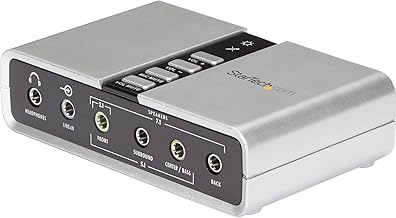
The StarTech ICUSBAUDIO7D adds computer audio connections through USB and supports 2-channel, 5.1-channel, and 7.1-channel output using 3.5 mm jacks. Its connections include a headphone port, line-in, stereo microphone inputs, and SPDIF digital output. A one-meter USB cable is included, and the adapter is bus-powered.
Best for: Desktop or laptop users who need more than ordinary stereo headphone output, including buyers setting up analog multichannel speakers or using digital audio output. It is more connection-focused than a basic USB headphone adapter.
For music playback and recording, its listed analog sampling-rate support is 44.1 kHz and 48 kHz. SPDIF digital output supports 48 kHz playback, while optical input passthrough supports up to two-channel audio at 48 kHz. These details help buyers compare it with devices that advertise higher headphone playback rates.
Limitation: Its listed sampling rates are limited to 44.1 kHz and 48 kHz for analog playback and recording. Buyers seeking higher-rate headphone playback should compare the specifications of other options, such as the Cubilux model.
tenlamp Podcast Equipment Bundle With Mixer

This tenlamp bundle is a different kind of external audio solution: it combines a condenser microphone, G9 sound board, shock mount, desktop stand, and power cable. The sound board includes four voice-change modes, 12 built-in sound effects, noise reduction, and adjustable bass, midrange, treble, and reverb settings. The listing describes USB audio connection and 3.5 mm and 6.35 mm dynamic-microphone inputs.
Best for: Beginners who want a bundled setup for voice recording, streaming, podcasting, or music-related content creation. It is the most suitable choice here for people who need a microphone and live-control features along with an audio device.
Why choose it over a basic adapter: This kit is intended for managing a microphone and adding voice effects, rather than simply routing computer audio to headphones. Its controls may be useful when producing or broadcasting spoken content.
Limitation: It is a larger, multi-component bundle rather than a small, portable headphone adapter. The supplied information does not state detailed recording bit depth or sample-rate specifications, so compare those requirements if recording fidelity is a priority.
Cubilux 7.1 USB Surround Sound Card

The Cubilux USB sound card offers stereo headphone output, line-in, microphone input, and 5.1- and 7.1-channel output. Its listed headphone-output support ranges from 44.1 kHz/16-bit to 384 kHz/24-bit, while its 7.1 surround audio supports sampling rates up to 48 kHz. The housing is made of aluminum alloy.
Best for: Buyers who want multichannel output as well as a stated high-resolution headphone-output specification. It is a useful comparison point for music listeners who also use their computer for movies or games.
Why it stands out: The product lists a higher maximum headphone-output sample rate than the StarTech adapter, while also specifying line-in and stereo microphone input. The aluminum housing is another stated design feature, though the listing does not provide a measurement of noise performance.
Limitation: The advertised 384 kHz/24-bit support applies to the headphone output; the listed 7.1 surround support goes up to 48 kHz. Check that distinction against your intended setup rather than treating the highest figure as applying to every output mode.
Buying Guide: How To Choose An External Sound Card For Music
What do you need the sound card to do?
Start with the connection problem you are trying to solve. If your computer needs a headphone jack or separate microphone input, a basic stereo USB adapter may be enough. If you need outputs for a multichannel speaker setup, look for explicit 5.1 or 7.1 support and confirm that the product provides the outputs your speakers require. For vocal recording, consider whether you need microphone inputs, physical controls, or a bundled microphone rather than only a playback adapter.
- Music listening: Prioritize headphone output, the connection type, and any stated sample-rate or bit-depth support.
- Voice calls: Check whether the device has a microphone input and whether your headset uses separate plugs or one combo connector.
- Recording or streaming: Look for microphone inputs and control features that match your recording setup.
- Surround playback: Confirm the number and type of outputs, not just the words “surround sound” in a product name.
Is a stereo adapter enough for listening to music?
For ordinary headphone listening, a stereo output may meet your needs. A compact adapter can be a practical way to connect 3.5 mm headphones to a computer through USB. A stereo device does not become a multichannel interface because it is used with music; choose 5.1 or 7.1 support only if your intended playback setup needs those channels.
Also distinguish a headphone output from a speaker output. The SABRENT listing specifically says it does not power passive speakers. If you plan to connect speakers, check whether they are powered and what input connection they use.
Which connections should you check before buying?
Match the sound card’s ports to your equipment. A separate headphone output and microphone input are different from a single combo jack. Some headsets have one four-pole plug for both listening and microphone use, while other headsets use separate plugs. The SABRENT listing explicitly says it does not support a four-pole headset through one combo plug, so buyers with that headset style should verify the required connection before choosing.
For recording gear, check the microphone input type and connector size. The tenlamp bundle lists 3.5 mm and 6.35 mm dynamic-microphone inputs. Do not assume that every adapter supports every microphone or instrument; the product information should match the equipment you intend to connect.
Do sample rate and bit depth matter?
Sample rate and bit depth describe supported digital audio formats, but a higher advertised maximum does not automatically mean every output or mode supports that maximum. Compare the specification for the exact connection you will use. For example, Cubilux lists up to 384 kHz/24-bit for headphone output but up to 48 kHz for 7.1 surround audio. StarTech lists 44.1 kHz and 48 kHz for analog playback and recording, with separate limits for SPDIF.
If your priority is everyday music listening, first make sure the adapter meets your connection needs. If you work with specific high-resolution files or recording software, check the device’s supported formats and your computer’s audio settings before purchasing.
Should you choose a mixer bundle or a simple USB adapter?
Choose a simple adapter when you mainly need to connect headphones, powered speakers, or a microphone to a computer. Choose a bundle with a sound board when you also need a microphone and want controls such as tone adjustment, effects, or voice modes. A bundle takes up more space and includes more components, so it is not automatically the better choice for someone who only wants an extra headphone jack.
What else should you verify for computer compatibility?
Check the connector on your computer, the operating system support described by the seller, and whether the device is intended for playback, recording, or both. “Plug-and-play” does not guarantee that every computer will select the adapter automatically; you may need to choose it as the input or output device in system settings. The SABRENT listing identifies USB Audio Device Class 1.0 support and names Windows, Mac, and Linux compatibility, while other listings describe their own supported devices or platforms. Confirm the current product details for your system.
Frequently Asked Questions
Can an external sound card improve music playback?
An external sound card can provide a different audio connection and may add features such as separate inputs, multichannel outputs, or higher stated headphone-output formats. The benefit depends on your computer, headphones, speakers, and listening needs; the product specifications alone do not guarantee a particular audible improvement.
Can I use a USB sound card with headphones and a microphone?
Some models provide both headphone output and microphone input. Check whether they use separate jacks or a single combo connector, then match those ports to your headset. The SABRENT has separate 3.5 mm headphone and microphone jacks.
Do external USB sound cards need drivers?
Some products are described as plug-and-play and do not require additional drivers. Operating-system support can vary, so check the product’s listed compatibility and be prepared to select the device in your computer’s sound settings.
Does 7.1 support matter for music?
Most buyers choosing an adapter for straightforward stereo music listening may not need 7.1 output. Multichannel support is more relevant when your setup requires 5.1 or 7.1 channels. Check the available physical outputs and supported formats before choosing a surround model.
Can a USB sound card power passive speakers?
Do not assume that it can. The SABRENT listing says its adapter does not power passive speakers. Check the product details and speaker requirements; powered speakers generally have their own power source, while passive speakers require an amplifier.
Is a podcast sound card suitable for music recording?
A podcast bundle may suit voice-focused recording and content creation when it includes a microphone and useful controls. However, the tenlamp listing does not provide detailed sample-rate or bit-depth specifications. Buyers recording music should verify those details and confirm that the listed inputs match their instruments and microphones.