
The best XLR-to-3.5mm cable depends on the microphone’s output, the device’s input, and whether the cable is wired for balanced or unbalanced audio. The Cable Matters unbalanced cable is best for connecting a microphone to a camera or computer with a 3.5mm mic input. The balanced cable may suit equipment specifically designed for that wiring, while the short 1.6-foot cable is better for compact setups. One listed cable explicitly says it is not for microphone use, so it is included as a useful distinction—not as a mic-cable recommendation.
| Product | Best For | Key Detail |
|---|---|---|
| Cable Matters Unbalanced 3.5mm to XLR Female | Camera, DSLR, or computer mic inputs | Designed for a microphone-to-3.5mm-input connection |
| Balanced 3.5mm to XLR Female Cord | Setups requiring the listed balanced wiring | Described as a balanced 3-pin cable |
| Unbalanced 3.5mm to XLR Female, 3.3 ft | Short-distance connections | Unbalanced cable with a short listed length |
| XLR to 3.5mm Stereo Microphone Cable, 1.6 ft | Compact recording rigs | Short cable listed for cameras and recording devices |
| Cable Matters 3.5mm to XLR Male-to-Male | Audio-device connections, not microphones | Product title says it is not for microphone use |
Cable Matters Unbalanced 3.5mm To XLR Female
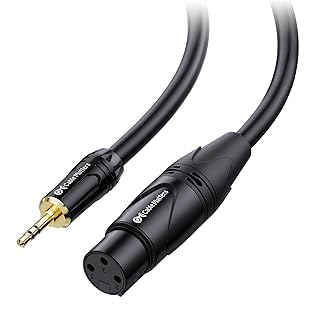
This unbalanced cable is listed for connecting a professional microphone to a camcorder, DSLR camera, or computer sound card with a 3.5mm microphone input. Its 3.5mm male connector has a step-down design intended to fit recessed camera mic ports. The product description also says the XLR-to-Aux connection splits the signal across the phone-jack input for dual-mono output.
Best for: A microphone-to-camera or microphone-to-computer connection when the receiving device has a compatible 3.5mm mic input. It was selected because its listed use directly matches this type of setup. The description specifies oxygen-free copper conductors, braided bare-copper shielding, and polyethylene insulation.
Limitation: It is unbalanced, so do not assume it provides the noise-rejection benefits associated with a balanced connection. Check the microphone’s power requirements and the device input before connecting; the listing mentions use with a powered microphone but does not establish compatibility with every microphone.
Balanced 3.5mm To XLR Female Mic Cord

This cord is described as a balanced 1/8-inch (3.5mm) to female 3-pin XLR stereo microphone cable. Its product title lists microphones, cellphones, iPods, laptops, recorders, amplifiers, speakers, mixers, and video consoles among possible equipment. The title also gives a length range of 3 to 10 feet, so confirm the exact option shown before ordering.
Best for: Buyers whose equipment documentation calls for this particular balanced 3.5mm-to-XLR wiring and connector arrangement. It was selected because it is explicitly identified as a microphone cord and describes a balanced configuration.
Limitation: “Balanced” does not mean it will work with every 3.5mm jack or microphone. Consumer 3.5mm inputs can use different contact arrangements, and the listing information does not specify every wiring detail. Verify the input and output pinout before choosing this cable.
Unbalanced 3.5mm To XLR Female Cable, 3.3 Feet

This is a short unbalanced cable described as a 3.5mm stereo jack-to-female-XLR cord. Its title identifies laptops, speakers, and mixers as possible equipment and notes a gold-plated connector and braided design. The 3.3-foot length is the main practical distinction for buyers who want a short run between nearby devices.
Best for: A compact setup where the source and destination are close together and the equipment supports the cable’s unbalanced connection. It was selected as a short-length alternative to the longer unbalanced microphone cable in this list.
Limitation: The supplied product details do not explain its exact pin wiring or confirm use with a specific camera or microphone. Check that the XLR end is the required female connector and that the 3.5mm connection matches the device’s input before buying.
XLR To 3.5mm Stereo Microphone Cable, 1.6 Feet

This 1.6-foot cable is listed for camcorders, DSLR cameras, computer recording devices, and other equipment. Its short length can help keep a small recording rig tidy when a microphone and recording device are mounted close together. The product name identifies it as a stereo microphone cable, but the supplied details do not specify the connector gender at each end or the wiring configuration.
Best for: Buyers who need a short cable for a compact camera or computer recording arrangement and have verified the connector ends match their equipment. It was selected because the listing directly names microphone recording applications and the XLR-to-3.5mm format.
Limitation: The brief listing details do not establish whether it is balanced, unbalanced, or suitable for a particular microphone. Confirm connector gender, pinout, and any power requirements before relying on it for a recording setup.
Cable Matters 3.5mm To XLR Male Cable

This 6-foot male-to-male cable is listed for connecting devices such as an iPod, MP3 player, laptop, or voice recorder to audio equipment. Crucially, the product title states “Not for Microphone Use.” That warning makes it a poor choice for someone specifically seeking a microphone cable, even though its connectors resemble those used in XLR-to-3.5mm searches.
Best for: Buyers who need the listed male-to-male connection for an audio source such as a laptop or portable player, rather than a microphone. It was selected to clarify an important distinction among cables that may appear similar in search results.
Limitation: Do not choose this cable to connect a microphone. The product title explicitly excludes microphone use, and the supplied details do not describe microphone wiring or compatibility.
Buying Guide: How To Choose An XLR-To-3.5mm Cable
Which connector ends do your devices need?
Identify the connector on the microphone and the socket on the recording device before shopping. “XLR to 3.5mm” describes the connector types, but product names may list them in either direction. Check whether the XLR connection must be male or female and whether the 3.5mm plug is the correct type for the device. A cable with the wrong connector gender will not connect directly without additional equipment.
Also distinguish a microphone input from a headphone or line-level output. A 3.5mm socket can serve different purposes, and a cable’s physical fit alone does not prove that the signal and wiring are appropriate. Check the device manual or port labeling for “mic in,” “line in,” or another specified input.
Should you choose balanced or unbalanced wiring?
Balanced and unbalanced describe how the audio signal is carried, not simply the shape of the connectors. A balanced cable can only provide the intended connection when both the source and receiving equipment support compatible balanced wiring. A 3.5mm microphone input may instead expect a particular unbalanced or stereo arrangement. Match the cable description to the equipment’s documented input and output rather than assuming balanced is always better.
For a short connection between nearby devices, an unbalanced cable may be the required format if the input expects it. For longer cable runs or electrically noisy locations, balanced wiring can be useful when the connected equipment supports it. The listed products do not provide enough pinout information to confirm every possible setup, so consult equipment documentation when wiring is unclear.
Does the microphone need power?
Some microphones require power, but a passive cable does not automatically supply it. The Cable Matters unbalanced listing mentions use with a powered microphone, but that does not establish that the cable itself powers a microphone or that it supports every powering method. Check whether the microphone needs phantom power, plug-in power, a battery, or another supply, and verify that the recording device can provide the required power.
Do not connect equipment based only on a product title that says “for microphone.” Power needs and connector wiring are separate compatibility questions. If the microphone requires a power source not provided by the recording device, an appropriate preamp, interface, or other device may be needed; confirm the equipment specifications first.
How long should the cable be?
Choose a cable long enough to reach comfortably without pulling on the connectors, but avoid unnecessary excess in a compact setup. The products here list lengths of 1.6 feet, 3.3 feet, 6 feet, and a 3-to-10-foot range. A short cable can reduce clutter when devices are mounted together. A longer cable gives more placement flexibility but should still match the signal type and equipment requirements.
What should you verify before ordering?
- Confirm that the receiving port is a microphone input or another input intended for the signal.
- Check XLR connector gender and the 3.5mm plug format.
- Match balanced or unbalanced wiring to the equipment specifications.
- Verify microphone power requirements separately from cable compatibility.
- Check cable length and whether the plug must fit a recessed port.
- Read product warnings carefully; a cable labeled “not for microphone use” is not a microphone solution.
Frequently Asked Questions
Can I connect an XLR microphone directly to a 3.5mm input?
Sometimes, if the cable wiring, connector genders, input type, and microphone power requirements are compatible. The connector shape alone does not guarantee a working or appropriate connection.
Is an XLR-to-3.5mm cable the same as an adapter?
Not necessarily. A cable connects compatible inputs and outputs with specific wiring. An adapter may change the connector format, but neither guarantees signal conversion, microphone preamplification, or power.
Can I use a headphone jack as a microphone input?
Usually, a headphone output is intended to send audio out, not receive a microphone signal. Check the device port label or manual and use a microphone input when required.
Does a 3.5mm-to-XLR cable provide phantom power?
Do not assume that it does. The listed cable descriptions do not establish phantom-power capability. Check the microphone and recording device specifications and use suitable equipment for the microphone’s power needs.
Why avoid the Cable Matters male-to-male cable for a microphone?
Its product title explicitly says “Not for Microphone Use.” It is listed for connecting portable audio sources such as laptops and MP3 players, so choose a cable specifically described for microphone connections instead.
Is a balanced cable always the best choice?
No. Balanced wiring is appropriate only when the connected equipment supports the required signal configuration. A cable that does not match the device’s input wiring may not work as intended, regardless of its balanced label.