
A digital optical to 3.5mm converter changes a compatible device’s digital optical audio output into analog sound for wired headphones, speakers, or other 3.5mm equipment. The PROZOR volume-control DAC is best for listeners who want an output knob; the DNXB is a direct optical-to-AUX option; and the other PROZOR models add RCA outputs for stereo systems. Set the source device to PCM or stereo audio, because these converters do not necessarily decode surround formats.
| Product | Best For | Notable Feature |
|---|---|---|
| PROZOR DAC with Volume Control | Adjustable output level | Volume knob and 3.5mm/RCA outputs |
| DNXB Optical to AUX Converter | Direct optical-to-3.5mm conversion | USB-powered, 192kHz support |
| PROZOR 192kHz DAC, Aluminum Alloy | 3.5mm plus RCA connections | Optical or coaxial input |
| PROZOR 192kHz DAC, PCM/LPCM | Two-channel PCM audio | Optical or coaxial input |
| LiNKFOR 3.5mm to SPDIF Converter | Reverse-direction conversion | 3.5mm analog input to optical output |
PROZOR DAC With Volume Control
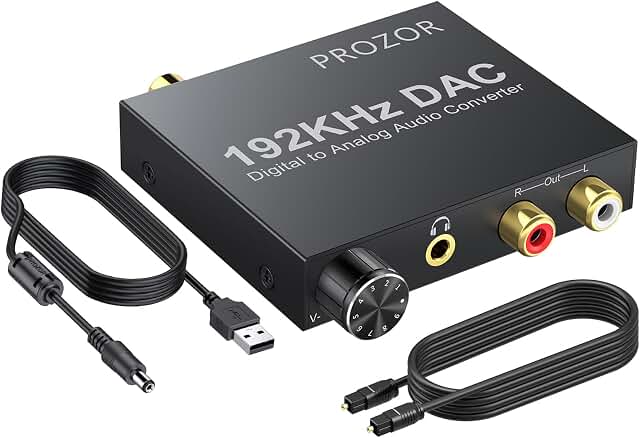
This PROZOR digital-to-analog converter accepts Toslink optical or coaxial digital PCM audio and provides analog stereo RCA and 3.5mm outputs simultaneously. Its built-in volume knob makes it the best fit among these options for users who want to adjust the converter’s output level directly rather than relying only on the source device.
The listed specifications include 24-bit audio and sampling rates of 32, 44.1, 48, 96, and 192kHz. The product description also says it can mute automatically when it receives a non-audio signal and can reduce noise when there is no signal. Those details may be useful in a TV or desktop setup where the source sometimes pauses or changes inputs.
- Best for: Headphone or speaker setups that benefit from a physical output-volume control.
- Choose this if: You want both a 3.5mm jack and stereo RCA outputs from one converter.
- Limitation: It converts digital PCM audio to analog; the listed signal direction cannot be reversed.
DNXB Optical To AUX Converter

The DNXB is designed for a straightforward connection from an optical SPDIF/Toslink output to a stereo 3.5mm AUX device. Its product information specifies USB power, optical input, and analog 3.5mm output. It is a practical match for someone who needs an AUX connection and does not need the RCA outputs offered by the PROZOR models.
The converter lists support for 32, 44.1, 48, 96, and 192kHz sampling rates and 24-bit data streams. The manufacturer emphasizes setting the source’s digital sound output to PCM or stereo before use. That setting is especially important when connecting a television, since a surround format may not work with a two-channel DAC.
- Best for: A basic optical-to-3.5mm connection for stereo headphones or powered speakers.
- Choose this if: Your source has optical audio out and your audio device uses a 3.5mm AUX input.
- Limitation: It is not reversible, and it requires the source to output a supported PCM or stereo signal.
PROZOR Aluminum Alloy 192kHz DAC

This PROZOR converter changes coaxial or Toslink digital PCM audio into analog left/right RCA and 3.5mm audio at the same time. The aluminum-alloy model is best for users who need more than one analog connection type, such as a 3.5mm device and an RCA stereo system. Its listed supported sampling rates extend to 192kHz, with 24-bit S/PDIF input.
The product description identifies an upgraded audio amplifier chipset and dual-channel operational amplifier. It also notes that TV volume may need to be adjusted through the television’s settings. This can matter when the TV’s optical output is fixed-level or when the connected analog equipment has its own volume control.
- Best for: Buyers who want both 3.5mm and RCA analog outputs from optical or coaxial digital input.
- Choose this if: You have multiple analog audio devices or want connection flexibility.
- Limitation: The source audio should be set to PCM; this is a DAC, not an analog-to-digital converter.
PROZOR 192kHz PCM/LPCM DAC

This PROZOR model accepts coaxial or Toslink/SPDIF digital audio and outputs analog stereo through RCA and 3.5mm connections. It is listed for uncompressed two-channel LPCM or PCM signals, with sample rates from 32kHz through 192kHz and 24-bit S/PDIF input. It is a suitable choice when the source can be configured for stereo PCM and the setup needs both common analog output types.
The description specifically warns that the input should be PCM or LPCM to avoid possible distortion. It also distinguishes the stereo converter from a separate model intended for 5.1 decoding. That makes the signal-format check an important part of choosing this unit, rather than assuming that every optical output format will work.
- Best for: Stereo systems using a PCM-capable TV, player, or other digital source.
- Choose this if: You need optical or coaxial input and simultaneous RCA and 3.5mm analog outputs.
- Limitation: It is specified for two-channel PCM/LPCM, not 5.1-channel decoding.
LiNKFOR 3.5mm To SPDIF Converter

This LiNKFOR product is included as a direction check, not as a match for most digital-optical-to-3.5mm searches. Its name specifies conversion from a 3.5mm analog signal to SPDIF optical output. That is the reverse of the direction needed to connect a TV’s optical output to 3.5mm headphones or speakers.
Choose a reverse-direction converter only when the source device has an analog 3.5mm output and the destination equipment accepts optical SPDIF input. The supplied product information mentions an optical cable and use with amplifiers or soundbars, but does not provide detailed audio-format specifications.
- Best for: Sending analog 3.5mm audio from a source to equipment with optical input.
- Choose this if: Your setup needs analog-to-digital conversion, not optical-to-analog conversion.
- Limitation: Avoid this product for a TV optical output to 3.5mm headphones; the stated conversion direction is opposite.
Buying Guide: How To Choose A Digital Optical To 3.5mm Converter
Does the converter match the signal direction?
Check the input and output labels before buying. For the common television-to-headphones setup, the converter needs an optical or Toslink input and a 3.5mm analog output. A product that converts 3.5mm analog audio to optical SPDIF performs the reverse task, even if its name includes both connection types.
These converters are digital-to-analog converters, often shortened to DACs. They take digital sound from an output such as a TV’s optical port and create an analog signal for equipment with a 3.5mm jack or RCA inputs. They do not turn an analog headphone output into an optical signal unless specifically designed for that opposite direction.
Will the converter work with a TV or media player?
Confirm that the source device has an optical audio output. Then check its sound settings for PCM, LPCM, or stereo output. The listed PROZOR and DNXB DACs specify PCM or two-channel PCM support; the product information does not establish that they decode every surround-sound format. A source set to an unsupported audio format may produce silence or distorted audio.
Some TVs allow you to choose PCM under digital audio output or expert sound settings. If the converter produces no sound, check the TV’s selected output, audio format, and volume settings first. Also make sure the connected headphone or speaker is plugged into the converter’s analog output, not into its digital input.
Do you need only 3.5mm, or RCA as well?
A simple optical-to-AUX converter is sufficient when the only destination is a 3.5mm headphone or speaker connection. Models with RCA and 3.5mm outputs offer more connection flexibility for stereo equipment. The PROZOR models in this list provide both analog output types according to their product descriptions.
Consider where the converter will sit and how the connected equipment handles volume. The PROZOR model with a volume knob offers a physical adjustment on the DAC itself. Other models may require volume control from the TV, the connected audio device, or both, depending on the setup.
What do the sampling-rate specifications mean?
Sampling-rate numbers such as 48kHz or 192kHz describe supported digital audio input formats. They do not guarantee that every source will output the highest listed rate, or that a particular connection will sound better. The source and converter must support a compatible format. For typical TV use, verifying PCM output and a working connection is more important than choosing solely by the largest number.
The products list different supported rates and features, so compare the exact model rather than assuming that all converters from the same brand are identical. If a source is set to a format the DAC does not accept, change the source settings to a supported PCM or stereo format.
How is a converter powered?
Power requirements can affect where a DAC fits in a setup. The DNXB listing identifies USB power. Check the product’s included accessories and power instructions before planning a connection, since an optical cable carries audio rather than serving as a power connection. The listed information for the other models should be reviewed for their specific power requirements.
What should you check before troubleshooting?
- Confirm the TV or source has an optical audio output, and connect it to the converter’s optical input.
- Set the digital audio format to PCM, LPCM, or stereo as required by the converter.
- Check whether the converter needs power and whether its power connection is secure.
- Verify the 3.5mm plug is fully inserted and the headphones or speakers are ready to receive analog audio.
- Adjust the source, converter, or speaker volume as appropriate for the selected model.
- Do not expect a DAC to convert analog 3.5mm audio into optical digital output.
Frequently Asked Questions
Can I connect TV optical audio to 3.5mm headphones?
Yes, if you use a digital-to-analog converter with optical input and 3.5mm output. Set the TV’s digital audio format to PCM or stereo when required by the converter.
Is an optical-to-3.5mm converter reversible?
Usually not. A DAC converts digital optical audio to analog 3.5mm audio. Reversing that direction requires an analog-to-digital converter designed for 3.5mm input and optical output.
Will an optical DAC convert Dolby Digital or 5.1 audio?
Do not assume that it will. The listed PROZOR models describe PCM or two-channel LPCM conversion, and one explicitly distinguishes stereo conversion from 5.1 decoding. Check the specific product’s supported formats and set the source accordingly.
Why is there no sound after connecting the converter?
Check that the optical cable is connected to the source output and DAC input, that the converter is powered, and that the source is set to PCM or stereo. Also check the analog device’s connection and volume.
Do I need a converter with RCA outputs?
Only if you want to connect equipment with stereo RCA inputs or need both RCA and 3.5mm outputs. For a single AUX connection, a converter with a 3.5mm output may be enough.
Can a 3.5mm-to-optical converter replace an optical-to-3.5mm DAC?
No. The direction is reversed. A 3.5mm-to-optical converter sends analog audio toward optical equipment, while an optical-to-3.5mm DAC sends digital audio toward an analog headphone or speaker connection.