
The best fit for a laptop that needs 5.1-channel analog output is an external USB sound adapter that explicitly supports multichannel playback, such as the StarTech 7.1 USB Audio Adapter. The Optimal Shop adapter also specifies six-channel analog playback, while Vantec advertises 7.1-channel surround. The biaze and Sabrent adapters are stereo alternatives, not 5.1 upgrades. Check your speaker connections and the adapter’s output format before choosing.
| Adapter | Best suited for | Channel information |
|---|---|---|
| StarTech ICUSBAUDIO7D | Flexible laptop audio with several connection types | Up to 7.1; also supports 5.1 and stereo |
| Optimal Shop USB 6 Channel | Six-channel analog playback | 6-channel analog; digital playback has a stated limitation |
| Vantec USB External 7.1 | USB-connected surround audio | 7.1-channel support stated |
| biaze USB Audio Adapter | Basic headphone and microphone connections | Stereo |
| SABRENT AU-MMSA | Simple replacement for stereo audio ports | Stereo only |
StarTech 7.1 USB Audio Adapter
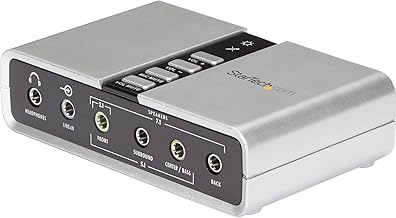
Best for: Laptop users who want a multichannel USB adapter with multiple analog connections and a digital output option. It supports up to 7.1 channels and also lists 5.1 and two-channel output, making it the clearest all-around match here for a 5.1 sound-adapter search.
The adapter connects through USB and is bus-powered, so its listed setup does not require a separate power supply. Connections include 3.5 mm jacks for multichannel output, a headphone port, line-in, stereo microphone inputs, and SPDIF digital output. The included USB cable is one meter long.
For analog playback and recording, the listed sampling rates are 44.1 kHz and 48 kHz. SPDIF digital output supports 48 kHz playback. The product information also says optical SPDIF input passthrough supports up to two-channel audio at 48 kHz.
Limitation: The SPDIF input passthrough is specified for two channels, so choose the analog outputs if your goal is multichannel 5.1 playback. Confirm that the laptop’s software and speaker system can use the intended output format.
Optimal Shop USB 6-Channel 5.1 Adapter

Best for: Buyers specifically looking for a USB adapter that states it supports six-channel analog playback. The product is described for PC and laptop use and provides both analog and digital recording and playback functions.
Its listed analog playback mode supports a six-channel codec. The adapter also describes digital recording through SPDIF input and analog recording at a fixed 48 kHz sampling rate. Listed sampling rates include 32 kHz, 44.1 kHz, and 48 kHz, although the product information notes that some rates require driver or application support.
Important limitation: The digital playback description says only left and right PCM channels can be conveyed in digital playback mode, even when the source is 5.1-channel audio. For a 5.1 setup, the stated six-channel analog playback mode is the relevant feature; do not assume SPDIF digital playback carries discrete 5.1 channels.
The listed operating-system support names Windows 98, XP, 2000, Vista, and Windows 7 and 8. The provided feature information does not establish support for newer operating systems, so verify compatibility before buying if the laptop uses a more recent system.
Vantec USB External 7.1 Audio Adapter

Best for: Buyers who want a USB-connected adapter advertised for 7.1-channel surround sound. Because 5.1 uses fewer channels than 7.1, this is a relevant option to compare when shopping for laptop surround audio, provided its physical connections suit the speaker system.
The listed connection is USB 2.0, with backward compatibility for USB 1.1. The feature information states support for 44.1 kHz and 48 kHz sampling rates for both playback and recording. These details make it a straightforward candidate for someone prioritizing a USB connection and stated multichannel support.
Limitation: The supplied product details do not list the number or type of audio jacks, nor do they specify operating-system support. Check the adapter’s connection layout and confirm that it works with the laptop and the speaker inputs before selecting it. Do not infer a particular analog or digital connection from the 7.1-channel description alone.
biaze USB Stereo Audio Adapter

Best for: Laptop users who need to restore or add ordinary headphone and microphone connections, rather than connect a 5.1 speaker system. This adapter provides a 3.5 mm speaker or headphone output and a separate mono microphone input through USB.
The product supports listening and speaking and lists CTIA-standard and Android earphones among the supported headset types. Its stated operating-system and device list includes Windows 10, 8.1, 8, 7, Vista, and XP, Mac OS X, Linux, Chromebook, Surface 3 Pro, Raspberry Pi, PS4, and PS5. A built-in DAC is listed, with output up to 16-bit/48 kHz and noise reduction.
Limitation: This is identified as a USB stereo sound card, not a 5.1 surround adapter. Choose it if stereo headphones, speakers, or a microphone are the goal; avoid it if you need discrete six-channel output for a 5.1 speaker system.
SABRENT AU-MMSA Stereo Sound Card

Best for: Buyers who want a simple USB replacement for a laptop’s stereo headphone and microphone ports. It has a USB Type-A connector, a 3.5 mm stereo headphone output, and a separate 3.5 mm mono microphone input. It is bus-powered and described as plug and play, without separate drivers, software, or external power.
The listed compatibility includes Windows, Mac, and Linux systems that support class-compliant USB audio. After connection, the adapter can be selected as the system’s sound output and input device. Its separate jacks make it useful for a conventional headphone-and-microphone setup.
Limitation: Sabrent explicitly identifies this as a two-channel stereo adapter that does not add surround sound. It also does not support a four-pole headset with a single combo plug or power passive speakers. Choose another product if the goal is laptop 5.1 output.
Buying Guide: How To Choose A 5.1 Sound Adapter
Does the adapter actually support 5.1 output?
Look for explicit wording such as “5.1,” “six-channel,” or support for multichannel analog output. A USB sound adapter can improve or replace a laptop’s audio connections without adding surround sound. The biaze and Sabrent products are stereo adapters, so their USB connection alone does not make them suitable for 5.1 speakers.
The StarTech adapter lists 5.1 output directly and supports up to 7.1 channels. The Optimal Shop product specifies six-channel analog playback. Vantec states 7.1-channel surround support, but the supplied details do not describe its output jacks. Match the stated channel support to the available connections before purchasing.
Should you use analog connections or SPDIF?
Check how the speaker system connects. A multichannel analog setup typically needs the adapter’s outputs to match the speaker system’s input arrangement. The StarTech feature list describes 5.1 output through 3.5 mm jacks. The Optimal Shop feature list identifies six-channel analog playback as a mode, while limiting its digital playback description to left and right PCM channels.
Do not treat every SPDIF connection as a guaranteed route for discrete 5.1 audio. The supplied product information for these adapters does not establish that every digital output carries multichannel sound in every laptop configuration. If you intend to use digital audio, verify the supported channel format and the requirements of the laptop and receiver or speakers.
How many jacks and inputs do you need?
List the connections required by your existing equipment before choosing an adapter. A surround speaker system may require multiple outputs, while a headset may need a headphone connection and a microphone input. The StarTech model lists multichannel 3.5 mm jacks, headphone, line-in, stereo microphone, and SPDIF connections. The Sabrent model has separate stereo headphone-out and mono microphone-in jacks.
Also check whether your headset uses separate plugs or one combined plug. Sabrent specifically says its adapter does not support a four-pole headset on a single combo connector. The biaze adapter lists support for CTIA-standard earphones, but its feature description identifies it as stereo rather than surround.
Will the adapter work with your laptop?
Confirm that the laptop has a suitable USB port and that its operating system is supported. Vantec lists USB 2.0 and backward compatibility with USB 1.1. StarTech describes a bus-powered USB connection. The Optimal Shop feature list names older Windows versions, while the biaze and Sabrent descriptions list broader operating-system support. These descriptions are not interchangeable; check the specific product information for the system you plan to use.
Operating-system support does not guarantee that a particular game, media player, or conferencing application will send audio to every channel. Software settings may affect the selected output device and channel configuration. Review the laptop’s audio settings and the application’s output options when troubleshooting.
What sampling-rate details matter?
Sampling-rate information can help compare recording and playback specifications, but it does not by itself confirm 5.1 compatibility. StarTech lists 44.1 kHz and 48 kHz for analog playback and recording, with SPDIF output at 48 kHz. Vantec lists 44.1 kHz and 48 kHz for playback and recording. The Optimal Shop adapter lists several rates, with some requiring driver or application support.
Choose based first on channel count, connection type, and system support. Use sampling-rate specifications as a secondary comparison, especially if you plan to use digital input or recording features.
Frequently Asked Questions
Can a USB sound adapter add 5.1 audio to a laptop?
Yes, if the adapter explicitly supports multichannel output and has connections compatible with the speaker system. A stereo USB audio adapter provides two-channel sound, not 5.1 surround.
Which listed adapter explicitly supports 5.1?
The StarTech ICUSBAUDIO7D explicitly lists 5.1 output and support for up to 7.1 channels. The Optimal Shop product describes six-channel analog playback, which is relevant to a 5.1 analog setup.
Does a 7.1 adapter work with a 5.1 speaker system?
A 7.1 channel rating indicates support for more channels than a 5.1 setup, but check the adapter’s actual connections and configuration details. The Vantec feature information states 7.1 support but does not list its jack layout.
Does SPDIF always carry 5.1 sound?
No. The supplied specifications matter. The Optimal Shop adapter’s digital playback description says it conveys only left and right PCM channels, and StarTech lists its SPDIF optical input passthrough as up to two-channel audio.
Can a stereo adapter replace a failed laptop audio port?
It can provide stereo headphone output and microphone input if those are the connections you need. The biaze and Sabrent adapters are described as stereo products, so they are not substitutes for a multichannel 5.1 adapter.
What should I check before buying?
Confirm the desired channel count, speaker input type, number of required jacks, USB connection, and operating-system support. If using digital audio, verify the supported channel format rather than assuming SPDIF delivers discrete 5.1 sound.