
The best USB conference call speakerphone depends on group size, connection preference, and how much microphone coverage you need. The Anker PowerConf S330 is best for a straightforward wired home-office setup, while the EMEET M0 Plus suits small groups that may expand with daisy chaining. The Anker PowerConf adds six microphones and Bluetooth, and the Jabra Speak 510 models offer portable USB or wireless use.
| Speakerphone | Best For | Connection |
|---|---|---|
| EMEET M0 Plus | Small groups with room to expand | USB-C, USB-A adapter, Bluetooth |
| Jabra Speak 510, Black | Portable calls and simple setup | USB or Bluetooth |
| Anker PowerConf | Multi-speaker pickup and wireless use | Bluetooth 5.3, USB-C |
| Anker PowerConf S330 | Wired home-office meetings | USB-C, USB adapter |
| Jabra Speak 510 | Flexible laptop or smartphone calls | USB or Bluetooth |
EMEET M0 Plus Conference Speakerphone

The EMEET M0 Plus is a USB and Bluetooth conference speakerphone with four microphones and 360-degree voice pickup. Its listed features include noise reduction, a USB-C connection with a USB-C-to-USB-A adapter, and support for up to eight people. The product description also says two units can be daisy-chained for meetings of up to 16 people.
Best for: Small teams that want a room-oriented microphone layout and the option to expand their setup. The four-microphone array and stated daisy-chain capability make it a flexible choice as meeting groups grow.
Limitation: The stated group sizes are eight people with one unit and up to 16 with daisy chaining. Choose another option if you need a simpler, single-person portable speakerphone.
Jabra Speak 510 Portable Speakerphone, Black

The Jabra Speak 510 is a portable speakerphone that connects by USB or Bluetooth. Its product details emphasize quick setup and clear meeting audio. The listing says it works with Microsoft Teams, Google Meet, and Zoom, making it a practical option for users who regularly switch between common meeting platforms.
Best for: People who move between a laptop and smartphone or want a portable device with wired and wireless connection choices. Its simple setup is useful for users who want to join calls without a complicated installation process.
Limitation: The supplied feature information does not specify microphone count, room coverage, or supported group size. Compare those details if you need a speakerphone for a larger conference room.
Anker PowerConf Bluetooth Conference Speaker
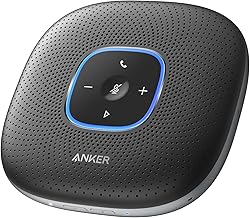
The Anker PowerConf uses six microphones arranged in a 360-degree array to pick up voices from different directions. Listed features include Voice Radar 3.0, which is described as reducing noise, canceling echo, and detecting multiple speakers. The speakerphone also automatically balances voice volume to account for differences in distance and speaking level.
Best for: Meetings with several participants seated around a shared workspace. The six-microphone array and automatic voice balancing are relevant when people speak from different positions. It supports Bluetooth 5.3 and USB-C, and the listing states up to 24 hours of call time.
Limitation: This model offers both Bluetooth and USB-C rather than a described USB-A connection. Check your computer’s available ports and connection needs before choosing it.
Anker PowerConf S330 USB Speakerphone

The Anker PowerConf S330 is a wired USB speakerphone designed for home-office meetings. It connects through USB-C and includes a standard USB adapter. The product details describe plug-and-play setup, four high-sensitivity microphones, 360-degree voice coverage, and voice pickup within three meters. Smart voice enhancement is intended to reduce background noise and enhance voices.
Best for: Users who prefer a stable wired connection and want quick setup at a desk. It is the more direct choice for a USB-first workspace, particularly if you do not need Bluetooth for a phone or laptop.
Limitation: The listed connection is wired USB, not Bluetooth. Avoid this model if wireless placement or switching between Bluetooth devices is a priority.
Jabra Speak 510 USB And Bluetooth Speakerphone
This Jabra Speak 510 listing describes a portable speakerphone for meetings and calls, with both USB and wireless Bluetooth connectivity. It is presented as a quick-to-set-up option with clear meeting audio and Microsoft Teams support. The listed connection flexibility lets users choose a wired laptop setup or Bluetooth when connecting wirelessly.
Best for: Buyers who want a portable device for calls across compatible laptops and smartphones. It has essentially the same listed core features as the other Jabra Speak 510 entry in this roundup, so connection options and portability are the main reasons to consider it.
Limitation: The supplied details do not give microphone coverage or a maximum group size. The two Jabra listings describe similar features, so compare the specific listing and included configuration before ordering.
Buying Guide: How To Choose A USB Conference Speakerphone
Do you need USB only, or USB and Bluetooth?
A wired USB speakerphone is a strong fit for a fixed desk or home-office setup. It connects directly to a computer, and the Anker PowerConf S330 is specifically described as plug and play over USB-C, with a standard USB adapter included. A wired connection can also reduce the need to manage wireless pairing.
Choose a USB-and-Bluetooth model if you want to connect in more than one way or use a smartphone as well as a computer. The EMEET M0 Plus, Anker PowerConf, and Jabra Speak 510 listings all describe wireless Bluetooth connectivity alongside a USB option. Confirm the exact ports and adapters you need against the product details.
How many people need to be heard?
For a small meeting around a shared table, look for microphone coverage in multiple directions. The Anker PowerConf lists six microphones in a 360-degree array, while the EMEET M0 Plus lists four microphones and 360-degree pickup. The S330 also has four microphones and states voice pickup within three meters.
The EMEET listing is the clearest option here for stated group size: it specifies up to eight people with one unit and up to 16 when two units are daisy-chained. The other supplied descriptions do not state maximum participant counts. A product’s participant guidance is not the same as a guarantee of ideal performance in every room.
Which features help with noisy or uneven meetings?
Noise reduction, echo cancellation, and voice enhancement can be useful when participants are speaking from different positions or there is background sound. The Anker PowerConf lists Voice Radar 3.0 for noise reduction, echo cancellation, and multiple-speaker detection. The S330 lists smart voice enhancement for reducing background noise and enhancing voices, while the EMEET M0 Plus lists noise reduction.
These feature descriptions do not establish how a device will perform in every environment. Consider the room’s acoustics, background noise, and number of speakers as well as the listed processing features.
Is portability important?
A portable speakerphone makes sense if you move between work areas or carry meeting equipment with you. Both Jabra Speak 510 listings emphasize portability, quick setup, and USB or Bluetooth connection. The Anker PowerConf also offers Bluetooth, but its supplied description highlights microphone coverage, voice processing, and call time rather than portability.
For a fixed desk where the speakerphone can remain connected, the S330’s wired USB design may be more appropriate. For a group workspace that could expand, the EMEET’s stated daisy-chain feature may matter more than portability.
Will the device work with your meeting software?
Check the product listing for named software compatibility and verify that the speakerphone appears as an available audio device in your meeting application. The Jabra Speak 510 details name Microsoft Teams, Google Meet, and Zoom. The EMEET M0 Plus and Anker PowerConf listings describe compatibility with leading platforms, while the Anker PowerConf product name identifies it as Zoom Certified.
Software support can depend on your computer, operating system, app settings, and connection method. Confirm current compatibility details before purchasing if your organization requires a particular platform or setup.
What should you compare before buying?
- Connection: Match USB-C, USB-A adapter, or Bluetooth options to your devices and preferred setup.
- Pickup pattern: Compare microphone count, 360-degree coverage, and any stated pickup distance.
- Group size: Look for an explicitly stated participant limit when you need one; only the EMEET details here give a specific group-size figure.
- Noise features: Check whether the listing describes noise reduction, echo cancellation, or voice enhancement.
- Portability: Consider whether you need a compact speakerphone for different rooms or a wired unit that stays at a desk.
- Expansion: If meetings may grow, note the EMEET’s listed daisy-chain option and stated capacity with two units.
Frequently Asked Questions
What is a USB conference call speakerphone?
It is a speaker and microphone device used for online meetings and calls, connected to a computer through USB. Many models combine speaker playback with microphones designed to pick up voices around a table.
Can I use a conference speakerphone with Bluetooth instead of USB?
Some models support both connection types. The EMEET M0 Plus, Anker PowerConf, and Jabra Speak 510 listings describe USB and Bluetooth connectivity. The Anker PowerConf S330 is described as a wired USB model.
Which option is best for a wired home office?
The Anker PowerConf S330 is the most directly suited to a wired home-office setup in this selection. Its listed features include USB-C, a standard USB adapter, plug-and-play setup, and four microphones with 360-degree coverage.
Which speakerphone lists support for a larger group?
The EMEET M0 Plus listing states support for up to eight people with one unit and up to 16 people with two daisy-chained units. The supplied details for the other models do not specify a maximum group size.
Are the two Jabra Speak 510 listings different products?
Both supplied listings describe a portable Jabra Speak 510 with USB and Bluetooth, quick setup, and clear meeting audio. The feature descriptions are similar, so review the individual listing details to confirm the exact product configuration.