
The best 2-person podcast equipment bundle depends on where you record and how much control you need: the Movo PodPro is suited to mobile recording, the MAONO E2 Gen2B emphasizes mixer features, and the M100 bundles offer compact setups for two speakers. Compare microphone type, device connections, monitoring, and included accessories before choosing. The options below are selected for their stated two-person focus and podcast or streaming use.
| Bundle | Best For | Notable Stated Features |
|---|---|---|
| M100 XLR/USB Dynamic Bundle | Flexible home or creator setups | Dual USB-C, mixer, two stands, headphones |
| M100 Condenser Bundle | Two-person streaming and recording | Two condenser microphones and pop filters |
| Movo PodPro | Portable recording with phones or computers | Battery-capable interface, two mics and headphones |
| MAONO E2 Gen2B | Co-hosts who want built-in effects and noise reduction | Dual XLR inputs, Bluetooth, loopback, sound buttons |
| Brvomussy Bundle | Gaming and live-streaming pairs | Audio interface, voice changer, condenser microphones |
M100 XLR/USB Dynamic Microphone Bundle

This M100 bundle is best for two-person home podcasting or streaming when a buyer wants several core accessories in one package. The listing describes XLR/USB dynamic microphones, an audio mixer, dual USB-C, two desktop stands, and headphones. It also names a voice changer and use with vocal recording, streaming, creation, and a home studio.
It was selected because the listing is explicitly designed for two people and identifies both microphones and monitoring accessories. The combination of XLR/USB microphones and a mixer may appeal to creators comparing connection options, though the supplied product information does not explain how each connection mode works.
- Best for: Co-hosts seeking a two-microphone bundle with stands and headphones.
- Choose this if: You want the listed mixer, dual USB-C, and voice-changing feature in the same kit.
- Limitation: The supplied details do not specify supported operating systems, recording software, or the mixer’s individual controls.
M100 Dual Condenser Microphone Bundle

This M100 option is best for pairs looking for two condenser microphones with pop filters for streaming, recording, phone use, or PC gaming. Its listing specifies dual XLR-to-3.5 mm condenser microphones and two pop filters. It describes the microphones as intended for clear studio-style vocals, but does not provide independent test results or detailed sound measurements.
The bundle was selected because it directly addresses two-person recording and includes a pop filter for each microphone. Compared with a kit that lists an audio mixer and headphones, this product description focuses more narrowly on the microphones and filters, so buyers should check the included package details before assuming other accessories are provided.
- Best for: Two speakers who need a pair of condenser microphones and pop filters.
- Better for: Buyers prioritizing a dual-mic setup for recording, streaming, or gaming.
- Limitation: The provided listing information does not identify included stands, headphones, or a mixer.
Movo PodPro Portable Podcast Bundle
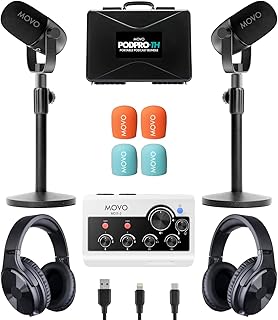
The Movo PodPro is best for two-person recording that may move between a home studio and mobile locations. The bundle includes a dual-channel MDX-2 USB audio interface, two CastMic XLR dynamic microphones, two pairs of studio headphones, and a travel case. The interface has two XLR inputs, two headphone outputs, stereo quarter-inch outputs, and 48V phantom power.
The listing says the interface can run on battery power for up to eight hours, or three hours with phantom power on. It includes USB-A, USB-C, and Lightning cables and is described for use with PC, Mac, iPhone, iPad, and Android devices. The CastMic is described as a cardioid XLR dynamic microphone with a 40Hz–16kHz frequency response and metal construction.
- Best for: Mobile creators who need two microphones, two headphone connections, and a portable interface.
- Choose this if: Recording on a phone or computer and having included connection cables are priorities.
- Limitation: Battery life is shorter when phantom power is on, according to the listing.
MAONO E2 Gen2B Dual-Input Bundle

The MAONO E2 Gen2B is best for co-hosts who want mixer functions for two-person recording and live sessions. Its listing describes dual XLR combo inputs, a 60dB preamp, USB-C and 3.5 mm connections for phones and computers, noise reduction, loopback, and Bluetooth. It also lists eight customizable sound-effect buttons, with the ability to upload audio clips up to 20 seconds and adjust button volumes.
This bundle was selected for its stated combination of two-person inputs and built-in features that may support live production. The listing says its low-noise preamps are intended to provide gain for dynamic microphones and that noise reduction can help block distractions such as fans or hums. Those are product claims, not a guarantee that every recording environment will sound noise-free.
- Best for: Podcasters or streamers who want built-in sound effects, loopback, and noise-reduction functions.
- Better for: Buyers who value mixer features alongside dual XLR inputs.
- Limitation: The supplied details do not list specific included microphones, headphones, or stands.
Brvomussy Two-Person Streaming Bundle

The Brvomussy bundle is best for pairs shopping for an all-in-one audio setup aimed at gaming, live streaming, singing, or YouTube content. The product name identifies an audio interface, voice changer, and condenser microphones, and describes the setup as being for two people. That makes it relevant to creators who want voice effects as part of their streaming workflow.
It was selected because it combines two-person positioning with an interface and microphones in the product title. Compared with the Movo bundle, the available product information does not specify microphone pickup pattern, connection cables, battery operation, or detailed interface inputs. Buyers should compare the full package contents and connection requirements before choosing it for a particular computer or phone.
- Best for: Gaming or streaming pairs interested in a voice changer and condenser microphones.
- Choose this if: Voice effects are a priority for your content format.
- Limitation: The supplied details do not describe the interface specifications or included monitoring accessories.
Buying Guide: How to Choose a Two-Person Podcast Kit
Which microphone type fits your recording setup?
Start by checking whether the bundle includes dynamic or condenser microphones. The Movo PodPro specifies dynamic XLR microphones, while the second M100 bundle and Brvomussy product name specify condenser microphones. The first M100 listing describes dynamic microphones. These types are not interchangeable descriptions, so use the product details to compare the actual microphone included rather than relying only on the word “podcast.”
Also check the connection named for each microphone. XLR microphones require an appropriate XLR input or interface connection. One M100 listing describes XLR-to-3.5 mm microphones, while other products name XLR microphones and interfaces. Confirm the complete signal path and device connection in the package details before ordering.
Do both speakers need separate headphone monitoring?
Two headphone connections let co-hosts monitor audio separately, but not every bundle lists two headphone outputs or two pairs of headphones. Movo specifically lists two headphone outputs and two headphone pairs. The first M100 listing names headphones but does not state the number of pairs in the supplied description. If both speakers need monitoring, verify the quantity of headphones and outputs.
Will you record on a phone, computer, or both?
Match the listed cables and ports to the devices you plan to use. Movo names USB-A, USB-C, and Lightning cables and lists use with computers, iPhones, iPads, and Android devices. The MAONO listing names USB-C and 3.5 mm connections for phones and computers. The first M100 listing mentions dual USB-C, while the second M100 listing mentions phone and PC use. Check the exact connection method for your device before purchase.
Do you need a portable or stationary setup?
A travel case and battery-capable interface can matter when recording away from a desk. Movo includes a travel case and states battery operation of up to eight hours, or three hours with phantom power on. A desktop-oriented bundle may suit a fixed recording space better when portability is not a priority. Consider where the equipment will be stored, powered, and used by both speakers.
Which built-in mixer features are useful?
Choose features based on your actual workflow. The MAONO listing highlights noise reduction, loopback, Bluetooth, and customizable sound-effect buttons. The first M100 listing names a mixer and voice changer, while the Brvomussy bundle also names a voice changer. If you only need two microphones and a straightforward recording chain, extra effects may not be essential. Check whether the mixer has the inputs and controls your recording software and format require.
What should you confirm before buying?
- Verify the number and type of microphones, stands, and headphones included.
- Check whether the interface or mixer has enough inputs for both speakers.
- Confirm cables and device connections for your phone or computer.
- Review power requirements, including battery details if recording on location.
- Compare stated features with your workflow instead of assuming that every bundle includes the same accessories.
Frequently Asked Questions
What equipment does a two-person podcast setup need?
A two-person setup generally needs two microphones and a way to connect them to the recording device. Headphones and an interface or mixer can support monitoring and control. Check each bundle’s included quantities and connections, because listings differ.
Is a dual-input interface important for two hosts?
A dual-input interface can provide a separate microphone connection for each host. The Movo PodPro and MAONO E2 Gen2B listings specifically describe two inputs. Confirm that the inputs match the microphone connectors in your chosen bundle.
Can these bundles be used for streaming as well as podcasts?
Several listings describe streaming use. The M100 bundles reference streaming, while the MAONO and Brvomussy listings also describe live or gaming-related workflows. Confirm device connections and software requirements for your intended setup.
Which option is described for portable recording?
The Movo PodPro is specifically described as portable and includes a travel case and battery-capable interface. Its stated battery life is up to eight hours, or three hours with phantom power on.
Do all five bundles include two headphones?
No. The supplied information explicitly lists two pairs of headphones for the Movo PodPro. Other product descriptions either list headphones without a quantity or do not specify them, so check package contents before buying.