
The best DJ mixer with a USB audio interface depends on how many sources you need and whether you want to record directly to a computer. The Pyle PAD30MXUBT is a compact option with a stated USB soundcard, while the Pyle PMXU83BT.5 suits setups needing more channels. For USB recording plus USB-stick playback, consider the Aveek 5 Channel Mixer. The selections below prioritize listed USB connectivity and practical input options; check the connection details against your computer, microphones, and speakers before buying.
| Product | Best For | USB Feature |
|---|---|---|
| Pyle PAD30MXUBT | Compact computer recording | USB soundcard and PC/Mac connection |
| Pyle PMXU83BT.5 | More microphones and sources | USB and direct-to-computer recording |
| Aveek 5 Channel Mixer | Computer recording and USB-stick use | USB-B recording and USB-drive playback/recording |
| Pyle PAD43MXUBT | Flexible four-channel home setup | USB PC recording and playback |
| STABCL 4 Channel Mixer | Basic effects and computer connection | Computer connection through USB |
Pyle PAD30MXUBT

Best for: A beginner or home DJ who wants a compact mixer with a specifically described USB soundcard for connecting to a Mac or PC. Its three channels accommodate multiple audio sources without requiring an eight-channel console.
The listed connections include an XLR microphone input, a 3.5 mm microphone jack, a headphone jack, RCA left/right inputs, a second RCA input pair, and RCA stereo outputs. Bluetooth streaming is also listed for compatible phones, tablets, and other devices. This combination makes the PAD30MXUBT a practical choice for a small setup that mixes a microphone and playback sources while recording or connecting to a computer.
Why it was selected: The product description explicitly calls out its USB soundcard and audio interface, making its computer-recording purpose clear. It also offers both Bluetooth and wired RCA connections.
Limitation: Three channels and RCA stereo outputs may not suit a larger setup with several microphones or more complex output routing. The listed Bluetooth version is 3.0.
Pyle PMXU83BT.5 8-Channel Mixer

Best for: DJs, small performance groups, or home studios that need more inputs for microphones, instruments, and media sources. The mixer has eight channels and four XLR/1/4-inch combo inputs, according to its listed features.
For computer use, the product description lists USB and direct-to-computer recording. Bluetooth 4.0, RCA connections, and mono and stereo channels add options for playback and source routing. Channel controls include gain, high, mid, low, and FX/send adjustments. The listed +48V phantom power is relevant to users connecting microphones that require phantom power; confirm the requirements of your specific microphone before use.
Why it was selected: It combines a higher channel count with computer recording and several input types, so it is better suited to expanding setups than a compact three- or four-channel unit.
Limitation: Its larger input capacity may be unnecessary if you only mix a single microphone and one playback source. The product details do not specify a USB recording sample rate or bit depth.
Aveek 5 Channel Audio Mixer

Best for: Buyers who want both computer recording and USB-stick playback or recording. The product lists a built-in recording chip and a USB-B connection for computer recording, along with a separate USB-drive playback and recording function.
The mixer provides three XLR inputs, stereo 6.35 mm inputs, and RCA stereo inputs. Its listed outputs include RCA and 6.35 mm main outputs for connecting to active speakers, a power amplifier, or an active sound system. The product description says to connect a computer through USB-B for plug-and-play recording, and notes that USB-stick playback supports MP3 music.
Why it was selected: The separate computer and USB-drive functions give this model more than one way to record or play audio. Its mix of XLR, 6.35 mm, and RCA connections also supports varied sources.
Limitation: The description says output devices must be active and that Bluetooth output devices cannot be connected. Check the powered-speaker or amplifier requirements of your setup before choosing it.
Pyle PAD43MXUBT 4-Channel Mixer

Best for: A home DJ or podcasting setup that needs four channels, several connection types, and basic onboard tone and effect controls. The product description lists USB PC recording and playback, plus Bluetooth streaming.
Inputs and connections include two XLR/6.35 mm combo jacks, RCA stereo input and output, a 2-track RCA input, and a 3.5 mm auxiliary input. A headphone jack is also listed. For sound shaping, the mixer includes an echo effect, high/low two-band EQ, pan control on each channel, gain controls, and peak indicators. It also lists +48V phantom power for condenser microphones that require it.
Why it was selected: The PAD43MXUBT combines a clear USB computer-recording feature with useful wired inputs and per-channel controls. It is better for a modest multi-source arrangement than the smaller PAD30MXUBT.
Limitation: The product lists a two-band EQ rather than a three-band EQ. Its USB recording specifications are not provided in the supplied product details.
STABCL 4-Channel USB Mixer
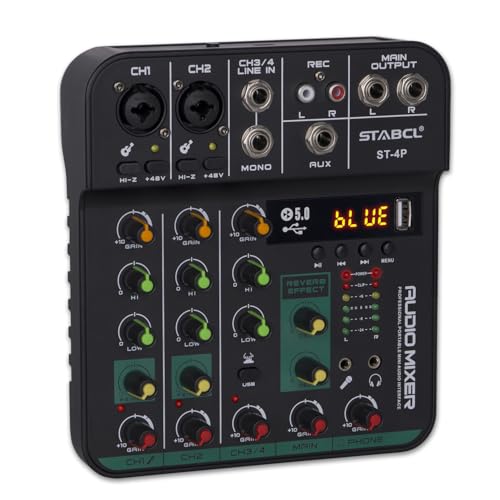
Best for: A small DJ, meeting, or home-recording setup that needs two XLR inputs, stereo connections, and simple onboard effects. Its listed controls include gain, a two-band equalizer, echo, and delay.
The product description lists a USB connection for a computer and USB or Bluetooth playback. It also includes two XLR inputs with 48V power, stereo 6.35 mm connections, a pair of 6.35 mm main outputs, and an auxiliary output. The LED peak indicator can help users monitor signal levels while adjusting channels.
Why it was selected: It offers computer connectivity alongside Bluetooth and USB playback, plus echo and delay controls for users who want basic effects without listing separate external effects equipment.
Limitation: The supplied details say the computer can power the mixer through a “typc” cable but do not define the recording format or USB audio specifications. Confirm the intended computer-recording workflow before purchase.
Buying Guide: How to Choose a DJ Mixer With USB Audio
Do you need USB recording, USB playback, or both?
“USB mixer” can describe different functions. Some mixers connect to a computer for recording or playback; others accept a USB flash drive for audio playback, recording, or both. These functions are not interchangeable. The Pyle PAD30MXUBT and PAD43MXUBT list USB computer recording or connection, while the Aveek model specifically lists USB-B computer recording and a separate USB-drive feature. Identify the exact workflow you need before comparing models.
How many channels and inputs will your setup require?
Count the sources you expect to mix at the same time, including microphones, instruments, turntables or players, and computer or phone audio. A three-channel mixer may work for a lean microphone-and-playback arrangement. A four- or five-channel model gives more room for additional sources, while the Pyle PMXU83BT.5 is the choice here with eight channels and four XLR/1/4-inch combo inputs. Input counts and channel counts are not always the same, so verify the connection layout against your equipment.
Which connections match your equipment?
Check each device’s output and each speaker’s input before choosing a mixer. XLR and combo inputs can accommodate listed microphone or instrument connections, while RCA, 3.5 mm, and 6.35 mm connections serve other common audio sources. Also check whether your speakers are active or need a separate amplifier. The Aveek description, for example, specifies active output equipment and says Bluetooth output devices cannot be connected.
Will you connect a condenser microphone?
Some condenser microphones require +48V phantom power. The Pyle PAD43MXUBT, Pyle PMXU83BT.5, Pyle PAD30MXUBT, and STABCL model list phantom power in their product details. Match the mixer’s stated power support to your microphone’s requirements. Do not assume every microphone uses phantom power or that a USB microphone can connect to an XLR input; check the microphone connection type as well.
Do you need Bluetooth or wired playback?
Bluetooth can make it convenient to send music from a phone or tablet, while wired inputs offer a direct connection using the appropriate cable. Bluetooth availability does not establish that a mixer can send audio wirelessly to speakers. Confirm whether the feature is for incoming playback, and use the listed outputs to plan the connection to speakers, headphones, or a recording device.
Which controls matter during a DJ set or recording?
Gain controls help set input levels, while EQ and pan controls shape or position channel audio. Echo and delay may suit users seeking basic effects, but they are not substitutes for checking the mixer’s overall routing and recording options. Peak indicators can provide a visual signal-level reference. Choose features based on the control you will actually use, rather than channel count alone.
What USB details should you verify?
The product descriptions here do not consistently state USB sample rate, bit depth, driver requirements, or supported recording software. If those details affect your work, consult the manufacturer’s documentation before purchasing. Also verify the connector type: the Aveek product specifies USB-B for computer recording, while other descriptions use broader terms such as USB or USB interface.
Frequently Asked Questions
What does a USB audio interface do in a DJ mixer?
A USB audio interface provides a path for audio between a mixer and a computer. Depending on the model, it may support recording, playback, or both. Check the product description to confirm the particular function rather than assuming every USB port handles computer recording.
Can I record a DJ mix directly to a computer?
Some listed mixers describe USB computer recording, including the Pyle PAD30MXUBT, Pyle PMXU83BT.5, Aveek mixer, and Pyle PAD43MXUBT. Confirm the computer connection, recording workflow, and any required software in the product documentation.
Can a USB mixer play music from a flash drive?
Some models include USB-drive playback, but this is a separate feature from connecting the mixer to a computer. The Aveek product specifically lists USB-stick MP3 playback and recording. Check that a model names flash-drive playback if you need it.
Is Bluetooth the same as a USB audio interface?
No. Bluetooth is a wireless audio connection, while a USB interface connects through a USB port. A mixer may offer both, but Bluetooth playback alone does not confirm that it can record audio to a computer.
Should I choose a mixer with more channels?
Choose enough inputs for the sources you will use simultaneously, with some allowance for future equipment. More channels can support a larger setup, but they may add unused capacity if your arrangement is simple. Compare actual input types as well as the advertised channel count.
Do all mixers with phantom power work with USB microphones?
No. Phantom power is relevant to compatible microphones connected through the appropriate analog input. USB microphones use a USB connection, and compatibility with a mixer should not be assumed. Check the microphone and mixer connection specifications before buying.