
The best surround sound speaker adapter depends on the connection you need: the VPFET HDMI extractor is the listed option for separating audio from an HDMI source, while the PROZOR and AUTOUTLET DACs convert digital optical audio to analog stereo. The MOBOREST and PANPEO adapters are for RCA-to-speaker-wire connections, not digital surround decoding. Check your source’s output, the adapter’s input, and the format your receiver or speakers accept before choosing.
| Product | Best For | Connection Type |
|---|---|---|
| VPFET HDMI Audio Extractor | Extracting HDMI audio, including supported optical 5.1 output | HDMI to optical or 3.5mm |
| PROZOR 192KHz DAC | Converting optical or coaxial PCM to stereo analog | Digital to RCA or 3.5mm |
| AUTOUTLET 192kHz DAC | Connecting optical audio to an RCA stereo amplifier | Optical to RCA |
| MOBOREST RCA Adapter | Making an RCA-to-speaker-wire connection | RCA to speaker wire |
| PANPEO RCA Adapter | Making multiple RCA-to-speaker-wire connections | RCA to speaker wire |
VPFET HDMI Audio Extractor
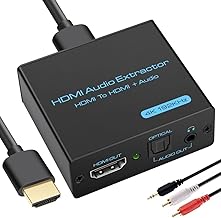
Best for: A setup where an HDMI source needs to send audio separately to an optical-input receiver or a 3.5mm audio device. This is the most directly relevant choice for extracting audio from an HDMI signal rather than converting an existing optical signal.
The extractor offers 2.0-channel, 5.1-channel, and pass modes. Its listed optical output supports DTS 5.1, while its 3.5mm output supports PCM 2.0. It also supports HDMI 1.4, HDCP 1.4, and video up to 4K at 30Hz under the listed specifications.
- Choose 5.1 mode when using the optical output, if the source and connected equipment support the selected format.
- Choose 2.0 mode for the 3.5mm stereo output.
- Use pass mode if the specified audio modes do not produce an audio or video signal.
Limitation: The product does not support ARC or eARC, and a TV is not supported as the input source. The listing also says Fire TV, Apple TV, and PS4/5 support only 1080p with this extractor, and it does not support 7.1-channel audio. Confirm the source, resolution, and channel requirements before buying.
PROZOR 192KHz Digital-to-Analog DAC

Best for: Connecting a digital optical or coaxial audio output to equipment with analog RCA or 3.5mm inputs. The PROZOR converts digital PCM audio to analog left and right channels, with RCA and 3.5mm output available simultaneously according to the product details.
The listed supported sampling rates are 32, 44.1, 48, 96, and 192 kHz, with 24-bit S/PDIF input. The product information also describes an upgraded audio amplifier chipset and dual-channel operational amplifier. This makes it a practical fit for a stereo amplifier or other analog-input device; it is not a multichannel surround decoder.
Setup note: The source device must send PCM audio. The product instructions specifically advise setting a TV’s audio output format to PCM. They also note that TV volume may need to be adjusted through the TV settings.
Limitation: This is a digital-to-analog converter, not an analog-to-digital converter. It outputs two analog channels, so choose another type of device if your goal is to pass a discrete multichannel surround signal through to a surround receiver.
AUTOUTLET Optical-to-RCA DAC

Best for: A digital optical source that needs to connect to a stereo amplifier with RCA inputs. Its stated purpose is converting optical Toslink digital audio into analog RCA audio, making it a straightforward alternative when RCA is the only analog connection needed.
The AUTOUTLET converter lists 24-bit/192 kHz processing and support for optical input sample rates of 32, 44.1, 48, 96, and 192 kHz. Its features describe a built-in audio amplifier chip and dual-channel operational amplifier. The key comparison with the PROZOR is the stated output: this model is described as optical-to-RCA, while the PROZOR listing includes both RCA and 3.5mm outputs and coaxial input.
Limitation: The listed output is analog stereo RCA, not a multichannel digital surround output. Check that the source can provide a supported optical signal and that the amplifier accepts RCA input. The supplied product information does not specify additional output connections.
MOBOREST RCA-to-Speaker-Wire Adapter

Best for: A connection task that specifically requires an RCA-to-speaker-wire adapter. The product name identifies a solderless connector and a two-pack, which may suit a buyer needing two matching adapters for a setup.
This is a different category from a DAC or HDMI audio extractor. It does not perform digital audio conversion or create surround sound. Its role is to adapt the connection type described in its name. Before choosing it, check the terminals and connection arrangement on the equipment you plan to join.
Limitation: The supplied product details do not specify wire gauge, supported equipment, or other electrical ratings. Do not assume it is suitable for every speaker or amplifier connection; verify the connector design against your actual hardware.
PANPEO 12-Pack RCA Speaker-Wire Adapters

Best for: Buyers who need a larger quantity of RCA-to-speaker-wire connectors. The product name specifies a 12-pack, solderless construction, and 14AWG, making those the key details to compare against the MOBOREST two-pack.
Like the MOBOREST adapter, this is a physical connection accessory rather than a signal converter. It will not transform optical or HDMI audio, decode surround formats, or replace an amplifier. Choose it when the connector type and wire-gauge description match the requirements of your equipment and installation.
Limitation: The supplied listing details do not explain the precise terminal layout or provide additional electrical specifications. Confirm that the adapter’s RCA and wire connections match your intended use before ordering.
Buying Guide: How To Choose A Surround Sound Speaker Adapter
What connection are you trying to adapt?
Start by identifying the source output and the receiving device input. An optical output, HDMI connection, analog RCA output, and speaker-wire terminal are not interchangeable. An adapter only solves the specific connection or conversion task it is designed for.
- For HDMI input with separate audio output, consider an HDMI audio extractor such as the VPFET.
- For optical digital audio going to analog stereo RCA, choose a DAC such as the AUTOUTLET.
- For optical or coaxial digital audio going to RCA or 3.5mm analog output, the PROZOR lists those input and output options.
- For a physical RCA-to-speaker-wire connection, compare the MOBOREST and PANPEO connector products.
Do you need stereo audio or surround sound?
A two-channel DAC outputs analog left and right audio. It does not provide discrete 5.1 or 7.1 surround channels simply because it is connected to a home theater system. If you need multichannel audio, check that the source, adapter, and receiver all support the same format and connection method. The VPFET listing identifies optical DTS 5.1 support but states that 7.1 is not supported.
Will the adapter accept your source’s audio format?
Digital converters often depend on the format selected in the source device. The PROZOR instructions say to set a TV’s audio output to PCM. If a DAC receives an unsupported bitstream, it may not produce the expected sound. Check the source settings and product details for supported inputs, sampling rates, and channel formats before connecting the system.
What video requirements matter for an HDMI extractor?
Check the extractor’s HDMI version, maximum listed resolution, and copy-protection support alongside its audio features. The VPFET listing specifies HDMI 1.4, HDCP 1.4, and up to 4K at 30Hz, while also noting that some named streaming devices and consoles are limited to 1080p with this product. It does not support ARC or eARC, so it is not a general-purpose TV audio return adapter.
Are RCA-to-speaker-wire adapters the same as speaker amplifiers?
No. A connector adapter changes the physical connection; it does not necessarily amplify a signal or make an incompatible output safe for a speaker. Verify the equipment’s output type and the adapter’s specifications. If the supplied listing information does not establish a required electrical rating, confirm it with the manufacturer or choose a product whose specifications clearly match the setup.
How many adapters do you need?
Compare the quantity and installation needs. The MOBOREST product name specifies a two-pack, while the PANPEO name specifies a 12-pack and 14AWG. Quantity alone does not determine suitability: the connector layout and wire requirements still need to match the equipment.
Frequently Asked Questions
Can a surround sound speaker adapter create 5.1 audio?
Not every adapter can. A connector adapter only changes a connection, and a stereo DAC converts to two analog channels. For 5.1 output, choose an adapter that explicitly supports the needed multichannel format, such as the VPFET’s listed optical DTS 5.1 mode, and confirm that the source and receiver support it too.
Can I connect a TV’s optical output to RCA speakers?
A digital-to-analog converter can connect a supported optical audio output to analog RCA inputs on an amplifier or other audio device. The PROZOR and AUTOUTLET products list optical-to-analog conversion. Check the TV’s audio format settings; the PROZOR instructions specifically recommend PCM.
Does the PROZOR DAC convert analog RCA audio to optical?
No. The listed PROZOR unit converts digital coaxial or optical PCM signals into analog RCA and 3.5mm output. Its specified signal direction is digital to analog, not analog to digital.
Does the VPFET extractor work with a TV using ARC or eARC?
No. The product information says it does not support ARC or eARC and does not support a TV as the input source. Check the connection route before choosing it for a television setup.
Which adapter is best for connecting RCA to speaker wire?
The MOBOREST and PANPEO products are both named as RCA-to-speaker-wire adapters. Compare the MOBOREST two-pack with the PANPEO 12-pack, which also lists 14AWG, and verify that the connector design fits your equipment.