
For simple music practice recordings, rehearsals, and musical ideas, a portable digital voice recorder can provide an easy way to capture sound without a full studio setup. The Tonfarb 136GB is best for buyers prioritizing storage, while the EVISTR and Tonfarb 64GB models offer substantial listed capacity. The 16GB recorder is a simpler option, and the talkBAK is designed for short, playful recordings rather than full music sessions. These devices are voice recorders, so they are not substitutes for multitrack music recorders or dedicated audio interfaces.
| Product | Best For | Key Listed Feature |
|---|---|---|
| Tonfarb 136GB | Longer-term portable storage | 136GB capacity and voice activation |
| Tonfarb 64GB | Practice and meeting capture | 64GB capacity, noise reduction |
| EVISTR 64GB | Portable recording and playback | 64GB capacity, USB, MP3 |
| 16GB Digital Voice Recorder | Basic lecture-style recording | Rechargeable USB design |
| talkBAK Voice Recorder | Short, creative voice clips | 60-second recording and voice modes |
Tonfarb 136GB Digital Voice Recorder
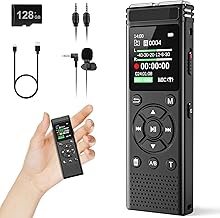
Best for: Musicians who want a portable recorder with a large stated storage capacity for capturing practice sessions, rehearsals, or spoken notes about arrangements. The product name lists 136GB of storage and up to 9,775 hours of audio recording; actual recording time can depend on settings and audio format.
Listed functions include playback, voice-activated recording, noise reduction, A-B repeat, MP3 playback, and password protection. A-B repeat may be useful for replaying a selected passage while learning or reviewing a spoken instruction. The MP3 player feature adds a way to play supported audio files, though the listing does not establish studio or multitrack editing features.
It was selected because its combination of stated capacity and playback-oriented functions suits buyers who want a self-contained device for everyday audio capture. Choose this if storage capacity and voice-recorder features matter more than music-production controls. Limitation: the listing describes a voice recorder, not a dedicated multitrack recorder, so it should not be treated as a complete home-studio system.
Tonfarb 64GB Voice Recorder

Best for: Musicians who want a moderate-capacity portable recorder for lessons, band discussions, rehearsal notes, or simple reference recordings. The listed features include 64GB of storage, playback, voice activation, noise reduction, password protection, A-B repeat, and MP3-player functionality.
Voice activation is intended to start recording when sound is detected, which can help with speech-focused use. For music, however, a feature designed around voice detection may not be the ideal way to capture quiet intros, pauses, or changes in dynamics. Consider making a test recording and checking that the device responds appropriately before relying on it for a performance or important rehearsal.
This model was selected as a feature-rich option for buyers who want playback and recording functions in one device without choosing the highest-capacity model in this list. Better for practice documentation and spoken musical ideas than for detailed production work. Limitation: the provided product information does not specify multitrack recording, instrument inputs, or editing tools.
EVISTR 64GB Digital Voice Recorder

Best for: Buyers seeking a portable recorder that lists 64GB capacity alongside playback, USB, and MP3 features. It may suit songwriters recording rough ideas, students documenting music lessons, or players who want to revisit a rehearsal without setting up recording software.
The product name identifies it as a mini portable recording device and mentions voice activation, making it oriented toward voice-recorder use. Its playback and MP3 functions can be useful for reviewing recorded material or listening to supported audio files. The listed information does not state the recording format, microphone type, input options, or whether the unit supports simultaneous tracks.
It was selected because its stated storage and basic playback-oriented features make it a practical category match for simple portable capture. Choose this if you want a compact voice recorder for reference recordings rather than a production system. Limitation: the available product details do not establish music-specific controls or connections for external instruments and microphones.
16GB Rechargeable Digital Voice Recorder

Best for: Buyers who prefer a straightforward, rechargeable recorder for spoken musical notes, lessons, or occasional practice capture. The listed product details specify 16GB storage, playback, USB recharging, and a compact recorder format.
This option has less stated storage than the 64GB and 136GB models in this comparison. That may be adequate for shorter or less frequent recordings, but buyers planning to keep many sessions on the device should consider how often they are willing to transfer or remove files. The product name highlights a lecture-oriented use, so its central purpose is general voice capture rather than advanced music recording.
It was selected as a simpler alternative for buyers who do not need the largest capacity or the extended feature lists of other models. Better for occasional reference clips and spoken reminders than for building a large archive of rehearsals. Limitation: the supplied details do not specify voice activation, noise reduction, or music-production functions.
talkBAK Voice Recorder And Changer

Best for: Short, playful voice clips, songwriting prompts, or experimenting with altered spoken audio. The listing describes a 60-second rechargeable audio recorder with three voice modes, pitch-changing playback, volume control, an LED indicator, and a USB-C cable.
Its voice-changing functions make it different from the longer-capacity voice recorders in this list. A musician could use it to capture a brief lyric idea or create a novelty vocal effect, but the stated 60-second recording limit makes it unsuitable for recording a complete song, rehearsal, or extended lesson. The listed functions focus on short recordings and playback effects rather than conventional music production.
It was selected for buyers interested in quick creative audio experiments rather than continuous recording. Choose this if short voice clips and pitch-altered playback are the main goals. Avoid this if you need to document full-length performances or store many long sessions, because the listed recording duration is limited to 60 seconds.
Buying Guide: Choosing A Digital Recorder For Music
What kind of music recording do you need?
Start by defining what you want to capture. A pocket voice recorder can be convenient for songwriting notes, lesson reminders, rehearsal references, and informal practice playback. It is generally a different type of tool from a music field recorder, multitrack recorder, or audio interface. Those categories may offer music-oriented recording controls or connections, while the products here are presented as voice recorders.
For a quick idea that you can review later, a basic recorder may be enough. For a full band rehearsal, a long performance, or a polished demo, check the device specifications carefully before buying. Look for clearly stated recording formats, microphone and input details, audio quality information, file-transfer options, and any track or editing capabilities you require. Do not assume those features are present if the product listing does not identify them.
How much storage is useful?
Capacity matters when you plan to keep many recordings on the device. The products here list 16GB, 64GB, or 136GB capacities, with the Tonfarb 136GB model naming the highest amount. More capacity can provide more room for files, but it does not by itself confirm sound quality or a specific number of music-recording hours. Recording format, bitrate, and device settings can affect file size and total recording time.
Choose a lower-capacity device if you make short clips and regularly move files elsewhere. Consider a higher-capacity model if you expect to keep many sessions together. Before recording something important, confirm how files are saved and transferred, and leave enough free space for the session.
Is voice activation a good choice for music?
Voice activation can be useful for speech-focused recording because it is intended to respond to detected sound. Music can include quiet openings, rests, soft passages, or gradual changes in volume. Those details may make automatic activation less predictable for a performance. If a recorder offers this function, test it with the kind of music you plan to capture before relying on it.
Manual recording may be preferable when you need to control exactly when a take begins and ends. Noise reduction is another feature to evaluate cautiously: the product names list it on some models, but the provided details do not explain how it works or how it affects musical sound. Compare the device’s actual specifications and test results rather than assuming that a voice-focused feature will improve an instrument recording.
Do you need playback or repeat functions?
Playback is useful for checking a practice take, reviewing a lesson, or listening to a rough arrangement idea. A-B repeat, listed on the two Tonfarb models, is described as a function for repeating a selected section. This may help with reviewing a passage, although it is not the same as editing, looping within a music-production application, or slowing audio for instrument practice.
MP3 playback can also be helpful if you want one device to record and play supported audio. Verify which file types the recorder accepts if you plan to use that function. Product names alone do not establish full format compatibility or the quality of playback through a particular device.
When should you choose a music recorder instead?
Consider a dedicated music recorder or an audio interface if you need features beyond simple portable capture. Examples include recording multiple sources at once, connecting external microphones or instruments, managing separate tracks, or editing and mixing audio. The products in this comparison do not list those capabilities, so buyers who require them should look for explicit confirmation in the product specifications.
For musicians who only need a record-and-review tool, a voice recorder may be more straightforward to carry and use. For a demo intended for release, collaboration, or detailed mixing, plan for a workflow that provides the required sound inputs and editing options. The right choice depends on whether convenience or production control is the priority.
What should you check before ordering?
- Confirm the stated storage capacity and whether it meets your recording habits.
- Check how the recorder transfers files and which audio formats it supports.
- Look for explicit microphone, input, recording-quality, and power details if they matter to your use.
- Decide whether playback, voice activation, noise reduction, or repeat functions are useful for your workflow.
- For music, test whether quiet passages and full-length sessions can be captured reliably.
- Do not assume a voice recorder supports multitrack recording or instrument connections unless the listing says so.
Frequently Asked Questions
Can a digital voice recorder record music?
It can capture sound, including music, but its performance and controls depend on the model. The products listed here are described as voice recorders, and their provided details do not establish professional music-recording capabilities.
Which listed recorder has the most storage?
The Tonfarb model in this comparison lists 136GB of storage. The Tonfarb and EVISTR alternatives list 64GB, while the basic rechargeable recorder lists 16GB.
Is voice activation suitable for recording a song?
It may not suit every song because soft openings, pauses, and quiet passages can challenge sound-triggered recording. Test the function with your music before using it for an important take.
Can these devices replace an audio interface?
The supplied product information does not identify these models as audio interfaces. Buyers who need computer-connected instrument recording, multiple inputs, or track-based production should look for a product that explicitly lists those features.
Is the talkBAK suitable for recording a full rehearsal?
No. Its product name lists a 60-second recording limit, so it is intended for short clips rather than a full rehearsal or performance.
What is the best option for simple practice recordings?
The best fit depends on storage and features. The Tonfarb 136GB prioritizes stated capacity, while the 64GB models provide another storage level with playback-oriented functions. Check the recording details and test the device before relying on it for music.