
The best audio recording instrument depends on how you plan to capture sound: the Zoom H1 XLR suits portable recording with external microphones, while the Focusrite Scarlett Solo is better for recording guitar or vocals to a computer. A voice recorder is a practical choice for lectures and meetings, and the CofeLife bundle targets podcasting and livestreaming. The Pyle deck is a specialized option for cassette playback and recording.
| Product | Best For | Recording Setup |
|---|---|---|
| Zoom H1 XLR | Filmmakers, musicians, and podcasters | Portable recorder with two XLR/TRS inputs |
| Focusrite Scarlett Solo 3rd Gen | Guitar and vocal recording | USB-C audio interface for computer recording |
| ZIPCIDE Digital Voice Recorder | Lectures, meetings, and interviews | Standalone voice recorder |
| CofeLife Podcast Equipment Bundle | Podcasting and livestreaming | Microphone bundle with voice changer |
| Pyle Dual Cassette Deck | Cassette recording and playback | Dual cassette deck with RCA cables |
Zoom H1 XLR Portable Recorder
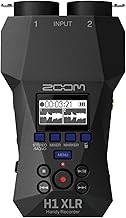
The Zoom H1 XLR is a portable two-channel recorder for creators who want to connect external microphones or instruments. Its two XLR/TRS combo inputs accept different source types, and the listed recording capability is up to 32-bit/96kHz. An OLED waveform display provides a visual way to monitor recording levels.
Best for: Filmmakers recording dialogue, musicians capturing instruments, and podcasters who need a standalone recorder with two external inputs. It was selected because its input options and waveform display support a more flexible recording setup than a basic voice recorder.
Choose this if you want to record with XLR or TRS-connected sources and check levels on the device. Limitation: It is a two-channel recorder, so it may not suit a setup that requires more than two simultaneous input sources.
Focusrite Scarlett Solo 3rd Gen Interface

The Focusrite Scarlett Solo is a USB-C audio interface designed for recording music and podcasts with a computer. Its features include microphone preamps, a switchable Air mode, two high-headroom instrument inputs, and Gain Halos for monitoring input level. The listed converters support recording and mixing at up to 24-bit/192kHz.
Best for: A guitarist, bassist, or vocalist recording directly into a computer. Its instrument inputs make it a better fit for direct guitar or bass recording than a voice-focused portable recorder. Air mode is listed as an option for adding clarity to acoustic instruments.
Choose this if your recording workflow is computer-based and you want to capture voice or instruments through an interface. Limitation: It is an interface rather than a standalone field recorder, so it is not the best match when you need to record without a computer.
ZIPCIDE 64GB Digital Voice Recorder

The ZIPCIDE recorder is a standalone device aimed at lectures, meetings, work, and interviews. Its listed features include a 64GB TF card, an external memory slot, AI and DSP noise reduction, and a voice-activated recording mode. The manufacturer states up to 15 hours of continuous recording and up to 30 hours of headphone playback.
Best for: People who want a dedicated recorder for speech rather than a computer-based music setup. Its storage and voice-activated mode make it a relevant option for long meetings or classes. The listing says voice activation is off by default and must be configured by connecting the recorder to a computer.
Choose this if you prioritize speech capture, onboard storage, and a compact recording workflow. Limitation: Voice activation requires setup, so it may not be ready to use immediately in that mode.
CofeLife Podcast Equipment Bundle

The CofeLife package is described as a BM800 podcast microphone bundle with a V8s voice changer and a condenser microphone. Its listed intended uses include podcasting, livestreaming, singing, and recording for PC or mobile platforms.
Best for: New podcasters or livestreamers looking for a bundled microphone-oriented setup rather than a standalone recorder or audio interface. It was selected because its stated purpose directly matches creator recording and streaming workflows.
Choose this if you want a package marketed for voice content and livestreaming. Limitation: Detailed feature information was not provided in the product listing data here, so check the current listing for included accessories, connection details, and device requirements before choosing it.
Pyle Dual Cassette Deck

The Pyle Home deck is a specialized recording device for cassette media. The product name lists a dual cassette configuration, RCA cables, switchable rack-mounting hardware, a CrO2 tape selector, and a three-digit counter. It is distinct from modern digital recorders and computer audio interfaces.
Best for: Buyers who specifically need a cassette deck for tape playback or recording. Its cassette format and tape selector make it more appropriate for legacy media tasks than for recording new podcasts or music digitally.
Choose this if cassette handling is the main requirement. Limitation: It records and plays cassette media; the provided details do not describe digital audio capture or computer-interface features.
Buying Guide: How to Choose Recording Equipment
Do you need a standalone recorder or a computer interface?
A standalone recorder captures audio without making a computer the center of the recording setup. The Zoom H1 XLR and ZIPCIDE voice recorder fit this general approach, but they address different needs: the Zoom offers two XLR/TRS inputs for connected sources, while ZIPCIDE emphasizes speech recording, onboard storage, and voice activation.
An audio interface connects recording sources to a computer-based workflow. The Scarlett Solo is the relevant choice here for recording vocals, guitar, or bass into computer software. Consider the interface route if you plan to edit or mix recordings on a computer. Choose a standalone recorder if portability and recording away from a computer matter more.
What inputs do you need for microphones and instruments?
Match the equipment to the source connections you expect to use. The Zoom has two XLR/TRS combo inputs, so it is the clearest option in this group for connecting multiple external microphones or instruments. The Scarlett Solo lists instrument inputs for guitar or bass and a microphone preamp. For the CofeLife bundle, confirm the connection type and included components in the current product details because those specifications were not supplied here.
- External microphones or mixed sources: Compare the Zoom’s two combo inputs with your intended setup.
- Direct guitar or bass to a computer: The Scarlett Solo lists instrument inputs and computer recording capabilities.
- Voice-only notes or meetings: A dedicated voice recorder may be more straightforward than a studio interface.
Which recording quality specifications matter?
Sample rate and bit depth describe digital recording settings, but they are not the only factors in choosing equipment. The Zoom lists recording up to 32-bit/96kHz, while the Scarlett Solo lists up to 24-bit/192kHz for recording and mixing. These figures should be compared within the context of the intended workflow: the Zoom is a portable recorder with external inputs, and the Scarlett is an interface for a computer.
For speech capture, storage capacity, battery life, and how the device manages noise may be more immediately useful than choosing a product by a single resolution figure. The ZIPCIDE listing specifies 64GB of storage and manufacturer-stated recording time, along with AI and DSP noise reduction.
Are you recording speech, music, or cassette tapes?
Speech-focused use includes lectures, interviews, and meetings. ZIPCIDE is built around voice recording features, while the Zoom is more adaptable when external microphones or instruments are involved. For music, the Scarlett Solo offers an interface workflow with instrument inputs, and the Zoom provides a portable recorder with two combo inputs.
The Pyle deck serves a different purpose: cassette playback and recording. It is not a direct substitute for a digital recorder or audio interface. If the goal is to preserve cassette material as digital files, confirm that your planned setup includes the necessary connection and capture equipment; digital transfer capability is not specified in the supplied product details.
What should you check before buying a podcast bundle?
A bundle can reduce the need to select each component separately, but the word “bundle” does not establish exactly what is included. Before choosing the CofeLife package, verify the microphone, voice changer, cables, connection method, power requirements, and intended device compatibility on its product page. The available description identifies it as a BM800 microphone bundle with a V8s voice changer for podcasting and livestreaming, but does not provide a complete specification list.
How important are portability and recording time?
For recording outside a studio, consider how the device is powered, how much audio it can store, and whether it supports the inputs you need. ZIPCIDE lists a rechargeable battery, a 64GB TF card, an external memory slot, and stated recording and playback durations. The provided Zoom feature details emphasize input flexibility and waveform monitoring rather than battery duration. Check current product documentation for any requirements not covered by the available information.
Frequently Asked Questions
What is the difference between an audio recorder and an audio interface?
An audio recorder captures audio on the recording device itself. An audio interface sends audio from connected sources into a computer-based recording workflow. The Zoom H1 XLR and ZIPCIDE are recorder options; the Scarlett Solo is an interface.
Which product is best for recording guitar and vocals on a computer?
The Focusrite Scarlett Solo is the clearest match in this group for computer-based guitar and vocal recording. Its listed features include microphone preamps, instrument inputs, Gain Halos, and recording up to 24-bit/192kHz.
Which recorder is better for lectures and meetings?
The ZIPCIDE digital voice recorder is specifically described for lectures, meetings, work, and interviews. It includes a 64GB TF card and voice-activated recording, although voice activation is off by default and requires configuration.
Can the Zoom H1 XLR connect external microphones?
Yes. The listed features specify two XLR/TRS combo inputs for connecting microphones, instruments, and other sources.
Is the Pyle deck suitable for digital podcast recording?
The provided product details describe a dual cassette deck for cassette media, not a digital podcast recorder. For podcast production, consider a microphone-centered setup or a digital recorder/interface instead.