
The best big speakers for a laptop depend on whether you mean stronger sound, larger drivers, or a fuller set of connection options. The OHAYO 60W speakers are a good fit for a compact desktop setup; the IBALL·BOX H1 offers the broadest listed wired connections; and the Sanyun SW208 combines Bluetooth with USB audio. For a simpler wired pair, consider Amazon Basics, while Logitech’s Z207 is suited to switching between Bluetooth and cable audio.
| Product | Best for | Listed connections |
|---|---|---|
| OHAYO 60W Computer Speakers | Compact desktop stereo with front volume control | Bluetooth 5.3 |
| IBALL·BOX H1 | Multiple wired input choices | USB-C DAC, optical, 3.5mm AUX, Bluetooth 5.3 |
| Sanyun SW208 | USB DAC and Bluetooth in a bookshelf-style pair | USB, Bluetooth 5.0 |
| Amazon Basics Stereo 2.0 | Basic USB-powered laptop audio | 3.5mm AUX, USB power |
| Logitech Z207 | Switching between Bluetooth and cable sources | Bluetooth, 3.5mm cable |
OHAYO 60W Computer Speakers
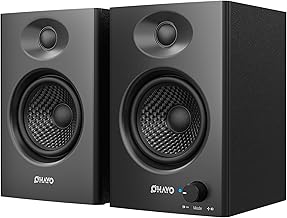
Best for laptop users who want a compact two-speaker desktop system with stated 60W total output. The pair uses a 3-inch carbon-fiber full-range driver and a 0.75-inch carbon-fiber silk-dome tweeter in each speaker, plus a rear bass port. The manufacturer describes the output as 30W per speaker and lists Bluetooth 5.3 for wireless playback.
A front-panel volume knob makes adjustments accessible at the desk. The MDF enclosure is described as reducing box resonance, while the compact design is intended for desktops, home offices, and gaming stations. These features make the OHAYO a practical choice when desk space matters but built-in laptop speakers are not enough.
Choose this if you want Bluetooth and front-mounted volume control in a compact stereo pair. Limitation: the supplied feature list identifies Bluetooth but does not specify USB, optical, or 3.5mm audio inputs, so check the connection requirements before choosing it.
IBALL·BOX H1 Powered Speakers

Best for a laptop or desktop user who wants several ways to connect. The H1 is a powered 2.0 stereo system with stated 60W output. Its listed inputs include USB-C DAC, optical, and 3.5mm AUX, alongside Bluetooth 5.3. That range makes it easier to select a connection based on the audio outputs available on a computer or monitor.
The speaker set uses dual 3-inch carbon-fiber woofers, dual 1-inch silk-dome tweeters, and a rear bass-reflex port. The manufacturer lists a 40Hz–20kHz frequency range and a signal-to-noise ratio of at least 95dB. Bass and treble controls are also listed, allowing users to adjust those aspects of the sound from the speaker system.
Choose this if connection flexibility and separate bass and treble controls are priorities. Limitation: it is a 2.0 system; the listed product information does not describe a separate subwoofer.
Sanyun SW208 Bluetooth Speakers

Best for buyers who want a bookshelf-style stereo pair with both Bluetooth and USB audio. The SW208 has 3-inch carbon-fiber speaker units and a built-in 24-bit DAC. According to the product description, a USB connection can send digital audio to the DAC, while Bluetooth 5.0 provides wireless playback.
The manufacturer describes the cabinet as a premium-finish wood structure and the system as a direct/reflective bookshelf design. It also characterizes the sound as having warm mids, deep low frequencies, and clear highs. Those details may suit a desk or small-room arrangement where the speakers can be positioned as a stereo pair.
Choose this if you value USB DAC playback and wireless listening in a bookshelf-style design. Limitation: the listed wireless version is Bluetooth 5.0, rather than the Bluetooth 5.3 specified for the OHAYO and H1 products.
Amazon Basics Stereo 2.0 Speakers

Best for a straightforward laptop or PC setup that needs an external stereo pair and accessible volume control. The Amazon Basics speakers are USB-powered and use a 3.5mm AUX input for audio. An in-line volume control provides a direct way to adjust playback without relying only on computer settings.
The simple connection arrangement can work well for buyers who do not need wireless audio or several digital inputs. USB provides power, while the 3.5mm connection carries audio, so users should make sure their setup has both a suitable USB port and an available headphone or AUX output.
Choose this if basic wired playback and in-line volume adjustment are enough. Limitation: the product details do not list Bluetooth, USB audio, or a stated power output, so it is not the most feature-rich choice for buyers seeking those specifications.
Logitech Z207 Stereo Speakers

Best for listeners who want to connect by Bluetooth or a 3.5mm cable and switch between audio devices. Logitech Easy-Switch is described as allowing users to move between devices by pausing audio on one and pressing play on another. This is useful when a laptop and another Bluetooth-capable source share the speaker setup.
Each speaker has one active, powered driver for full-range audio and one passive radiator intended to provide bass extension. The 2.0 arrangement keeps the system to a pair of speakers, without a separate subwoofer listed in the supplied product details.
Choose this if the option to use Bluetooth or a 3.5mm connection and switch between sources matters more than a long list of digital inputs. Limitation: the provided features do not state output wattage or driver size, making direct power comparisons with the OHAYO or H1 difficult.
Buying Guide: How To Choose Laptop Speakers
What does “big speakers” mean for a laptop?
“Big” can refer to physical cabinet size, stronger output, larger drivers, or sound that feels fuller than a laptop’s built-in speakers. These are not interchangeable. A larger driver does not by itself tell you how loud a speaker will play, and a wattage figure does not reveal cabinet dimensions. Compare the specific details that matter for your desk and listening habits.
Among these options, the H1 and OHAYO state 60W output. The Sanyun description highlights 3-inch speaker units and a built-in DAC, while the Logitech features emphasize flexible source switching. The Amazon Basics pair focuses on a simple wired connection rather than published output specifications.
Which connection should you choose?
- USB audio: The H1 lists a USB-C DAC input, and the Sanyun SW208 lists USB connection through its built-in 24-bit DAC. Confirm that the needed cable and port suit your laptop.
- 3.5mm audio: The H1, Amazon Basics, and Logitech list a 3.5mm connection. This can be a direct option when the computer has a compatible audio output.
- Bluetooth: The OHAYO and H1 list Bluetooth 5.3; the Sanyun lists Bluetooth 5.0; and the Logitech supports Bluetooth. Wireless playback avoids an audio cable, but the supplied descriptions do not give every product’s pairing or latency details.
- Optical: The H1 lists optical input. Consider it when the source device has a matching output; the product details do not list optical input for the other options.
Do you need a 2.0 or a subwoofer system?
All five selections are described as stereo 2.0 speakers or a pair of speakers. A 2.0 setup uses left and right speakers without a separate subwoofer listed in the product information. The OHAYO and H1 descriptions mention bass ports, and Logitech lists passive radiators, but those features are not the same as a separate subwoofer. If a dedicated subwoofer is essential, verify that a product explicitly includes one before buying.
How much desk space is available?
Check the speaker dimensions on the product listing and measure the intended placement area before ordering. The OHAYO is described as compact and space-saving, while the Sanyun is presented as a bookshelf-style pair. The supplied details do not give dimensions for any of the five products, so cabinet fit cannot be compared from these specifications alone. Leave room for the speakers’ placement and the cables required by the chosen connection.
Which features matter for work, music, or gaming?
For convenient desk adjustments, the OHAYO has a front volume knob and the Amazon Basics model has an in-line control. For source flexibility, compare the H1’s listed inputs with Logitech’s Bluetooth and 3.5mm options. Buyers who want tone adjustment can consider the H1, which lists bass and treble controls. Match the feature to a real use case rather than selecting by wattage alone.
Frequently Asked Questions
Can laptop speakers connect through Bluetooth?
Yes. The OHAYO, H1, Sanyun SW208, and Logitech Z207 list Bluetooth support. The listed Bluetooth versions are 5.3 for OHAYO and H1, and 5.0 for Sanyun. The Logitech description does not specify a version.
Which listed speakers have USB audio?
The IBALL·BOX H1 lists a USB-C DAC, and the Sanyun SW208 lists USB connection with a built-in 24-bit DAC. Amazon Basics lists USB for power and 3.5mm AUX for audio, so its description does not identify USB as the audio input.
Which product offers the most listed wired inputs?
The IBALL·BOX H1 lists USB-C DAC, optical, and 3.5mm AUX connections. It also supports Bluetooth 5.3, giving it the broadest stated connection selection among these five products.
Are any of these products a 2.1 speaker system?
No product in the supplied list is identified as a 2.1 system. The listed products are described as 2.0 stereo speakers or pairs. Check the full product listing if a separate subwoofer is a requirement.
What should I check before ordering laptop speakers?
Confirm the connection your laptop supports, whether the speakers need a separate power connection, and whether the pair fits your desk. Also check the full listing for dimensions, included cables, and any input details that are not stated in the supplied product descriptions.