
To transfer an audio cassette tape, first capture its sound as a digital audio file; these products do not state that they burn a finished DVD. The ClearClick Video to Digital Converter 3.0 is the most directly relevant option for capturing audio from cassette tapes, while the ClearClick Cassette Tape to USB is designed specifically for saving cassette audio as MP3 files. If you mean VHS or camcorder tapes rather than audio cassettes, the Portta or ClearClick video converters are more relevant. Creating a DVD may require a computer and separate DVD-authoring and burning steps.
| Product | Best suited for | Output described |
|---|---|---|
| ClearClick Video to Digital Converter 3.0 | Capturing cassette audio and other analog sources | Digital recording; confirm the file and storage details before purchase |
| ClearClick Cassette Tape to USB | Converting audio cassettes to MP3 | MP3 files on a USB flash drive |
| ClearClick Video to Digital Converter 3.0 Bundle | People considering the listed converter bundle | Digital video and audio recording |
| KLIM K7 Cassette Tape Player | Portable cassette playback and MP3 conversion | MP3 conversion with an included SD card |
| Portta VHS to Digital Converter | Capturing video from playback equipment | Digital video recording; requires a source player |
ClearClick Video to Digital Converter 3.0
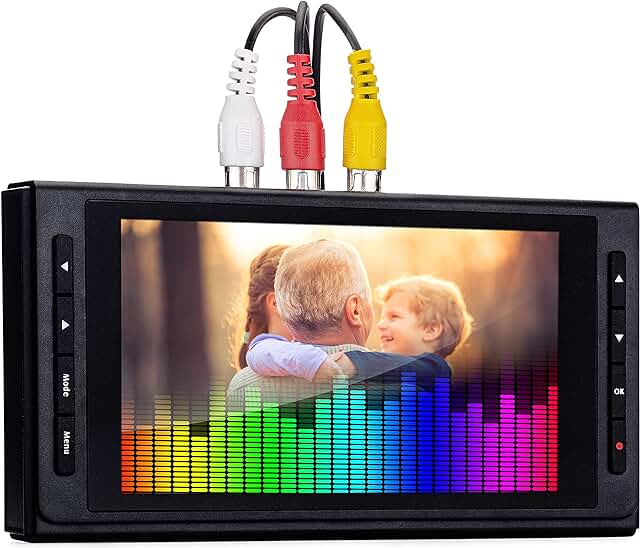
Best for: People who want one recorder for audio cassettes and several kinds of analog media. The product description specifically lists cassette tapes alongside VCR, VHS, AV, RCA, Hi8, camcorder, DVD, turntables, and other video or audio sources.
This is the strongest match for buyers seeking a general-purpose capture device that includes cassette audio among its stated sources. The listing says that a working VCR or camcorder and tapes are required, but that wording primarily addresses those video sources. Check the connection and storage instructions for the particular audio source you plan to use before ordering.
Important limitation: The listed description does not say that the converter creates or burns a DVD. Treat it as a capture device, not a complete cassette-to-DVD system. A separate DVD authoring and burning workflow may be needed if a physical DVD is your goal.
ClearClick Cassette Tape To USB

Best for: Buyers focused specifically on converting audio cassettes into digital MP3 files. The product is described as a second-generation cassette-to-USB converter, and its listed features include file splitting and a 16 GB USB drive.
Choose this if your priority is saving cassette recordings as portable audio files rather than digitizing VHS footage. The included USB drive and file-splitting feature are useful details for people organizing recordings into separate tracks or files. The listing also describes setup as instant, although it does not provide enough detail here to establish every supported file or connection option.
Important limitation: MP3 files on a USB drive are not the same as a DVD. If you need a DVD, you will need to check whether your intended DVD player supports the type of disc and audio format you create, or use a computer-based authoring process.
ClearClick Video To Digital Converter 3.0 Bundle

Best for: Buyers considering the ClearClick 3.0 converter in a bundle listing. The product name identifies it as a third-generation video-to-digital converter and says it can record video and audio from sources including VCRs, VHS, AV, RCA, Hi8, camcorders, DVD, turntables, and cassette tapes.
It is relevant when a household has multiple analog media types and wants to explore a single capture-device category. Its listed cassette support makes it a possible fit for audio digitizing, while the video-source list gives it broader stated use than a cassette-only product. Compare the bundle contents with the standalone listing before choosing; the supplied product information does not specify what additional items the bundle contains.
Important limitation: The listing says a working VCR or camcorder is required for those source types. It does not establish that the bundle includes a cassette deck, DVD burner, or DVD-authoring software, so verify what is needed for your particular setup.
KLIM K7 Cassette Tape Player

Best for: People who want a portable cassette player with MP3 conversion features. The listed details include a built-in microphone and speaker, rechargeable battery, earphones, and a 16 GB SD card. The product name also identifies it as a cassette-to-MP3 converter.
Choose this if portability and cassette playback matter along with creating digital audio files. Its included SD card distinguishes it from the USB-focused ClearClick cassette converter. The built-in speaker and earphones are listed playback options, while the rechargeable battery is a practical feature for portable use.
Important limitation: The product description identifies MP3 conversion, not DVD creation. Confirm how files are transferred from the SD card and what computer or disc-burning steps are required if you ultimately want a DVD.
Portta VHS To Digital Converter

Best for: Buyers transferring video from VHS, VCR, DVR, DVD, Hi8, Mini DV, or gaming-console equipment. The product name describes a video-to-digital recorder with a remote and lists these source categories.
This is a better fit for video tapes and video playback devices than for audio cassette conversion. The listing explicitly says that a VCR, VHS/DVD player, or camcorder is required, so the converter should not be treated as a standalone tape player. Select it when the source is video and you already have the appropriate playback equipment.
Important limitation: The supplied product information does not list audio-cassette conversion or DVD burning. For an audio cassette, choose a product that specifically describes cassette-to-MP3 conversion or cassette-audio recording instead.
Buying Guide: How To Transfer Cassette Tapes
Do you mean an audio cassette or a video cassette?
“Cassette tape” can refer to an audio cassette or, informally, a video cassette such as VHS. The distinction determines the equipment you need. For an audio cassette, look for a cassette player or converter that explicitly supports cassette audio. For VHS, you need a working VCR or compatible playback device and a video capture product. The Portta listing is aimed at video sources; the ClearClick cassette-to-USB listing is aimed at audio cassettes.
Can you transfer an audio cassette directly to DVD?
The listed products describe digital audio or video capture and MP3 conversion, not a one-step process that burns an audio cassette to DVD. A typical workflow is to play the cassette, capture its audio as a digital file, and then use a computer and suitable DVD-authoring or disc-burning software if a physical disc is required. Check the disc format and playback requirements of the device that will play the finished DVD.
Which output should you choose?
- MP3 on USB: The ClearClick Cassette Tape to USB listing explicitly describes MP3 files and includes a 16 GB USB drive.
- MP3 with an SD card: The KLIM K7 listing describes MP3 conversion and includes a 16 GB SD card.
- Multiple audio and video sources: The ClearClick Video to Digital Converter 3.0 lists cassette tapes along with a range of video and audio sources.
- Video capture: The Portta converter is described for video equipment and requires a source player.
Do not assume that a USB drive, SD card, or digital capture file is automatically compatible with every DVD player. Confirm the actual output format and your intended playback method before starting a large transfer.
Do you already have a working tape player?
Capture equipment cannot play a tape by itself unless the product explicitly includes a player. The Portta listing says that a VCR, VHS/DVD player, or camcorder is required. The ClearClick 3.0 listing also notes a working VCR or camcorder requirement for its video sources. For audio cassettes, confirm whether the selected product includes cassette playback or needs an external cassette deck.
How should you prepare tapes for transfer?
Check that each tape is labeled and that the playback equipment works before recording an entire collection. Capture a short test first, then confirm that the resulting audio or video plays as expected and that the file can be moved or saved. For valuable or fragile tapes, avoid repeated playback and consult a qualified transfer service if the tape appears damaged. These preparation steps help identify connection, playback, or file-handling problems early.
What should you verify before buying?
- Whether the device supports audio cassettes, VHS, or both.
- Whether a separate cassette deck, VCR, camcorder, or other player is required.
- What output format and storage medium the product uses.
- Whether included accessories are clearly specified, especially for bundle listings.
- Whether the output can be converted into the DVD format you intend to use.
Frequently Asked Questions
Which listed product is specifically for cassette-to-MP3 conversion?
The ClearClick Cassette Tape to USB is described as converting cassette tapes to MP3 files on a USB flash drive. The KLIM K7 is also described as a cassette-to-MP3 converter and lists an included SD card.
Does the ClearClick Video to Digital Converter 3.0 list cassette tapes as a source?
Yes. Its product name lists cassette tapes along with video sources and turntables. Check its connection and storage requirements to confirm it suits your specific cassette player and recording setup.
Does the Portta converter transfer audio cassette tapes?
The supplied product name focuses on video sources such as VHS, VCR, DVR, DVD, Hi8, and Mini DV. It does not specifically list audio cassette tapes, so it is not the clearest choice for audio-cassette conversion.
Will these products automatically make a playable DVD?
The supplied descriptions do not state that any of these products burns a finished DVD. They describe digital recording or MP3 conversion. A separate DVD-authoring and burning step may be necessary.
Do I need a working VCR to digitize an audio cassette?
A VCR is for video tapes, not standard audio cassettes. For audio cassettes, use a compatible cassette player or a product that specifically supports cassette playback and conversion. The Portta listing calls for video playback equipment.