
The best USB-to-tape deck depends on whether you want to digitize tapes with a full-size deck, capture audio from an existing player, or save MP3 files without a computer. The TEAC W-1200B is best for a feature-rich dual-deck setup, while the Pyle PT659DU offers cassette playback and computer transfer. For a compact, computer-free workflow, consider the DIGITNOW BR607 or KLIM K7.
| Product | Best For | Transfer Method |
|---|---|---|
| TEAC W-1200B | Dual-deck recording and computer capture | USB output to a PC or Mac |
| Pyle PT659DU | Home cassette playback and MP3 transfer | USB connection to a computer |
| DigitalLife AuralynX | Capturing audio from a separate tape deck | USB audio interface and recording software |
| DIGITNOW BR607 | Computer-free tape-to-MP3 conversion | USB flash drive |
| KLIM K7 | Portable listening and SD-card conversion | SD card |
TEAC W-1200B Dual Cassette Deck

Best for: Buyers who want a full-size dual cassette deck with a USB output for computer recording. The W-1200B connects to a PC or Mac for digital recording at 48 kHz/16-bit PCM, according to the product details. Its two independent cassette mechanisms also support playback and recording functions.
This is the most feature-rich choice in this selection for people who want tape playback, recording, and digital capture in one component. Other listed features include noise reduction designed to suppress tape hiss, pitch control, A-B repeat, RCA analog inputs, a headphone output, and a remote. It supports Type I and Type II tapes for recording and playback, and Type IV tapes for playback.
Choose this if you want a home-deck format and expect to use a computer as part of your recording setup. The pitch control and repeat functions may also be useful when adjusting playback or working through spoken recordings.
Limitation: This is a larger deck-style component, not a pocket-size cassette player. Computer recording also means you will need to manage the USB connection and recording workflow on a PC or Mac.
Pyle PT659DU Dual Cassette Deck

Best for: Home users looking for a dual cassette deck that transfers tape audio to a computer. The PT659DU connects to a PC or Mac by USB, and the listed feature describes converting cassette music to MP3 on the computer.
The two-deck design allows both decks to play tapes, while deck B is the recording and dubbing deck. Dubbing can be done at normal or high speed. The unit also has a CrO2 tape selector, recorder-level control, gain control for adjusting the signal sent to the computer, and an auto-stop function.
Better for buyers who value cassette-to-cassette dubbing as well as computer transfer. The gain and recorder-level controls offer ways to adjust the signal during the transfer process, while the USB connection keeps the computer involved in creating digital files.
Limitation: Only deck B is specified for recording and dubbing. If you need each deck to record independently, compare the deck’s functions carefully before choosing.
DigitalLife AuralynX USB Audio Capture Device

Best for: People who already own a tape deck and want to send its analog audio into a computer through USB. This is an audio capture device rather than a cassette player, so it is a practical match when the tape deck has an appropriate analog output.
The AuralynX provides stereo RCA female inputs and a 3.5 mm input. Its listed uses include capturing sound from cassette tapes, vinyl records, or mixer output. The two input options allow different analog sources, but only one input can be used at a time. The product information recommends software such as Audacity and also lists QuickTime compatibility.
Choose this if you want to keep using an existing deck and record its output with audio software. It may suit listeners who want to edit or store captured audio digitally instead of buying another cassette deck.
Limitation: RCA users may need a separate R/L extension cable. The product listing says ChromeOS and GarageBand are not supported; macOS users may need to enable microphone access in system settings.
DIGITNOW BR607 USB Cassette Player
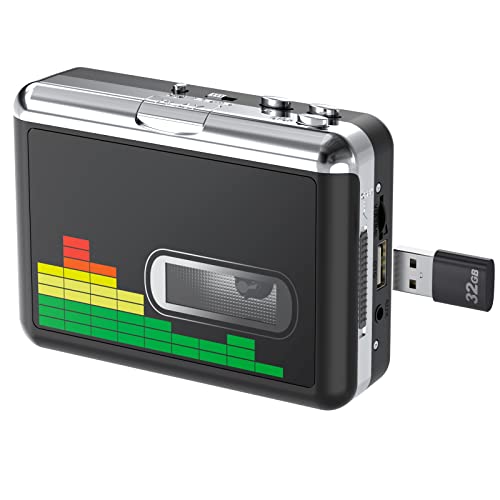
Best for: Buyers who want to convert cassette tapes to MP3 files without using a computer during the recording process. The BR607 saves recordings to a USB flash drive and includes a playback function, volume control, and earphones.
The listed USB-drive requirements specify FAT32 format and capacity up to 128 GB. The unit can be powered through a USB port or by two AA batteries. Its auto-reverse feature switches to the other side of a tape automatically. The product details also specify a 32 kHz sample rate, stereo L/R channels, and a 128 Kbps bit rate.
Better for a simple, standalone conversion process: insert a compatible flash drive, play the tape, and save the recording without opening computer software. It can also be used to listen through earphones or another speaker system.
Limitation: This model records to a USB flash drive rather than directly to a computer. Check that your drive meets the listed FAT32 and capacity requirements before relying on it for a transfer.
KLIM K7 Portable Cassette Player

Best for: Portable listening and tape-to-MP3 conversion to an SD card. The K7 includes a 16 GB SD card and card reader, and its listed conversion process does not require a computer or app download.
Along with cassette playback, the K7 can play music stored on its SD card. It has a built-in speaker and microphone, plus a 3.5 mm earphone jack and included earphones. The built-in microphone can record audio to the SD card, but the product details explicitly say the device does not record onto cassette tapes.
Choose this if you want a portable cassette player that can also store converted music on removable digital media. The included card and reader provide a ready-made storage path, while the speaker and earphone jack offer two ways to listen.
Limitation: This product uses an SD card rather than a USB connection to a computer for its stated tape-to-MP3 workflow. It is not the right match if you specifically need a full-size deck or a direct USB audio interface.
Buying Guide: How To Choose A USB-to-Tape Setup
Do you need a complete cassette deck or just a USB capture device?
A USB cassette deck combines tape playback with a digital connection, while a USB audio capture device depends on a separate tape player or deck. Choose a deck such as the TEAC or Pyle if you need a cassette mechanism as part of the purchase. Choose the DigitalLife capture device if you already have a tape player with an analog output and want to record its signal on a computer.
Before buying a capture device, check the output connections on your existing deck. The DigitalLife unit lists RCA and 3.5 mm inputs, but only one can be used at a time. Confirm that you have the right cable or adapter for your equipment; the product information notes that RCA users may need an extension cable sold separately.
Would you rather record to a computer, USB drive, or SD card?
A computer-based setup gives you a place to manage audio files and, with suitable software, edit captured recordings. The TEAC sends audio to a PC or Mac over USB, the Pyle connects to a computer for transfer, and the DigitalLife capture device works with listed audio applications such as Audacity and QuickTime.
Standalone players reduce the need to use a computer while capturing. The DIGITNOW BR607 records to a compatible USB flash drive, while the KLIM K7 stores converted MP3 files on an SD card. These approaches can be convenient for straightforward transfers, but check the storage format and media requirements for the specific product.
How important are dubbing and deck features?
If you want to copy one cassette to another, compare the deck’s recording and dubbing functions. The Pyle supports normal- and high-speed dubbing, with deck B specified for recording and dubbing. The TEAC has two independent mechanisms and includes features such as pitch control, A-B repeat, and a tape counter. These functions may matter more for regular home-deck use than for a one-time digitizing project.
If your main goal is to create digital copies, consider how the device sends audio to storage and how much control you need during recording. Computer-connected products require a computer workflow, while standalone models save to removable media. Feature details differ, so do not assume that a USB port on one product serves the same purpose as a USB port on another.
What tape types and recording controls should you check?
Look at tape-type support if your collection includes more than standard Type I tapes. The TEAC W-1200B listing specifies Type I and Type II recording and playback, plus Type IV playback. The Pyle listing notes a CrO2 tape selector. Confirm that the stated support matches the tapes you intend to play or record.
For computer capture, input-level controls can help you manage the audio signal. The Pyle lists recorder-level and gain controls, while the DigitalLife device provides input options for analog sources. These details do not guarantee a particular result; the condition of the tape, playback equipment, connections, and recording settings can all affect a transfer.
Which option fits a portable or computer-free setup?
For portable listening and SD-card conversion, the KLIM K7 is the more travel-oriented option in this group, with an integrated speaker, earphone jack, and included SD card. The DIGITNOW BR607 is another computer-free choice, but it records to a USB flash drive and lists specific drive-format requirements. If you plan to digitize many tapes, consider how you will organize and back up the resulting files after capture.
Frequently Asked Questions
Can I connect any cassette deck to a computer with USB?
No. A deck needs a suitable USB audio output or an analog connection used with a compatible USB capture device. Check the deck’s output ports and the capture device’s inputs before purchasing cables or equipment.
What is the difference between a USB cassette player and a USB audio capture device?
A USB cassette player includes a cassette mechanism. A USB audio capture device takes an analog signal from a separate source, such as a tape deck, and sends it to a computer. The DigitalLife AuralynX is a capture device, not a standalone cassette player.
Can the DIGITNOW BR607 convert tapes without a computer?
Yes. Its listed workflow saves tape recordings as MP3 files on a USB flash drive without requiring a PC. The product specifies a FAT32 drive with a capacity of up to 128 GB.
Which option supports recording to a computer?
The TEAC W-1200B is listed with USB output for digital recording on a PC or Mac. The Pyle PT659DU connects to a computer by USB for tape-to-MP3 transfer, and the DigitalLife capture device records analog audio through compatible computer software.
Does the KLIM K7 record onto cassette tapes?
No. Its listed microphone recording function saves audio to the SD card. The product details specifically state that the K7 does not support recording onto cassette tapes.