
To transfer reel-to-reel tapes to a computer, play each tape on a compatible reel-to-reel deck and capture its audio through an audio interface, or use a digitization service. Of the listed products, Lotus Media is the direct transfer option; the other products are tape supplies or equipment for a different tape format, not reel-to-reel-to-computer converters. The comparison below clarifies what each can and cannot do.
| Product | Best suited for | Transfer role |
|---|---|---|
| Lotus Media digitization service | People who prefer to send out audio media | Service transfer, with format and length limits |
| Tech Collector 8mm bundle | People digitizing 8mm video | Not for reel-to-reel audio |
| RTM LPR 35 tape | People recording new audio | Blank recording tape, not a transfer device |
| RTM SM 911 tape | Studio recording and mastering | Blank recording tape, not a transfer device |
| Pomya aluminum reel | People needing a compatible take-up reel | Reel accessory, not a transfer device |
Lotus Media Audio Digitization Service

Best for: People who would rather mail in eligible audio media than operate a deck and recording setup. Lotus Media describes a send-in service that provides an MP3 file and cloud delivery.
The listed service covers one audio tape per transfer. Its stated reel-to-reel allowance is up to 50 feet of audio on a 3-inch reel; it also lists other formats, including DAT. The service description says the customer receives mailing materials and instructions, and that digital files are delivered through Google Drive for 30 days.
Why it was selected: It is the only listed option that directly offers digitization of audio media, including a limited reel-to-reel format. It is a service rather than a device for transferring tapes directly to your own computer.
Limitation: The stated reel-to-reel limit is specific to 50 feet on a 3-inch reel. Check the service details before sending a larger reel or a different tape format.
Tech Collector 8mm Transfer Bundle

Best for: People converting 8mm, Hi8, or Digital8 video tapes, not audio reel-to-reel recordings.
The bundle is described as including a camcorder, USB capture device, battery, and AV cables. Its capture device transfers supported video playback to computer files or allows DVD burning. These features make it relevant to home video digitization, but the listed formats do not include open-reel audio tape.
Why it was selected: It is the only listed product with a USB capture device, so it may seem relevant to someone searching for tape-to-computer equipment. The format distinction is essential: a video capture adapter does not by itself play or convert audio from a reel-to-reel deck.
Limitation: Avoid this option for reel-to-reel audio. Its stated purpose is 8mm-family video transfer.
RTM LPR 35 Recording Tape

Best for: People who need blank tape for recording audio on compatible reel-to-reel equipment.
RTM describes LPR 35 as quarter-inch magnetic recording tape supplied on a 5-inch Trident plastic reel, with 885 feet of tape. Its listed features emphasize low noise, high output, and studio-quality analog recording. These are recording-media characteristics; the product is not an audio interface, playback deck, or computer capture device.
Why it was selected: It is a reel-to-reel product from the supplied list and may be useful to someone preparing a recording or tape workflow. It does not transfer existing audio into digital files.
Limitation: Choose it only when you need recording tape. It will not digitize a tape without a playback deck and a separate recording path to a computer.
RTM SM 911 Studio Master Tape
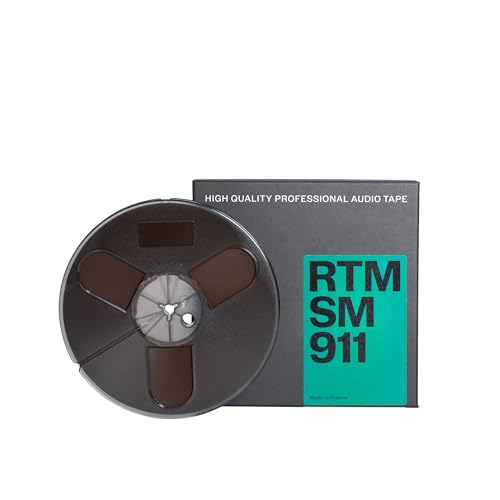
Best for: People looking for quarter-inch tape for studio recording or mastering, rather than a way to transfer tapes to a computer.
The listed product is 1,200 feet of quarter-inch magnetic tape on a 7-inch Trident plastic reel. RTM describes it as a high-output tape with low-noise playback and a formula intended for recording and mastering. The supplied information gives possible recording times at 7.5 and 15 inches per second.
Why it was selected: It is a relevant reel-to-reel recording supply, but its role should not be confused with digitization hardware. It can be part of an analog recording setup, not the computer transfer chain itself.
Limitation: This is blank recording media. It cannot play an existing tape or create a digital audio file on its own.
Pomya Aluminum Take-Up Reel

Best for: People who need a replacement take-up reel and have confirmed that the reel dimensions and mounting style suit their deck.
Pomya lists a 7-inch, quarter-inch empty reel made from aluminum alloy. It has a six-hole flange and stainless-steel screws. These details relate to physical reel construction and fit, not to audio conversion or computer connectivity.
Why it was selected: A compatible reel can be useful when handling or playing reel-to-reel tape, but it is only an accessory. It does not provide playback, digitization, or a USB connection.
Limitation: Confirm your deck’s reel requirements before buying. This product is not a substitute for a working tape recorder, audio interface, or capture software.
Buying Guide: How To Transfer Reel-To-Reel Tapes To A Computer
A basic DIY transfer uses a compatible reel-to-reel deck, a way to route the deck’s audio output into a computer, and software that can record the input. The listed products do not provide that complete setup. In particular, the 8mm bundle is for video formats, while the RTM products are recording tape and the Pomya product is an empty reel.
Do you want to do the transfer yourself?
A DIY setup gives you control over playback and file creation, but it requires a suitable working deck and a separate audio connection to the computer. The exact connection depends on the outputs available on the deck and inputs available on the computer or audio interface. Check those connections before purchasing any interface or cables.
A service is an alternative if you do not have a compatible deck or do not want to operate recording software. Confirm that the service accepts your tape size, length, and format before shipping. The Lotus Media listing describes reel-to-reel transfers only up to 50 feet on a 3-inch reel, so it may not cover other reel sizes or longer tapes.
What should you check before connecting a deck?
- Tape format: Verify that the machine can play the specific tape you have. Reel size alone does not establish format compatibility.
- Deck condition: The tape must play reliably enough for a transfer. If playback is unstable, address the equipment issue before recording a full tape.
- Audio connection: Identify the deck’s output and the computer or interface input. Do not assume a USB video capture device can accept reel-to-reel audio.
- Recording software: Use software that can record the computer’s selected audio input and save the file in a format you can use.
- File plan: Decide whether you want a single file per tape or separate files for individual tracks, and make sure you have enough storage.
Should you use a transfer service or a DIY setup?
| Choice | Better for | Check first |
|---|---|---|
| Transfer service | People who prefer not to set up playback and computer recording | Accepted reel size, tape length, output format, and delivery period |
| DIY transfer | People with a compatible deck who want to manage the files themselves | Deck playback, audio output, computer input, and recording software |
A service can simplify the process, but it depends on the service’s format limits and delivery method. A DIY transfer gives you direct control over file naming and storage, but requires equipment that is not included among the listed products.
What do the listed reels and tapes actually do?
Blank recording tape and empty reels are useful only for particular recording or handling needs. RTM LPR 35 and SM 911 are recording media, while the Pomya reel is a take-up accessory. None converts sound to a computer file. Do not buy these products as a replacement for an audio interface or a digitization service.
Frequently Asked Questions
Can I transfer reel-to-reel tapes to a computer with a USB cable?
Not by itself. You need a deck that plays the tape and a compatible way to send its audio output into the computer, such as an appropriate audio interface. A USB cable alone does not play the tape.
Can the Tech Collector 8mm bundle digitize reel-to-reel audio?
No. Its stated formats are 8mm, Hi8, and Digital8 video. It is not listed as a reel-to-reel audio transfer system.
Does RTM LPR 35 or SM 911 convert existing tapes to digital?
No. These are magnetic recording tapes for reel-to-reel audio equipment. They do not play tapes or create computer audio files.
Can Lotus Media transfer any reel-to-reel tape?
The listed service covers up to 50 feet of reel-to-reel audio on a 3-inch reel. Confirm with the service before sending a different reel size, length, or format.
What is the minimum equipment for a DIY transfer?
You need a compatible reel-to-reel deck, a suitable audio path from the deck to the computer, and recording software. The exact connection depends on the deck’s output and the computer’s available input hardware.