
A 3.5mm AUX connection cannot send audio into an HDMI port with a simple cable; most products sold for this setup convert audio in the opposite direction, from HDMI or HDMI ARC to 3.5mm. For a TV with an ARC port, the MEEKI and QIMIAOUS adapters are options for stereo AUX output. The Adoreen cable adds an integrated cable design and supports ARC/eARC according to its listing. For a separate HDMI source such as a player or console, the VPFET extractor offers a different connection type.
| Product | Best for | Connection type |
|---|---|---|
| MEEKI ARC-to-AUX cable | TVs with HDMI ARC and nearby AUX equipment | HDMI ARC to 3.5mm |
| MEEKI ARC-to-AUX adapter | ARC TVs and devices with a 3.5mm input | HDMI ARC to 3.5mm |
| Adoreen 4-foot cable | ARC/eARC TV setups needing a longer integrated cable | HDMI ARC/eARC to 3.5mm |
| QIMIAOUS ARC adapter | PCM 2.0 stereo TV audio | HDMI ARC to 3.5mm |
| VPFET HDMI extractor | HDMI source devices that are not the TV output | HDMI input to 3.5mm or optical |
MEEKI HDMI ARC To AUX Cable

This MEEKI converter takes digital audio from a TV’s HDMI ARC port and sends stereo analog audio to a 3.5mm connection. Its listed uses include connecting an ARC-equipped HDTV to a speaker, soundbar, home theater amplifier, or mixer. It is USB powered and lists support for a sampling rate up to 192 kHz.
Best for: Buyers who need a direct ARC-to-AUX cable for a TV and a stereo audio device. It is selected because its intended direction and TV use are clearly specified.
Important limitation: It does not support eARC or standard HDMI ports. The TV must output PCM audio; the listing says Dolby AC3 and DTS 5.1 are not supported. TV remote volume control is also unavailable while using this product, so adjust volume on the connected audio device.
MEEKI HDMI ARC To 3.5mm Adapter
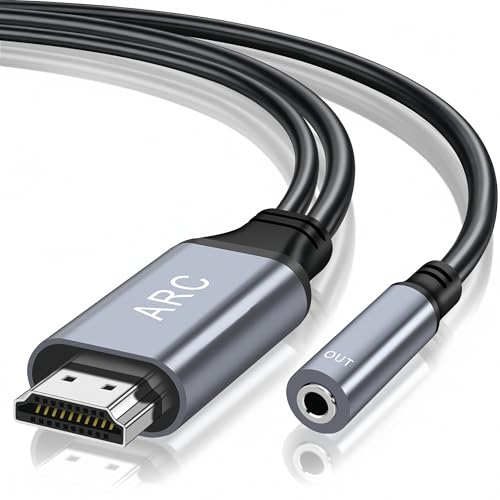
This MEEKI model converts audio from an HDMI ARC-equipped HDTV into stereo AUX output through a 3.5mm female connector. It is described for use with speakers, soundbars, amplifiers, and mixers. The adapter requires USB power and lists a maximum sampling rate of 192 kHz.
Best for: Buyers who prefer a female 3.5mm output to connect a separate AUX cable. It is a practical choice when the audio equipment’s cable already ends in a 3.5mm plug.
Important limitation: This is not a general HDMI audio extractor: it must connect to a TV’s ARC port and does not support eARC or other HDMI ports. Set the TV audio output to PCM, and note that the listing does not promise volume adjustment with the TV remote.
Adoreen 4-Foot ARC To AUX Cable

The Adoreen cable is a USB-powered, integrated adapter cable for converting TV HDMI ARC/eARC audio to 3.5mm AUX. Its listing specifies a 4-foot length, a braided jacket, gold-plated HDMI and AUX connectors, and an aluminum alloy housing. It supports PCM or stereo output and says TV remote volume control can work through CEC.
Best for: Buyers who want an all-in-one cable rather than separate converter and AUX parts, and whose TV supports ARC or eARC. The listed length may suit a short connection from a TV to nearby equipment.
Important limitation: It is unidirectional and cannot connect directly to a game console or set-top box. The TV must use ARC/eARC output and PCM/LPCM audio; the product does not decode compressed Dolby Digital 5.1, DTS, or 7.1 audio. USB power is required.
QIMIAOUS HDMI ARC To AUX Adapter
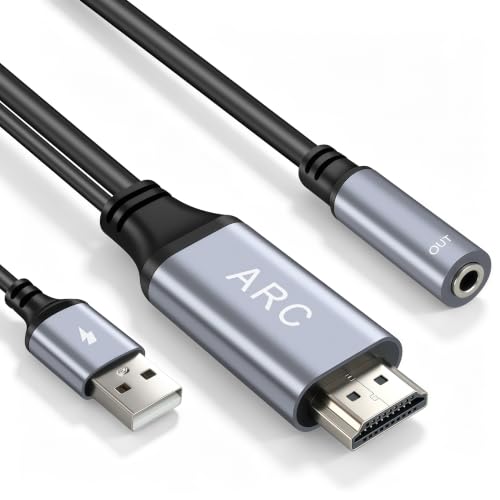
QIMIAOUS describes this device as a USB-powered converter for sending audio from a TV’s HDMI ARC port to a 3.5mm stereo output. Its listing specifies PCM 2.0 audio and a sampling rate up to 192 kHz. It is intended for connection to an AUX-equipped speaker, soundbar, amplifier, or mixer.
Best for: Buyers who need a straightforward ARC-to-stereo adapter and can set the TV to PCM. It is selected as another compact option for the common task of connecting a TV to analog audio equipment.
Important limitation: The adapter is not for a standard HDMI port or an eARC port. It does not support 5.1-channel Dolby AC3 or DTS according to the listing, and USB power is necessary. The listing also says TV remote volume control is not available during use.
VPFET HDMI Audio Extractor

Unlike the ARC adapters above, the VPFET takes an HDMI signal from a source device and extracts audio to either 3.5mm or optical output. It supports selectable 2.0-channel, 5.1-channel, and pass modes. The listing specifies PCM 2.0 for its 3.5mm output, optical DTS 5.1, and HDMI 1.4 video up to 4K at 30 Hz.
Best for: Buyers who need audio from an HDMI source device routed to AUX or optical equipment. It is included because it serves the broader HDMI-to-3.5mm search, but its signal direction differs from a TV’s ARC output.
Important limitation: The device does not support ARC or eARC and cannot use the TV as its input source. The listing notes that some sources, including Fire TV, Apple TV, and PS4/PS5, support only 1080p with this extractor, and that it does not support 7.1-channel audio.
Buying Guide: How To Choose An HDMI To 3.5mm Adapter
Does “3.5mm AUX To HDMI” Mean The Signal Goes That Way?
Usually, no. A 3.5mm AUX jack carries analog audio, while HDMI carries digital audio and video. A simple cable cannot reliably convert between these signal types. Check the product’s stated input and output directions before buying. The ARC adapters in this guide take audio from a TV’s HDMI ARC port and output it through 3.5mm; they do not send AUX audio into HDMI.
If you want to connect a phone, computer, or other AUX source to an HDMI display, you need a converter designed specifically for that direction. The products here are not listed for that purpose.
Does The TV Have HDMI ARC Or eARC?
Look for an HDMI port labeled “ARC” or “eARC” on the TV. A regular HDMI port is not interchangeable with an ARC port for these TV-audio adapters. The MEEKI and QIMIAOUS models in this guide specify ARC and state that they do not support eARC. The Adoreen listing specifies ARC/eARC. Confirm the exact port and supported feature on the TV before choosing.
Are You Connecting A TV Or A Separate HDMI Source?
Choose an ARC adapter when the TV itself is the audio source and you want to connect its sound output to AUX equipment. Choose a standard HDMI audio extractor when the source is a device such as a media player or game system. The VPFET is a source-to-output extractor, not a TV ARC adapter, and its listing specifically excludes ARC/eARC.
Which Audio Format Should You Set?
Many ARC-to-AUX converters in this selection require PCM or stereo audio. If the TV is set to output Dolby Digital, DTS, or another multichannel format that the adapter does not support, audio may not play as expected. Select PCM/LPCM or stereo in the TV’s sound settings, following the adapter’s instructions. The VPFET uses selectable modes, with 2.0CH specified for its 3.5mm output.
Do You Need A Cable Or A Female AUX Jack?
Check the connector at the other end of your audio equipment’s cable. A product with a built-in 3.5mm cable may connect directly to an AUX input. A female 3.5mm output is designed to accept a separate cable with a male plug. Also consider distance: the Adoreen product listed here is 4 feet long, while the MEEKI cable listing does not specify a length in the supplied product details.
Will The TV Remote Control Volume?
Do not assume that ARC-to-AUX conversion preserves TV remote volume control. The two MEEKI listings and the QIMIAOUS listing say the TV remote cannot control volume during use. Adoreen says AUX volume can be adjusted through the TV remote using CEC. Check the specific product details and be prepared to use the connected speaker or amplifier’s controls.
Frequently Asked Questions
Can I Connect A 3.5mm AUX Cable Directly To HDMI?
No. AUX is analog audio and HDMI is a digital audio-video connection. Use a converter designed for the direction and devices involved; a passive cable alone does not perform the required conversion.
Can An HDMI ARC-To-AUX Adapter Work In A Regular HDMI Port?
Not if the adapter is designed for ARC. The TV port must support ARC, and the product must be connected in the stated direction. Check the product listing because ordinary HDMI ports do not provide the ARC audio return function.
Why Is There No Sound From My ARC-To-3.5mm Adapter?
Check that the HDMI cable is in the TV’s ARC port, connect the adapter’s USB power, and set the TV’s digital audio output to PCM or stereo. Also verify that the connected audio device is set to the correct AUX input and that the adapter supports the TV’s ARC/eARC type.
Can These Adapters Send Dolby 5.1 Audio Through 3.5mm?
The ARC-to-AUX products described here are intended for stereo PCM output and list limitations for multichannel formats. The VPFET specifies PCM 2.0 for its 3.5mm output. Check each device’s format requirements rather than assuming that a 3.5mm connection carries surround sound.
Can I Use An ARC Adapter With A Game Console?
An ARC-to-AUX cable connects to a TV’s ARC/eARC port, not directly to a console’s HDMI output. For a separate HDMI source, use an extractor designed for HDMI input, and check its resolution and audio-format limitations. The VPFET listing says it does not support ARC/eARC.