
You can connect your phone to a car radio with built-in Bluetooth, an AUX cable, a USB connection, or an FM transmitter. If your vehicle lacks Bluetooth or an AUX input, an FM transmitter is a practical option: it pairs with your phone and broadcasts audio to an unused FM frequency. The LENCENT is best for USB or memory-card playback, while the LIHAN and Syncwire offer Bluetooth 5.4 and charging. Nulaxy adds a color display and audio controls, and AILKIN provides four charging ports.
| Product | Best For | Connection Method |
|---|---|---|
| LENCENT T25 | Multiple audio sources | Bluetooth, FM, USB drive, or microSD |
| LIHAN Bluetooth 5.4 | Wireless audio and calls | Bluetooth and FM |
| Syncwire Bluetooth 5.4 | Charging two devices | Bluetooth and FM |
| Nulaxy KM18 | Visible track and frequency information | Bluetooth and FM |
| AILKIN FM Transmitter | Several charging connections | Bluetooth and FM |
LENCENT T25 FM Transmitter
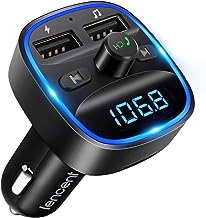
The LENCENT T25 is an FM transmitter for drivers who want more than one way to play audio. It can stream from a phone over Bluetooth or play supported files from a USB flash drive or microSD card. The listed supported formats include WMA, MP3, WAV, APE, and FLAC, with USB drives and microSD cards specified up to 32GB.
Best for: Drivers who want phone audio, hands-free calls, and local music playback options. Its two USB ports provide 5V/2.4A and 5V/1A outputs for charging two devices. The product features also describe CVC noise suppression and echo cancellation for calls and voice navigation.
Limitation: This device sends audio through FM, so you need to tune the car radio to the transmitter’s frequency. The listed memory-card and flash-drive capacity limit is 32GB.
LIHAN Bluetooth 5.4 FM Transmitter

The LIHAN adapter is designed to add wireless phone audio to a vehicle without Bluetooth or an AUX jack. It connects to a phone over Bluetooth and sends the sound to the car radio over FM. The product description lists music, podcasts, video audio, GPS directions, and hands-free calls among its supported uses.
Best for: Drivers who want to use phone apps through their existing radio and prefer a Bluetooth 5.4 adapter. LIHAN says the device is intended for cars, trucks, SUVs, and RVs, and notes that one device connects at a time. Its listed noise-reduction improvements are intended to help with FM interference in busy city driving.
Limitation: Audio still depends on an available FM frequency. The one-device-at-a-time limit means drivers or passengers must take turns connecting.
Syncwire Bluetooth 5.4 Car Adapter

The Syncwire adapter combines an FM transmitter, Bluetooth connection, and two charging ports. Its listed outputs are a 36W PD port and a 12W USB-A port, allowing two devices to charge at once. The product description identifies Bluetooth 5.4 as its connection technology and says it is designed to reduce transmission delay and connection problems.
Best for: Drivers who want wireless phone audio plus charging for two devices. The adapter’s rainbow ambient light can be turned off by double-pressing the red “B” button, according to the product information. The listing also describes hands-free calls and music streaming.
Limitation: The radio connection uses FM, so signal quality can depend on finding a suitable frequency in your area. Choose another option if you need a direct wired audio connection instead.
Nulaxy KM18 Color-Screen Transmitter

The Nulaxy KM18 adds a 1.8-inch color display to an FM transmitter. Its screen can show information such as incoming phone numbers, track names, FM frequency, battery voltage, and connected Bluetooth devices. The listing also identifies seven EQ modes and hands-free calling.
Best for: Drivers who want visible connection and playback information while using a phone with the car radio. It has two charging ports: PD 30W and QC3.0 18W. The product description says its echo-cancellation feature is intended to reduce background noise during calls.
Limitation: The display provides information, but the device still relies on FM transmission to play audio through the car radio. The listed compatibility is for 12V–24V vehicles; check your vehicle’s power outlet before choosing it.
AILKIN Four-Port FM Transmitter

The AILKIN transmitter pairs a phone over Bluetooth and broadcasts its audio to a car radio on a matching FM frequency. Its four charging ports include two USB-C and two USB-A ports, with a listed maximum output of 54W. The product information says supported charging output can vary by device and lists examples of voltage and current combinations.
Best for: Drivers and passengers who need several charging connections while streaming phone audio. The product description also mentions a blue LED ring for visibility and power-status indication, as well as Bluetooth 5.4 and an FM transmitter designed for standard cigarette-lighter sockets.
Limitation: The 54W figure is a maximum listed output, not a guarantee that every connected device will receive that amount. You must also match the transmitter’s FM frequency with the car radio.
How To Connect A Phone To A Car Radio
The right connection method depends on the radio and the ports available in your vehicle. Start by checking the radio’s menu and the car’s dashboard or center console for Bluetooth settings, an AUX input, or a USB port. If the car has none of these options, an FM transmitter may provide a way to play phone audio through the radio.
- Check for built-in Bluetooth. Enable Bluetooth on the phone, open the car’s pairing or phone menu, and follow the prompts shown by the vehicle and phone.
- Use an AUX input if available. Connect the phone to the radio’s AUX input using a suitable audio cable or adapter. Select AUX as the radio’s source.
- Try USB if the radio supports phone audio. Connect the phone to the vehicle’s USB port and select the relevant USB or phone source. USB behavior varies by vehicle and phone, so check the vehicle instructions.
- Use an FM transmitter when direct options are unavailable. Plug the transmitter into its required vehicle power outlet, pair the phone, and set both the transmitter and radio to the same clear FM frequency.
Buying Guide: What Should You Compare?
Does your car already have Bluetooth, AUX, or USB?
Use a built-in connection when it meets your needs. Bluetooth avoids adding a separate transmitter, while AUX provides a direct wired audio path if the radio has an input. A USB port may charge a phone or support audio, but its functions depend on the car and phone. An FM transmitter is most relevant when the radio lacks a usable Bluetooth or AUX option.
How does an FM transmitter connect to the radio?
An FM transmitter connects to the phone wirelessly, then broadcasts audio over a selected FM frequency. Tune the car radio to the same frequency. For fewer interruptions, look for a frequency with little or no existing radio broadcast. If you hear static or another station, try a different clear frequency on both devices.
Which features matter for your daily use?
- For calls and navigation: Look for product details that mention hands-free calling, echo cancellation, or noise suppression, such as those listed for LENCENT and Nulaxy.
- For music stored outside the phone: LENCENT lists USB flash drive and microSD playback, along with supported audio formats and a 32GB limit.
- For display information: Nulaxy’s 1.8-inch screen is described as showing track names, FM frequency, and incoming phone numbers.
- For charging several devices: Compare the number and type of ports. AILKIN lists four ports; Syncwire and LENCENT list two.
How many devices need to connect or charge?
Check both Bluetooth connection limits and charging-port count. LIHAN specifies that one device connects at a time. A transmitter with multiple charging ports can power more than one device, but charging performance depends on the adapter’s port output and the connected devices. Confirm that the available port types match the cables you use.
What should you know about power and fit?
Many FM transmitters plug into a vehicle power outlet. Check the product’s stated vehicle-voltage range and the shape and location of your car’s outlet before buying. Nulaxy lists compatibility with 12V–24V vehicles, while AILKIN describes a standard cigarette-lighter socket fit. Keep the device and cables positioned so they do not obstruct driving controls.
How can you improve sound and reduce interruptions?
With an FM transmitter, the radio frequency matters: a crowded frequency can introduce interference. Recheck the frequency when driving between areas, because a station that was clear in one location may be occupied elsewhere. Keep phone and transmitter connections set up according to their instructions, and use the vehicle’s audio controls to set a comfortable listening level.
Frequently Asked Questions
Can I connect my phone to a car radio without Bluetooth?
Yes. If the radio has an AUX input, use a suitable wired connection. If it has neither Bluetooth nor AUX, an FM transmitter can send the phone’s audio to an unused FM frequency on the radio.
Do I need an app to use an FM transmitter?
The listed products connect to a phone over Bluetooth and use the car radio’s FM tuner for audio. The supplied product information does not say that a separate app is required for these basic connection steps.
Why does an FM transmitter sound static-filled?
Static can occur when the selected frequency is occupied or affected by local radio interference. Try another unused FM frequency and tune both the transmitter and car radio to match.
Can I use an FM transmitter for GPS directions and calls?
The LENCENT and LIHAN descriptions list voice navigation or GPS audio and hands-free calls. Check the specific product’s features, then route phone audio through the transmitter and car radio as directed.
Will a USB port in my car play music from my phone?
It depends on the vehicle, radio, and phone. A USB port may support charging, media playback, or other functions. Consult your vehicle’s instructions and select USB as the audio source if the radio supports it.
Which listed transmitter has the most charging ports?
The AILKIN product lists four charging ports: two USB-C and two USB-A. Its product information specifies a maximum total output of 54W, with actual charging depending on connected devices and supported charging protocols.