
The best headphone splitter for a laptop depends on whether you want two people to hear audio or need to connect a headset with separate microphone and headphone plugs. The Fidioto, SYNCWIRE, and 20 cm stereo splitter are audio-sharing options; the UGREEN and PC headset splitter are designed to separate mic and audio connections. Check your laptop’s jack and your headset’s plug style before choosing.
| Product | Best For | Connection Type |
|---|---|---|
| Fidioto 2-Pack | Sharing audio, with a spare cable | One 3.5 mm male to two female audio ports; no mic |
| PC Headset Splitter Adapter | Headsets with separate mic and audio plugs | Headphone-and-mic Y adapter |
| SYNCWIRE Headphone Splitter | Audio sharing with a braided cable | One 3.5 mm male to two female audio ports; no mic |
| 20 cm Stereo Audio Splitter | A short audio-sharing connection | Two-way stereo audio |
| UGREEN Headphone Splitter | Connecting a separate-plug headset to one laptop jack | Headphone and microphone plugs to one 3.5 mm jack |
Fidioto 2-Pack Audio Splitter

The Fidioto is a simple audio-sharing choice for a laptop with a 3.5 mm audio output. Its 3.5 mm male connector branches to two female ports, allowing two sets of headphones to connect to one source. The listing describes a 9-inch cable and a two-pack, so buyers get two splitter cables.
Best for: People who want to listen with another person and prefer having a spare splitter. It is selected for its clearly stated dual-female audio layout and laptop use.
Limitation: The product is identified as having no mic. Choose another type if you need to connect a headset microphone or split separate mic and headphone plugs.
PC Headset Mic And Audio Splitter

This Y adapter is intended for a headset setup that uses separate microphone and headphone connections. The listing names gaming headset models and brands, including Astro, Turtle Beach, HyperX, SteelSeries, and Razer, as examples of the type of headset it is designed for. For laptop use, the key question is whether the laptop has the matching separate audio and mic ports.
Best for: Laptop users whose headset has distinct mic and headphone plugs and whose computer accepts those separate connections. It is selected as a headset adapter rather than an audio-sharing splitter.
Limitation: It is not the right choice for connecting two pairs of headphones to one laptop output. Confirm the plug arrangement on both the headset and laptop before buying.
SYNCWIRE Braided Headphone Splitter

The SYNCWIRE splitter uses a 3.5 mm male connector and two female outputs for stereo audio. Its listing describes a nylon-braided cable and identifies it as a no-mic splitter. It is presented for use with devices such as Apple and Samsung products, tablets, and other compatible 3.5 mm equipment, including a laptop with a suitable audio output.
Best for: Buyers seeking a braided audio-sharing cable for two headphones. The dual-female design makes its intended use easy to distinguish from a mic-and-audio adapter.
Limitation: It does not provide a microphone connection, so it will not serve as a separate mic-and-headphone adapter for a headset. The listing does not state a cable length.
20 cm Two-Way Stereo Audio Splitter

This 20 cm cable is described as a 3.5 mm stereo, two-way audio splitter. Its listing says it supports dual headphone and speaker audio output and names laptops, tablets, iPhone, iPad, and other 3.5 mm devices as intended uses. The short stated length can be useful when the splitter will sit close to the laptop rather than needing to reach across a desk.
Best for: Buyers who need a compact way to send audio to two headphones or speakers from a compatible 3.5 mm source. It is selected for its stated short cable length and stereo audio-sharing purpose.
Limitation: The listing describes audio output, not a microphone connection. Avoid this option if your goal is to use a headset mic through the splitter.
UGREEN Headset Mic And Audio Adapter
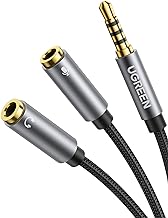
The UGREEN adapter combines separate headphone and microphone plugs into one 3.5 mm connection for a laptop, PC, or tablet with a single headset jack. Its listed construction includes a flexible TPE body, nylon braiding, a copper core, and gold-plated connectors. The product information specifies CTIA-standard headphone compatibility and says to connect the headset and microphone to the adapter before plugging it into the computer.
Best for: Someone with a headset that has separate audio and mic plugs who needs to connect both through a single laptop headset jack. It is selected because its intended direction and connection use are described clearly.
Limitation: The listing says it does not support OMTP headphones or iPhone headsets. It is not an audio-sharing splitter for two listeners.
Buying Guide: How To Choose A Laptop Headphone Splitter
Do you want to share audio or connect a headset microphone?
Start by identifying the job. An audio-sharing splitter takes one audio source and provides two headphone outputs. The Fidioto, SYNCWIRE, and 20 cm splitter fit this general purpose. A headset adapter instead connects separate microphone and headphone plugs to a single combined jack, or separates those signals for a computer with distinct ports. The UGREEN and PC headset adapter are aimed at that second type of setup.
These products may all be called “headphone splitters,” but they are not interchangeable. A two-output audio splitter does not automatically make a headset microphone work. Likewise, a mic-and-audio adapter is not designed to let two people listen to one audio source.
What ports does your laptop have?
Look at the laptop’s audio connections before choosing a cable. A single 3.5 mm headset jack combines headphone and microphone signals. A laptop with separate headphone and microphone ports requires a different connection arrangement. Some laptops have no 3.5 mm jack, so these products may not connect directly without another compatible adapter; the listed products do not specify a USB or wireless connection.
Also check the laptop’s output and input labels. A headphone icon generally indicates audio output, while a microphone marking indicates input. When labels are unclear, consult the laptop documentation rather than assuming that every 3.5 mm port supports both functions.
What kind of plug does your headset use?
A headset with one combined 3.5 mm plug differs from a headset with separate headphone and mic plugs. For a two-plug headset and a laptop with one combined jack, the UGREEN is described for combining those connections, subject to its CTIA compatibility note. The PC headset adapter is listed for separate mic and headphone connections, so check the exact arrangement and direction required for your setup.
For the UGREEN, confirm that the headset uses CTIA wiring. Its product details exclude OMTP headphones and iPhone headsets. Do not assume that a plug fitting physically means the microphone wiring is compatible.
How many listeners need audio?
If two people need to hear the laptop at once, choose a splitter with one male input and two female headphone outputs. The Fidioto is supplied as a two-pack, while SYNCWIRE is identified as a braided audio splitter. The 20 cm option is a compact choice when a short cable is sufficient. These are audio-sharing cables, not microphone adapters.
For shared listening, consider where the people will sit and how far apart the headphones are. The Fidioto listing states a 9-inch cable and the 20 cm listing states its length. The SYNCWIRE listing provided here does not specify cable length, so check the current product details if reach is important.
Does cable construction or length matter?
Choose a cable length that suits the space between the laptop and connected devices. A short cable keeps the connection close to the computer but provides less reach. A longer cable can offer more placement flexibility, though cable length alone does not indicate sound quality or microphone support.
Construction descriptions can help compare physical features, but they do not guarantee performance in every setup. The SYNCWIRE is described as nylon-braided; the UGREEN listing also specifies nylon braiding and a flexible TPE body. Select based on the listed build and your handling needs, not on an assumption that a particular material changes compatibility.
What should you verify before ordering?
- Identify whether you need two audio outputs or a mic-and-headphone adapter.
- Count the plugs on your headset and ports on your laptop.
- Confirm whether the laptop has a combined 3.5 mm jack or separate audio and mic ports.
- Check headset wiring standards when the product listing names a standard, such as CTIA.
- For audio sharing, verify that the splitter has two headphone outputs and does not claim mic support you need.
- Check the stated cable length and connector type against your desk setup.
Frequently Asked Questions
Can I use a headphone splitter with a laptop?
Yes, if the splitter’s connector and function match the laptop’s audio port. A 3.5 mm audio splitter needs a compatible 3.5 mm output. A headset mic adapter must also match the laptop’s combined or separate audio connections.
Can two people listen to one laptop with a splitter?
Yes. Use a one-to-two stereo audio splitter with two headphone outputs. The Fidioto, SYNCWIRE, and 20 cm options are listed for audio splitting. They are not described as microphone adapters.
Will a headphone splitter make my headset microphone work?
Not necessarily. A basic audio-sharing splitter sends audio to multiple outputs and may not carry microphone signals. Choose a headset mic-and-audio adapter that matches the laptop and headset plugs.
What is the difference between an audio splitter and a headset adapter?
An audio splitter distributes sound from one source to two listening outputs. A headset adapter routes headphone and microphone signals between plugs and ports. Check the connector layout because the two cable types solve different problems.
Does the UGREEN adapter work with every headset?
No. Its product details specify CTIA-standard headphone compatibility and exclude OMTP headphones and iPhone headsets. Verify your headset’s wiring standard and plug arrangement before choosing it.
Can I connect a splitter to a laptop without a 3.5 mm jack?
Not directly unless the laptop provides another compatible connection path. The listed products use 3.5 mm connections. Check the laptop’s available ports and any adapter requirements before purchasing.