
The best choice depends on what you mean by a remote control sound board: a wireless presentation remote with volume buttons, a mixer for live audio, or a programmable board that plays recorded sounds. The QUI clicker is best for controlling presentations from across a room, while the FULUODE mixer is better suited to multi-channel audio. The Stemedu module is for DIY sound projects, not remote operation. The listed QUI options appear to describe the same feature set, so compare their listing details before choosing.
| Product | Best For | Key Distinction |
|---|---|---|
| QUI Presentation Clicker | Presentation playback control | Wireless slide, volume, and screen controls |
| FULUODE 8-Channel Mixer | Live sound and karaoke setups | Eight channels, Bluetooth, and USB recording |
| Stemedu 8MB Sound Module | DIY audio projects | USB-loaded MP3 playback |
| SINWE Live Sound Card | Podcast and audio production setups | Product name identifies it as a mixer and production device |
| Second QUI Clicker Listing | Presentation control | Same listed feature set as the other QUI option |
QUI Presentation Clicker With Volume Control
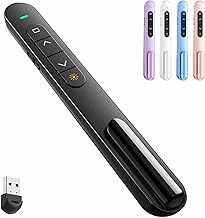
Best for: Presenters who need to move around a room while advancing slides and adjusting computer audio. This is a wireless presenter remote, not a mixing console or a sound-effects board.
The listed controls include page up and down, hyperlink navigation, volume adjustment, power, and full-screen or black-screen switching. The product description says it uses a USB receiver and requires no software or driver. Its stated wireless range is up to 328 feet, and it includes a red pointer light for indicating parts of a slide.
Why it was selected: Of the listed products, this one most directly combines remote operation with volume control. It may suit someone searching for a remote to manage presentation audio and slides from a distance.
Limitation: It requires one AAA battery, which is not included. Its controls are intended for presentations rather than direct control of a standalone sound board.
FULUODE CT-80S 8-Channel Audio Mixer

Best for: Users who need a physical mixer for studio, karaoke, or live-music audio rather than a handheld remote. The product name and listing identify it as an eight-channel mixing console.
Listed features include reverb, an MP3 player, Bluetooth, USB recording, and 48V phantom power. These functions make it a more appropriate match for someone who means a sound board when searching, especially when several audio channels or playback and recording functions matter.
Why it was selected: It is the most clearly specified conventional mixer in the supplied options. Its channel count and listed audio functions help distinguish it from presentation clickers and small sound modules.
Limitation: The supplied information does not describe a wireless remote control. Choose it for its listed mixer functions, not on the assumption that it can be operated remotely.
Stemedu 8MB Programmable Sound Module

Best for: DIY makers adding recorded music or voice to a stuffed animal, greeting card, music box, or similar project. It is a compact playback module, not a wireless remote or a full audio mixer.
The module has 8MB of memory and supports MP3 playback. The listing says users can transfer their own audio files from a computer with a USB cable and use the board without welding. Its specified power options are 4.5–5 volts or a 3.7-volt lithium battery, and an empty AA battery case is included.
Why it was selected: It provides programmable sound playback in a small DIY-focused format. Choose this if the goal is to trigger or include recorded audio in a project rather than remotely adjust a live sound mix.
Limitation: The listed memory is limited to 8MB, and the product description does not specify wireless or remote-control operation. Check the power requirements against the project before installation.
SINWE Live Sound Card And Audio Mixer

Best for: Shoppers investigating a podcast or audio-production device. The supplied product name describes it as a live sound card and mixer for podcast production.
Why it was selected: It is relevant to buyers who use “sound board” to mean equipment for producing or mixing audio. However, the information provided for this product contains no feature list beyond its name, so the available details do not support a more specific comparison of inputs, controls, or recording functions.
Limitation: Remote-control support, connections, and included functions are not specified in the supplied product information. Confirm those requirements in the listing before choosing it for a particular setup.
QUI Wireless Presenter Remote, Alternate Listing

Best for: Buyers comparing the second supplied QUI listing for a remote that controls slide navigation and computer volume. The provided feature descriptions match the other QUI option, including the USB receiver, red pointer, and stated range of up to 328 feet.
Why it was selected: This is a separate supplied Amazon listing for a product with the same stated feature set. It gives buyers another listing to check, but the supplied details do not establish a meaningful functional difference between the two.
Limitation: Do not assume this listing offers extra features compared with the other QUI clicker. It is a presentation remote rather than a sound mixer, and it requires one AAA battery that is not included.
Buying Guide: How To Choose A Remote Control Sound Board
The phrase “remote control sound board” can refer to several different types of equipment. Identify the job first: controlling a presentation, mixing live audio, playing stored sound effects, or producing a podcast. The products above serve different purposes, so a feature comparison is more useful than treating them as interchangeable.
Do you need a remote or a mixer?
A presentation clicker gives a person handheld control of supported computer presentation functions, including volume on the QUI listings. A mixer is a physical audio device for managing sound sources. The FULUODE listing describes an eight-channel mixer, but the supplied features do not say it includes a remote. If wireless operation is essential, verify that the exact mixer listing explicitly supports it.
How many audio sources will you connect?
Channel count matters when a setup uses several microphones or other audio inputs. The FULUODE product is identified as an eight-channel mixer. The supplied SINWE information does not state a channel count, and the Stemedu module is a playback board rather than a multichannel console. Confirm the required inputs and outputs before selecting production equipment.
Do you want live mixing or stored sound playback?
Choose a mixer when you need to combine or manage audio sources for live music, karaoke, or a studio setup. Choose a programmable sound module when you need to load an MP3 file and build playback into a DIY project. The Stemedu board is designed around USB file transfer and 8MB memory; it is not described as a full mixing device.
What should you check about power and setup?
The Stemedu module lists 4.5–5-volt or 3.7-volt lithium-battery power and comes with an empty AA battery case. The QUI clicker requires one AAA battery, which is not included, and uses a USB receiver. For the mixers, review the complete listing for power, connection, and setup details, because those specifications are not fully provided here.
Does the stated wireless range fit your room?
The QUI clicker listing states a wireless control distance of up to 328 feet. Treat that as the manufacturer’s stated maximum rather than a guarantee for every room or setup. The mixer and sound module details provided do not specify a wireless range or remote-control method. If you need to operate a board from a distance, verify the control method and range directly.
Frequently Asked Questions
What is the best listed option for controlling presentation volume remotely?
The QUI Presentation Clicker is the clearest match. Its listed controls include volume adjustment, slide navigation, and screen switching, and it connects through a USB receiver.
Is the FULUODE mixer a remote-control sound board?
It is described as an eight-channel audio mixer with reverb, Bluetooth, an MP3 player, USB recording, and 48V phantom power. The supplied features do not confirm a remote control.
Can the Stemedu module work as a full sound mixer?
No such function is listed. It is a small programmable MP3 playback module with 8MB memory, intended for DIY audio projects rather than multichannel mixing.
Do the two QUI listings have different stated features?
The supplied descriptions list the same controls, red pointer light, USB receiver setup, battery requirement, and up-to-328-foot range. The provided information does not establish a functional difference.
Which product is intended for podcast production?
The SINWE product name identifies it as a live sound card and audio mixer for podcast production. The supplied details do not specify its connections, remote functions, or other individual features.